
Solved Desktop Icon Displays Wrong

murray2552

New member
Local time
4:02 AM
Messages
3
I have a pretty simple issue, but its bugging me..
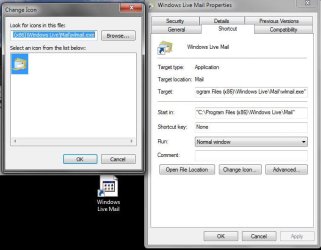
I just got a new PC with windows 7 and got everything up and running fine, but the only problem is my Windows Live Mail desktop icon is replaced with a broken link or unrecognized file icon. The program functions fine, and if I right click on the shortcut and go to change icon, the right icon is displayed there.. but it doesn't appear on the shortcut. Same deal in my Programs folder and pinned to the taskbar. I attached screenshots to show what I mean (the desktop shortcut is under the open window).

Any quick fixes or does anyone know where the icon image is located so I can switch it to something else, then back to its default image?
 

Attachments
  • Capture.JPG
    Capture.JPG
    46.7 KB · Views: 189
  • Capture2.JPG
    Capture2.JPG
    9.7 KB · Views: 70

My Computer

OS
Windows 7 Home 64 Bit
I have a pretty simple issue, but its bugging me..
I just got a new PC with windows 7 and got everything up and running fine, but the only problem is my Windows Live Mail desktop icon is replaced with a broken link or unrecognized file icon. The program functions fine, and if I right click on the shortcut and go to change icon, the right icon is displayed there.. but it doesn't appear on the shortcut. Same deal in my Programs folder and pinned to the taskbar. I attached screenshots to show what I mean (the desktop shortcut is under the open window).

Any quick fixes or does anyone know where the icon image is located so I can switch it to something else, then back to its default image?

You could try this tutorial Icon Cache - Rebuild first and if that doesn't work post back as others may have other ideas.
 

My Computer

Computer type
PC/Desktop
Computer Manufacturer/Model Number
My own abomination, I call it the Money Pit
OS
Windows 10 Pro x 2/Windows 11 Home
CPU
Intel i7 2600K @ 3.40 GHz
Motherboard
ASUS Sabertooth P67
Memory
Corsair Vengeance 16GB DDR3 1600MHz CL8 Dual Channel Kit
Graphics Card(s)
EVGA GeForce RTX 3080 XC3 ULTRA GAMING 10GB GDDR6X
Sound Card
Onboard Realtek or Nvidia High Definition Audio (HDMI)
Monitor(s) Displays
Samsung JS7000 50" SUHD TV or Samsung 27" FHD 60Hz 8ms GTG V
Screen Resolution
1920 x 1080
Hard Drives
1 x Samsung 870 EVO 250 GB SSD (Windows 10 Pro), 1 x Samsung 850 EVO 250 GB SSD (Windows 10 Pro)
PSU
Corsair AX860 - 860W Modular Power Supply
Case
Phanteks Enthoo Luxe Full Tower Case - Black
Cooling
CORSAIR Hydro Series H150i PRO RGB 360mm Liquid CPU Cooler
Keyboard
Logitech K830 Illuminated Living-Room Keyboard
Mouse
Logitech MX Anywhere 2S Wireless Mouse
Internet Speed
100 Mbps
Antivirus
ESET Internet Security
Browser
Latest Version Of Firefox & Microsoft Edge Chromium Stable
Other Info
LG Super Multi Blue Internal Blu-ray Disk Rewriter - BH10LS30
6x2 HDMI Switcher (6 inputs, 2 outputs) so I can send the output of my Cable Box, Roku, or any my 4 computers to either my TV or Monitor separately or simultaneously.
Hello Murary, and welcome to Seven Forums.

If the above doesn't help, then try going through the steps completely to change the icon to the correct default icon about 2 to 3 times to see if that may toggle the default icon to display again.

Hope this helps,
Shawn
 

My Computer

Computer type
PC/Desktop
Computer Manufacturer/Model Number
Self built custom
OS
64-bit Windows 11 Pro for Workstations
CPU
Intel i7-8700K OC'd to 5 GHz
Motherboard
ASUS ROG Maximus XI Formula Z390
Memory
64 GB (4x16GB) G.SKILL TridentZ RGB DDR4 3600 MHz
Graphics Card(s)
ASUS ROG-STRIX-GTX1080TI-O11G-GAMING
Sound Card
Integrated
Monitor(s) Displays
2 x Samsung Odyssey G7 27"
Screen Resolution
2560x1440
Hard Drives
1TB Samsung 990 PRO M.2,
4TB Samsung 990 PRO PRO M.2,
TerraMaster F8 SSD Plus NAS
PSU
Seasonic Prime Titanium 850W
Case
Thermaltake Core P3
Cooling
Corsair Hydro H115i
Keyboard
Logitech wireless K800
Mouse
Logitech MX Master 4
Internet Speed
2 Gb/s Download and 100 Mb/s Upload
Antivirus
Malwarebyte Anti-Malware Premium
Browser
Google Chrome
Other Info
Logitech Z625 speaker system,
Logitech BRIO 4K Pro webcam,
HP Color LaserJet Pro MFP M477fdn,
APC SMART-UPS RT 1000 XL - SURT1000XLI,
Galaxy S23 Plus phone
Quick fix could be to make another shortcut.
go to C:\Program Files (x86)\Windows Live\Mail, right click wlmail.exe and pin it to the taskbar and also to the start menu.
That must work, but if it doesnt, right click and drag and drop (copy - do not Move!)
 

My Computer

Computer Manufacturer/Model Number
Three desktops and one laptop with good specs..
OS
Vista and now 7 in 32 and 64 bit.
Thanks guys, but the problem is that the icon within my programs file is also displaying the wrong image. That second image I attached is the icon within programs(x86)... I'll try this icon cache thing and get back to you guys.

If I knew where I could find the icon image, I could re-link it, but I can't find it anywhere.
 

My Computer

OS
Windows 7 Home 64 Bit
I didn't realize that was going to be such an easy process or I would've done it before the first response. Clearing the cache worked perfectly- Thanks!
 

My Computer

OS
Windows 7 Home 64 Bit
I'm happy to hear that you got it sorted Murray. :)
 

My Computer

Computer type
PC/Desktop
Computer Manufacturer/Model Number
Self built custom
OS
64-bit Windows 11 Pro for Workstations
CPU
Intel i7-8700K OC'd to 5 GHz
Motherboard
ASUS ROG Maximus XI Formula Z390
Memory
64 GB (4x16GB) G.SKILL TridentZ RGB DDR4 3600 MHz
Graphics Card(s)
ASUS ROG-STRIX-GTX1080TI-O11G-GAMING
Sound Card
Integrated
Monitor(s) Displays
2 x Samsung Odyssey G7 27"
Screen Resolution
2560x1440
Hard Drives
1TB Samsung 990 PRO M.2,
4TB Samsung 990 PRO PRO M.2,
TerraMaster F8 SSD Plus NAS
PSU
Seasonic Prime Titanium 850W
Case
Thermaltake Core P3
Cooling
Corsair Hydro H115i
Keyboard
Logitech wireless K800
Mouse
Logitech MX Master 4
Internet Speed
2 Gb/s Download and 100 Mb/s Upload
Antivirus
Malwarebyte Anti-Malware Premium
Browser
Google Chrome
Other Info
Logitech Z625 speaker system,
Logitech BRIO 4K Pro webcam,
HP Color LaserJet Pro MFP M477fdn,
APC SMART-UPS RT 1000 XL - SURT1000XLI,
Galaxy S23 Plus phone
This happened to me with win 7 pro - I followed your instructions to Programs - windows live - mail - to the next you mentioned and dragged icon to desk top and it worked and I added to task bar - thank you so much... I like WinXP better and Outlook Express as I could create neat emails and send pictures better. I dislike the changes year after year - why not just improve what we have and stop Microsoft from being greedy. It fries your brain always changing - I suppose they know that. I found this post 565 days later by asking the question to Google.
 

My Computer

OS
Win 7 Pro
I recently had the problem similar to murray2552 where most of my desktop Icons were overshadowed by the unrecognized file icon, but you could still see the real icon behind it.
In icon properties, the icon would display OK....Removing and remaking the shortcut did no good,, neither did deleting and remaking the icon cache....Even a System Restore was of no avail :eek:

Then I found this very old topic that probably applied to Windows 98 or at least XP !...But it did the trick !

From Control Panel, select "Display"....There are three sizes of display you can have...Select "Larger"(or a different one than you have) and "Apply"....It will get you to log off and then when you log back on, hopefully, you icons will be larger but all good..
You can then go back to "Display" and set thing back how you wish..."Apply" and log off/on and all should be well..
It was hard to find this solution, so thought I would post it here as it could prove of benefit..
And this topic got found fairly easily in a Google search for the problem :)
 

My Computer

Computer type
PC/Desktop
Computer Manufacturer/Model Number
Custom
OS
Windows 7 Ultimate x64
CPU
AMD A10 5800k
Motherboard
Asrock FMA75 Pro 4
Memory
2x4GB GSkill Sniper 1866MHz
Graphics Card(s)
Sapphire HD7770
Hard Drives
Kingston 128GB SSD
WD Blue 1TB
Antivirus
MSE
Browser
Waterfox
Back
Top
