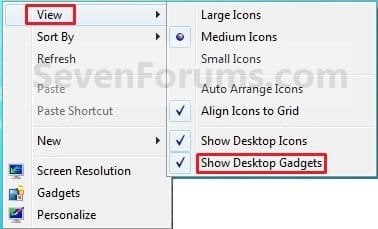
Desktop Icons - Hide or Show

How to Hide or Show Desktop Icons in Windows 7 and Windows 8

   Information
This will show you how to easily hide or show all icons (ex: files, folders, shortcuts) on your desktop in Windows 7 and Windows 8.


OPTION ONE

Hide or Show Desktop Icons using the Desktop Context Menu


1. Right click or press and hold on a empty area of your desktop, then do step 2 or 3 below for what you would like to do.

2. To Show All Desktop Icons
NOTE: This is the default setting.
A) Click/tap on Show Desktop Icons to check it. (See screenshot below step 3)
3. To Hide All Desktop Icons
A) Click/tap on Show Desktop Icons to uncheck it. (See screenshot below)
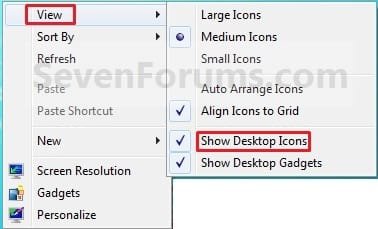
Icons.jpg
B) Save your current theme in Windows 7 or Windows 8 to help prevent these settings from being reset after you log off and on, or restart the computer.


OPTION TWO

Hide or Show Desktop Icons using a BAT File Download


1. To Show All Desktop Icons
NOTE: This is the default setting.
A) Click/tap on the download button below to download the file below, and go to step 3 below.
Show_Desktop_Icons.bat


Download


2. To Hide All Desktop Icons
A) Click/tap on the download button below to download the file below, and go to step 3 below.
Hide_Desktop_Icons.bat

Download


3. Save the .bat file to another location other than your desktop, and run it.
NOTE: It would be hard to see the .bat file on your desktop if already set to hide.

4. If prompted, click/tap on Run.
NOTE: If you like, you can stop getting the Run prompt by unblocking the downloaded .bat file.

5. You will now notice a command prompt quickly open and close, and your screen flash while applying the changes to your registry and restarting explorer.

6. When finished, you can delete the downloaded .bat file(s) if you like.
That's it,
Shawn


Attachments

Last edited:
when my computer restarts, the icons come back. why? i want them out of my screen in and out windows.
 

My Computer

Computer Manufacturer/Model Number
Asus K40IN
OS
Windows 7 x86 ultimate
CPU
C2D 2.2ghz
Memory
4 Gigabytes (3.5 usable)
Graphics Card(s)
Geforce Cuda G102M 512
Sound Card
Realtek HD with SRS WOW
Monitor(s) Displays
Default
Hard Drives
320 GB Seagate Barracuda
Mouse
A4tech Glazer x5
Internet Speed
120kbps more or less.
Other Info
LAN party!
Hello Doc Achmed,

Did you make any changes to the theme?

Try setting the icons how you want them as hidden, then save your current theme to see if that may stop this.

Hope this helps,
Shawn
 

My Computer

Computer type
PC/Desktop
Computer Manufacturer/Model Number
Self built custom
OS
64-bit Windows 11 Pro for Workstations
CPU
Intel i7-8700K OC'd to 5 GHz
Motherboard
ASUS ROG Maximus XI Formula Z390
Memory
64 GB (4x16GB) G.SKILL TridentZ RGB DDR4 3600 MHz
Graphics Card(s)
ASUS ROG-STRIX-GTX1080TI-O11G-GAMING
Sound Card
Integrated
Monitor(s) Displays
2 x Samsung Odyssey G7 27"
Screen Resolution
2560x1440
Hard Drives
1TB Samsung 990 PRO M.2,
4TB Samsung 990 PRO PRO M.2,
TerraMaster F8 SSD Plus NAS
PSU
Seasonic Prime Titanium 850W
Case
Thermaltake Core P3
Cooling
Corsair Hydro H115i
Keyboard
Logitech wireless K800
Mouse
Logitech MX Master 4
Internet Speed
2 Gb/s Download and 100 Mb/s Upload
Antivirus
Malwarebyte Anti-Malware Premium
Browser
Google Chrome
Other Info
Logitech Z625 speaker system,
Logitech BRIO 4K Pro webcam,
HP Color LaserJet Pro MFP M477fdn,
APC SMART-UPS RT 1000 XL - SURT1000XLI,
Galaxy S23 Plus phone
Hide Desktop Icons - via Regsitry

   Information
Ever wanted to wonder off and not needing to lockscreen? Or using multiple monitors, but want to show your beautiful wallpaper but can't when you lockscreen? You're want is now realised with this simple registry add-on.

   Note
Remember this tutorial, if you want to get things back to normal again :D


Steps:

1) Click Start > type regedit in the search box and hit Enter to bring up the registry editor.

2) Navigate to HKEY_CURRENT_USER > Software > Microsoft > Windows > CurrentVersion > Policies > Explorer
Noname.jpg
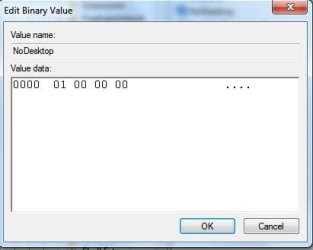
3) On the right hand pane, right-click and New > Binary Value. Name the key as "NoDesktop" and add in the value of "01 00 00 00". See attachements.
Noname1.jpg
4) No need to restart pc, logoff and on again is fine, for it to take effect.

   Note
You may need to auto-hide your taskbar also to have that total stealth look. To do this just right-click taskbar > Properties > and tick "Auto-Hide the taskbar", like so.


   Information
If you want to revert this effect, just go back and delete this registry key.


Happy stealthing.
 
Last edited by a moderator:

My Computer

Computer Manufacturer/Model Number
Lenovo ThinkPad T60
OS
Windows 7 Ultimate 64Bit
CPU
GenuineIntel Intel(R) Core(TM) DuoCore T2400 @ 1.83GHz
Motherboard
Intel(R) 82801G (ICH7 Family)
Memory
2.00 GB
Graphics Card(s)
Mobile Intel(R) 945 Express Chipset
Sound Card
SoundMAX Integrated Digital HD Audio
Monitor(s) Displays
ThinkPad Display
Screen Resolution
1400x1050
Hard Drives
100Gb SATA
Keyboard
Standard Keyboard
Mouse
HID-compliant Mouse
Internet Speed
Cable Broadband - 54Mbps
Other Info
Intel(R) PRO/1000 PL Network Connection
11a/b/g Wireless LAN Mini PCI Express Adapter
Hello Doc Achmed,

Did you make any changes to the theme?

Try setting the icons how you want them as hidden, then save your current theme to see if that may stop this.

Hope this helps,
Shawn

Hit it on the nose Brink.

I disabled the feature in registry and the icons came back. Saved the theme and it worked.


Laptops, full of useless toys ;)
Nice going bro.
 

My Computer

Computer Manufacturer/Model Number
Asus
OS
Windows 7 x64 Ultimate SP1
CPU
I5 875K Unlocked
Motherboard
P7P55D-E-PRO
Memory
Kingston HyperX Genesis DDR3-1600MHz 9-9-9-27 @ 1.65V XMP
Graphics Card(s)
EVGA GeForce GTX 570 HD 732 MHz GPU 1280 MB, 152 GB Mem
Sound Card
Onboard Via 1828S
Monitor(s) Displays
Samsung T240 HD
Screen Resolution
Dual 1920X1200 1027X768
Hard Drives
OCZ Vertex II Extended Sandforce SSD 60 Gig 2X WD Black Caviar 1 terabyte 6GBS Transer Sata 3 Marvell Chip
PSU
Corsair Gold fully Modular 80 Plus 850
Case
Coolermaster Half X Full Tower
Cooling
Noctua NH-U12P
Keyboard
MS
Mouse
MS
Internet Speed
Fast enough
Other Info
My fridge has a water tap
That's great news Zardoc. I'll add a note in the tutorial for this. :)
 

My Computer

Computer type
PC/Desktop
Computer Manufacturer/Model Number
Self built custom
OS
64-bit Windows 11 Pro for Workstations
CPU
Intel i7-8700K OC'd to 5 GHz
Motherboard
ASUS ROG Maximus XI Formula Z390
Memory
64 GB (4x16GB) G.SKILL TridentZ RGB DDR4 3600 MHz
Graphics Card(s)
ASUS ROG-STRIX-GTX1080TI-O11G-GAMING
Sound Card
Integrated
Monitor(s) Displays
2 x Samsung Odyssey G7 27"
Screen Resolution
2560x1440
Hard Drives
1TB Samsung 990 PRO M.2,
4TB Samsung 990 PRO PRO M.2,
TerraMaster F8 SSD Plus NAS
PSU
Seasonic Prime Titanium 850W
Case
Thermaltake Core P3
Cooling
Corsair Hydro H115i
Keyboard
Logitech wireless K800
Mouse
Logitech MX Master 4
Internet Speed
2 Gb/s Download and 100 Mb/s Upload
Antivirus
Malwarebyte Anti-Malware Premium
Browser
Google Chrome
Other Info
Logitech Z625 speaker system,
Logitech BRIO 4K Pro webcam,
HP Color LaserJet Pro MFP M477fdn,
APC SMART-UPS RT 1000 XL - SURT1000XLI,
Galaxy S23 Plus phone
Is there a way to make an icon/shortcut to hide/show gadgets? Like way you can make one to call 3D Flip? C:\Windows\System32\rundll32.exe DwmApi #105
 

My Computer

OS
Vista
That's great news Zardoc. I'll add a note in the tutorial for this. :)

Hey Brink,

It isn't as great as I thought. After 2 or 3 reboots, the icons come back. This seems to be a common problem with laptops and I have also seen this happen with PGP shortcuts to desktop that vanish after a few reboots.

It's hard to repro since it doesn't happen every time.

I can't get my hand on what would cause a reg hack to re-activate itself.

I'll keep looking.

:geek:
 

My Computer

Computer Manufacturer/Model Number
Asus
OS
Windows 7 x64 Ultimate SP1
CPU
I5 875K Unlocked
Motherboard
P7P55D-E-PRO
Memory
Kingston HyperX Genesis DDR3-1600MHz 9-9-9-27 @ 1.65V XMP
Graphics Card(s)
EVGA GeForce GTX 570 HD 732 MHz GPU 1280 MB, 152 GB Mem
Sound Card
Onboard Via 1828S
Monitor(s) Displays
Samsung T240 HD
Screen Resolution
Dual 1920X1200 1027X768
Hard Drives
OCZ Vertex II Extended Sandforce SSD 60 Gig 2X WD Black Caviar 1 terabyte 6GBS Transer Sata 3 Marvell Chip
PSU
Corsair Gold fully Modular 80 Plus 850
Case
Coolermaster Half X Full Tower
Cooling
Noctua NH-U12P
Keyboard
MS
Mouse
MS
Internet Speed
Fast enough
Other Info
My fridge has a water tap
Do you have any included OEM software (ex: dock or toggle key pop-ups) common to laptops running that may be interfering with it?
 

My Computer

Computer type
PC/Desktop
Computer Manufacturer/Model Number
Self built custom
OS
64-bit Windows 11 Pro for Workstations
CPU
Intel i7-8700K OC'd to 5 GHz
Motherboard
ASUS ROG Maximus XI Formula Z390
Memory
64 GB (4x16GB) G.SKILL TridentZ RGB DDR4 3600 MHz
Graphics Card(s)
ASUS ROG-STRIX-GTX1080TI-O11G-GAMING
Sound Card
Integrated
Monitor(s) Displays
2 x Samsung Odyssey G7 27"
Screen Resolution
2560x1440
Hard Drives
1TB Samsung 990 PRO M.2,
4TB Samsung 990 PRO PRO M.2,
TerraMaster F8 SSD Plus NAS
PSU
Seasonic Prime Titanium 850W
Case
Thermaltake Core P3
Cooling
Corsair Hydro H115i
Keyboard
Logitech wireless K800
Mouse
Logitech MX Master 4
Internet Speed
2 Gb/s Download and 100 Mb/s Upload
Antivirus
Malwarebyte Anti-Malware Premium
Browser
Google Chrome
Other Info
Logitech Z625 speaker system,
Logitech BRIO 4K Pro webcam,
HP Color LaserJet Pro MFP M477fdn,
APC SMART-UPS RT 1000 XL - SURT1000XLI,
Galaxy S23 Plus phone
No Brink, none of that (at least that I have seen)


OK I've tried a fix and it works.

Brink, if you want to modify your tutorial on desktop icons and add (force hide of desktop icons)

One thing that doesn't work (well not like one would want) is to use the Local Group Policy Editor. If you go to user configuration/Administrative Tasks/Desktop and enable ''Hide and disable all items on desktop'' it will keep icons hidden (won't affect Gadgets) but you will loose right click menu on desktop. So that's a no go.

Here is the fix based on 2 different registry commands. One exits (the one that will change the reg key when you right click on desktop and disable desktop icons) and the other you may need to create (it's the one that Aem talks about above to unlock double screen saver but gives the same result for hiding icons also). One won't work without the other.

Here is the simple way. First hide desktop icons (as shown in basic tutorial)

Open Notepad and paste this command and save as HideDesktopIcons.reg

Code:
Windows Registry Editor Version 5.00
[HKEY_CURRENT_USER\Software\Microsoft\Windows\CurrentVersion\Explorer\Advanced]
"HideIcons"=dword:00000001
[HKEY_CURRENT_USER\Software\Microsoft\Windows\CurrentVersion\Policies\Explorer]
"NoDesktop"=dword:00000001

Double click to activate. Log off and back on. Should be fine.

;)
 

My Computer

Computer Manufacturer/Model Number
Asus
OS
Windows 7 x64 Ultimate SP1
CPU
I5 875K Unlocked
Motherboard
P7P55D-E-PRO
Memory
Kingston HyperX Genesis DDR3-1600MHz 9-9-9-27 @ 1.65V XMP
Graphics Card(s)
EVGA GeForce GTX 570 HD 732 MHz GPU 1280 MB, 152 GB Mem
Sound Card
Onboard Via 1828S
Monitor(s) Displays
Samsung T240 HD
Screen Resolution
Dual 1920X1200 1027X768
Hard Drives
OCZ Vertex II Extended Sandforce SSD 60 Gig 2X WD Black Caviar 1 terabyte 6GBS Transer Sata 3 Marvell Chip
PSU
Corsair Gold fully Modular 80 Plus 850
Case
Coolermaster Half X Full Tower
Cooling
Noctua NH-U12P
Keyboard
MS
Mouse
MS
Internet Speed
Fast enough
Other Info
My fridge has a water tap
Zardoc,

The registry entry for only hiding the desktop icons is this instead to have the right click still work on the desktop. Have you tried it without the "NoDesktop" entry instead?

Hide:
Code:
Windows Registry Editor Version 5.00
 
[HKEY_CURRENT_USER\Software\Microsoft\Windows\CurrentVersion\Explorer\Advanced]
"HideIcons"=dword:00000001

Unhide:
Code:
Windows Registry Editor Version 5.00
 
[HKEY_CURRENT_USER\Software\Microsoft\Windows\CurrentVersion\Explorer\Advanced]
"HideIcons"=dword:00000000

(Log off and on to apply)
 

My Computer

Computer type
PC/Desktop
Computer Manufacturer/Model Number
Self built custom
OS
64-bit Windows 11 Pro for Workstations
CPU
Intel i7-8700K OC'd to 5 GHz
Motherboard
ASUS ROG Maximus XI Formula Z390
Memory
64 GB (4x16GB) G.SKILL TridentZ RGB DDR4 3600 MHz
Graphics Card(s)
ASUS ROG-STRIX-GTX1080TI-O11G-GAMING
Sound Card
Integrated
Monitor(s) Displays
2 x Samsung Odyssey G7 27"
Screen Resolution
2560x1440
Hard Drives
1TB Samsung 990 PRO M.2,
4TB Samsung 990 PRO PRO M.2,
TerraMaster F8 SSD Plus NAS
PSU
Seasonic Prime Titanium 850W
Case
Thermaltake Core P3
Cooling
Corsair Hydro H115i
Keyboard
Logitech wireless K800
Mouse
Logitech MX Master 4
Internet Speed
2 Gb/s Download and 100 Mb/s Upload
Antivirus
Malwarebyte Anti-Malware Premium
Browser
Google Chrome
Other Info
Logitech Z625 speaker system,
Logitech BRIO 4K Pro webcam,
HP Color LaserJet Pro MFP M477fdn,
APC SMART-UPS RT 1000 XL - SURT1000XLI,
Galaxy S23 Plus phone
Hi Brink,

I tested this a better of late last night and this morning. Yes, I know the reg tweak for the right click desktop command to remove icons is the one you give and the one I posted in first of 2 tweaks. It's been like that since Win 95 I think?

Now the second command did not work like I expected. It took a few reboots to notice that it actually does the same thing as the Local Group Policy Editor to hide all desktop items. Basically it also disables right click context menu.

So what I thought might be the issue, is a conflict between user and machine. I applied a different reg tweak and I can say for sure after 10 reboots the issue has gone.

Here is the simple tweak. Paste in Note pad and save as HideDesktopIcons.reg


Code:
Windows Registry Editor Version 5.00
[HKEY_CURRENT_USER\Software\Microsoft\Windows\CurrentVersion\Explorer\Advanced]
"HideIcons"=dword:00000001
[HKEY_LOCAL_MACHINE\SOFTWARE\Microsoft\Windows\CurrentVersion\Explorer\Advanced]
"HideIcons"=dword:00000001

Double click file. Reboot to apply.

It seems that this hack bugs when you log off. If you restart, it always works. I think this is the repro for the problem.


Even if this hack works, this still shows without a doubt that there is an issue with desktop icon settings.

:rolleyes:
 
Last edited:

My Computer

Computer Manufacturer/Model Number
Asus
OS
Windows 7 x64 Ultimate SP1
CPU
I5 875K Unlocked
Motherboard
P7P55D-E-PRO
Memory
Kingston HyperX Genesis DDR3-1600MHz 9-9-9-27 @ 1.65V XMP
Graphics Card(s)
EVGA GeForce GTX 570 HD 732 MHz GPU 1280 MB, 152 GB Mem
Sound Card
Onboard Via 1828S
Monitor(s) Displays
Samsung T240 HD
Screen Resolution
Dual 1920X1200 1027X768
Hard Drives
OCZ Vertex II Extended Sandforce SSD 60 Gig 2X WD Black Caviar 1 terabyte 6GBS Transer Sata 3 Marvell Chip
PSU
Corsair Gold fully Modular 80 Plus 850
Case
Coolermaster Half X Full Tower
Cooling
Noctua NH-U12P
Keyboard
MS
Mouse
MS
Internet Speed
Fast enough
Other Info
My fridge has a water tap

My Computer

Computer type
PC/Desktop
Computer Manufacturer/Model Number
Self built custom
OS
64-bit Windows 11 Pro for Workstations
CPU
Intel i7-8700K OC'd to 5 GHz
Motherboard
ASUS ROG Maximus XI Formula Z390
Memory
64 GB (4x16GB) G.SKILL TridentZ RGB DDR4 3600 MHz
Graphics Card(s)
ASUS ROG-STRIX-GTX1080TI-O11G-GAMING
Sound Card
Integrated
Monitor(s) Displays
2 x Samsung Odyssey G7 27"
Screen Resolution
2560x1440
Hard Drives
1TB Samsung 990 PRO M.2,
4TB Samsung 990 PRO PRO M.2,
TerraMaster F8 SSD Plus NAS
PSU
Seasonic Prime Titanium 850W
Case
Thermaltake Core P3
Cooling
Corsair Hydro H115i
Keyboard
Logitech wireless K800
Mouse
Logitech MX Master 4
Internet Speed
2 Gb/s Download and 100 Mb/s Upload
Antivirus
Malwarebyte Anti-Malware Premium
Browser
Google Chrome
Other Info
Logitech Z625 speaker system,
Logitech BRIO 4K Pro webcam,
HP Color LaserJet Pro MFP M477fdn,
APC SMART-UPS RT 1000 XL - SURT1000XLI,
Galaxy S23 Plus phone
Since there is a repro, I will post this issue in SP1 beta.

Thanks Brink.
 

My Computer

Computer Manufacturer/Model Number
Asus
OS
Windows 7 x64 Ultimate SP1
CPU
I5 875K Unlocked
Motherboard
P7P55D-E-PRO
Memory
Kingston HyperX Genesis DDR3-1600MHz 9-9-9-27 @ 1.65V XMP
Graphics Card(s)
EVGA GeForce GTX 570 HD 732 MHz GPU 1280 MB, 152 GB Mem
Sound Card
Onboard Via 1828S
Monitor(s) Displays
Samsung T240 HD
Screen Resolution
Dual 1920X1200 1027X768
Hard Drives
OCZ Vertex II Extended Sandforce SSD 60 Gig 2X WD Black Caviar 1 terabyte 6GBS Transer Sata 3 Marvell Chip
PSU
Corsair Gold fully Modular 80 Plus 850
Case
Coolermaster Half X Full Tower
Cooling
Noctua NH-U12P
Keyboard
MS
Mouse
MS
Internet Speed
Fast enough
Other Info
My fridge has a water tap
Thank you!

Just letting you guys know. I installed Windows 7 a few days ago (love it so far) and thanks to this Forum I not only got the Desktop looking the way I wanted, but system runs faster and so much smoother.

THANK YOU ALL :D

Ohhh.... GO SAINTS!

Eric
 

My Computer

Computer Manufacturer/Model Number
Dell Insriron E1505
OS
Windows 7
CPU
Intel Centrino Duo
Memory
2 GB
You're most welcome Eric from all of us, and welcome to Seven Forums. :)
 

My Computer

Computer type
PC/Desktop
Computer Manufacturer/Model Number
Self built custom
OS
64-bit Windows 11 Pro for Workstations
CPU
Intel i7-8700K OC'd to 5 GHz
Motherboard
ASUS ROG Maximus XI Formula Z390
Memory
64 GB (4x16GB) G.SKILL TridentZ RGB DDR4 3600 MHz
Graphics Card(s)
ASUS ROG-STRIX-GTX1080TI-O11G-GAMING
Sound Card
Integrated
Monitor(s) Displays
2 x Samsung Odyssey G7 27"
Screen Resolution
2560x1440
Hard Drives
1TB Samsung 990 PRO M.2,
4TB Samsung 990 PRO PRO M.2,
TerraMaster F8 SSD Plus NAS
PSU
Seasonic Prime Titanium 850W
Case
Thermaltake Core P3
Cooling
Corsair Hydro H115i
Keyboard
Logitech wireless K800
Mouse
Logitech MX Master 4
Internet Speed
2 Gb/s Download and 100 Mb/s Upload
Antivirus
Malwarebyte Anti-Malware Premium
Browser
Google Chrome
Other Info
Logitech Z625 speaker system,
Logitech BRIO 4K Pro webcam,
HP Color LaserJet Pro MFP M477fdn,
APC SMART-UPS RT 1000 XL - SURT1000XLI,
Galaxy S23 Plus phone
ieii (: awesome
i hate desktop icons x)
 

My Computer

OS
Windows 7 Ultimate x86
CPU
Intel Core Duo E2180 2.00GHz
Motherboard
Asus P5VD2-VM SE
Memory
Kingston 2gb
Graphics Card(s)
NVIDIA GeForce 8500
Sound Card
onboard
Monitor(s) Displays
23inch Samsung SyncMaster 2343NWX
Screen Resolution
2048x1152
Hard Drives
WD Caviar Blue SATA 320gb capacity
Internet Speed
3mb
Saving the theme doesn't work for me. The icons still show up after reboot and when connecting/disconnecting to power. I don't want to mess with my registry like option 2, are there any alternative solution for this?
 

My Computer

OS
Windows 7 Home Premium 64-Bit
Hello l0w33ji, and welcome to Seven Forums.

As a test, create a new administrator account to see if they work properly in it.
 

My Computer

Computer type
PC/Desktop
Computer Manufacturer/Model Number
Self built custom
OS
64-bit Windows 11 Pro for Workstations
CPU
Intel i7-8700K OC'd to 5 GHz
Motherboard
ASUS ROG Maximus XI Formula Z390
Memory
64 GB (4x16GB) G.SKILL TridentZ RGB DDR4 3600 MHz
Graphics Card(s)
ASUS ROG-STRIX-GTX1080TI-O11G-GAMING
Sound Card
Integrated
Monitor(s) Displays
2 x Samsung Odyssey G7 27"
Screen Resolution
2560x1440
Hard Drives
1TB Samsung 990 PRO M.2,
4TB Samsung 990 PRO PRO M.2,
TerraMaster F8 SSD Plus NAS
PSU
Seasonic Prime Titanium 850W
Case
Thermaltake Core P3
Cooling
Corsair Hydro H115i
Keyboard
Logitech wireless K800
Mouse
Logitech MX Master 4
Internet Speed
2 Gb/s Download and 100 Mb/s Upload
Antivirus
Malwarebyte Anti-Malware Premium
Browser
Google Chrome
Other Info
Logitech Z625 speaker system,
Logitech BRIO 4K Pro webcam,
HP Color LaserJet Pro MFP M477fdn,
APC SMART-UPS RT 1000 XL - SURT1000XLI,
Galaxy S23 Plus phone
Made new admin account, saved the theme, reboot 2x, they still show up. :(
 

My Computer

OS
Windows 7 Home Premium 64-Bit
Back
Top