Desktop Icons Won't Stay Customized

tmagic650

New member
Local time
3:59 PM
Messages
4
Location
Montana
When I place an icon on the desktop, they show only with a generic Explorer folder. When I look in the icon's properties, the logo of the program or website shows as selected, but I have to choose an icon from the system instead, for the desktop icon to change its display. In Vista, icons placed on the desktop automatically displayed the site or programs logo. What's happening here?
 

My Computer My Computer

At a glance

Vista/Windows 7Intel Core dual Quad Q66004GB Corsair 800 DDR2MSI Geforce N9800
Computer Manufacturer/Model Number
Home built Antec Mid Tower Intel Q6600
OS
Vista/Windows 7
CPU
Intel Core dual Quad Q6600
Motherboard
Abit IP35P
Memory
4GB Corsair 800 DDR2
Graphics Card(s)
MSI Geforce N9800
Sound Card
On-Board Realtek HD
Monitor(s) Displays
Samsung SyncMaster 245bw
Screen Resolution
1920x1200
Hard Drives
Seagate 450GB, 250GB SATA- 100GB Seagate external
PSU
Antec Earthwatts 450
Case
Antec Mid Tower
Cooling
ZeroTherm Nirvana
Keyboard
Logitech EX110
Mouse
Logitech Wireless
Internet Speed
10MPS

My Computer My Computer

At a glance

Windows 7 Ultimate x64 SP1Core i7 920 (D0) @ 4Ghz, *26c idle *65c full ...12GB DDR3 Corsair Dominator -CMD12GX3M6A1600C...Zotac Geforce GTX 770
Computer type
PC/Desktop
Computer Manufacturer/Model Number
Airbot 2.0
OS
Windows 7 Ultimate x64 SP1
CPU
Core i7 920 (D0) @ 4Ghz, *26c idle *65c full load on air
Motherboard
Asus P6X58D Premium - Sata 6Gb/s - USB 3.0
Memory
12GB DDR3 Corsair Dominator -CMD12GX3M6A1600C8 at 1600MHz
Graphics Card(s)
Zotac Geforce GTX 770
Sound Card
ASUS Xonar D2X
Monitor(s) Displays
1 LG 24" Flatron W2453V-PF 1 Samsung 24" P2450H both 2ms RT
Screen Resolution
1920x1080@60hz
Hard Drives
1 Samsung 250GB 840 Evo SSD
1 OCZ Vertex2 180GB SSD
1 TB Samsung Spinpoint F1 7200RPM 32MB cache
2 500GB WD Caviar Blacks 7200RPM 32MB cache (WD5001AALS)

Pioneer DVD Burner DVR-S18M
PSU
Corsair HX1000W
Case
Cooler Master HAF 932
Cooling
Case Fans *3 230mm, *1 140mm/CPU - *Tuniq Tower 120 Extreme
Keyboard
Logitech Wireless MK700
Mouse
Logitech Wireless MK700
Internet Speed
DL 15 Mbps UL 0.98 Mbps
Antivirus
None
Browser
Firefox Nightly
Other Info
Processor-7.7 *RAM- 7.9 *Graphics-7.9 *Gaming Graphics- 7.9 *SSD- 7.8 W.E.I final score= 7.7
*Phone- LG Nexus 5
Speaking of icons, I like a clean desktop with no icons showing.(I use the desktop toolbar.)
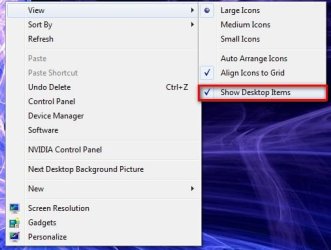
With Vista and earlier you could right click anywhere on the desktop and in the view category, you have an option to hide desktop icons. With W7 when you do this you have an option to "Show Desktop Items" or not by checking it. This is all fine but in my situation when you un check this option all my sidebar gadgets disappear also:confused:. Can this be corrected easily or am I missing a way to only hide just the desktop icons?:o
Cheers;)
 

My Computer My Computer

At a glance

Ubuntu,Mandriva,PCLOS,XP and,Windows 7AMD Athlon 64 X2 Dual Core 42004 GBNVIDIA GeForce
Computer Manufacturer/Model Number
Custom Low Rider !!
OS
Ubuntu,Mandriva,PCLOS,XP and,Windows 7
CPU
AMD Athlon 64 X2 Dual Core 4200
Memory
4 GB
Graphics Card(s)
NVIDIA GeForce
Sound Card
Onboard
Monitor(s) Displays
22" Acer Wide Screen
Screen Resolution
1280x1024
Hard Drives
WD 1 TB Caviar Black 7200 RPM
Case
Custom
Cooling
F-12 cooled
Keyboard
Saitek Eclipse
Mouse
Logitech invisible optic wireless
Internet Speed
Broadband
Hello Smoaky,

You can use a free program like RocketDock to drag the icons on instead, then remove the desktop icons to leave only the gadgets.

Hope this helps,
Shawn
 

My Computer My Computer

At a glance

64-bit Windows 11 Pro for WorkstationsIntel i7-8700K OC'd to 5 GHz64 GB (4x16GB) G.SKILL TridentZ RGB DDR4 3600...ASUS ROG-STRIX-GTX1080TI-O11G-GAMING
Computer type
PC/Desktop
Computer Manufacturer/Model Number
Self built custom
OS
64-bit Windows 11 Pro for Workstations
CPU
Intel i7-8700K OC'd to 5 GHz
Motherboard
ASUS ROG Maximus XI Formula Z390
Memory
64 GB (4x16GB) G.SKILL TridentZ RGB DDR4 3600 MHz
Graphics Card(s)
ASUS ROG-STRIX-GTX1080TI-O11G-GAMING
Sound Card
Integrated
Monitor(s) Displays
2 x Samsung Odyssey G7 27"
Screen Resolution
2560x1440
Hard Drives
1TB Samsung 990 PRO M.2,
4TB Samsung 990 PRO PRO M.2,
TerraMaster F8 SSD Plus NAS
PSU
Seasonic Prime Titanium 850W
Case
Thermaltake Core P3
Cooling
Corsair Hydro H115i
Keyboard
Logitech wireless K800
Mouse
Logitech MX Master 4
Internet Speed
2 Gb/s Download and 100 Mb/s Upload
Antivirus
Malwarebyte Anti-Malware Premium
Browser
Google Chrome
Other Info
Logitech Z625 speaker system,
Logitech BRIO 4K Pro webcam,
HP Color LaserJet Pro MFP M477fdn,
APC SMART-UPS RT 1000 XL - SURT1000XLI,
Galaxy S23 Plus phone
Thanks for the info;)
I am using Iconoid which is a free app.and works well with W7

Iconoid - Hide and show desktop icons, maketransparent backgrounds

I was just hoping there was a simpler solution somewhere in the W7 settings so that we wouldn't have to install a program just do do this easy task.:cry:
Anyone that has solved this without installing any program to do this please let us know.:D
 

My Computer My Computer

At a glance

Ubuntu,Mandriva,PCLOS,XP and,Windows 7AMD Athlon 64 X2 Dual Core 42004 GBNVIDIA GeForce
Computer Manufacturer/Model Number
Custom Low Rider !!
OS
Ubuntu,Mandriva,PCLOS,XP and,Windows 7
CPU
AMD Athlon 64 X2 Dual Core 4200
Memory
4 GB
Graphics Card(s)
NVIDIA GeForce
Sound Card
Onboard
Monitor(s) Displays
22" Acer Wide Screen
Screen Resolution
1280x1024
Hard Drives
WD 1 TB Caviar Black 7200 RPM
Case
Custom
Cooling
F-12 cooled
Keyboard
Saitek Eclipse
Mouse
Logitech invisible optic wireless
Internet Speed
Broadband
Check this link out. I've used it XP and it works in se7en. Runs right from the folder. Gadgets remain.
 

My Computer My Computer

At a glance

7 Professional 64bitAMD Phenom II X4 965 Black Edition Deneb 3.4GHz8GB (Kingston DDR3 1333 2GB x4)On Board ATI
OS
7 Professional 64bit
CPU
AMD Phenom II X4 965 Black Edition Deneb 3.4GHz
Motherboard
ASUS M4A785TD-M EVO
Memory
8GB (Kingston DDR3 1333 2GB x4)
Graphics Card(s)
On Board ATI
Strange, I seem to have option right here.

2009-01-28_102333.jpg
 

My Computer My Computer

At a glance

Windows 7 Ultimate Vista Ultimate x64Core 2 Duo E8500 3.16Ghz @ 3.8Ghz2x2Gigs Patriot PC2-6400 LLInno3D GeForce GTX260 216 SP
Computer Manufacturer/Model Number
Home Brew
OS
Windows 7 Ultimate Vista Ultimate x64
CPU
Core 2 Duo E8500 3.16Ghz @ 3.8Ghz
Motherboard
eVGA 750i FTW
Memory
2x2Gigs Patriot PC2-6400 LL
Graphics Card(s)
Inno3D GeForce GTX260 216 SP
Monitor(s) Displays
ASUS VW222U 22" 2ms Response time
Screen Resolution
1680x1050
Hard Drives
SATA 150GB
SATA II 250GB
USB IDE 750GB Ext.
PSU
HYTEC 600W & Thermaltake 650W Toughpower Power Exp
Case
Thermaltake Armor LCS (Liquid Cooling System)
Cooling
Liquid Cooling System
Keyboard
Logitech G15 Gaming Keyboard
Mouse
Logitech G9 Gaming Mouse
Yes that is the same as mine...but the option in Vista is "show desktop icons" there is a difference. If you uncheck the "show desktop items"in W7 the sidebar gadgets disappear also. This does not happen in Vista.
W7 need to replace the "show desktop items" option to be the same as Vista which is "show desktop icons"
 

My Computer My Computer

At a glance

Ubuntu,Mandriva,PCLOS,XP and,Windows 7AMD Athlon 64 X2 Dual Core 42004 GBNVIDIA GeForce
Computer Manufacturer/Model Number
Custom Low Rider !!
OS
Ubuntu,Mandriva,PCLOS,XP and,Windows 7
CPU
AMD Athlon 64 X2 Dual Core 4200
Memory
4 GB
Graphics Card(s)
NVIDIA GeForce
Sound Card
Onboard
Monitor(s) Displays
22" Acer Wide Screen
Screen Resolution
1280x1024
Hard Drives
WD 1 TB Caviar Black 7200 RPM
Case
Custom
Cooling
F-12 cooled
Keyboard
Saitek Eclipse
Mouse
Logitech invisible optic wireless
Internet Speed
Broadband
Yes I see your point, that is a bit silly, but in Vista you also have the option to close the sidebar and open it again in the system tray.
 

My Computer My Computer

At a glance

Windows 7 Ultimate Vista Ultimate x64Core 2 Duo E8500 3.16Ghz @ 3.8Ghz2x2Gigs Patriot PC2-6400 LLInno3D GeForce GTX260 216 SP
Computer Manufacturer/Model Number
Home Brew
OS
Windows 7 Ultimate Vista Ultimate x64
CPU
Core 2 Duo E8500 3.16Ghz @ 3.8Ghz
Motherboard
eVGA 750i FTW
Memory
2x2Gigs Patriot PC2-6400 LL
Graphics Card(s)
Inno3D GeForce GTX260 216 SP
Monitor(s) Displays
ASUS VW222U 22" 2ms Response time
Screen Resolution
1680x1050
Hard Drives
SATA 150GB
SATA II 250GB
USB IDE 750GB Ext.
PSU
HYTEC 600W & Thermaltake 650W Toughpower Power Exp
Case
Thermaltake Armor LCS (Liquid Cooling System)
Cooling
Liquid Cooling System
Keyboard
Logitech G15 Gaming Keyboard
Mouse
Logitech G9 Gaming Mouse
So that should be an option in W7 yes?? Show icons and show desktopitems Both should be available for us to choose from.
Have already sent feedback to Microsoft but I am afraid my request will be sent to the circular file:cry:
Any thoughts about this anyone?
 

My Computer My Computer

At a glance

Ubuntu,Mandriva,PCLOS,XP and,Windows 7AMD Athlon 64 X2 Dual Core 42004 GBNVIDIA GeForce
Computer Manufacturer/Model Number
Custom Low Rider !!
OS
Ubuntu,Mandriva,PCLOS,XP and,Windows 7
CPU
AMD Athlon 64 X2 Dual Core 4200
Memory
4 GB
Graphics Card(s)
NVIDIA GeForce
Sound Card
Onboard
Monitor(s) Displays
22" Acer Wide Screen
Screen Resolution
1280x1024
Hard Drives
WD 1 TB Caviar Black 7200 RPM
Case
Custom
Cooling
F-12 cooled
Keyboard
Saitek Eclipse
Mouse
Logitech invisible optic wireless
Internet Speed
Broadband
Back
Top