
Desktop in Navigation pane (Save as window)

getaman

New member
Local time
4:21 PM
Messages
19
Hello,
I am asking for help regarding the Navigation Pane of the Save as... dialogue window in Windows 7. In the old days there used to be an option to directly access Desktop through this Pane (or whatever it used to be), but not it is missing. Just Harddrive, Network, Libraries and Favourites are visible.

I tried using a tool for altering the Navigation Pane but it would not affect the Save as... window...

Is there any solution for this annoying problem?

Yes I know it is possible to write just Desktop in the Name field to go there but it feels like a really annoying workaround, it should be a better solution.

Thanks in advance!
 

Attachments
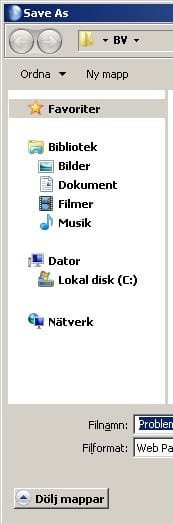
  • NavigationPane.jpg
    NavigationPane.jpg
    12.5 KB · Views: 19

My Computer

Computer Manufacturer/Model Number
HP G62-112SO Laptop
OS
Windows 7 Home Premium 64bit
CPU
Intel Core i3 M 330 @ 2.13 GHz
Motherboard
"ACPI x64-based PC" (?)
Memory
4 GB
Graphics Card(s)
Intel Graphics Media Accelerator HD
Sound Card
Realtek High Definition Audio
Monitor(s) Displays
"PnP-Screen" (?)
Screen Resolution
1366 x 768
Hard Drives
Partition 1: 218 GB HDD (ST9250410AS)
Partition 2: 14,5 GB HDD
Partition 3: 99,1 MB HDD
PSU
AC Adapter 230 V
Keyboard
Standard keyboard PS/2 (Built-in)
Mouse
Synaptics PS/2 Port TouchPad / A4Tech USB-Optical Mouse
Internet Speed
0.5 MBit
Right click on the Favoriter selection in the Save as pane, and click on Restore Favorite links

A Guy
 

My Computer

Computer type
PC/Desktop
OS
Windows 10 Home x64
CPU
INTEL Core i5-750 Quad-Core 3.37GHz
Motherboard
ASUS P7P55D
Memory
HyperX Fury Black Series 8GB (2 x 4GB) 1866Mhz
Graphics Card(s)
EVGA GeForce GTX 750 Superclocked 1GB 128-Bit GDDR5
Monitor(s) Displays
LG 32MA68HY 32" IPS
Screen Resolution
1920 x 1080
Hard Drives
Samsung 840 Evo 120GB, SEAGATE 500GB Barracuda® 7200.12, SATA 3 Gb/s, 7200 RPM, 16MB cache
PSU
ANTEC TruePower New TP-550, 80 PLUS, 550W
Case
ANTEC Three Hundred Illusion
Cooling
COOLER MASTER Hyper 212 Plus, 4 x 120mm 1 x 140mm Noctua's
Internet Speed
85 + Mbps
Antivirus
Avast
Browser
Vivaldi
Sorry, did not work. Nothing happens when I click that.
 

My Computer

Computer Manufacturer/Model Number
HP G62-112SO Laptop
OS
Windows 7 Home Premium 64bit
CPU
Intel Core i3 M 330 @ 2.13 GHz
Motherboard
"ACPI x64-based PC" (?)
Memory
4 GB
Graphics Card(s)
Intel Graphics Media Accelerator HD
Sound Card
Realtek High Definition Audio
Monitor(s) Displays
"PnP-Screen" (?)
Screen Resolution
1366 x 768
Hard Drives
Partition 1: 218 GB HDD (ST9250410AS)
Partition 2: 14,5 GB HDD
Partition 3: 99,1 MB HDD
PSU
AC Adapter 230 V
Keyboard
Standard keyboard PS/2 (Built-in)
Mouse
Synaptics PS/2 Port TouchPad / A4Tech USB-Optical Mouse
Internet Speed
0.5 MBit
Last edited by a moderator:

My Computer

Computer type
PC/Desktop
OS
Windows 10 Home x64
CPU
INTEL Core i5-750 Quad-Core 3.37GHz
Motherboard
ASUS P7P55D
Memory
HyperX Fury Black Series 8GB (2 x 4GB) 1866Mhz
Graphics Card(s)
EVGA GeForce GTX 750 Superclocked 1GB 128-Bit GDDR5
Monitor(s) Displays
LG 32MA68HY 32" IPS
Screen Resolution
1920 x 1080
Hard Drives
Samsung 840 Evo 120GB, SEAGATE 500GB Barracuda® 7200.12, SATA 3 Gb/s, 7200 RPM, 16MB cache
PSU
ANTEC TruePower New TP-550, 80 PLUS, 550W
Case
ANTEC Three Hundred Illusion
Cooling
COOLER MASTER Hyper 212 Plus, 4 x 120mm 1 x 140mm Noctua's
Internet Speed
85 + Mbps
Antivirus
Avast
Browser
Vivaldi
Does not work at all. Nothing happens. If I try to move any link, object or anything to the Favorites in the Nav. Pane all I see is a (/) symbol. Restore Favorite links not working. I am utterly frustrated by Windows 7, the library idea and all, I don't understand why they had to remove the Desktop link.

Sorry if I seem annoyed but I spend hours and hours trying to figure out simple things that Microsoft for some reason made extremely hard or impossible to alter.
 

My Computer

Computer Manufacturer/Model Number
HP G62-112SO Laptop
OS
Windows 7 Home Premium 64bit
CPU
Intel Core i3 M 330 @ 2.13 GHz
Motherboard
"ACPI x64-based PC" (?)
Memory
4 GB
Graphics Card(s)
Intel Graphics Media Accelerator HD
Sound Card
Realtek High Definition Audio
Monitor(s) Displays
"PnP-Screen" (?)
Screen Resolution
1366 x 768
Hard Drives
Partition 1: 218 GB HDD (ST9250410AS)
Partition 2: 14,5 GB HDD
Partition 3: 99,1 MB HDD
PSU
AC Adapter 230 V
Keyboard
Standard keyboard PS/2 (Built-in)
Mouse
Synaptics PS/2 Port TouchPad / A4Tech USB-Optical Mouse
Internet Speed
0.5 MBit
They did not remove the desktop link, I have it, Windows 7 has it, just your installation does not.

Try running the System File Checker and see if it finds and corrects any issues.

http://www.sevenforums.com/tutorials/1538-sfc-scannow-command-system-file-checker.html

When did you install 7? Has the desktop link always been missing? Sorry, I'm off, but will be back later and check for any replies. Someone else may chime in while I am gone. A Guy
 

My Computer

Computer type
PC/Desktop
OS
Windows 10 Home x64
CPU
INTEL Core i5-750 Quad-Core 3.37GHz
Motherboard
ASUS P7P55D
Memory
HyperX Fury Black Series 8GB (2 x 4GB) 1866Mhz
Graphics Card(s)
EVGA GeForce GTX 750 Superclocked 1GB 128-Bit GDDR5
Monitor(s) Displays
LG 32MA68HY 32" IPS
Screen Resolution
1920 x 1080
Hard Drives
Samsung 840 Evo 120GB, SEAGATE 500GB Barracuda® 7200.12, SATA 3 Gb/s, 7200 RPM, 16MB cache
PSU
ANTEC TruePower New TP-550, 80 PLUS, 550W
Case
ANTEC Three Hundred Illusion
Cooling
COOLER MASTER Hyper 212 Plus, 4 x 120mm 1 x 140mm Noctua's
Internet Speed
85 + Mbps
Antivirus
Avast
Browser
Vivaldi
I actually made a reinstall of Win 7 a few weeks ago, I remember it being like that in the state preior to that and still is, so... well. I am clueless at the moment, but I will give the SFC a try. Thank you for the effort in helping so far by the way.
 

My Computer

Computer Manufacturer/Model Number
HP G62-112SO Laptop
OS
Windows 7 Home Premium 64bit
CPU
Intel Core i3 M 330 @ 2.13 GHz
Motherboard
"ACPI x64-based PC" (?)
Memory
4 GB
Graphics Card(s)
Intel Graphics Media Accelerator HD
Sound Card
Realtek High Definition Audio
Monitor(s) Displays
"PnP-Screen" (?)
Screen Resolution
1366 x 768
Hard Drives
Partition 1: 218 GB HDD (ST9250410AS)
Partition 2: 14,5 GB HDD
Partition 3: 99,1 MB HDD
PSU
AC Adapter 230 V
Keyboard
Standard keyboard PS/2 (Built-in)
Mouse
Synaptics PS/2 Port TouchPad / A4Tech USB-Optical Mouse
Internet Speed
0.5 MBit
Back
Top