
Desktop missing from Windows Explorer

beejay

New member
Local time
6:37 PM
Messages
3
I have been struggling along with Windows 7 Home Premium 64-bit on a new i7 machine for about a year and have a habit of creating shortcuts on my Desktops leading to things like folders, documents, spreadsheets, pictures to which I expect to want quick access. I normally access them by opening Windows Explorer and clicking on the word "Desktop" in the left pane which then gives me a A - Z list, in the right pane, of everything on my Desktop.
Today I spent several hours on MS Publisher trying to see if I could print background colour all the way to all edges of the pages in a A5 booklet card - without success.
My problem is that when I now open Windows Explorer I can no longer see Desktop listed in the left pane. I know I can access my needed items by going to C:\ > Users > MyName and clicking on "Desktop" but that is a laborious process. I have done a System Restore to a point yesterday when I know I could find "Desktop" in the normal way in Windows Explorer.
Can anyone please tell me how make the link to Desktop once again visible in the left pane of my Windows Explorer ?
I am 84 years of age and a bit slow with too much technicality so a detailed explanation would be much appreciated, thanks.
beejay.
 

My Computer My Computer

At a glance

Win 7 Home Premium 64-bit or Windows XP Pro (...Intel Core i7 CPU 750 @ 3.07GHz4 x 2GB Kingston DDR3NVIDIA GeForce 9400GT
Computer Manufacturer/Model Number
Generic desktop
OS
Win 7 Home Premium 64-bit or Windows XP Pro (see Hard Drives)
CPU
Intel Core i7 CPU 750 @ 3.07GHz
Motherboard
Gigabyte EX58-UD3R
Memory
4 x 2GB Kingston DDR3
Graphics Card(s)
NVIDIA GeForce 9400GT
Sound Card
on board
Monitor(s) Displays
14 x 17" plus 1 x 19" CRT monitors (VGA)
Screen Resolution
1024 x 768
Hard Drives
3 x Seagate SATA2 500GB x 7200RPM in two mobile racks.
One rack for my data drive and the other swappable between XP Pro and Win7 64-bit (see "Other Info" for more details).
PSU
Thermaltake 550W
Case
Thermaltake Wing RS 301
Cooling
Large fans
Keyboard
MS MultiMedia Keyboard 1.0A
Mouse
MS IntelliMouse Optical USB and PS/2 Compatible
Internet Speed
Broadband 2+ (speed very variable)
Other Info
I have 3 hard drives and my case has 2 Welland trayless mobile racks. The drive in the lower rack is recognised as F: drive which contains all my data and is normally not removed from the rack. The upper rack is used to accept a drive on which there is an operating system and programs, either Win7 64-bit or (occasionally) Windows XP Pro.
Hi Beejay,

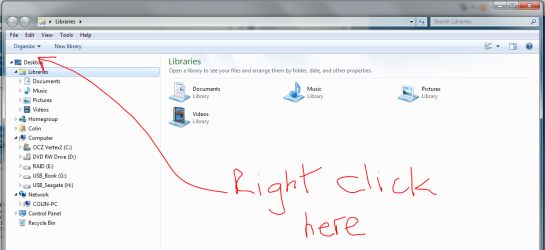
If you right-click in the space shown in the image below, and then select Show all folders from the context menu that appears when you right-click, the Desktop icon should re-appear.

Let us know if that works for you.

Regards,
Golden
 

Attachments

  • Capture2.PNG
    Capture2.PNG
    49.2 KB · Views: 1,147

My Computer My Computer

At a glance

Windows 10 Pro x64 ; Xubuntu x64Intel i7 860 @ 2.80 GHz O/C'ed to 4.0GHz16GB Corsair Vengance DDR3 @ 661 MHz Dual Cha...EVGA NVidia GTX 560 1024MB
Computer type
PC/Desktop
Computer Manufacturer/Model Number
Golden Mk. I.4
OS
Windows 10 Pro x64 ; Xubuntu x64
CPU
Intel i7 860 @ 2.80 GHz O/C'ed to 4.0GHz
Motherboard
Gigabyte P55A-UD3R Rev.1. Award BIOS F13
Memory
16GB Corsair Vengance DDR3 @ 661 MHz Dual Channel (9-9-9-24)
Graphics Card(s)
EVGA NVidia GTX 560 1024MB
Sound Card
Realtek Integrated
Monitor(s) Displays
Dual Samsung SyncMaster 2494HS
Screen Resolution
1920*1080 and 1920*1080
Hard Drives
1*Samsung 840 EVO 120GB SSD;
1*OCZ Vertex 2 60GB SSD;
2*Samsung F3 SpinPoint 1TB in RAID0;
1*Samsung F1 SpinPoint 1TB;
2*Western Digital 1TB External USB 3.0
1*Western Digital 500GB External USB 3.0
1*Seagate 500GB External USB 2.0
PSU
Thermaltake ToughPower QFan 750W
Case
Thermaltake Element S VK60001W2Z
Cooling
Corsair H60 Water Cooling, 2*230mm and 2*80mm case fans
Keyboard
Logitech G110
Mouse
Logitech MX518
Link to Desktop now found, thanks

Immediately after I posted my request I found the answer in another posting below my message saying the answer could be found at
 

My Computer My Computer

At a glance

Win 7 Home Premium 64-bit or Windows XP Pro (...Intel Core i7 CPU 750 @ 3.07GHz4 x 2GB Kingston DDR3NVIDIA GeForce 9400GT
Computer Manufacturer/Model Number
Generic desktop
OS
Win 7 Home Premium 64-bit or Windows XP Pro (see Hard Drives)
CPU
Intel Core i7 CPU 750 @ 3.07GHz
Motherboard
Gigabyte EX58-UD3R
Memory
4 x 2GB Kingston DDR3
Graphics Card(s)
NVIDIA GeForce 9400GT
Sound Card
on board
Monitor(s) Displays
14 x 17" plus 1 x 19" CRT monitors (VGA)
Screen Resolution
1024 x 768
Hard Drives
3 x Seagate SATA2 500GB x 7200RPM in two mobile racks.
One rack for my data drive and the other swappable between XP Pro and Win7 64-bit (see "Other Info" for more details).
PSU
Thermaltake 550W
Case
Thermaltake Wing RS 301
Cooling
Large fans
Keyboard
MS MultiMedia Keyboard 1.0A
Mouse
MS IntelliMouse Optical USB and PS/2 Compatible
Internet Speed
Broadband 2+ (speed very variable)
Other Info
I have 3 hard drives and my case has 2 Welland trayless mobile racks. The drive in the lower rack is recognised as F: drive which contains all my data and is normally not removed from the rack. The upper rack is used to accept a drive on which there is an operating system and programs, either Win7 64-bit or (occasionally) Windows XP Pro.
The fix saying Right-click and then Show All Folders did not work for me
Found in the tutorial "How to Restore the Defaul;t Favourite Links in Windows 7 Navigation Pane". That is Right-click on Favourites and then on Restore Favourite Links - that worked fine. Many thanks for the wonderful help. Beejay.
 

My Computer My Computer

At a glance

Win 7 Home Premium 64-bit or Windows XP Pro (...Intel Core i7 CPU 750 @ 3.07GHz4 x 2GB Kingston DDR3NVIDIA GeForce 9400GT
Computer Manufacturer/Model Number
Generic desktop
OS
Win 7 Home Premium 64-bit or Windows XP Pro (see Hard Drives)
CPU
Intel Core i7 CPU 750 @ 3.07GHz
Motherboard
Gigabyte EX58-UD3R
Memory
4 x 2GB Kingston DDR3
Graphics Card(s)
NVIDIA GeForce 9400GT
Sound Card
on board
Monitor(s) Displays
14 x 17" plus 1 x 19" CRT monitors (VGA)
Screen Resolution
1024 x 768
Hard Drives
3 x Seagate SATA2 500GB x 7200RPM in two mobile racks.
One rack for my data drive and the other swappable between XP Pro and Win7 64-bit (see "Other Info" for more details).
PSU
Thermaltake 550W
Case
Thermaltake Wing RS 301
Cooling
Large fans
Keyboard
MS MultiMedia Keyboard 1.0A
Mouse
MS IntelliMouse Optical USB and PS/2 Compatible
Internet Speed
Broadband 2+ (speed very variable)
Other Info
I have 3 hard drives and my case has 2 Welland trayless mobile racks. The drive in the lower rack is recognised as F: drive which contains all my data and is normally not removed from the rack. The upper rack is used to accept a drive on which there is an operating system and programs, either Win7 64-bit or (occasionally) Windows XP Pro.
Nice one - well done.
 

My Computer My Computer

At a glance

Windows 10 Pro x64 ; Xubuntu x64Intel i7 860 @ 2.80 GHz O/C'ed to 4.0GHz16GB Corsair Vengance DDR3 @ 661 MHz Dual Cha...EVGA NVidia GTX 560 1024MB
Computer type
PC/Desktop
Computer Manufacturer/Model Number
Golden Mk. I.4
OS
Windows 10 Pro x64 ; Xubuntu x64
CPU
Intel i7 860 @ 2.80 GHz O/C'ed to 4.0GHz
Motherboard
Gigabyte P55A-UD3R Rev.1. Award BIOS F13
Memory
16GB Corsair Vengance DDR3 @ 661 MHz Dual Channel (9-9-9-24)
Graphics Card(s)
EVGA NVidia GTX 560 1024MB
Sound Card
Realtek Integrated
Monitor(s) Displays
Dual Samsung SyncMaster 2494HS
Screen Resolution
1920*1080 and 1920*1080
Hard Drives
1*Samsung 840 EVO 120GB SSD;
1*OCZ Vertex 2 60GB SSD;
2*Samsung F3 SpinPoint 1TB in RAID0;
1*Samsung F1 SpinPoint 1TB;
2*Western Digital 1TB External USB 3.0
1*Western Digital 500GB External USB 3.0
1*Seagate 500GB External USB 2.0
PSU
Thermaltake ToughPower QFan 750W
Case
Thermaltake Element S VK60001W2Z
Cooling
Corsair H60 Water Cooling, 2*230mm and 2*80mm case fans
Keyboard
Logitech G110
Mouse
Logitech MX518
Back
Top