Solved How to remove the OneDrive icon from Windows Explorer permanently?

ShiftF5

New member
Local time
6:35 AM
Messages
20
Hello,
I have Windows 7 Professional x64 SP1. The computer is using a mandatory profile for the user and most settings are controlled by Local GPO (there is no domain controller).

Long ago I uninstalled OneDrive from the computers, however on one computer the OneDrive icon has re-appeared in the Windows Explorer "Favorites" menu. (See attachment).

Everything on Google says to just uninstall it from the Control Panel in Windows 7, however it's not listed in the Control Panel. Apparently there should also be a Group Policy located in Local Computer Policy - Computer Configuration - Administrative Templates - Windows Components - OneDrive but the OneDrive option does not exist (The instructions may have been for Windows 8+).

Simply deleting the icon doesn't work because the computer has a mandatory profile. Logging out and back in restores it.

I'm hoping there's a way to permanently remove it that someone has discovered!

Thanks!
 

Attachments

  • OneDrive.png
    OneDrive.png
    11.4 KB · Views: 31

My Computer My Computer

At a glance

Windows 7 Professional 64-bit8 GB
Computer type
PC/Desktop
Computer Manufacturer/Model Number
HP EliteDesk 705 G1 SFF
OS
Windows 7 Professional 64-bit
Memory
8 GB

My Computer My Computer

At a glance

Win7 pro x64stock i7 7700kCorsair Vengeance LPX 16GB (2x8GB) DDR4 @ 320...integrated Intel HD 630
Computer type
PC/Desktop
Computer Manufacturer/Model Number
diy
OS
Win7 pro x64
CPU
stock i7 7700k
Motherboard
Gigabyte Z270N-WIFI mini-ITX
Memory
Corsair Vengeance LPX 16GB (2x8GB) DDR4 @ 3200MHz
Graphics Card(s)
integrated Intel HD 630
Sound Card
onboard Realtek ALC1220
Monitor(s) Displays
two vertically mounted samsung 55" 4k un55mu8000
Screen Resolution
1920x1280
Hard Drives
256GB Samsung EVO 960 M.2 pci-e NVMe SSD
PSU
SilverStone Nightjar ST45NF 450Watt Fanless
Case
No case. Motherboard is mounted directly onto power supply
Cooling
Evercool low profile 815EP with Panaflow 12L fan at 7v
Keyboard
Ortek MCK-86 mini
Mouse
Belkin 5-button USB
Internet Speed
spectrum 400mbps
johnhoh Yes I have seen that, however that registry key does not exist on Windows 7 (at least, not on mine). In Windows 7, OneDrive is installed as an application/app, but in Windows 10 it's part of the OS - so that could explain the difference.
 

My Computer My Computer

At a glance

Windows 7 Professional 64-bit8 GB
Computer type
PC/Desktop
Computer Manufacturer/Model Number
HP EliteDesk 705 G1 SFF
OS
Windows 7 Professional 64-bit
Memory
8 GB
per this link
User Folders - Restore Default Location

Brinks says you can RESTORE Onedrive in Win8 by executing this batch file

taskkill /f /im explorer.exe
timeout /t 2 /nobreak >nul
if not exist "%UserProfile%\OneDrive" mkdir "%UserProfile%\OneDrive"
reg add "HKCU\Software\Microsoft\Windows\CurrentVersion\Explorer\Shell Folders" /v "{A52BBA46-E9E1-435F-B3D9-28DAA648C0F6}" /t REG_SZ /d "C:\Users\%USERNAME%\OneDrive" /f
reg add "HKCU\Software\Microsoft\Windows\CurrentVersion\Explorer\User Shell Folders" /v "{A52BBA46-E9E1-435F-B3D9-28DAA648C0F6}" /t REG_EXPAND_SZ /d %%USERPROFILE%%"\OneDrive" /f
attrib +r -s -h "%USERPROFILE%\OneDrive" /S /D
timeout /t 1 /nobreak >nul
start explorer.exe

which suggests that you may be able to DELETE the regisry keys

HKCU\Software\Microsoft\Windows\CurrentVersion\Explorer\Shell Folders\{A52BBA46-E9E1-435F-B3D9-28DAA648C0F6}
and
HKCU\Software\Microsoft\Windows\CurrentVersion\Explorer\User Shell Folders\{A52BBA46-E9E1-435F-B3D9-28DAA648C0F6}

in order to get rid of onedrive.

Worth a try to see if the keys are there in win7. Definitely back up each key before deleting it (in regedit right click on key then do file > export, to create a file on your desktop that you can click on to restore the keys if needed)
 

My Computer My Computer

At a glance

Win7 pro x64stock i7 7700kCorsair Vengeance LPX 16GB (2x8GB) DDR4 @ 320...integrated Intel HD 630
Computer type
PC/Desktop
Computer Manufacturer/Model Number
diy
OS
Win7 pro x64
CPU
stock i7 7700k
Motherboard
Gigabyte Z270N-WIFI mini-ITX
Memory
Corsair Vengeance LPX 16GB (2x8GB) DDR4 @ 3200MHz
Graphics Card(s)
integrated Intel HD 630
Sound Card
onboard Realtek ALC1220
Monitor(s) Displays
two vertically mounted samsung 55" 4k un55mu8000
Screen Resolution
1920x1280
Hard Drives
256GB Samsung EVO 960 M.2 pci-e NVMe SSD
PSU
SilverStone Nightjar ST45NF 450Watt Fanless
Case
No case. Motherboard is mounted directly onto power supply
Cooling
Evercool low profile 815EP with Panaflow 12L fan at 7v
Keyboard
Ortek MCK-86 mini
Mouse
Belkin 5-button USB
Internet Speed
spectrum 400mbps
What you see in the Favorites are links.
Click on Favorites (top) and on right side you will see the links. Just right click on OneDrive link and choose remove.
 
Last edited:

My Computers My Computers

  • At a glance

    Windows 7 HP 64i5 6600K - 800MHz to 4200MHz4+4G GSkill DDR4 3000IG - Intel 530
    Computer type
    PC/Desktop
    Computer Manufacturer/Model Number
    custom build
    OS
    Windows 7 HP 64
    CPU
    i5 6600K - 800MHz to 4200MHz
    Motherboard
    GA-Z170-HD3P
    Memory
    4+4G GSkill DDR4 3000
    Graphics Card(s)
    IG - Intel 530
    Monitor(s) Displays
    Samsung 226BW
    Screen Resolution
    1680x1050
    Hard Drives
    (1) -1 SM951 – 128GB M.2 AHCI PCIe SSD drive for Windows 7 and Lubuntu
    (2) -1 WD SATA 3 - 1T for Data
    (3) -1 WD SATA 3 - 1T for backup
    PSU
    Thermaltake 450W TR2 gold
    Keyboard
    Old and good Chicony mechanical keyboard
    Mouse
    Logitech mX performance - 9 buttons (had to disable some)
    Internet Speed
    500Mb/s
    Browser
    Firefox 64
    Other Info
    TinyWall firewall
  • At a glance

    Windows 7 Proi7-4500U 800MHz to 3.0GHz(4+4)G DDR3 1600IG intel 4400 + NVIDIA GeForce GT 745M
    Computer type
    Laptop
    System Manufacturer/Model Number
    Asus Q550LF
    OS
    Windows 7 Pro
    CPU
    i7-4500U 800MHz to 3.0GHz
    Motherboard
    Asus Q550LF
    Memory
    (4+4)G DDR3 1600
    Graphics Card(s)
    IG intel 4400 + NVIDIA GeForce GT 745M
    Sound Card
    Realtek
    Monitor(s) Displays
    LG Display LP156WF4-SPH1
    Screen Resolution
    1920 x 1080
    Hard Drives
    BX500 120G SSD for Windows and programs +
    1T HDD for data
    Internet Speed
    500 Mb/s
    Browser
    Firefox
    Other Info
    TinyWall firewall
@johnhoh - Thank you, that's very clever. I normally only work that job weekends so I will try that as soon as I'm back in.

@Megahertz07 - thanks for the reply but as I stated in my initial post:
Simply deleting the icon doesn't work because the computer has a mandatory profile. Logging out and back in restores it.
 

My Computer My Computer

At a glance

Windows 7 Professional 64-bit8 GB
Computer type
PC/Desktop
Computer Manufacturer/Model Number
HP EliteDesk 705 G1 SFF
OS
Windows 7 Professional 64-bit
Memory
8 GB
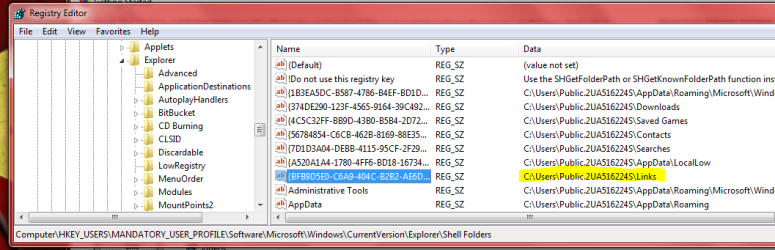
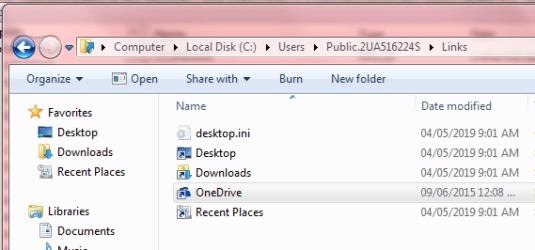
johnhoh - Thanks for your help. Your suggestion didn't solve the problem per se, as those registry keys didn't exist in W7, *however* it gave me a good starting point to locate where the link was stored. The Shell Folders registry key had some promising-looking folders listed in it, which I navigated and from there was able to find the shortcut to OneDrive in the user's profile (in the "Links" folder). Logged in as an Administrator instead of the mandatory user, I was able to navigate to the shortcut and delete it. I deleted it from both the user profile and the mandatory profile for good measure (see attached screenshots). It worked! Thanks so much for your help.
 

Attachments

  • Capture1.PNG
    Capture1.PNG
    28.5 KB · Views: 1
  • Capture2.PNG
    Capture2.PNG
    17.3 KB · Views: 8
  • Capture3.PNG
    Capture3.PNG
    19.2 KB · Views: 8

My Computer My Computer

At a glance

Windows 7 Professional 64-bit8 GB
Computer type
PC/Desktop
Computer Manufacturer/Model Number
HP EliteDesk 705 G1 SFF
OS
Windows 7 Professional 64-bit
Memory
8 GB
good work, thanks for telling us how you did it in case folks down the road want to know
 

My Computer My Computer

At a glance

Win7 pro x64stock i7 7700kCorsair Vengeance LPX 16GB (2x8GB) DDR4 @ 320...integrated Intel HD 630
Computer type
PC/Desktop
Computer Manufacturer/Model Number
diy
OS
Win7 pro x64
CPU
stock i7 7700k
Motherboard
Gigabyte Z270N-WIFI mini-ITX
Memory
Corsair Vengeance LPX 16GB (2x8GB) DDR4 @ 3200MHz
Graphics Card(s)
integrated Intel HD 630
Sound Card
onboard Realtek ALC1220
Monitor(s) Displays
two vertically mounted samsung 55" 4k un55mu8000
Screen Resolution
1920x1280
Hard Drives
256GB Samsung EVO 960 M.2 pci-e NVMe SSD
PSU
SilverStone Nightjar ST45NF 450Watt Fanless
Case
No case. Motherboard is mounted directly onto power supply
Cooling
Evercool low profile 815EP with Panaflow 12L fan at 7v
Keyboard
Ortek MCK-86 mini
Mouse
Belkin 5-button USB
Internet Speed
spectrum 400mbps
NP. Nothing worse than finding a thread with your exact issue but no solution :) It also will help Future Me when the icon reappears 6 months from now and I forget where I found it...
 

My Computer My Computer

At a glance

Windows 7 Professional 64-bit8 GB
Computer type
PC/Desktop
Computer Manufacturer/Model Number
HP EliteDesk 705 G1 SFF
OS
Windows 7 Professional 64-bit
Memory
8 GB
Back
Top