Desktop Resurrection - Need power supply for 2002 Dell desktop

youngfrankUMD

New member
Local time
2:58 PM
Messages
15
Wasn't sure if this is the right category but I guess it's ultimately a question of hardware...

In case you don't want to read the whole background, my ultimate question is, Which power supply should I look to get to replace the dead one in the old unit?

I just moved into an off-campus house at college and the last homeowners left behind a lot of stuff, including what appears to be a functional Dell desktop PC. At least 10 years old, judging by the available ports on the MB and the other hardware inside. The unit is dead on its own, but I tried connecting the 20-pin part of my desktop's power supply to the old unit and the motherboard seemed to power up (light went on, CPU fan started).

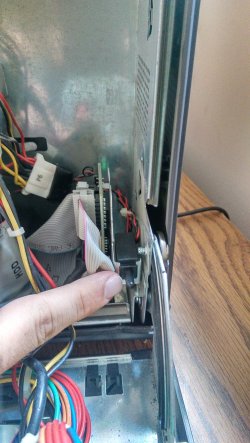
The hard drive and CD-ROM drive didn't seem to power on, but I found what seemed to be a safety button (see first image) which I am guessing prevents those devices from powering on if the case is open. Can anyone confirm this for me? I want to know if anything else in this unit is dead, but it seems like everything was in great shape (not much dust, etc). I don't really want to pump more than like $50 bucks into this thing, as my goal was to use this PC as either a dedicated Linux machine or to host a web site (not expecting much traffic at all, and with FiOS Quantum 75/75 we have more than enough bandwidth).

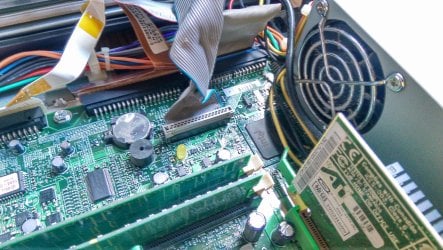
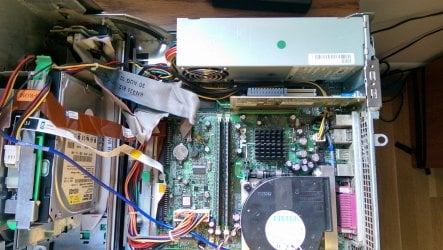
The motherboard looks very much like the Dell OptiPlex GX260 SDT SFF Socket 478 (Image: http://attach.forum.ge/post-54-1270667615.jpg) although I cannot seem to find the exact model number without taking out the power supply (good ol' Dell plopped it right on top of the PCI connector...) The drives are NOT Serial ATA... (so I guess that makes them IDE? correct me if I'm wrong here, still learning.)

I guess what I want to know the most at this point is what is a good replacement for the power supply? From what I can read, the current one in there is a Dell PS-5161-1D (Image: http://i.ebayimg.com/00/s/MTIwMFgxNjAw/z/SsQAAOSwpDdVEFNE/$_35.JPG) but I don't know if I should go with the same one or a different one.

Advice? Thanks in advance :D:D:D
 

Attachments

  • IMG_20150606_154115.jpg
    IMG_20150606_154115.jpg
    599.8 KB · Views: 3
  • IMG_20150606_152707.jpg
    IMG_20150606_152707.jpg
    681.6 KB · Views: 1
  • IMG_20150606_151747.jpg
    IMG_20150606_151747.jpg
    598.4 KB · Views: 2

My Computer My Computer

At a glance

Windows 7 x64 UltimateAMD Phenom II X4 970 @ 3.6 GHzPatriot Viper 3 Series 8GB DDR3Not worth noting
Computer type
PC/Desktop
Computer Manufacturer/Model Number
Custom Build (;
OS
Windows 7 x64 Ultimate
CPU
AMD Phenom II X4 970 @ 3.6 GHz
Motherboard
Gigabyte GA-78LMT
Memory
Patriot Viper 3 Series 8GB DDR3
Graphics Card(s)
Not worth noting
Hard Drives
Western Digital 1TB 7,200RPM 6GB/s

My Computer My Computer

At a glance

Windows 7 Home Premium SP1, 64-bitIntel Skylake i5-6600K, not overclocked8 GB HyperX DDR4-2666 (2 x 4 GB)none; graphics are integrated on CPU
Computer type
PC/Desktop
Computer Manufacturer/Model Number
Ignatz Special; 4 speed manual gearbox; factory air conditioning; one of one
OS
Windows 7 Home Premium SP1, 64-bit
CPU
Intel Skylake i5-6600K, not overclocked
Motherboard
AsRock Z170M Extreme 4, micro ATX
Memory
8 GB HyperX DDR4-2666 (2 x 4 GB)
Graphics Card(s)
none; graphics are integrated on CPU
Sound Card
onboard: Realtek ALC1150; external: USB Behringer UF0-202
Monitor(s) Displays
Dell S2340M 23 inch IPS
Screen Resolution
1600 x 900
Hard Drives
System: Crucial MX100 series SSD, 128 GB;
Data: Samsung Spinpoint 103SJ, 1 TB;
Backup: WD Caviar Green WD30EZRX-00D8PB0, 3 TB
PSU
Rosewill SilentNight 500 watt fanless, semi-modular
Case
Antec Solo II
Cooling
Noctua NH-U12S; Noctua F12 intake, Noctua S12A exhaust
Keyboard
Microsoft 200 6JH-00001 USB
Mouse
Dell or Microsoft optical wired; USB
Antivirus
Microsoft Security Essentials and Malwarebytes Premium
Browser
Pale Moon
Other Info
All fans PWM; speeds at idle: CPU circa 500 rpm; intake circa 600 rpm; exhaust circa 600 rpm; CPU temps 27 idle and 47 C load in a warm room (27 C/81 F) when running Intel Extreme Tuning Utility stress test.
Oh nice! Yeah that looks like the right one, and it even says it was designed for OptiPlex GX280, which is the same MB family. I'm just wondering, do you recommend any other product that might be better/smaller for a similar price? I'm concerned with hardware compatibility but I want to get the best one I can for cheap. Thanks for your input!
 

My Computer My Computer

At a glance

Windows 7 x64 UltimateAMD Phenom II X4 970 @ 3.6 GHzPatriot Viper 3 Series 8GB DDR3Not worth noting
Computer type
PC/Desktop
Computer Manufacturer/Model Number
Custom Build (;
OS
Windows 7 x64 Ultimate
CPU
AMD Phenom II X4 970 @ 3.6 GHz
Motherboard
Gigabyte GA-78LMT
Memory
Patriot Viper 3 Series 8GB DDR3
Graphics Card(s)
Not worth noting
Hard Drives
Western Digital 1TB 7,200RPM 6GB/s
Can you get your own eyeballs on the existing power supply to the point that you can read the model number directly off the label?

If so, I'd go with that. I'm taking your word for it that you have it properly ID'ed, but I have no idea if you are completely wrong.

I assume this thing won't boot.

Is there any type of Dell sticker anywhere on the machine? Dell uses something similar to a serial number that you can then enter at the Dell support web site and it will then tell you all the machine specs.

The Dell site may no longer have info for a 13 year old machine. That's pre-historic and long out of warranty.

But it's conceivable they can still sell you another power supply known to be compatible, new or otherwise. I dunno.
 

My Computer My Computer

At a glance

Windows 7 Home Premium SP1, 64-bitIntel Skylake i5-6600K, not overclocked8 GB HyperX DDR4-2666 (2 x 4 GB)none; graphics are integrated on CPU
Computer type
PC/Desktop
Computer Manufacturer/Model Number
Ignatz Special; 4 speed manual gearbox; factory air conditioning; one of one
OS
Windows 7 Home Premium SP1, 64-bit
CPU
Intel Skylake i5-6600K, not overclocked
Motherboard
AsRock Z170M Extreme 4, micro ATX
Memory
8 GB HyperX DDR4-2666 (2 x 4 GB)
Graphics Card(s)
none; graphics are integrated on CPU
Sound Card
onboard: Realtek ALC1150; external: USB Behringer UF0-202
Monitor(s) Displays
Dell S2340M 23 inch IPS
Screen Resolution
1600 x 900
Hard Drives
System: Crucial MX100 series SSD, 128 GB;
Data: Samsung Spinpoint 103SJ, 1 TB;
Backup: WD Caviar Green WD30EZRX-00D8PB0, 3 TB
PSU
Rosewill SilentNight 500 watt fanless, semi-modular
Case
Antec Solo II
Cooling
Noctua NH-U12S; Noctua F12 intake, Noctua S12A exhaust
Keyboard
Microsoft 200 6JH-00001 USB
Mouse
Dell or Microsoft optical wired; USB
Antivirus
Microsoft Security Essentials and Malwarebytes Premium
Browser
Pale Moon
Other Info
All fans PWM; speeds at idle: CPU circa 500 rpm; intake circa 600 rpm; exhaust circa 600 rpm; CPU temps 27 idle and 47 C load in a warm room (27 C/81 F) when running Intel Extreme Tuning Utility stress test.
Here is the best image I got of the power supply label. I think I got the model right...?

Also why would you say it won't boot? I know it won't boot if the hard drive doesn't power up but that was the other thing I was wondering with the first image I attached to my first post... if that little button was like a sentinel for if the case is open, to cut power to those devices to prevent any malfunction.... but if those components are shot it's not worth my resources to resurrect, may as well just buy or build another cheap platform
 

Attachments

  • IMG_20150606_160613.jpg
    IMG_20150606_160613.jpg
    404.8 KB · Views: 2

My Computer My Computer

At a glance

Windows 7 x64 UltimateAMD Phenom II X4 970 @ 3.6 GHzPatriot Viper 3 Series 8GB DDR3Not worth noting
Computer type
PC/Desktop
Computer Manufacturer/Model Number
Custom Build (;
OS
Windows 7 x64 Ultimate
CPU
AMD Phenom II X4 970 @ 3.6 GHz
Motherboard
Gigabyte GA-78LMT
Memory
Patriot Viper 3 Series 8GB DDR3
Graphics Card(s)
Not worth noting
Hard Drives
Western Digital 1TB 7,200RPM 6GB/s
Here is the best image I got of the power supply label. I think I got the model right...?

Also why would you say it won't boot? I know it won't boot if the hard drive doesn't power up but that was the other thing I was wondering with the first image I attached to my first post... if that little button was like a sentinel for if the case is open, to cut power to those devices to prevent any malfunction.... but if those components are shot it's not worth my resources to resurrect, may as well just buy or build another cheap platform

I said "I assume this thing won't boot" because you said "The unit is dead on its own". Maybe it all starts and runs fine and all is well with the world. I have no idea other than what you typed.

I don't have the slightest idea "if that little button was like a sentinel" or "if it's not worth my resources to resurrect". That's up to you to figure out.

All I ever intended to do was point you to a power supply that may or may not match. It's up to you to decide if it's a match.
 

My Computer My Computer

At a glance

Windows 7 Home Premium SP1, 64-bitIntel Skylake i5-6600K, not overclocked8 GB HyperX DDR4-2666 (2 x 4 GB)none; graphics are integrated on CPU
Computer type
PC/Desktop
Computer Manufacturer/Model Number
Ignatz Special; 4 speed manual gearbox; factory air conditioning; one of one
OS
Windows 7 Home Premium SP1, 64-bit
CPU
Intel Skylake i5-6600K, not overclocked
Motherboard
AsRock Z170M Extreme 4, micro ATX
Memory
8 GB HyperX DDR4-2666 (2 x 4 GB)
Graphics Card(s)
none; graphics are integrated on CPU
Sound Card
onboard: Realtek ALC1150; external: USB Behringer UF0-202
Monitor(s) Displays
Dell S2340M 23 inch IPS
Screen Resolution
1600 x 900
Hard Drives
System: Crucial MX100 series SSD, 128 GB;
Data: Samsung Spinpoint 103SJ, 1 TB;
Backup: WD Caviar Green WD30EZRX-00D8PB0, 3 TB
PSU
Rosewill SilentNight 500 watt fanless, semi-modular
Case
Antec Solo II
Cooling
Noctua NH-U12S; Noctua F12 intake, Noctua S12A exhaust
Keyboard
Microsoft 200 6JH-00001 USB
Mouse
Dell or Microsoft optical wired; USB
Antivirus
Microsoft Security Essentials and Malwarebytes Premium
Browser
Pale Moon
Other Info
All fans PWM; speeds at idle: CPU circa 500 rpm; intake circa 600 rpm; exhaust circa 600 rpm; CPU temps 27 idle and 47 C load in a warm room (27 C/81 F) when running Intel Extreme Tuning Utility stress test.
Oh well my apologies, I though I was being more clear. When I said "the unit is dead on its own" I meant the power supply. The motherboard seems to work and other things will power on when I connect a working power supply to the MB, but not everything (i.e. disk drives). What I then intended to ask was, if someone were familiar with this model computer, if that button I have pictured is a sentinel for the case being open. Some devices (like washing machines, as an easy example) have hardware sentinels that can tell if something is open or not in position to function properly. You can't, for instance, open the top of a top-loading washing machine and watch the agitator move because the sentinel detects if the top lid is open and stops the cycle if it is opened during operation. In a similar manner, other devices may have hardware that prohibits operation until a button is depressed, a spring is expanded, etc. which signals that the device as a whole is in proper working position.

I was specifically asking if that button does this for the hard drive and CD drive, because if it does, then I will try to see if there is another problem. If this is not the case, and those disk drives are nonfunctional, then I would be considering the entire unit "not worth my resources to resurrect." As I said initially, I wanted to get this thing running for $50 or less, so the fewer things I can eliminate as causes for lack of functionality the better.
 

My Computer My Computer

At a glance

Windows 7 x64 UltimateAMD Phenom II X4 970 @ 3.6 GHzPatriot Viper 3 Series 8GB DDR3Not worth noting
Computer type
PC/Desktop
Computer Manufacturer/Model Number
Custom Build (;
OS
Windows 7 x64 Ultimate
CPU
AMD Phenom II X4 970 @ 3.6 GHz
Motherboard
Gigabyte GA-78LMT
Memory
Patriot Viper 3 Series 8GB DDR3
Graphics Card(s)
Not worth noting
Hard Drives
Western Digital 1TB 7,200RPM 6GB/s
I would close the case and try to start it up with a new and working power supply in there. Then connect it to an old monitor and see what happens! I have CD drive and hard drive links here:

I couldn't find an optical drive that fit your model, but here's an external one here: Dell External USB Slim DVD+/-RW Optical Drive : Storage, Drives and Media | Dell

Also here's a hard drive:
WD Blue Internal Desktop Hard Drive

And if you don't have a monitor, here's one: (It's what I have, and it's good)

HP W2338H 23" Wide LCD Monitor HD 1080p VGA HDMI Speakers 1920x1080 | eBay

And of course, you will need n operating system if you get a new hard drive. Judging by the pictures, your processor has the old Intel logo used from 1968 to late 2005. I would get Windows Vista or XP, depending on the amount of RAM you have.

That should be all you need.

Oh, and if the case can't close, tape the button down or something.
 
Last edited:

My Computer My Computer

At a glance

Windows 10 Home 64-bit (I no longer make post...Intel Pentium E6300 @2.6 GHz7GB DDR3 PC3-10600 MB/sec (message as PC3-8500)Integrated Intel GMA X4500 HD graphics
Computer type
PC/Desktop
Computer Manufacturer/Model Number
Hewlett-Packard
OS
Windows 10 Home 64-bit (I no longer make posts here)
CPU
Intel Pentium E6300 @2.6 GHz
Motherboard
IPIEL-LA3 (Eureka3)
Memory
7GB DDR3 PC3-10600 MB/sec (message as PC3-8500)
Graphics Card(s)
Integrated Intel GMA X4500 HD graphics
Sound Card
Integrated Realtek ALC888S
Monitor(s) Displays
Hewlett-Packard w2338h widescreen monitor
Screen Resolution
1920 x 1080- 60 GHz
Hard Drives
Size: 750 GB
Interface: SATA
Transfer rating: 3.0 Gb/sec
Rotational Speed: 7200 RPM
Almost dead; 6+ years of age
PSU
250W
Case
Mid-size ATX H: 38.7 cm W:17.5 cm L:41.1 cm
Cooling
Unknown
Keyboard
Logitech K120 keyboard
Mouse
Logitech M310 mouse
Internet Speed
425 Kbps download speed
Antivirus
Windows Defender
Browser
Google Chrome
Other Info
I also have a webcam in, camera facing away. I only use it so Cortana works. It's the Logitech Webcam Pro 9000.
Back
Top