Desktop Slideshow

How to Create a Desktop Slideshow in Windows 7

   Information
This will show you how to create a slideshow of wallpaper images (pictures) on your Windows 7 desktop. You will have the option to select how often the pictures change and to shuffle them.

The default folder that Windows 7 uses to store the pictures in is located at:
C:\Windows\Web\Wallpaper.

   Note
The Windows 7 Starter and Home Basic editions do not include the Desktop Slideshow feature.

Lets talk about Windows 7 Starter - Windows 7 Team Blog - The Windows Blog

Instead, you will need to use the tutorial in the link below to have a Desktop Slideshow in the Windows 7 Starter and Home Basic editions.

How to Change the Desktop Background in Windows 7 Starter Edition

   Warning
If you checked the Turn off all unnecceassary animations box in the Ease of Access Center, or uncheck the Animate controls and elements inside windows option in the Visual Effects settings, then this will also remove the fade effect between wallpapers in the desktop slideshow.

You must also be using a Aero theme to be able to use and set the desktop slideshow.


Here's How:
1. Right click on a empty space on the desktop and click on Personalize.

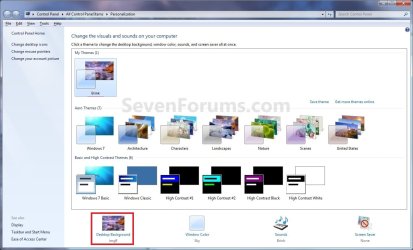
2. Click on the Desktop Background link at the bottom of the window. (see screenshot below)
NOTE: The name in gray under Desktop Background is the current desktop background file name.
Personalize.jpg
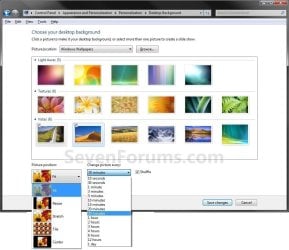
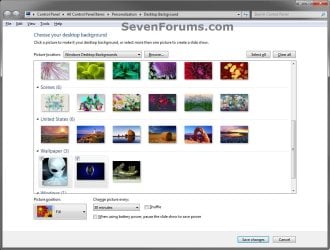
3. You will now see this window. (see screenshots below)
NOTE: You may need to scroll down or enlarge the window to see all available options like below.
change-2.jpg

Desktop_Background.jpg

4. Select a Picture Location
A) Click on the drop down arrow menu to select from the list of available picture folder locations, or click on the Browse button to navigate to the picture folder or library location. (see screenshots above)

B) Select the picture folder and click on Select Folder.
5. Select Desktop Background Pictures
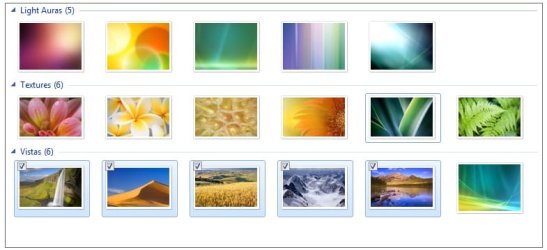
A) Select more than one picture by right clicking on an available picture, or clicking on the check box (to check) in the upper left corner of the picture. (see screenshots below and below step 3)
Select_Images.jpg
6. Select the Picture Position
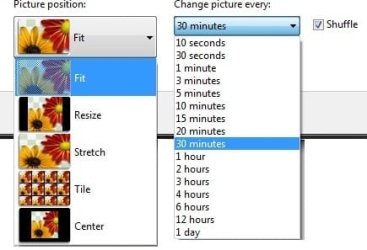
A) Click on the drop down arrow menu, and click on the picture position you want for the desktop background images. (see screenshots below and below step 3)
Options.jpg
7. Select How Often to Change Pictures
A) Click on the drop down arrow menu, and click on how often you want the pictures to change. (see screenshots above and below step 3)
8. To Shuffle the Pictures
A) Check the Shuffle box to shuffle the selected pictures to change in a random order. (see screenshot below step 3 and below step 6)
NOTE: Uncheck the Shuffle box to have the selected pictures change in order.
9. To Pause Slide Show when on Battery Power
A) Check or uncheck the When using battery, pause the slide show to save power box for what you would like. (see left screenshot below step 3)
NOTE: This option is only available if you have a PC that has a battery (ex: laptop), or a destop with a UPS and it's data cable connected.
10. Click on Save changes to apply the changes. (see screenshots below step 3)

11. Close the Personalize window when done. (see screenshots below step 2)

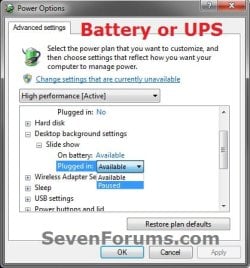
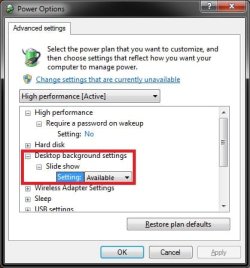
12. Open your Advanced Power Plan Settings. Under Desktop background settings for Slide show, make sure that you have the setting as Available for both "Plugged in" or "On battery" (if available), and click on OK. (see screenshots below)
NOTE: The "On battery" option is the same setting in step 9 above.
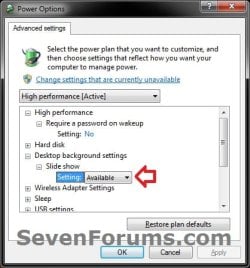
Slide_Show.jpgPower_Options-2.jpg
13. You will now have your selected images (step 5) change automatically on your desktop for how often (step 7) you set it to.

   Tip
You can now also right click on your desktop, and click on Next desktop background to change or scroll your desktop background to the next image you had selected (step 5) in the slideshow.

The keyboard shortcut for this is:
Shift+F10 and press N
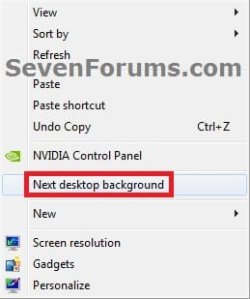
Next_desktop_background.jpg


That's it,
Shawn


Last edited:
Last edited:

My Computer

Computer type
PC/Desktop
Computer Manufacturer/Model Number
Self built custom
OS
64-bit Windows 11 Pro for Workstations
CPU
Intel i7-8700K OC'd to 5 GHz
Motherboard
ASUS ROG Maximus XI Formula Z390
Memory
64 GB (4x16GB) G.SKILL TridentZ RGB DDR4 3600 MHz
Graphics Card(s)
ASUS ROG-STRIX-GTX1080TI-O11G-GAMING
Sound Card
Integrated
Monitor(s) Displays
2 x Samsung Odyssey G7 27"
Screen Resolution
2560x1440
Hard Drives
1TB Samsung 990 PRO M.2,
4TB Samsung 990 PRO PRO M.2,
TerraMaster F8 SSD Plus NAS
PSU
Seasonic Prime Titanium 850W
Case
Thermaltake Core P3
Cooling
Corsair Hydro H115i
Keyboard
Logitech wireless K800
Mouse
Logitech MX Master 4
Internet Speed
2 Gb/s Download and 100 Mb/s Upload
Antivirus
Malwarebyte Anti-Malware Premium
Browser
Google Chrome
Other Info
Logitech Z625 speaker system,
Logitech BRIO 4K Pro webcam,
HP Color LaserJet Pro MFP M477fdn,
APC SMART-UPS RT 1000 XL - SURT1000XLI,
Galaxy S23 Plus phone
I have some problems... I do not see the drop down arrow menu for setting time between each pictures. is there a way to fix that?
Thank You
 

My Computer

OS
Borat Sagdiyev
Hello Morj, and welcome to Seven Forums.

What edition of Windows 7 do you have? The Windows 7 Starter edition does not have the Personalization feature included in it to allow you to be able to change the desktop background or to have slideshow. If you do have the Windows 7 starter edition, then you can use the free program in this tutorial below to be able to instead.

http://www.sevenforums.com/tutorials/47294-desktop-background-change-windows-7-starter.html


If you do not and the "Change picture every" menu is grayed out, then you will need to select (check) more than one picture for it to no longer be grayed out.

Hope this helps for now,
Shawn
 

My Computer

Computer type
PC/Desktop
Computer Manufacturer/Model Number
Self built custom
OS
64-bit Windows 11 Pro for Workstations
CPU
Intel i7-8700K OC'd to 5 GHz
Motherboard
ASUS ROG Maximus XI Formula Z390
Memory
64 GB (4x16GB) G.SKILL TridentZ RGB DDR4 3600 MHz
Graphics Card(s)
ASUS ROG-STRIX-GTX1080TI-O11G-GAMING
Sound Card
Integrated
Monitor(s) Displays
2 x Samsung Odyssey G7 27"
Screen Resolution
2560x1440
Hard Drives
1TB Samsung 990 PRO M.2,
4TB Samsung 990 PRO PRO M.2,
TerraMaster F8 SSD Plus NAS
PSU
Seasonic Prime Titanium 850W
Case
Thermaltake Core P3
Cooling
Corsair Hydro H115i
Keyboard
Logitech wireless K800
Mouse
Logitech MX Master 4
Internet Speed
2 Gb/s Download and 100 Mb/s Upload
Antivirus
Malwarebyte Anti-Malware Premium
Browser
Google Chrome
Other Info
Logitech Z625 speaker system,
Logitech BRIO 4K Pro webcam,
HP Color LaserJet Pro MFP M477fdn,
APC SMART-UPS RT 1000 XL - SURT1000XLI,
Galaxy S23 Plus phone
hello again,
I do not have the *Windows 7 starter* edition... Is there a difference between french and english version? I have the french one. Here is a picture of what it shows...
Thank You
 

Attachments

  • Desktop.PNG
    Desktop.PNG
    246.6 KB · Views: 172

My Computer

OS
Borat Sagdiyev
Forget the last post i wrote, everything is O.K. and i don't know why. But I'm happy! :D
 

My Computer

OS
Borat Sagdiyev
Morj, I'm happy to hear that you got it sorted. :)
 

My Computer

Computer type
PC/Desktop
Computer Manufacturer/Model Number
Self built custom
OS
64-bit Windows 11 Pro for Workstations
CPU
Intel i7-8700K OC'd to 5 GHz
Motherboard
ASUS ROG Maximus XI Formula Z390
Memory
64 GB (4x16GB) G.SKILL TridentZ RGB DDR4 3600 MHz
Graphics Card(s)
ASUS ROG-STRIX-GTX1080TI-O11G-GAMING
Sound Card
Integrated
Monitor(s) Displays
2 x Samsung Odyssey G7 27"
Screen Resolution
2560x1440
Hard Drives
1TB Samsung 990 PRO M.2,
4TB Samsung 990 PRO PRO M.2,
TerraMaster F8 SSD Plus NAS
PSU
Seasonic Prime Titanium 850W
Case
Thermaltake Core P3
Cooling
Corsair Hydro H115i
Keyboard
Logitech wireless K800
Mouse
Logitech MX Master 4
Internet Speed
2 Gb/s Download and 100 Mb/s Upload
Antivirus
Malwarebyte Anti-Malware Premium
Browser
Google Chrome
Other Info
Logitech Z625 speaker system,
Logitech BRIO 4K Pro webcam,
HP Color LaserJet Pro MFP M477fdn,
APC SMART-UPS RT 1000 XL - SURT1000XLI,
Galaxy S23 Plus phone
Use background image instead of background color

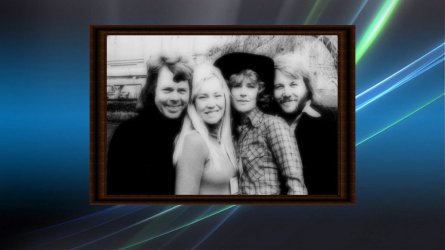
Hi there, For picture position I would like have my images centered. I know this might sound a bit odd but is there anyway to have centered images but have a background image instead of a background color? So the desktop would look like this:

74brightonpose-wallpaper.jpg

And I notice that centering takes all screen space into account including the taskbar so the image doesn't sit completely centered. Is there anyway to center only in the screen space above the taskbar? Hope that makes sense. Cheers.
 

My Computer

Computer Manufacturer/Model Number
Acer Aspire 5741
OS
windows 7 Home Premium
CPU
Intel Core i5 @ 2.27GHz 32nm Technology
Motherboard
Acer Aspire 5741 (CPU)
Memory
DDR3 4.0GB
Graphics Card(s)
Intel(R) Graphics Media Accelerator HD
Sound Card
Realtek High Definition Audio Intel(R) Display Audio
Monitor(s) Displays
Generic PnP Monitor on Intel Graphics Media Accelerator HD
Screen Resolution
1366x768
Hard Drives
Seagate 2.5" SATA 500GB
Keyboard
Synaptics PS/2 Port TouchPad
Mouse
Microsoft Comfort Mouse 4500 (IntelliPoint)
Hello Kiwichick,

Sorry, but no.

As a workaround, you could use Paint (mspaint.exe) and open the main background image (ex: blue one in your screenshot), then paste and center the other image on it and save this new combined image to use as your wallpaper with Fill instead.

Hope this helps,
Shawn
 

My Computer

Computer type
PC/Desktop
Computer Manufacturer/Model Number
Self built custom
OS
64-bit Windows 11 Pro for Workstations
CPU
Intel i7-8700K OC'd to 5 GHz
Motherboard
ASUS ROG Maximus XI Formula Z390
Memory
64 GB (4x16GB) G.SKILL TridentZ RGB DDR4 3600 MHz
Graphics Card(s)
ASUS ROG-STRIX-GTX1080TI-O11G-GAMING
Sound Card
Integrated
Monitor(s) Displays
2 x Samsung Odyssey G7 27"
Screen Resolution
2560x1440
Hard Drives
1TB Samsung 990 PRO M.2,
4TB Samsung 990 PRO PRO M.2,
TerraMaster F8 SSD Plus NAS
PSU
Seasonic Prime Titanium 850W
Case
Thermaltake Core P3
Cooling
Corsair Hydro H115i
Keyboard
Logitech wireless K800
Mouse
Logitech MX Master 4
Internet Speed
2 Gb/s Download and 100 Mb/s Upload
Antivirus
Malwarebyte Anti-Malware Premium
Browser
Google Chrome
Other Info
Logitech Z625 speaker system,
Logitech BRIO 4K Pro webcam,
HP Color LaserJet Pro MFP M477fdn,
APC SMART-UPS RT 1000 XL - SURT1000XLI,
Galaxy S23 Plus phone
Thanks Brink, Yes I know that. That's what I've been doing. But it's not so convenient if you have a whole folder of images you want to use. And then if I ever decided to change the background I would have to do them all over again. That's why I was hoping there would be some other way to do it.
 

My Computer

Computer Manufacturer/Model Number
Acer Aspire 5741
OS
windows 7 Home Premium
CPU
Intel Core i5 @ 2.27GHz 32nm Technology
Motherboard
Acer Aspire 5741 (CPU)
Memory
DDR3 4.0GB
Graphics Card(s)
Intel(R) Graphics Media Accelerator HD
Sound Card
Realtek High Definition Audio Intel(R) Display Audio
Monitor(s) Displays
Generic PnP Monitor on Intel Graphics Media Accelerator HD
Screen Resolution
1366x768
Hard Drives
Seagate 2.5" SATA 500GB
Keyboard
Synaptics PS/2 Port TouchPad
Mouse
Microsoft Comfort Mouse 4500 (IntelliPoint)
Sorry, but there's just not a way to only have them centered above the taskbar. :(
 

My Computer

Computer type
PC/Desktop
Computer Manufacturer/Model Number
Self built custom
OS
64-bit Windows 11 Pro for Workstations
CPU
Intel i7-8700K OC'd to 5 GHz
Motherboard
ASUS ROG Maximus XI Formula Z390
Memory
64 GB (4x16GB) G.SKILL TridentZ RGB DDR4 3600 MHz
Graphics Card(s)
ASUS ROG-STRIX-GTX1080TI-O11G-GAMING
Sound Card
Integrated
Monitor(s) Displays
2 x Samsung Odyssey G7 27"
Screen Resolution
2560x1440
Hard Drives
1TB Samsung 990 PRO M.2,
4TB Samsung 990 PRO PRO M.2,
TerraMaster F8 SSD Plus NAS
PSU
Seasonic Prime Titanium 850W
Case
Thermaltake Core P3
Cooling
Corsair Hydro H115i
Keyboard
Logitech wireless K800
Mouse
Logitech MX Master 4
Internet Speed
2 Gb/s Download and 100 Mb/s Upload
Antivirus
Malwarebyte Anti-Malware Premium
Browser
Google Chrome
Other Info
Logitech Z625 speaker system,
Logitech BRIO 4K Pro webcam,
HP Color LaserJet Pro MFP M477fdn,
APC SMART-UPS RT 1000 XL - SURT1000XLI,
Galaxy S23 Plus phone
Hi,

I have the very same problem morj2025 experienced. Just as in his screenshot, the shuffle option and the time interval dropdown menu do not appear. I am using Windows 7 Professional Edition.

Any ideas will be appreciated.
 
Last edited:

My Computer

OS
Windows 7 Professional
Hello Pirpir, and welcome to Seven Forums.

You could do a system restore using a restore point dated before this happened to undo it and hopefully fix it for you.

Hope this helps,
Shawn
 

My Computer

Computer type
PC/Desktop
Computer Manufacturer/Model Number
Self built custom
OS
64-bit Windows 11 Pro for Workstations
CPU
Intel i7-8700K OC'd to 5 GHz
Motherboard
ASUS ROG Maximus XI Formula Z390
Memory
64 GB (4x16GB) G.SKILL TridentZ RGB DDR4 3600 MHz
Graphics Card(s)
ASUS ROG-STRIX-GTX1080TI-O11G-GAMING
Sound Card
Integrated
Monitor(s) Displays
2 x Samsung Odyssey G7 27"
Screen Resolution
2560x1440
Hard Drives
1TB Samsung 990 PRO M.2,
4TB Samsung 990 PRO PRO M.2,
TerraMaster F8 SSD Plus NAS
PSU
Seasonic Prime Titanium 850W
Case
Thermaltake Core P3
Cooling
Corsair Hydro H115i
Keyboard
Logitech wireless K800
Mouse
Logitech MX Master 4
Internet Speed
2 Gb/s Download and 100 Mb/s Upload
Antivirus
Malwarebyte Anti-Malware Premium
Browser
Google Chrome
Other Info
Logitech Z625 speaker system,
Logitech BRIO 4K Pro webcam,
HP Color LaserJet Pro MFP M477fdn,
APC SMART-UPS RT 1000 XL - SURT1000XLI,
Galaxy S23 Plus phone
Hello Pirpir, and welcome to Seven Forums.

You could do a system restore using a restore point dated before this happened to undo it and hopefully fix it for you.

Hope this helps,
Shawn

Hello Brink,

Thanks for the reply. Actually, It's been a few days since I installed Windows 7 to my system, and I have never been able to tweak the time adjustments of slide show feature. The feature itself works just fine, but has no options for shuffling or frequency. Now I suspect that this may be related to non-English versions of Windows 7 (yet it does not make any sense!).
 

My Computer

OS
Windows 7 Professional
Have you tried to install DreamScene, or upgrade from Vista that had DreamScene installed? It will remove this feature.

Open your Advanced Power Plan Settings (step 5 at link) to double check that under Desktop background settings and Slide show, you have Available selected and click on OK.

Power_Options.jpg
 

My Computer

Computer type
PC/Desktop
Computer Manufacturer/Model Number
Self built custom
OS
64-bit Windows 11 Pro for Workstations
CPU
Intel i7-8700K OC'd to 5 GHz
Motherboard
ASUS ROG Maximus XI Formula Z390
Memory
64 GB (4x16GB) G.SKILL TridentZ RGB DDR4 3600 MHz
Graphics Card(s)
ASUS ROG-STRIX-GTX1080TI-O11G-GAMING
Sound Card
Integrated
Monitor(s) Displays
2 x Samsung Odyssey G7 27"
Screen Resolution
2560x1440
Hard Drives
1TB Samsung 990 PRO M.2,
4TB Samsung 990 PRO PRO M.2,
TerraMaster F8 SSD Plus NAS
PSU
Seasonic Prime Titanium 850W
Case
Thermaltake Core P3
Cooling
Corsair Hydro H115i
Keyboard
Logitech wireless K800
Mouse
Logitech MX Master 4
Internet Speed
2 Gb/s Download and 100 Mb/s Upload
Antivirus
Malwarebyte Anti-Malware Premium
Browser
Google Chrome
Other Info
Logitech Z625 speaker system,
Logitech BRIO 4K Pro webcam,
HP Color LaserJet Pro MFP M477fdn,
APC SMART-UPS RT 1000 XL - SURT1000XLI,
Galaxy S23 Plus phone
No, I have neither used DreamScene or upgraded over Vista. Now comes the funny part:

I tried your suggestion with a voice in my mind: "of course!", unfortunately there was no change in the UI after adjusting the power settings. Then I noticed something. If you take a look at Morj's screenshot, you'll notice the slider on the right, which means there are more to see. But in the illustrations on the web, the time drop-down menu always appeared next to the fit/stretch etc. menu. Therefore, I believe it was because of this when Morj said "Forget the last post i wrote, everything is O.K. and i don't know why. But I'm happy!
biggrin.gif
" just after his question.

Anyway, thank you for helping out Brink!
 

My Computer

OS
Windows 7 Professional
LOL, that's great news. I'll have to remember that on some languages, you have to scroll down instead of it being next to it as in the English version.
 

My Computer

Computer type
PC/Desktop
Computer Manufacturer/Model Number
Self built custom
OS
64-bit Windows 11 Pro for Workstations
CPU
Intel i7-8700K OC'd to 5 GHz
Motherboard
ASUS ROG Maximus XI Formula Z390
Memory
64 GB (4x16GB) G.SKILL TridentZ RGB DDR4 3600 MHz
Graphics Card(s)
ASUS ROG-STRIX-GTX1080TI-O11G-GAMING
Sound Card
Integrated
Monitor(s) Displays
2 x Samsung Odyssey G7 27"
Screen Resolution
2560x1440
Hard Drives
1TB Samsung 990 PRO M.2,
4TB Samsung 990 PRO PRO M.2,
TerraMaster F8 SSD Plus NAS
PSU
Seasonic Prime Titanium 850W
Case
Thermaltake Core P3
Cooling
Corsair Hydro H115i
Keyboard
Logitech wireless K800
Mouse
Logitech MX Master 4
Internet Speed
2 Gb/s Download and 100 Mb/s Upload
Antivirus
Malwarebyte Anti-Malware Premium
Browser
Google Chrome
Other Info
Logitech Z625 speaker system,
Logitech BRIO 4K Pro webcam,
HP Color LaserJet Pro MFP M477fdn,
APC SMART-UPS RT 1000 XL - SURT1000XLI,
Galaxy S23 Plus phone
Hopefully someone can offer a little insight. I recently decided to start using the slideshow for the first time. I have maybe ten wallpapers in use right now, but plan to add more, and have it set to change every ten seconds. Every once in a while the wallpaper change will not be smooth. Instead a weird flash of colors will go across the middle of the screen the flash is horizontal and maybe two inches tall. I have never had a single problem with my screen and turning on slideshow is the only change I've made in the past two days. I have integrated Intel graphics, and it probably gets all of its memory from ram. Any clue what is behind the flash of colors.
 

My Computer

Computer type
Laptop
Computer Manufacturer/Model Number
Toshiba P775-S7100
OS
Windows 7 Professional SP1 64-bit
CPU
Intel Core i5-2450M @2.5 GHz
Memory
6 GB DDR3 1333MHz
Graphics Card(s)
Intel HD 3000
Monitor(s) Displays
Built-in 17.3" LED; 22" Insignia NS-L22Q-10A
Screen Resolution
1600x900; 1360x768
Hard Drives
750 GB Hitachi
1TB Seagate FreeAgent External
Internet Speed
Verizon DSL Speed(Down/Up): 3360 Kbps / 800 Kbps
Antivirus
MSE and MBAM Pro
Browser
IE10
Hello Petey,

This sounds like it may be your video drivers.
  • If available, update to the latest driver version.
  • If you already have the latest driver version, then uninstall and reinstall the latest driver.
  • If this started right after installing the lastest driver, then you might rollback to the older driver that was more stable until another new driver is released.
Hope this helps,
Shawn
 

My Computer

Computer type
PC/Desktop
Computer Manufacturer/Model Number
Self built custom
OS
64-bit Windows 11 Pro for Workstations
CPU
Intel i7-8700K OC'd to 5 GHz
Motherboard
ASUS ROG Maximus XI Formula Z390
Memory
64 GB (4x16GB) G.SKILL TridentZ RGB DDR4 3600 MHz
Graphics Card(s)
ASUS ROG-STRIX-GTX1080TI-O11G-GAMING
Sound Card
Integrated
Monitor(s) Displays
2 x Samsung Odyssey G7 27"
Screen Resolution
2560x1440
Hard Drives
1TB Samsung 990 PRO M.2,
4TB Samsung 990 PRO PRO M.2,
TerraMaster F8 SSD Plus NAS
PSU
Seasonic Prime Titanium 850W
Case
Thermaltake Core P3
Cooling
Corsair Hydro H115i
Keyboard
Logitech wireless K800
Mouse
Logitech MX Master 4
Internet Speed
2 Gb/s Download and 100 Mb/s Upload
Antivirus
Malwarebyte Anti-Malware Premium
Browser
Google Chrome
Other Info
Logitech Z625 speaker system,
Logitech BRIO 4K Pro webcam,
HP Color LaserJet Pro MFP M477fdn,
APC SMART-UPS RT 1000 XL - SURT1000XLI,
Galaxy S23 Plus phone
I slowed the change rate to 30seconds and haven't noticed it since. My video card isn't exactly something to brag about, so it probably couldn't handle doing the transition effect so often, as far as I can tell.
 

My Computer

Computer type
Laptop
Computer Manufacturer/Model Number
Toshiba P775-S7100
OS
Windows 7 Professional SP1 64-bit
CPU
Intel Core i5-2450M @2.5 GHz
Memory
6 GB DDR3 1333MHz
Graphics Card(s)
Intel HD 3000
Monitor(s) Displays
Built-in 17.3" LED; 22" Insignia NS-L22Q-10A
Screen Resolution
1600x900; 1360x768
Hard Drives
750 GB Hitachi
1TB Seagate FreeAgent External
Internet Speed
Verizon DSL Speed(Down/Up): 3360 Kbps / 800 Kbps
Antivirus
MSE and MBAM Pro
Browser
IE10
I'm happy to hear that you found a workaround. :)
 

My Computer

Computer type
PC/Desktop
Computer Manufacturer/Model Number
Self built custom
OS
64-bit Windows 11 Pro for Workstations
CPU
Intel i7-8700K OC'd to 5 GHz
Motherboard
ASUS ROG Maximus XI Formula Z390
Memory
64 GB (4x16GB) G.SKILL TridentZ RGB DDR4 3600 MHz
Graphics Card(s)
ASUS ROG-STRIX-GTX1080TI-O11G-GAMING
Sound Card
Integrated
Monitor(s) Displays
2 x Samsung Odyssey G7 27"
Screen Resolution
2560x1440
Hard Drives
1TB Samsung 990 PRO M.2,
4TB Samsung 990 PRO PRO M.2,
TerraMaster F8 SSD Plus NAS
PSU
Seasonic Prime Titanium 850W
Case
Thermaltake Core P3
Cooling
Corsair Hydro H115i
Keyboard
Logitech wireless K800
Mouse
Logitech MX Master 4
Internet Speed
2 Gb/s Download and 100 Mb/s Upload
Antivirus
Malwarebyte Anti-Malware Premium
Browser
Google Chrome
Other Info
Logitech Z625 speaker system,
Logitech BRIO 4K Pro webcam,
HP Color LaserJet Pro MFP M477fdn,
APC SMART-UPS RT 1000 XL - SURT1000XLI,
Galaxy S23 Plus phone
Back
Top