
Solved Desktop toolbar on the Taskbar causing headache

  • Thread starter Thread starter The Blessed One
  • Start date Start date
As I said before, I've been using the desktop toolbar for as long as it's been available and have never had this problem. Unticking show title has no adverse effects at all.
 

Attachments

  • dt_toolbar.PNG
    dt_toolbar.PNG
    4.6 KB · Views: 12

My Computer My Computer

At a glance

Windows 7 Ultimate (x64) SP1Intel 3770k 4.6GHz8GB (2x 4GB) Crucial BallistixSapphire 7950 (1060/1600)
Computer Manufacturer/Model Number
tw33k
OS
Windows 7 Ultimate (x64) SP1
CPU
Intel 3770k 4.6GHz
Motherboard
ASUS Maximus V Formula
Memory
8GB (2x 4GB) Crucial Ballistix
Graphics Card(s)
Sapphire 7950 (1060/1600)
Sound Card
On Board Realtek HD Audio
Monitor(s) Displays
27" Acer B273HU (via HDMI)
Screen Resolution
2048 x 1152
Hard Drives
Crucial M4 128GB
2TB WD Black
1TB Samsung F3 SATA
1TB WD Elite External
2TB WD USB 3.0
PSU
Corsair AX750 Gold
Case
Corsair Obsidian 800DW
Cooling
Corsair H100 (2x AP-121/2x UK-3000 push/pull)
Keyboard
Microsoft Wireless 5000
Mouse
Microsoft Wireless 5000
Internet Speed
5mb/s
Other Info
Logitech z-2300 2.1 speakers
Lamptron FC-5 v2
Unticking show title has no adverse effects at all
In my case it does not do anything. Titles remain and the first toolbar gets scrambled.
 

My Computer My Computer

At a glance

Vista, Windows7, Mint Mate, Zorin, Windows 8from 1.6GHz Duo to i7
Computer Manufacturer/Model Number
HP, Dell, Gateway, Toshiba - 4 laptops and 2 desktops
OS
Vista, Windows7, Mint Mate, Zorin, Windows 8
CPU
from 1.6GHz Duo to i7
Monitor(s) Displays
2x HP w2207
Hard Drives
5x HDD, 7x SSD, 12x Externals
Keyboard
with trackball - no mices
Mouse
Trackball mice
Internet Speed
DSL 6000
This is very strange. I can't find anything anywhere on this problem. Perhaps not many people use this feature but it would be good to know how to rectify the problem
 

My Computer My Computer

At a glance

Windows 7 Ultimate (x64) SP1Intel 3770k 4.6GHz8GB (2x 4GB) Crucial BallistixSapphire 7950 (1060/1600)
Computer Manufacturer/Model Number
tw33k
OS
Windows 7 Ultimate (x64) SP1
CPU
Intel 3770k 4.6GHz
Motherboard
ASUS Maximus V Formula
Memory
8GB (2x 4GB) Crucial Ballistix
Graphics Card(s)
Sapphire 7950 (1060/1600)
Sound Card
On Board Realtek HD Audio
Monitor(s) Displays
27" Acer B273HU (via HDMI)
Screen Resolution
2048 x 1152
Hard Drives
Crucial M4 128GB
2TB WD Black
1TB Samsung F3 SATA
1TB WD Elite External
2TB WD USB 3.0
PSU
Corsair AX750 Gold
Case
Corsair Obsidian 800DW
Cooling
Corsair H100 (2x AP-121/2x UK-3000 push/pull)
Keyboard
Microsoft Wireless 5000
Mouse
Microsoft Wireless 5000
Internet Speed
5mb/s
Other Info
Logitech z-2300 2.1 speakers
Lamptron FC-5 v2
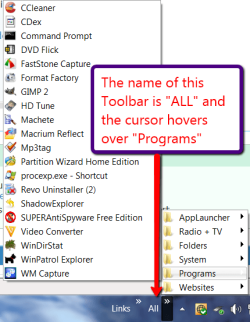
1. When I click on the arrows part it shows me a list of the stuff on my desktop but I can't scroll down the list using my laptop touch-pad scroll bar (which works on every other application). So I have to navigate to the bottom all the time and click on the down arrow (very annoying!).
I'm having the same issue on my desktop PC. It would be nice if I could use the mouse wheel to scroll up and down the toolbar just like I do with every other program (Firefox bookmarks for example). Has anyone found a means of scrolling through the Desktop toolbar with a mouse wheel and or touch-pad?
 

My Computer My Computer

At a glance

Windows 7 Ultimate SP1 x64Intel Core 2 Duo E6420 Conroe 2.13GHz LGA 775...4GB DDR 2 PC2 6400512MB ATI Radeon HD 4870
OS
Windows 7 Ultimate SP1 x64
CPU
Intel Core 2 Duo E6420 Conroe 2.13GHz LGA 775 65W
Motherboard
MSI P6N SLI Platinum LGA 775 NVIDIA nForce 650i SLI ATX
Memory
4GB DDR 2 PC2 6400
Graphics Card(s)
512MB ATI Radeon HD 4870
Sound Card
Realtek HD ALC888
Monitor(s) Displays
Panasonic Viera TC-32LZ800
Screen Resolution
1920 x 1080
Hard Drives
Various....
PSU
ENERMAX Liberty ELT500AWT 500W ATX12V
1. When I click on the arrows part it shows me a list of the stuff on my desktop but I can't scroll down the list using my laptop touch-pad scroll bar (which works on every other application). So I have to navigate to the bottom all the time and click on the down arrow (very annoying!).
I'm having the same issue on my desktop PC. It would be nice if I could use the mouse wheel to scroll up and down the toolbar just like I do with every other program (Firefox bookmarks for example). Has anyone found a means of scrolling through the Desktop toolbar with a mouse wheel and or touch-pad?
I suggest you organize your shortcuts in subfolders within a main folder. Then you do not have that problem. http://www.sevenforums.com/tutorials/72092-toolbars-how-use-windows-7-vista.html
 

Attachments

  • 2011-03-22_0002.png
    2011-03-22_0002.png
    26.7 KB · Views: 2

My Computer My Computer

At a glance

Vista, Windows7, Mint Mate, Zorin, Windows 8from 1.6GHz Duo to i7
Computer Manufacturer/Model Number
HP, Dell, Gateway, Toshiba - 4 laptops and 2 desktops
OS
Vista, Windows7, Mint Mate, Zorin, Windows 8
CPU
from 1.6GHz Duo to i7
Monitor(s) Displays
2x HP w2207
Hard Drives
5x HDD, 7x SSD, 12x Externals
Keyboard
with trackball - no mices
Mouse
Trackball mice
Internet Speed
DSL 6000
1. When I click on the arrows part it shows me a list of the stuff on my desktop but I can't scroll down the list using my laptop touch-pad scroll bar (which works on every other application). So I have to navigate to the bottom all the time and click on the down arrow (very annoying!).
I'm having the same issue on my desktop PC. It would be nice if I could use the mouse wheel to scroll up and down the toolbar just like I do with every other program (Firefox bookmarks for example). Has anyone found a means of scrolling through the Desktop toolbar with a mouse wheel and or touch-pad?
I suggest you organize your shortcuts in subfolders within a main folder. Then you do not have that problem. http://www.sevenforums.com/tutorials/72092-toolbars-how-use-windows-7-vista.html
Yes, I could do that and I already have done that. It still doesn't solve the issue of not being able to scroll. I was hoping someone might have found an answer. Thanks though.
 

My Computer My Computer

At a glance

Windows 7 Ultimate SP1 x64Intel Core 2 Duo E6420 Conroe 2.13GHz LGA 775...4GB DDR 2 PC2 6400512MB ATI Radeon HD 4870
OS
Windows 7 Ultimate SP1 x64
CPU
Intel Core 2 Duo E6420 Conroe 2.13GHz LGA 775 65W
Motherboard
MSI P6N SLI Platinum LGA 775 NVIDIA nForce 650i SLI ATX
Memory
4GB DDR 2 PC2 6400
Graphics Card(s)
512MB ATI Radeon HD 4870
Sound Card
Realtek HD ALC888
Monitor(s) Displays
Panasonic Viera TC-32LZ800
Screen Resolution
1920 x 1080
Hard Drives
Various....
PSU
ENERMAX Liberty ELT500AWT 500W ATX12V
Back
Top
