Solved Desktop Window Manager Gone

kel37211

New member
Local time
10:02 AM
Messages
7
So just recently my Aero effects have stopped working, I can't change the transparency or window color, and my dwm is not even running or listed in the services as you can see in the picture.

dwmgone.jpg


I've tried running the aero trouble shooter and it says DWM is disabled and the service isn't running.

dwmerror.jpg


The themes service is running and automatic. I've tried net stop uxsms and net start uxsms, and it says the service name is invalid. I've also tried multiple system restores' before and after updates. I'm not sure if this is the problem or not but Windows 7 Service Pack 1 for x64-based Systems (KB976932) won't install either, I've tried System Repair and Clean start up then manually installing it but it won't work.

If I do net stop uxsms it says "The service name is invalid.

More help is available by typing NET HELPMSG 2185."
 
Last edited by a moderator:

My Computer

OS
Windows 7 Home Premium 64bit.
Are your graphics drivers up to date?
 

My Computer

Computer type
PC/Desktop
Computer Manufacturer/Model Number
Custom Built
OS
Windows 7 Ultimate x64
CPU
Intel(R) Core(TM) 2 Quad Q8200 @ 2.33 GHz
Motherboard
Asus P5KPL-AM SE Motherboard
Memory
2x2GB Kingston DDR2
Graphics Card(s)
1GB AMD Radeon HD 5450
Sound Card
VIA Technologies High Definition Audio Device
Monitor(s) Displays
Samsung SyncMaster 733NW
Screen Resolution
1440x900
Hard Drives
SEAGATE 320GB Barracuda® 7200.12, SATA 3 Gb/s, 7200 RPM, 16MB cache x 2
Case
Custom Casing
Cooling
Ice cubes from the freezer ;)
Keyboard
Generic Plug & Play Keyboard
Mouse
Optical Mouse
Internet Speed
Very slow
According to my Win 7 Pro X64 system, DWM has no dependencies.

Open the Run dialog and paste the following into it:

C:\Windows\System32\svchost.exe -k LocalSystemNetworkRestricted


That is what the Path to executable shows on my system. See if that starts DWM.

In the registry, I find 3 entries for LocalSystemNetworkRestricted.
Windows Registry Editor Version 5.00

[HKEY_LOCAL_MACHINE\SOFTWARE\Microsoft\RADAR\HeapLeakDetection\DiagnosedApplications\svchost.exe_LocalSystemNetworkRestricted]
"LastDetectionTime"=hex(b):fc,bc,d0,6d,dc,e1,cb,01

Windows Registry Editor Version 5.00

[HKEY_LOCAL_MACHINE\SOFTWARE\Microsoft\Windows NT\CurrentVersion\Svchost\LocalSystemNetworkRestricted]
"CoInitializeSecurityParam"=dword:00000001

Windows Registry Editor Version 5.00

[HKEY_LOCAL_MACHINE\SOFTWARE\Wow6432Node\Microsoft\Windows NT\CurrentVersion\Svchost\LocalSystemNetworkRestricted]
"CoInitializeSecurityParam"=dword:00000001
Check your system, see what is at these locations. If necessary you could create a .reg file to merge these keys int your registry. If you need help doing that let me know and I'll provide a sing .reg that you can use.
 

My Computer

Computer type
PC/Desktop
Computer Manufacturer/Model Number
Lenovo IdeaCenter 450
OS
Windows 10 Pro X64
CPU
Intel Quad Core i7-4770 @ 3.4Ghz
Memory
16.0GB PC3-12800 DDR3 SDRAM 1600 MHz
Graphics Card(s)
Intel Integrated HD Graphics
Sound Card
Realtek HD Audio
Monitor(s) Displays
HP 22" LCD
Screen Resolution
1680 x 1050
Hard Drives
250GB Samsung EVO SATA-3 SSD
2TB Seagate ST2000DM001 SATA-2
1.5TB Seagate ST3150041AS SATA
Keyboard
Dell USB
Mouse
Lenovo USB
Internet Speed
Cable via Road Runner 3MB Upload, 30MB Download
Antivirus
Windows Defender, MBAM Pro, MBAE
Browser
Seamonkey
Other Info
UEFI/GPT
PLDS DVD-RW DH16AERSH
Are your graphics drivers up to date?
Yes

According to my Win 7 Pro X64 system, DWM has no dependencies.

Open the Run dialog and paste the following into it:

C:\Windows\System32\svchost.exe -k LocalSystemNetworkRestricted


That is what the Path to executable shows on my system. See if that starts DWM.

In the registry, I find 3 entries for LocalSystemNetworkRestricted.
Windows Registry Editor Version 5.00

[HKEY_LOCAL_MACHINE\SOFTWARE\Microsoft\RADAR\HeapLeakDetection\DiagnosedApplications\svchost.exe_LocalSystemNetworkRestricted]
"LastDetectionTime"=hex(b):fc,bc,d0,6d,dc,e1,cb,01

Windows Registry Editor Version 5.00

[HKEY_LOCAL_MACHINE\SOFTWARE\Microsoft\Windows NT\CurrentVersion\Svchost\LocalSystemNetworkRestricted]
"CoInitializeSecurityParam"=dword:00000001

Windows Registry Editor Version 5.00

[HKEY_LOCAL_MACHINE\SOFTWARE\Wow6432Node\Microsoft\Windows NT\CurrentVersion\Svchost\LocalSystemNetworkRestricted]
"CoInitializeSecurityParam"=dword:00000001
Check your system, see what is at these locations. If necessary you could create a .reg file to merge these keys int your registry. If you need help doing that let me know and I'll provide a sing .reg that you can use.

C:\Windows\System32\svchost.exe -k LocalSystemNetworkRestricted

Didn't work, think you could provide the .reg?
 

My Computer

OS
Windows 7 Home Premium 64bit.
Before you try the .reg file, look at the current values using regedit, see if they are different. If not no point in merging the .reg file.

Here is the reg file. Basically it's what I entered before just removing the two additional Windows Registry Editor Version 5.00 lines:
Windows Registry Editor Version 5.00

[HKEY_LOCAL_MACHINE\SOFTWARE\Microsoft\RADAR\HeapLeakDetection\DiagnosedApplications\svchost.exe_LocalSystemNetworkRestricted]
"LastDetectionTime"=hex(b):fc,bc,d0,6d,dc,e1,cb,01

[HKEY_LOCAL_MACHINE\SOFTWARE\Microsoft\Windows NT\CurrentVersion\Svchost\LocalSystemNetworkRestricted]
"CoInitializeSecurityParam"=dword:00000001

[HKEY_LOCAL_MACHINE\SOFTWARE\Wow6432Node\Microsoft\Windows NT\CurrentVersion\Svchost\LocalSystemNetworkRestricted]
"CoInitializeSecurityParam"=dword:00000001
Copy the above and paste into a notepad window.
Click File then Save as and call it DWM_fix.reg (or whatever you want to call it). Make sure Save as type All files (*.*) is selected when saving the file or Windows will add a .txt to the end and you'll end up with DWM_fix.reg.txt.
 

My Computer

Computer type
PC/Desktop
Computer Manufacturer/Model Number
Lenovo IdeaCenter 450
OS
Windows 10 Pro X64
CPU
Intel Quad Core i7-4770 @ 3.4Ghz
Memory
16.0GB PC3-12800 DDR3 SDRAM 1600 MHz
Graphics Card(s)
Intel Integrated HD Graphics
Sound Card
Realtek HD Audio
Monitor(s) Displays
HP 22" LCD
Screen Resolution
1680 x 1050
Hard Drives
250GB Samsung EVO SATA-3 SSD
2TB Seagate ST2000DM001 SATA-2
1.5TB Seagate ST3150041AS SATA
Keyboard
Dell USB
Mouse
Lenovo USB
Internet Speed
Cable via Road Runner 3MB Upload, 30MB Download
Antivirus
Windows Defender, MBAM Pro, MBAE
Browser
Seamonkey
Other Info
UEFI/GPT
PLDS DVD-RW DH16AERSH
registry change didn't work, still not fixed.
 

My Computer

OS
Windows 7 Home Premium 64bit.
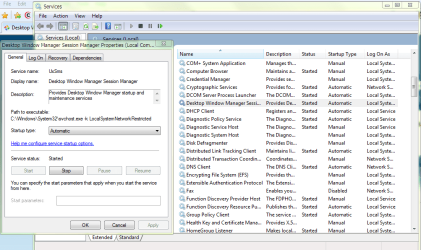
In the Start Search, type Services and then click on View local services. In the right pane find Desktop Window Manager Session Manager, double click its name and make sure start up is set to Automatic, and is running.
DWM.PNG
 

My Computer

Computer type
PC/Desktop
Computer Manufacturer/Model Number
Home Built Desktop By DataTech
OS
Windows 7 Ultimate X64 SP1
CPU
Intel i5-2550K, Differing ~4.4-4.8GHz No built in GPU
Motherboard
ASUS P8Z68-V PRO/GEN3
Memory
16GB G.Skill Sniper 1866MHz @ 2133MHz 2x8GB
Graphics Card(s)
ASUS GTX650TIB-DC2OC-2GD5, (650TI Boost)
Sound Card
Onboard Realtek 5-1
Monitor(s) Displays
Samsung P2570HD
Screen Resolution
1920x1080
Hard Drives
Samsung 840 Pro 256GB SSD for OS, 500GB Seagate Constellation (Enterprise drive) for Data
PSU
Corsair HX650W
Case
Inwin Dragon Rider
Cooling
Hyper 212 EVO w/two Noctua fans, push-pull, @1300 RPM
Keyboard
E-Z Eyes, bright yellow keys with large characters
Mouse
steelseries SENSEI Laser Pro Gaming
Internet Speed
48-51Mbs Mbs down, 11 Mbs up Xfinity Cable
Antivirus
Norton Internet Security 2013
Browser
IE 10, Opera, Pale Moon if needed
Other Info
4 case fans, LG BluRay-RE, ASUS DVD-RW, Mr. Fusion power supply, 1.21 gigawatts.
As mentioned in the first post, it's not a listed service, meaning its not even in the services list.
 

My Computer

OS
Windows 7 Home Premium 64bit.
As mentioned in the first post, it's not a listed service, meaning its not even in the services list.
I'm sorry about that . Is the same service listed in msconfig/Services with a check mark?
I have had this same issue and I fixed it with a http://www.sevenforums.com/tutorials/3413-repair-install.html#post31238 .
Also go to Control Panel\All Control Panel Items\Troubleshooting\Appearance and Personalization and run the Aero Trouble shooter to see how that works.
 

My Computer

Computer type
PC/Desktop
Computer Manufacturer/Model Number
Home Built Desktop By DataTech
OS
Windows 7 Ultimate X64 SP1
CPU
Intel i5-2550K, Differing ~4.4-4.8GHz No built in GPU
Motherboard
ASUS P8Z68-V PRO/GEN3
Memory
16GB G.Skill Sniper 1866MHz @ 2133MHz 2x8GB
Graphics Card(s)
ASUS GTX650TIB-DC2OC-2GD5, (650TI Boost)
Sound Card
Onboard Realtek 5-1
Monitor(s) Displays
Samsung P2570HD
Screen Resolution
1920x1080
Hard Drives
Samsung 840 Pro 256GB SSD for OS, 500GB Seagate Constellation (Enterprise drive) for Data
PSU
Corsair HX650W
Case
Inwin Dragon Rider
Cooling
Hyper 212 EVO w/two Noctua fans, push-pull, @1300 RPM
Keyboard
E-Z Eyes, bright yellow keys with large characters
Mouse
steelseries SENSEI Laser Pro Gaming
Internet Speed
48-51Mbs Mbs down, 11 Mbs up Xfinity Cable
Antivirus
Norton Internet Security 2013
Browser
IE 10, Opera, Pale Moon if needed
Other Info
4 case fans, LG BluRay-RE, ASUS DVD-RW, Mr. Fusion power supply, 1.21 gigawatts.
It's not there and I've already ran the troubleshooter, the error I got is in the original post.
 

My Computer

OS
Windows 7 Home Premium 64bit.

My Computer

Computer type
PC/Desktop
Computer Manufacturer/Model Number
Lenovo IdeaCenter 450
OS
Windows 10 Pro X64
CPU
Intel Quad Core i7-4770 @ 3.4Ghz
Memory
16.0GB PC3-12800 DDR3 SDRAM 1600 MHz
Graphics Card(s)
Intel Integrated HD Graphics
Sound Card
Realtek HD Audio
Monitor(s) Displays
HP 22" LCD
Screen Resolution
1680 x 1050
Hard Drives
250GB Samsung EVO SATA-3 SSD
2TB Seagate ST2000DM001 SATA-2
1.5TB Seagate ST3150041AS SATA
Keyboard
Dell USB
Mouse
Lenovo USB
Internet Speed
Cable via Road Runner 3MB Upload, 30MB Download
Antivirus
Windows Defender, MBAM Pro, MBAE
Browser
Seamonkey
Other Info
UEFI/GPT
PLDS DVD-RW DH16AERSH

Attachments

My Computer

Computer type
Laptop
Computer Manufacturer/Model Number
Sager NP9170
OS
Win 7 Pro x64 / Win 10 Pro
CPU
Intel(R) Core(TM) i7-3630QM CPU @ 2.40GHz
Motherboard
CLEVO P170EM
Memory
12 GB
Graphics Card(s)
(1) Intel(R) HD Graphics 4000 (2) NVIDIA GeForce GTX 675M
Sound Card
(1) Realtek High Definition Audio (2) Intel(R) Display Aud
Monitor(s) Displays
17.3
Screen Resolution
1920x1080
Hard Drives
(1) Samsung 860 EVO 500GB(OS) (1) Samsung 860 EVO 500GB(Data)
Keyboard
Backlite
Antivirus
MSE, Malwarebytes Pro
Browser
Firefox
Other Info
DESKTOP: Custom-built.
OS: Win 10 Pro x64.
CASE: Rosewill R5.
CPU: Intel I5 4670K CPU @ 3.40GHz.
CPU COOLER: Cool Master Hyper 212 EVO.
MOTHERBOARD: Asus Z87-A.
MEMORY: Kingston HyperX 2x4 GB.
GPU: Nvidia Geforce 650 TI.
PSU: Corsair TX750.
DRIVES: (1) Samsung 840 120 GB SSD (2) Western Digital blue 500 GB 7200 RPM.
Very good news! Much better than a repair install.:)
 

My Computer

Computer type
PC/Desktop
Computer Manufacturer/Model Number
Home Built Desktop By DataTech
OS
Windows 7 Ultimate X64 SP1
CPU
Intel i5-2550K, Differing ~4.4-4.8GHz No built in GPU
Motherboard
ASUS P8Z68-V PRO/GEN3
Memory
16GB G.Skill Sniper 1866MHz @ 2133MHz 2x8GB
Graphics Card(s)
ASUS GTX650TIB-DC2OC-2GD5, (650TI Boost)
Sound Card
Onboard Realtek 5-1
Monitor(s) Displays
Samsung P2570HD
Screen Resolution
1920x1080
Hard Drives
Samsung 840 Pro 256GB SSD for OS, 500GB Seagate Constellation (Enterprise drive) for Data
PSU
Corsair HX650W
Case
Inwin Dragon Rider
Cooling
Hyper 212 EVO w/two Noctua fans, push-pull, @1300 RPM
Keyboard
E-Z Eyes, bright yellow keys with large characters
Mouse
steelseries SENSEI Laser Pro Gaming
Internet Speed
48-51Mbs Mbs down, 11 Mbs up Xfinity Cable
Antivirus
Norton Internet Security 2013
Browser
IE 10, Opera, Pale Moon if needed
Other Info
4 case fans, LG BluRay-RE, ASUS DVD-RW, Mr. Fusion power supply, 1.21 gigawatts.
Back
Top