Desparate help needed! Network died.

I have done both, that's actually what fixed the problem this morning, but attempting it again had no luck!

Is there a MAC clone option on the router? wireless adapter needs it as much as LAN adapters.

http://www.sevenforums.com/network-sharing/54086-unindentified-network-router-port.html
Folks, I was wondering what would would happen if the Vista / 7 computers were taken off the network (unplugged). Turn all computers, router, and ISP modem off (just for a count of 10) ... then first turn on the ISP modem, then the router, then the non-vista / 7 computers. If Internet access was restored, then you could diagnose the reason Vista / 7 are having problems?

Cheers!
Robert

That is the order i prefer to do it with. And i think you might have something to go with in troubleshooting, but i would not bet my house on it. The route's job is to route/broadcast networks. If it is turned on before the modem, with no IPs it might not do anything or just broad a dummy network. When the modem do come on with all these IPs, the router might not know what to do as it thinks it's already doing it's job with broadcasting the dummy network.
 

My Computer

Computer Manufacturer/Model Number
Lenovo ThinkPad T60
OS
Windows 7 Ultimate 64Bit
CPU
GenuineIntel Intel(R) Core(TM) DuoCore T2400 @ 1.83GHz
Motherboard
Intel(R) 82801G (ICH7 Family)
Memory
2.00 GB
Graphics Card(s)
Mobile Intel(R) 945 Express Chipset
Sound Card
SoundMAX Integrated Digital HD Audio
Monitor(s) Displays
ThinkPad Display
Screen Resolution
1400x1050
Hard Drives
100Gb SATA
Keyboard
Standard Keyboard
Mouse
HID-compliant Mouse
Internet Speed
Cable Broadband - 54Mbps
Other Info
Intel(R) PRO/1000 PL Network Connection
11a/b/g Wireless LAN Mini PCI Express Adapter
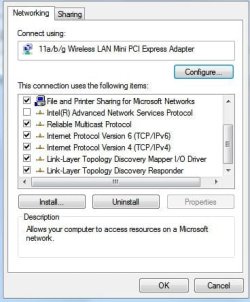
Thanks for the help so far! But would someone please tell me how to disable ipv6 :) that would be great thanks!
 

My Computer

OS
Win 7
Ok, aem and Robert, I have attempted what you proposed with no luck! I also found the ipv6 settings and disabled them, again with no luck!


I can once again access my router page, but when trying to release and renew, when I "renew" it brings up no router information, it remains blank in all boxes!
 

My Computer

OS
Win 7
Bypass the router and connect directly via your ethernet port... if you can connect, then you know its a router problem... reset your router to default settings..
 

My Computer

Computer type
PC/Desktop
Computer Manufacturer/Model Number
LENOVO K450 @3.0GHZ
OS
64-bit Windows 8.1 Pro
CPU
Core(TM) i5 CPU 4330 Haswell @ 3.20GHz
Motherboard
LENOVO
Memory
12.00 GB
Graphics Card(s)
Intel(R) HD Graphics
Sound Card
Intel HD integtrated
Monitor(s) Displays
HP 25' ISP Monitor
Screen Resolution
1900/1020
Hard Drives
(1) ST1000DM003-1CH162 (2) Generic STORAGE DEVICE USB Device (3) Generic STORAGE DEVICE USB Device
Internet Speed
100mb down/10mb up
Right-click on the network connection of choice in Properties, untick.
Noname.jpg
 

My Computer

Computer Manufacturer/Model Number
Lenovo ThinkPad T60
OS
Windows 7 Ultimate 64Bit
CPU
GenuineIntel Intel(R) Core(TM) DuoCore T2400 @ 1.83GHz
Motherboard
Intel(R) 82801G (ICH7 Family)
Memory
2.00 GB
Graphics Card(s)
Mobile Intel(R) 945 Express Chipset
Sound Card
SoundMAX Integrated Digital HD Audio
Monitor(s) Displays
ThinkPad Display
Screen Resolution
1400x1050
Hard Drives
100Gb SATA
Keyboard
Standard Keyboard
Mouse
HID-compliant Mouse
Internet Speed
Cable Broadband - 54Mbps
Other Info
Intel(R) PRO/1000 PL Network Connection
11a/b/g Wireless LAN Mini PCI Express Adapter
I rang up my isp today and told them my problem, they then asked me to change some MAC settings, to use my computers mac address as the default address.
It worked fine all day, but now, 10pm GMT, exactly the same time it went off yesterday, its gone again! I've repeated the steps my isp told me with no luck, and once again restarted the modem and router multiple times!
When I release my ip and renew it, the internet appears to be working for 5 seconds before access getting "limited" again! It's happened 2 days in a row at the same time.
 

My Computer

OS
Win 7
When it happens at the same time like that it's usaully your router attempting to renew the lease on the IP address, for some reason that process seems to be failing.

Somebody else was having this problem the other day but it was with a corporate network and only occured on the Windows 7 machines.
 

My Computer

Computer type
PC/Desktop
Computer Manufacturer/Model Number
Home built
OS
Windows 7 Ult, Windows 8.1 Pro,
CPU
Q9650-4.275GHz, E8600 4.5GHz, E6750-3.8GHz
Motherboard
Evga 780i FTW
Memory
G.Skill PC2 9600 1200Mhz 5 5 5 15 2T
Graphics Card(s)
GTX480
Sound Card
Asus Xonar D2
Monitor(s) Displays
HannsG
Screen Resolution
1680X1050
Hard Drives
GSkill Phoenix Pro 120GB SSD
PSU
ThermalTake Toughpower 1000Watt modular
Case
ThermalTake XaserV
Cooling
Xigmatek S1283
Keyboard
Logitech G15
Mouse
Logitech G9
Internet Speed
T1
Ah ok! I have no idea what the problem is!
Thought it was sorted after the MAC address was changed! She told me to change it from "default mac address" to "use this computers address" and it worked!
Until now ofc!
 

My Computer

OS
Win 7
So the default MAC address was different to the machine MAC address...

Go MAC!!

Good to hear it's solved.
 

My Computer

Computer Manufacturer/Model Number
Lenovo ThinkPad T60
OS
Windows 7 Ultimate 64Bit
CPU
GenuineIntel Intel(R) Core(TM) DuoCore T2400 @ 1.83GHz
Motherboard
Intel(R) 82801G (ICH7 Family)
Memory
2.00 GB
Graphics Card(s)
Mobile Intel(R) 945 Express Chipset
Sound Card
SoundMAX Integrated Digital HD Audio
Monitor(s) Displays
ThinkPad Display
Screen Resolution
1400x1050
Hard Drives
100Gb SATA
Keyboard
Standard Keyboard
Mouse
HID-compliant Mouse
Internet Speed
Cable Broadband - 54Mbps
Other Info
Intel(R) PRO/1000 PL Network Connection
11a/b/g Wireless LAN Mini PCI Express Adapter
So the default MAC address was different to the machine MAC address...

Go MAC!!

Good to hear it's solved.

It worked temporarily aem, it has been off for the past 2 hours and it has now miraculously come back to life.

No idea what's going on, came back and looked at my PC 2 hours later and the "Unidentified Network" problem had vanished.

Lets see how long this lasts for.
 

My Computer

OS
Win 7
Was there an option in the router to enabled MAC cloning?
 

My Computer

Computer Manufacturer/Model Number
Lenovo ThinkPad T60
OS
Windows 7 Ultimate 64Bit
CPU
GenuineIntel Intel(R) Core(TM) DuoCore T2400 @ 1.83GHz
Motherboard
Intel(R) 82801G (ICH7 Family)
Memory
2.00 GB
Graphics Card(s)
Mobile Intel(R) 945 Express Chipset
Sound Card
SoundMAX Integrated Digital HD Audio
Monitor(s) Displays
ThinkPad Display
Screen Resolution
1400x1050
Hard Drives
100Gb SATA
Keyboard
Standard Keyboard
Mouse
HID-compliant Mouse
Internet Speed
Cable Broadband - 54Mbps
Other Info
Intel(R) PRO/1000 PL Network Connection
11a/b/g Wireless LAN Mini PCI Express Adapter
No not to enable cloning of the MAC.
The only options to do with MAC codes are "Use deault MAC code" or "Use this computers MAC address"
Or "Use specific MAC address".

Internet is again off, lasted for 15 minutes last night.
 

My Computer

OS
Win 7
Is there a box where you can put in a MAC address? Would one of those option offer you that?
 

My Computer

Computer Manufacturer/Model Number
Lenovo ThinkPad T60
OS
Windows 7 Ultimate 64Bit
CPU
GenuineIntel Intel(R) Core(TM) DuoCore T2400 @ 1.83GHz
Motherboard
Intel(R) 82801G (ICH7 Family)
Memory
2.00 GB
Graphics Card(s)
Mobile Intel(R) 945 Express Chipset
Sound Card
SoundMAX Integrated Digital HD Audio
Monitor(s) Displays
ThinkPad Display
Screen Resolution
1400x1050
Hard Drives
100Gb SATA
Keyboard
Standard Keyboard
Mouse
HID-compliant Mouse
Internet Speed
Cable Broadband - 54Mbps
Other Info
Intel(R) PRO/1000 PL Network Connection
11a/b/g Wireless LAN Mini PCI Express Adapter
Back
Top