Solved Details Pane associating mp4 video files with audio details

Rockfish

New member
Local time
2:49 PM
Messages
3
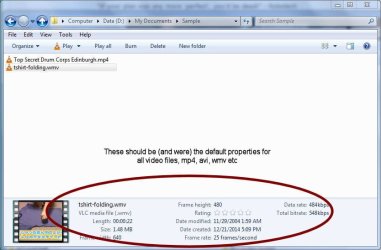
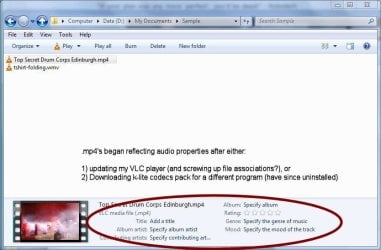
How can I re-associate .mp4 files with video details displaying in the Details Pane? After installing the K-lite codecs pack, my mp4's all began displaying in the details pane as audio files (Album, Artist etc) and no longer displays the important video default details (size, frame height, bitrate etc). I assume it was because of incorrectly associating file types when installing the codecs (even though wmv's, avi's are still correct), so I uninstalled the codecs but the Details categories remain for typical audio files. I've exhausted The Google and I'm stumped... any help? (Win7, 32-bit with VLC as my default player) Thanks!
 

My Computer My Computer

At a glance

Win7 Pro 32-bit
OS
Win7 Pro 32-bit

My Computer My Computer

At a glance

W7 Ultimate SP1, LM19.2 MATE, W10 Home 1703, ...AMD Phenom II x6 1100T, 3.3 GHz12GB DDR3 1333 G-Skill (4GB x 2), G-Skill (2G...NVIDIA GeForce GTX 660
Computer type
PC/Desktop
Computer Manufacturer/Model Number
n/a
OS
W7 Ultimate SP1, LM19.2 MATE, W10 Home 1703, W10 Pro 1703 VM, #All 64 bit
CPU
AMD Phenom II x6 1100T, 3.3 GHz
Motherboard
ASUS M4A88T-M/USB3 (AM3)
Memory
12GB DDR3 1333 G-Skill (4GB x 2), G-Skill (2GB x 2)
Graphics Card(s)
NVIDIA GeForce GTX 660
Sound Card
Realtek?
Monitor(s) Displays
Samsung S23B350
Screen Resolution
1920x1080
Hard Drives
WD Green 2TB (SATA), WD Green 3TB (SATA), WD Blue 4TB (SATA), WD Blue 6TB (SATA)
PSU
Cooler Master
Case
Antec GX300 Tower
Cooling
3x Antec TRICOOL 120mm Fans
Mouse
Wired Optical
Internet Speed
DSL
Antivirus
Avast
Browser
Pale Moon (64 bit)
Other Info
2018-12-27 Upgraded HDDs
2015-12-10 Upgraded case, graphics card, storage
2015-08-15 Upgraded motherboard & RAM
2015-07-15 Upgraded LM17.1 to LM17.2
Thanks, lehnerus2000, but I've attached a couple screenshots to clarify what I'm trying to resolve. Unfortunately using system restore points won't cover this, but the change apparently occurred when I installed the latest VLC update or downloaded a k-lite codecs pack for another program (and have since uninstalled). .mp4's are the only files affected.
 

Attachments

  • Details pane, CORRECT.jpg
    Details pane, CORRECT.jpg
    54.4 KB · Views: 2
  • Details pane, INCORRECT.jpg
    Details pane, INCORRECT.jpg
    59.8 KB · Views: 1

My Computer My Computer

At a glance

Win7 Pro 32-bit
OS
Win7 Pro 32-bit
File Association Settings

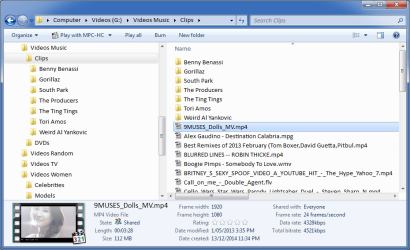
Here's what I see (with K-Lite Codec Pack with MPC-HC).
Details Pane (Video) - MPC-HC.png
I've just done a rebuild and I haven't installed VLC yet.
I normally have KLCP and VLC installed.
I have all video associations set to MPC-HC.

I don't recall noticing this issue.

Have you checked the file association settings in VLC?

Option 1
Try disabling the video formats in VLC (and any other media players) you have installed.
Reboot.
If the Details pane looks normal, enable the file association on one of your media players.
If it doesn't fix the problem, you may need to use Option 2.

Option 2
Uninstall your media players.
Reset all of your file associations back to default (see Tutorial).
Reinstall your media players (make sure that the file association option is only selected in one player)

Tutorial (and reg file downloads)
http://www.sevenforums.com/tutorials/19449-default-file-type-associations-restore.html
 
Last edited:

My Computer My Computer

At a glance

W7 Ultimate SP1, LM19.2 MATE, W10 Home 1703, ...AMD Phenom II x6 1100T, 3.3 GHz12GB DDR3 1333 G-Skill (4GB x 2), G-Skill (2G...NVIDIA GeForce GTX 660
Computer type
PC/Desktop
Computer Manufacturer/Model Number
n/a
OS
W7 Ultimate SP1, LM19.2 MATE, W10 Home 1703, W10 Pro 1703 VM, #All 64 bit
CPU
AMD Phenom II x6 1100T, 3.3 GHz
Motherboard
ASUS M4A88T-M/USB3 (AM3)
Memory
12GB DDR3 1333 G-Skill (4GB x 2), G-Skill (2GB x 2)
Graphics Card(s)
NVIDIA GeForce GTX 660
Sound Card
Realtek?
Monitor(s) Displays
Samsung S23B350
Screen Resolution
1920x1080
Hard Drives
WD Green 2TB (SATA), WD Green 3TB (SATA), WD Blue 4TB (SATA), WD Blue 6TB (SATA)
PSU
Cooler Master
Case
Antec GX300 Tower
Cooling
3x Antec TRICOOL 120mm Fans
Mouse
Wired Optical
Internet Speed
DSL
Antivirus
Avast
Browser
Pale Moon (64 bit)
Other Info
2018-12-27 Upgraded HDDs
2015-12-10 Upgraded case, graphics card, storage
2015-08-15 Upgraded motherboard & RAM
2015-07-15 Upgraded LM17.1 to LM17.2
Thanks, appreciate the help! It was the VLC 2.1.5 upgrade. We were thinking along the same vein and I'd already tried to change associations and found they were strangely grayed out. It led me to a thread on the VLC forums identifying this as a not-entirely-unique issue. I uninstalled and downgraded to an earlier version and issue was resolved. Thanks again for the help and your prompt replies!
 

My Computer My Computer

At a glance

Win7 Pro 32-bit
OS
Win7 Pro 32-bit
No problems

Thanks, appreciate the help! It was the VLC 2.1.5 upgrade. We were thinking along the same vein and I'd already tried to change associations and found they were strangely grayed out. It led me to a thread on the VLC forums identifying this as a not-entirely-unique issue. I uninstalled and downgraded to an earlier version and issue was resolved. Thanks again for the help and your prompt replies!
No problems. :)

I find VLC updates to be very "hit-and-miss". :(

On my PC, VLC v2.0.8 was the last version that the video transcoding tool worked correctly.
 

My Computer My Computer

At a glance

W7 Ultimate SP1, LM19.2 MATE, W10 Home 1703, ...AMD Phenom II x6 1100T, 3.3 GHz12GB DDR3 1333 G-Skill (4GB x 2), G-Skill (2G...NVIDIA GeForce GTX 660
Computer type
PC/Desktop
Computer Manufacturer/Model Number
n/a
OS
W7 Ultimate SP1, LM19.2 MATE, W10 Home 1703, W10 Pro 1703 VM, #All 64 bit
CPU
AMD Phenom II x6 1100T, 3.3 GHz
Motherboard
ASUS M4A88T-M/USB3 (AM3)
Memory
12GB DDR3 1333 G-Skill (4GB x 2), G-Skill (2GB x 2)
Graphics Card(s)
NVIDIA GeForce GTX 660
Sound Card
Realtek?
Monitor(s) Displays
Samsung S23B350
Screen Resolution
1920x1080
Hard Drives
WD Green 2TB (SATA), WD Green 3TB (SATA), WD Blue 4TB (SATA), WD Blue 6TB (SATA)
PSU
Cooler Master
Case
Antec GX300 Tower
Cooling
3x Antec TRICOOL 120mm Fans
Mouse
Wired Optical
Internet Speed
DSL
Antivirus
Avast
Browser
Pale Moon (64 bit)
Other Info
2018-12-27 Upgraded HDDs
2015-12-10 Upgraded case, graphics card, storage
2015-08-15 Upgraded motherboard & RAM
2015-07-15 Upgraded LM17.1 to LM17.2
Back
Top