JavaScript is disabled. For a better experience, please enable JavaScript in your browser before proceeding.
You are using an out of date browser. It may not display this or other websites correctly.
You should upgrade or use an
alternative browser .
Solved Details View too Tight
This happens after I try DreamScene Activator from here:
DreamScene Activator: Activate DreamScene In All Editions Of Windows 7 & Vista | door2windows
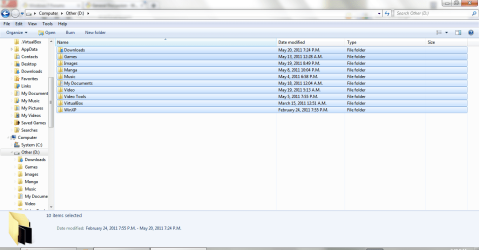
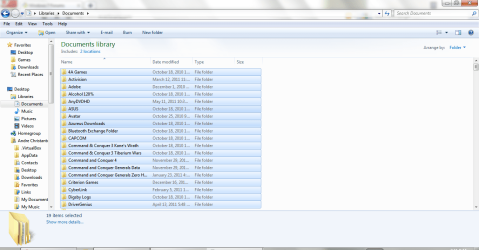
My folder view is resetted for all folder types to default details view, auto-folder discovery is likely turned off too, and some view modes is too tight including list, details view modes. But view modes in Library doesn't affected. Well, I can't explain it clearly but focus on the blue selection color where at library is wider than in any other mode
I've tried to remove DreamScene Activator and sfc with no luck
Thanks
EDIT: Auto-Refresh is disabled too. So I have to click Refresh to view file I copied, moved, or extracted. And I don't have any idea to enable it
Windows 7 Ultimate x64 SP1 Intel Core i7 3630QM 8GB NVIDIA GeForce 740M 2GB Laptop ASUS N56VB Windows 7 Ultimate x64 SP1 Intel Core i7 3630QM ASUS N56VB 8GB NVIDIA GeForce 740M 2GB Realtek 1920*1080 1 Drive 1TB 5400RPM: Logitech M325
MS SQL DB Developer
Power User
Can't you just move the column header to the size you need it to be.?
Seven ultimate 32bit Core2Duo E5700 3GB DDR2 HD5670 Asus Seven ultimate 32bit Core2Duo E5700 Asus p5qlem 3GB DDR2 HD5670 Onboard Philips 18.5 widescreen Depends 500GB Samsung 7200RPM 500w Sparta Aerocool Standard + 2x 40's inserted Multimedia Genius 10meg.
мιи∂вℓσ	
Guru
Gold Member
VIP
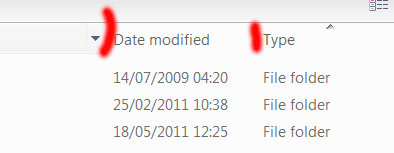
i'm not quite sure what your problem is, if you want to make the columns wider or narrower, move your mouse pointer to the top of the column where i've put the red lines.
your mouse cursor should then change, and you will be able to resize the width. i tried to get a screenshot of this, but it was difficult.
==========================================
the auto-refresh thing is an annoying bug that only a few people experience. i've had it from time to time (even with sp1) and would love to know what the fix is. do you have any system restore points? that was the only way i could get rid of the very annoying problem.
mickey megabyte 1234 ultimate 64 sp1 i5 2500K [email protected] MSI P67A-GD53 8 gigs GSkill Ripjaws 1600 amd hd6950 creative x-fi gamer samsung 24" 1920x1080 ocz vertex 2e 60 gig, samsung f3 1tb, buffalo 2tb ext antec 550 antec three hundred i'm a cooling fan saitek eclipse ii logitech g3 about 4 Mbps i love win7
New member
Member
Thread Starter
No. I don't mean the Left-Right wide but the up-down wide of file selection (the row width I guess)
Windows 7 Ultimate x64 SP1 Intel Core i7 3630QM 8GB NVIDIA GeForce 740M 2GB Laptop ASUS N56VB Windows 7 Ultimate x64 SP1 Intel Core i7 3630QM ASUS N56VB 8GB NVIDIA GeForce 740M 2GB Realtek 1920*1080 1 Drive 1TB 5400RPM: Logitech M325
мιи∂вℓσ	
Guru
Gold Member
VIP
do you mean the height of each blue bar?
mickey megabyte 1234 ultimate 64 sp1 i5 2500K [email protected] MSI P67A-GD53 8 gigs GSkill Ripjaws 1600 amd hd6950 creative x-fi gamer samsung 24" 1920x1080 ocz vertex 2e 60 gig, samsung f3 1tb, buffalo 2tb ext antec 550 antec three hundred i'm a cooling fan saitek eclipse ii logitech g3 about 4 Mbps i love win7
New member
Member
Thread Starter
Yes I mean the height of each blue bar
Windows 7 Ultimate x64 SP1 Intel Core i7 3630QM 8GB NVIDIA GeForce 740M 2GB Laptop ASUS N56VB Windows 7 Ultimate x64 SP1 Intel Core i7 3630QM ASUS N56VB 8GB NVIDIA GeForce 740M 2GB Realtek 1920*1080 1 Drive 1TB 5400RPM: Logitech M325
мιи∂вℓσ	
Guru
Gold Member
VIP
i'm sorry, but i can't help you with that - but now we know exactly what your problem is, maybe others can.
good luck!
mickey megabyte 1234 ultimate 64 sp1 i5 2500K [email protected] MSI P67A-GD53 8 gigs GSkill Ripjaws 1600 amd hd6950 creative x-fi gamer samsung 24" 1920x1080 ocz vertex 2e 60 gig, samsung f3 1tb, buffalo 2tb ext antec 550 antec three hundred i'm a cooling fan saitek eclipse ii logitech g3 about 4 Mbps i love win7
New member
Member
Thread Starter
OK. Thanks for trying to help
Windows 7 Ultimate x64 SP1 Intel Core i7 3630QM 8GB NVIDIA GeForce 740M 2GB Laptop ASUS N56VB Windows 7 Ultimate x64 SP1 Intel Core i7 3630QM ASUS N56VB 8GB NVIDIA GeForce 740M 2GB Realtek 1920*1080 1 Drive 1TB 5400RPM: Logitech M325
New member
Member
Thread Starter
Update:
Windows 7 Ultimate x64 SP1 Intel Core i7 3630QM 8GB NVIDIA GeForce 740M 2GB Laptop ASUS N56VB Windows 7 Ultimate x64 SP1 Intel Core i7 3630QM ASUS N56VB 8GB NVIDIA GeForce 740M 2GB Realtek 1920*1080 1 Drive 1TB 5400RPM: Logitech M325
мιи∂вℓσ	
Guru
Gold Member
VIP
thanks for reporting back
mickey megabyte 1234 ultimate 64 sp1 i5 2500K [email protected] MSI P67A-GD53 8 gigs GSkill Ripjaws 1600 amd hd6950 creative x-fi gamer samsung 24" 1920x1080 ocz vertex 2e 60 gig, samsung f3 1tb, buffalo 2tb ext antec 550 antec three hundred i'm a cooling fan saitek eclipse ii logitech g3 about 4 Mbps i love win7
New member
Member
Thread Starter
OK. Solved.
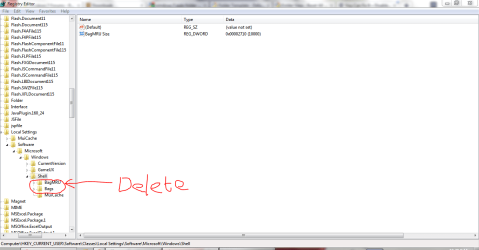
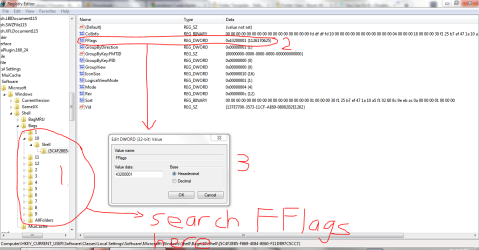
First, close all Explorer windows. Open Regedit and go to HKEY_CURRENT_USER\Software\Classes\Local Settings\Software\Microsoft\Windows\Shell and delete "BagMRU" and "Bag" keys and close Regedit
Then open ONE folder you want to fix and close it
Open Regedit again and go to HKEY_CURRENT_USER\Software\Classes\Local Settings\Software\Microsoft\Windows\Shell\Bags (This key store all your folder view settings) and find ALL DWORD Values called FFlags and change its value to 41200001 in hexadecimal and close Regedit
Open troubled folder again (it should be fixed now) and open Folder Options -> View -> Apply to Folders. And if you happen to come across a folder that is "fixed" but you don't want to fix it (for example Computers) just open Folder Options -> View -> Reset Folders.
Done and sorry I can't make better tutorials
Thanks
Last edited: Jun 5, 2011
Windows 7 Ultimate x64 SP1 Intel Core i7 3630QM 8GB NVIDIA GeForce 740M 2GB Laptop ASUS N56VB Windows 7 Ultimate x64 SP1 Intel Core i7 3630QM ASUS N56VB 8GB NVIDIA GeForce 740M 2GB Realtek 1920*1080 1 Drive 1TB 5400RPM: Logitech M325
мιи∂вℓσ	
Guru
Gold Member
VIP
does this solve the refresh bug as well?
mickey megabyte 1234 ultimate 64 sp1 i5 2500K [email protected] MSI P67A-GD53 8 gigs GSkill Ripjaws 1600 amd hd6950 creative x-fi gamer samsung 24" 1920x1080 ocz vertex 2e 60 gig, samsung f3 1tb, buffalo 2tb ext antec 550 antec three hundred i'm a cooling fan saitek eclipse ii logitech g3 about 4 Mbps i love win7
New member
Member
Thread Starter
Well. I don't know why. But after I restart my PC that bug is gone
Windows 7 Ultimate x64 SP1 Intel Core i7 3630QM 8GB NVIDIA GeForce 740M 2GB Laptop ASUS N56VB Windows 7 Ultimate x64 SP1 Intel Core i7 3630QM ASUS N56VB 8GB NVIDIA GeForce 740M 2GB Realtek 1920*1080 1 Drive 1TB 5400RPM: Logitech M325
мιи∂вℓσ	
Guru
Gold Member
VIP
no need to apologise
i've been looking for a solution for that refresh bug
for a long time ...
mickey megabyte 1234 ultimate 64 sp1 i5 2500K [email protected] MSI P67A-GD53 8 gigs GSkill Ripjaws 1600 amd hd6950 creative x-fi gamer samsung 24" 1920x1080 ocz vertex 2e 60 gig, samsung f3 1tb, buffalo 2tb ext antec 550 antec three hundred i'm a cooling fan saitek eclipse ii logitech g3 about 4 Mbps i love win7