Detecting drives; Done, No Drives Found - Error and Slow startup

Daqueh

New member
Local time
12:49 AM
Messages
14
Hey.

When I start up my PC everything goes very slowly, things "chops" or lagged as most say.

It comes up a menu that says:


JMicron Technology Corp.. PCI Express to SATA1 HOST Controller ROM v1.02
Copyright © 2005-2010. JMicron Technology Corp..

Detecting drives; Done, No Drives Found.

-

Have tried most but I find no solutions to this problem, if there is anyone who knows anything about this or can help me, please comment on what I should do.

Thank you!

*

When I get into the desktop, everything quickly, and I have no problems there ..

What could it be?
 

My Computer My Computer

At a glance

Windows 7 64bitIntel Core i7 2700k @ 3.50 GHz12GB Corsair Dominator 1600Mhz2 x Asus Radeon HD 6990 2GB Crossfire
Computer Manufacturer/Model Number
ASUSTeK Computer INC / Maximus IV Extreme-Z
OS
Windows 7 64bit
CPU
Intel Core i7 2700k @ 3.50 GHz
Motherboard
ASUSTeK Computer INC / Maximus IV Extreme-Z
Memory
12GB Corsair Dominator 1600Mhz
Graphics Card(s)
2 x Asus Radeon HD 6990 2GB Crossfire
Sound Card
On board
Monitor(s) Displays
24" Samsung SyncMaster S24B300 LCD
Screen Resolution
1920X1080
Hard Drives
160 GB Corsair Force 3 SSD + 500GB 7200Rpm
PSU
Corsair HX 1050W
Case
Corsair 650D Midi Tower
Keyboard
Gaming Keyboard G110
Mouse
Logitech® MX™518 Optical Gaming Mouse
Internet Speed
9 Download / 1 Upload
Other Info
It's a Desktop PC.
That message would indicate that you have an add on card installed inside your desktop PC that adds SATA ports.

Do you?

Mind you, without your System Specs I am just stabbing in the dark.
 

My Computer My Computer

At a glance

Windows 7 64 Bit Home Premium SP1i7-3820GSkill F3-14900CL9Q - 16GBEVGA GeForce GTX660 - Driver 352.86
Computer type
PC/Desktop
Computer Manufacturer/Model Number
Home Built - Jan 2013
OS
Windows 7 64 Bit Home Premium SP1
CPU
i7-3820
Motherboard
Asus P9X79-PRO - Bios 4608
Memory
GSkill F3-14900CL9Q - 16GB
Graphics Card(s)
EVGA GeForce GTX660 - Driver 352.86
Sound Card
On board Realtek ALC898
Monitor(s) Displays
Acer S271HL
Screen Resolution
1920 x 1080
Hard Drives
#1- Samsung 840 Pro Series
#2- Western Digital WD1002FAEX Sata3 Black
#3- Western Digital WD1002FAEX Sata3 Black
PSU
Corsair CMPSU-850TX-V2 - 850 watt (by Seasonic)
Case
Corsair Obsidian 550D
Cooling
Standard 3 120mm case fans, Cooler Master Hyper 212 EVO
Keyboard
MS KC-0405
Mouse
Intellimouse 5-button
Internet Speed
56 Mbits/Sec (on a good day)
Antivirus
Avast & Malwarebytes
Browser
Firefox
Other Info
Asus DVD - DRW-24B1ST 24X
hello Daqueh and welcome to Seven Forums. First it would be very helpful if we knew what hardware you have and whether you have a Desktop or a laptop. At the bottom of your last post, in the bottom left, click 'My System Specs' you will find a link there to edit system specs. Fill it out as completely as possible. To see what we would like, in this post, click my system specs and see mine.

What it seems to me is you are seeing the post screen for a J micron sata controller. If there is nothing connected to it, you can disable it in BIOS. I would assume your drives are connected to your chipset's controller. If that is the case, you can disable the J Micron controller in bios. Your Manual will tell you which ports are controlled by your chipset and which are controlled by the J Micron controller. If you disable the J Micron controller, nothing connected to it will work. If later you connect a drive to one of the ports controlled by the J micron controller, just enable it in BIOS. If I misunderstood your problem, pleas let us know.
 

My Computers My Computers

  • At a glance

    Windows 11 ProRyzen 9 5900X32GB G Skill DDR4-3600EVGA RTX 3080 FTW 3 Ultra
    Computer type
    PC/Desktop
    Computer Manufacturer/Model Number
    ALWAYS UNDER CONSTRUCTION
    OS
    Windows 11 Pro
    CPU
    Ryzen 9 5900X
    Motherboard
    Asus X570 Crosshair Viii Hero
    Memory
    32GB G Skill DDR4-3600
    Graphics Card(s)
    EVGA RTX 3080 FTW 3 Ultra
    Sound Card
    On Board/Sennheiser PC37X Headset
    Monitor(s) Displays
    3 X Asus 27"
    Screen Resolution
    2560x1440
    Hard Drives
    2 X 1 TB NVME drives
    PSU
    EVGA 850
    Case
    Phanteks Eclipse P400A
    Cooling
    EVGA 280 AIO
    Keyboard
    Logitech G510s/ Logitech G13
    Mouse
    Logitech G502
    Internet Speed
    24/1
    Antivirus
    ESET/MBAM Pro/SAS Pro
    Browser
    Chrome/ Firefox/ Edge
  • At a glance

    Windows 11 ProIntel Ultra 9 288V32 GB LPDDR5X 8533
    Computer type
    Laptop
    System Manufacturer/Model Number
    Dell 16 Plus
    OS
    Windows 11 Pro
    CPU
    Intel Ultra 9 288V
    Memory
    32 GB LPDDR5X 8533
    Monitor(s) Displays
    16" Mini-LED HDR600 Touch 90 Hz
    Screen Resolution
    2560X1600
    Hard Drives
    1 TB NVME
Hey sorry guys I'm new to desktop PC, I just got it built by a friend, and he's not available for a long time... :/

I have updated, feel free to check it out, and maybe you guys find a solution?

Thanks.
 

My Computer My Computer

At a glance

Windows 7 64bitIntel Core i7 2700k @ 3.50 GHz12GB Corsair Dominator 1600Mhz2 x Asus Radeon HD 6990 2GB Crossfire
Computer Manufacturer/Model Number
ASUSTeK Computer INC / Maximus IV Extreme-Z
OS
Windows 7 64bit
CPU
Intel Core i7 2700k @ 3.50 GHz
Motherboard
ASUSTeK Computer INC / Maximus IV Extreme-Z
Memory
12GB Corsair Dominator 1600Mhz
Graphics Card(s)
2 x Asus Radeon HD 6990 2GB Crossfire
Sound Card
On board
Monitor(s) Displays
24" Samsung SyncMaster S24B300 LCD
Screen Resolution
1920X1080
Hard Drives
160 GB Corsair Force 3 SSD + 500GB 7200Rpm
PSU
Corsair HX 1050W
Case
Corsair 650D Midi Tower
Keyboard
Gaming Keyboard G110
Mouse
Logitech® MX™518 Optical Gaming Mouse
Internet Speed
9 Download / 1 Upload
Other Info
It's a Desktop PC.
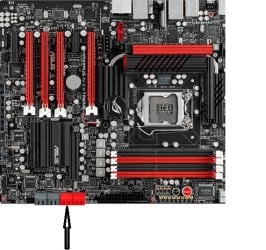
The red arrows are the Intel sata Ports, the black arrow are the J Micron ports. Connect your drives to the red ports marked 14. If nothing is connected to the ports with the black arrow, disable the controller in bios under sata controllers.

z1.jpg

z2.JPG
 

My Computers My Computers

  • At a glance

    Windows 11 ProRyzen 9 5900X32GB G Skill DDR4-3600EVGA RTX 3080 FTW 3 Ultra
    Computer type
    PC/Desktop
    Computer Manufacturer/Model Number
    ALWAYS UNDER CONSTRUCTION
    OS
    Windows 11 Pro
    CPU
    Ryzen 9 5900X
    Motherboard
    Asus X570 Crosshair Viii Hero
    Memory
    32GB G Skill DDR4-3600
    Graphics Card(s)
    EVGA RTX 3080 FTW 3 Ultra
    Sound Card
    On Board/Sennheiser PC37X Headset
    Monitor(s) Displays
    3 X Asus 27"
    Screen Resolution
    2560x1440
    Hard Drives
    2 X 1 TB NVME drives
    PSU
    EVGA 850
    Case
    Phanteks Eclipse P400A
    Cooling
    EVGA 280 AIO
    Keyboard
    Logitech G510s/ Logitech G13
    Mouse
    Logitech G502
    Internet Speed
    24/1
    Antivirus
    ESET/MBAM Pro/SAS Pro
    Browser
    Chrome/ Firefox/ Edge
  • At a glance

    Windows 11 ProIntel Ultra 9 288V32 GB LPDDR5X 8533
    Computer type
    Laptop
    System Manufacturer/Model Number
    Dell 16 Plus
    OS
    Windows 11 Pro
    CPU
    Intel Ultra 9 288V
    Memory
    32 GB LPDDR5X 8533
    Monitor(s) Displays
    16" Mini-LED HDR600 Touch 90 Hz
    Screen Resolution
    2560X1600
    Hard Drives
    1 TB NVME
Hey, everything is connected from before I think, sorry man if I don't understand, but this is a picture of inside my computer where my SATA's is, what do you want me to do with those?

buc8b.jpg
 

My Computer My Computer

At a glance

Windows 7 64bitIntel Core i7 2700k @ 3.50 GHz12GB Corsair Dominator 1600Mhz2 x Asus Radeon HD 6990 2GB Crossfire
Computer Manufacturer/Model Number
ASUSTeK Computer INC / Maximus IV Extreme-Z
OS
Windows 7 64bit
CPU
Intel Core i7 2700k @ 3.50 GHz
Motherboard
ASUSTeK Computer INC / Maximus IV Extreme-Z
Memory
12GB Corsair Dominator 1600Mhz
Graphics Card(s)
2 x Asus Radeon HD 6990 2GB Crossfire
Sound Card
On board
Monitor(s) Displays
24" Samsung SyncMaster S24B300 LCD
Screen Resolution
1920X1080
Hard Drives
160 GB Corsair Force 3 SSD + 500GB 7200Rpm
PSU
Corsair HX 1050W
Case
Corsair 650D Midi Tower
Keyboard
Gaming Keyboard G110
Mouse
Logitech® MX™518 Optical Gaming Mouse
Internet Speed
9 Download / 1 Upload
Other Info
It's a Desktop PC.
The startup is still really slow, only the startup, all the things at the startup loads REALLY slowly.

Do I have to edit some settings in the BIOS or something?

I don't know anything.

Please help if you can.

Thank you!
 

My Computer My Computer

At a glance

Windows 7 64bitIntel Core i7 2700k @ 3.50 GHz12GB Corsair Dominator 1600Mhz2 x Asus Radeon HD 6990 2GB Crossfire
Computer Manufacturer/Model Number
ASUSTeK Computer INC / Maximus IV Extreme-Z
OS
Windows 7 64bit
CPU
Intel Core i7 2700k @ 3.50 GHz
Motherboard
ASUSTeK Computer INC / Maximus IV Extreme-Z
Memory
12GB Corsair Dominator 1600Mhz
Graphics Card(s)
2 x Asus Radeon HD 6990 2GB Crossfire
Sound Card
On board
Monitor(s) Displays
24" Samsung SyncMaster S24B300 LCD
Screen Resolution
1920X1080
Hard Drives
160 GB Corsair Force 3 SSD + 500GB 7200Rpm
PSU
Corsair HX 1050W
Case
Corsair 650D Midi Tower
Keyboard
Gaming Keyboard G110
Mouse
Logitech® MX™518 Optical Gaming Mouse
Internet Speed
9 Download / 1 Upload
Other Info
It's a Desktop PC.
You should respond to essenbe's post. Tell us what you have done and the result. Then we will know how best to proceed.
And we will also know that you are cooperating ;).
 

My Computer My Computer

At a glance

Windows 7 64 Bit Home Premium SP1i7-3820GSkill F3-14900CL9Q - 16GBEVGA GeForce GTX660 - Driver 352.86
Computer type
PC/Desktop
Computer Manufacturer/Model Number
Home Built - Jan 2013
OS
Windows 7 64 Bit Home Premium SP1
CPU
i7-3820
Motherboard
Asus P9X79-PRO - Bios 4608
Memory
GSkill F3-14900CL9Q - 16GB
Graphics Card(s)
EVGA GeForce GTX660 - Driver 352.86
Sound Card
On board Realtek ALC898
Monitor(s) Displays
Acer S271HL
Screen Resolution
1920 x 1080
Hard Drives
#1- Samsung 840 Pro Series
#2- Western Digital WD1002FAEX Sata3 Black
#3- Western Digital WD1002FAEX Sata3 Black
PSU
Corsair CMPSU-850TX-V2 - 850 watt (by Seasonic)
Case
Corsair Obsidian 550D
Cooling
Standard 3 120mm case fans, Cooler Master Hyper 212 EVO
Keyboard
MS KC-0405
Mouse
Intellimouse 5-button
Internet Speed
56 Mbits/Sec (on a good day)
Antivirus
Avast & Malwarebytes
Browser
Firefox
Other Info
Asus DVD - DRW-24B1ST 24X
Here is another picture of your board. Find the sata data cable (the small one) attached to your SSD. Trace it back to where it is connected to your motherboard. It should be connected to one of the ports where the black arrow is pointing. Let us know which port it is connected to.

z 1.JPG
 
Last edited:

My Computers My Computers

  • At a glance

    Windows 11 ProRyzen 9 5900X32GB G Skill DDR4-3600EVGA RTX 3080 FTW 3 Ultra
    Computer type
    PC/Desktop
    Computer Manufacturer/Model Number
    ALWAYS UNDER CONSTRUCTION
    OS
    Windows 11 Pro
    CPU
    Ryzen 9 5900X
    Motherboard
    Asus X570 Crosshair Viii Hero
    Memory
    32GB G Skill DDR4-3600
    Graphics Card(s)
    EVGA RTX 3080 FTW 3 Ultra
    Sound Card
    On Board/Sennheiser PC37X Headset
    Monitor(s) Displays
    3 X Asus 27"
    Screen Resolution
    2560x1440
    Hard Drives
    2 X 1 TB NVME drives
    PSU
    EVGA 850
    Case
    Phanteks Eclipse P400A
    Cooling
    EVGA 280 AIO
    Keyboard
    Logitech G510s/ Logitech G13
    Mouse
    Logitech G502
    Internet Speed
    24/1
    Antivirus
    ESET/MBAM Pro/SAS Pro
    Browser
    Chrome/ Firefox/ Edge
  • At a glance

    Windows 11 ProIntel Ultra 9 288V32 GB LPDDR5X 8533
    Computer type
    Laptop
    System Manufacturer/Model Number
    Dell 16 Plus
    OS
    Windows 11 Pro
    CPU
    Intel Ultra 9 288V
    Memory
    32 GB LPDDR5X 8533
    Monitor(s) Displays
    16" Mini-LED HDR600 Touch 90 Hz
    Screen Resolution
    2560X1600
    Hard Drives
    1 TB NVME
RE:

Hey, everything worked perfectly before I reseted my computer.

It's just that everything goes slow at the startup, here is a video I made that might explain to you guys better.

Startup slow - YouTube

Maybe find a solution?

Thank you guys for helping me!
 

My Computer My Computer

At a glance

Windows 7 64bitIntel Core i7 2700k @ 3.50 GHz12GB Corsair Dominator 1600Mhz2 x Asus Radeon HD 6990 2GB Crossfire
Computer Manufacturer/Model Number
ASUSTeK Computer INC / Maximus IV Extreme-Z
OS
Windows 7 64bit
CPU
Intel Core i7 2700k @ 3.50 GHz
Motherboard
ASUSTeK Computer INC / Maximus IV Extreme-Z
Memory
12GB Corsair Dominator 1600Mhz
Graphics Card(s)
2 x Asus Radeon HD 6990 2GB Crossfire
Sound Card
On board
Monitor(s) Displays
24" Samsung SyncMaster S24B300 LCD
Screen Resolution
1920X1080
Hard Drives
160 GB Corsair Force 3 SSD + 500GB 7200Rpm
PSU
Corsair HX 1050W
Case
Corsair 650D Midi Tower
Keyboard
Gaming Keyboard G110
Mouse
Logitech® MX™518 Optical Gaming Mouse
Internet Speed
9 Download / 1 Upload
Other Info
It's a Desktop PC.
Please answer the question from the post above. You are seeming to get a double boot, which is not uncommon from an Asus motherboard. Also, your 500Gb hard drive seems to be connected to a Marvell port. Also, I could not make the message out in the you tube , but on the Bios screen at the bottom it says hdd something detected followed by and exclamation point (!). What does that say? Everything in the start up is your bios until you get to the 'Loading Windows' screen. After that, it is your SSD, which is also booting slow. The message on the American Megatrends screen may give some info as to what the problem is.
 

My Computers My Computers

  • At a glance

    Windows 11 ProRyzen 9 5900X32GB G Skill DDR4-3600EVGA RTX 3080 FTW 3 Ultra
    Computer type
    PC/Desktop
    Computer Manufacturer/Model Number
    ALWAYS UNDER CONSTRUCTION
    OS
    Windows 11 Pro
    CPU
    Ryzen 9 5900X
    Motherboard
    Asus X570 Crosshair Viii Hero
    Memory
    32GB G Skill DDR4-3600
    Graphics Card(s)
    EVGA RTX 3080 FTW 3 Ultra
    Sound Card
    On Board/Sennheiser PC37X Headset
    Monitor(s) Displays
    3 X Asus 27"
    Screen Resolution
    2560x1440
    Hard Drives
    2 X 1 TB NVME drives
    PSU
    EVGA 850
    Case
    Phanteks Eclipse P400A
    Cooling
    EVGA 280 AIO
    Keyboard
    Logitech G510s/ Logitech G13
    Mouse
    Logitech G502
    Internet Speed
    24/1
    Antivirus
    ESET/MBAM Pro/SAS Pro
    Browser
    Chrome/ Firefox/ Edge
  • At a glance

    Windows 11 ProIntel Ultra 9 288V32 GB LPDDR5X 8533
    Computer type
    Laptop
    System Manufacturer/Model Number
    Dell 16 Plus
    OS
    Windows 11 Pro
    CPU
    Intel Ultra 9 288V
    Memory
    32 GB LPDDR5X 8533
    Monitor(s) Displays
    16" Mini-LED HDR600 Touch 90 Hz
    Screen Resolution
    2560X1600
    Hard Drives
    1 TB NVME
Hey, everything worked perfectly before I reseted my computer.

Could you explain (in detail) what you mean when you say you "Reset Your Computer"?
 

My Computer My Computer

At a glance

Windows 7 64 Bit Home Premium SP1i7-3820GSkill F3-14900CL9Q - 16GBEVGA GeForce GTX660 - Driver 352.86
Computer type
PC/Desktop
Computer Manufacturer/Model Number
Home Built - Jan 2013
OS
Windows 7 64 Bit Home Premium SP1
CPU
i7-3820
Motherboard
Asus P9X79-PRO - Bios 4608
Memory
GSkill F3-14900CL9Q - 16GB
Graphics Card(s)
EVGA GeForce GTX660 - Driver 352.86
Sound Card
On board Realtek ALC898
Monitor(s) Displays
Acer S271HL
Screen Resolution
1920 x 1080
Hard Drives
#1- Samsung 840 Pro Series
#2- Western Digital WD1002FAEX Sata3 Black
#3- Western Digital WD1002FAEX Sata3 Black
PSU
Corsair CMPSU-850TX-V2 - 850 watt (by Seasonic)
Case
Corsair Obsidian 550D
Cooling
Standard 3 120mm case fans, Cooler Master Hyper 212 EVO
Keyboard
MS KC-0405
Mouse
Intellimouse 5-button
Internet Speed
56 Mbits/Sec (on a good day)
Antivirus
Avast & Malwarebytes
Browser
Firefox
Other Info
Asus DVD - DRW-24B1ST 24X
@Essenbe

The cable was connected from the SSD to exactly the port where the black arrow was pointing :)

--

Also, by reseting the computer I mean that the guy that sold me his pc, removed all programs so it was all new when I got it =)

I had no problems in the start, then this happend. Also he didn't have any problems with the PC at all.

EDIT:

Essenbe,

With the BIOS screen you mean the American Megatrends menu that popped up?

It said "No Keyboard detected!"

AT the bottom

It also said


SATA Port1: Corsair Force 3 SSD
SATA Port5: ASUS (unreadable)
 

My Computer My Computer

At a glance

Windows 7 64bitIntel Core i7 2700k @ 3.50 GHz12GB Corsair Dominator 1600Mhz2 x Asus Radeon HD 6990 2GB Crossfire
Computer Manufacturer/Model Number
ASUSTeK Computer INC / Maximus IV Extreme-Z
OS
Windows 7 64bit
CPU
Intel Core i7 2700k @ 3.50 GHz
Motherboard
ASUSTeK Computer INC / Maximus IV Extreme-Z
Memory
12GB Corsair Dominator 1600Mhz
Graphics Card(s)
2 x Asus Radeon HD 6990 2GB Crossfire
Sound Card
On board
Monitor(s) Displays
24" Samsung SyncMaster S24B300 LCD
Screen Resolution
1920X1080
Hard Drives
160 GB Corsair Force 3 SSD + 500GB 7200Rpm
PSU
Corsair HX 1050W
Case
Corsair 650D Midi Tower
Keyboard
Gaming Keyboard G110
Mouse
Logitech® MX™518 Optical Gaming Mouse
Internet Speed
9 Download / 1 Upload
Other Info
It's a Desktop PC.
What should I do?
 

My Computer My Computer

At a glance

Windows 7 64bitIntel Core i7 2700k @ 3.50 GHz12GB Corsair Dominator 1600Mhz2 x Asus Radeon HD 6990 2GB Crossfire
Computer Manufacturer/Model Number
ASUSTeK Computer INC / Maximus IV Extreme-Z
OS
Windows 7 64bit
CPU
Intel Core i7 2700k @ 3.50 GHz
Motherboard
ASUSTeK Computer INC / Maximus IV Extreme-Z
Memory
12GB Corsair Dominator 1600Mhz
Graphics Card(s)
2 x Asus Radeon HD 6990 2GB Crossfire
Sound Card
On board
Monitor(s) Displays
24" Samsung SyncMaster S24B300 LCD
Screen Resolution
1920X1080
Hard Drives
160 GB Corsair Force 3 SSD + 500GB 7200Rpm
PSU
Corsair HX 1050W
Case
Corsair 650D Midi Tower
Keyboard
Gaming Keyboard G110
Mouse
Logitech® MX™518 Optical Gaming Mouse
Internet Speed
9 Download / 1 Upload
Other Info
It's a Desktop PC.
What is connected to sata port 5? If it is a DVD or another hard drive, disconnect it and try it again.
 

My Computers My Computers

  • At a glance

    Windows 11 ProRyzen 9 5900X32GB G Skill DDR4-3600EVGA RTX 3080 FTW 3 Ultra
    Computer type
    PC/Desktop
    Computer Manufacturer/Model Number
    ALWAYS UNDER CONSTRUCTION
    OS
    Windows 11 Pro
    CPU
    Ryzen 9 5900X
    Motherboard
    Asus X570 Crosshair Viii Hero
    Memory
    32GB G Skill DDR4-3600
    Graphics Card(s)
    EVGA RTX 3080 FTW 3 Ultra
    Sound Card
    On Board/Sennheiser PC37X Headset
    Monitor(s) Displays
    3 X Asus 27"
    Screen Resolution
    2560x1440
    Hard Drives
    2 X 1 TB NVME drives
    PSU
    EVGA 850
    Case
    Phanteks Eclipse P400A
    Cooling
    EVGA 280 AIO
    Keyboard
    Logitech G510s/ Logitech G13
    Mouse
    Logitech G502
    Internet Speed
    24/1
    Antivirus
    ESET/MBAM Pro/SAS Pro
    Browser
    Chrome/ Firefox/ Edge
  • At a glance

    Windows 11 ProIntel Ultra 9 288V32 GB LPDDR5X 8533
    Computer type
    Laptop
    System Manufacturer/Model Number
    Dell 16 Plus
    OS
    Windows 11 Pro
    CPU
    Intel Ultra 9 288V
    Memory
    32 GB LPDDR5X 8533
    Monitor(s) Displays
    16" Mini-LED HDR600 Touch 90 Hz
    Screen Resolution
    2560X1600
    Hard Drives
    1 TB NVME
Hey not sure man.

That menu pops up sometimes, then I have to take the power off the computer, then restart it, to get rid of it.

I tried to restart it now, but it didn't pop up, it pops up random times.

I don't know where the SATA5 is, I looked at the picture you posted, I could only see 4 SATA ports there, could you tell me what one is the SATA5 one?

Cheers man.
 

My Computer My Computer

At a glance

Windows 7 64bitIntel Core i7 2700k @ 3.50 GHz12GB Corsair Dominator 1600Mhz2 x Asus Radeon HD 6990 2GB Crossfire
Computer Manufacturer/Model Number
ASUSTeK Computer INC / Maximus IV Extreme-Z
OS
Windows 7 64bit
CPU
Intel Core i7 2700k @ 3.50 GHz
Motherboard
ASUSTeK Computer INC / Maximus IV Extreme-Z
Memory
12GB Corsair Dominator 1600Mhz
Graphics Card(s)
2 x Asus Radeon HD 6990 2GB Crossfire
Sound Card
On board
Monitor(s) Displays
24" Samsung SyncMaster S24B300 LCD
Screen Resolution
1920X1080
Hard Drives
160 GB Corsair Force 3 SSD + 500GB 7200Rpm
PSU
Corsair HX 1050W
Case
Corsair 650D Midi Tower
Keyboard
Gaming Keyboard G110
Mouse
Logitech® MX™518 Optical Gaming Mouse
Internet Speed
9 Download / 1 Upload
Other Info
It's a Desktop PC.
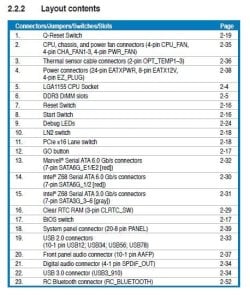
I'm not sure. Go to the Asus web site and download your manual, if you don't have it. It will tell you what the port numbers are and where they're located.
 

My Computers My Computers

  • At a glance

    Windows 11 ProRyzen 9 5900X32GB G Skill DDR4-3600EVGA RTX 3080 FTW 3 Ultra
    Computer type
    PC/Desktop
    Computer Manufacturer/Model Number
    ALWAYS UNDER CONSTRUCTION
    OS
    Windows 11 Pro
    CPU
    Ryzen 9 5900X
    Motherboard
    Asus X570 Crosshair Viii Hero
    Memory
    32GB G Skill DDR4-3600
    Graphics Card(s)
    EVGA RTX 3080 FTW 3 Ultra
    Sound Card
    On Board/Sennheiser PC37X Headset
    Monitor(s) Displays
    3 X Asus 27"
    Screen Resolution
    2560x1440
    Hard Drives
    2 X 1 TB NVME drives
    PSU
    EVGA 850
    Case
    Phanteks Eclipse P400A
    Cooling
    EVGA 280 AIO
    Keyboard
    Logitech G510s/ Logitech G13
    Mouse
    Logitech G502
    Internet Speed
    24/1
    Antivirus
    ESET/MBAM Pro/SAS Pro
    Browser
    Chrome/ Firefox/ Edge
  • At a glance

    Windows 11 ProIntel Ultra 9 288V32 GB LPDDR5X 8533
    Computer type
    Laptop
    System Manufacturer/Model Number
    Dell 16 Plus
    OS
    Windows 11 Pro
    CPU
    Intel Ultra 9 288V
    Memory
    32 GB LPDDR5X 8533
    Monitor(s) Displays
    16" Mini-LED HDR600 Touch 90 Hz
    Screen Resolution
    2560X1600
    Hard Drives
    1 TB NVME

My Computers My Computers

  • At a glance

    Windows 11 ProRyzen 9 5900X32GB G Skill DDR4-3600EVGA RTX 3080 FTW 3 Ultra
    Computer type
    PC/Desktop
    Computer Manufacturer/Model Number
    ALWAYS UNDER CONSTRUCTION
    OS
    Windows 11 Pro
    CPU
    Ryzen 9 5900X
    Motherboard
    Asus X570 Crosshair Viii Hero
    Memory
    32GB G Skill DDR4-3600
    Graphics Card(s)
    EVGA RTX 3080 FTW 3 Ultra
    Sound Card
    On Board/Sennheiser PC37X Headset
    Monitor(s) Displays
    3 X Asus 27"
    Screen Resolution
    2560x1440
    Hard Drives
    2 X 1 TB NVME drives
    PSU
    EVGA 850
    Case
    Phanteks Eclipse P400A
    Cooling
    EVGA 280 AIO
    Keyboard
    Logitech G510s/ Logitech G13
    Mouse
    Logitech G502
    Internet Speed
    24/1
    Antivirus
    ESET/MBAM Pro/SAS Pro
    Browser
    Chrome/ Firefox/ Edge
  • At a glance

    Windows 11 ProIntel Ultra 9 288V32 GB LPDDR5X 8533
    Computer type
    Laptop
    System Manufacturer/Model Number
    Dell 16 Plus
    OS
    Windows 11 Pro
    CPU
    Intel Ultra 9 288V
    Memory
    32 GB LPDDR5X 8533
    Monitor(s) Displays
    16" Mini-LED HDR600 Touch 90 Hz
    Screen Resolution
    2560X1600
    Hard Drives
    1 TB NVME
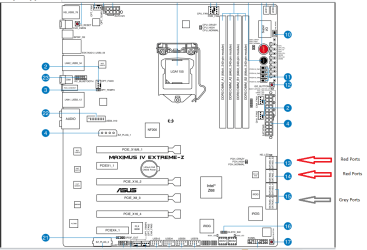
Below is your motherboard with the SATA ports marked.

  • The "top" red ports are the Marvel Controller ports. There are 2 ports here, on on top of the other from this bird's-eye perspective.
  • The red ports "below" those are the SATA3 (6GB) ports, two of them.
  • The grey ports below those red ports are the SATA2 (3GB) ports, two sets of two.
Large.PNG


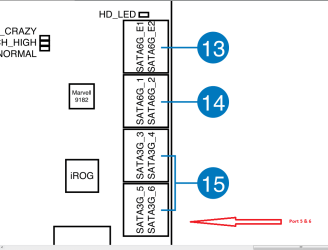
The following is a blow up of those ports. You can see where ports 5 & 6 are.


Small.PNG


The top one is #5, the bottom one (closest to the motherboard) is #6.


Whatever you have plugged into #5 is the suspect. Unplug it and check to see if anything improves.


Please answer honestly: are you comfortable working inside this computer? You seem reluctant.
 

My Computer My Computer

At a glance

Windows 7 64 Bit Home Premium SP1i7-3820GSkill F3-14900CL9Q - 16GBEVGA GeForce GTX660 - Driver 352.86
Computer type
PC/Desktop
Computer Manufacturer/Model Number
Home Built - Jan 2013
OS
Windows 7 64 Bit Home Premium SP1
CPU
i7-3820
Motherboard
Asus P9X79-PRO - Bios 4608
Memory
GSkill F3-14900CL9Q - 16GB
Graphics Card(s)
EVGA GeForce GTX660 - Driver 352.86
Sound Card
On board Realtek ALC898
Monitor(s) Displays
Acer S271HL
Screen Resolution
1920 x 1080
Hard Drives
#1- Samsung 840 Pro Series
#2- Western Digital WD1002FAEX Sata3 Black
#3- Western Digital WD1002FAEX Sata3 Black
PSU
Corsair CMPSU-850TX-V2 - 850 watt (by Seasonic)
Case
Corsair Obsidian 550D
Cooling
Standard 3 120mm case fans, Cooler Master Hyper 212 EVO
Keyboard
MS KC-0405
Mouse
Intellimouse 5-button
Internet Speed
56 Mbits/Sec (on a good day)
Antivirus
Avast & Malwarebytes
Browser
Firefox
Other Info
Asus DVD - DRW-24B1ST 24X
@TVeblem

Not comfortable at all, but the guy that built the PC will look inside it.

Anyways, thank you guys for trying to help me, sorry for being such a newbie.

:)
 

My Computer My Computer

At a glance

Windows 7 64bitIntel Core i7 2700k @ 3.50 GHz12GB Corsair Dominator 1600Mhz2 x Asus Radeon HD 6990 2GB Crossfire
Computer Manufacturer/Model Number
ASUSTeK Computer INC / Maximus IV Extreme-Z
OS
Windows 7 64bit
CPU
Intel Core i7 2700k @ 3.50 GHz
Motherboard
ASUSTeK Computer INC / Maximus IV Extreme-Z
Memory
12GB Corsair Dominator 1600Mhz
Graphics Card(s)
2 x Asus Radeon HD 6990 2GB Crossfire
Sound Card
On board
Monitor(s) Displays
24" Samsung SyncMaster S24B300 LCD
Screen Resolution
1920X1080
Hard Drives
160 GB Corsair Force 3 SSD + 500GB 7200Rpm
PSU
Corsair HX 1050W
Case
Corsair 650D Midi Tower
Keyboard
Gaming Keyboard G110
Mouse
Logitech® MX™518 Optical Gaming Mouse
Internet Speed
9 Download / 1 Upload
Other Info
It's a Desktop PC.
Back
Top