Solved Determine Product Key From Unbootable Hard Drive

My Computer My Computer

At a glance

Vista, Windows7, Mint Mate, Zorin, Windows 8from 1.6GHz Duo to i7
Computer Manufacturer/Model Number
HP, Dell, Gateway, Toshiba - 4 laptops and 2 desktops
OS
Vista, Windows7, Mint Mate, Zorin, Windows 8
CPU
from 1.6GHz Duo to i7
Monitor(s) Displays
2x HP w2207
Hard Drives
5x HDD, 7x SSD, 12x Externals
Keyboard
with trackball - no mices
Mouse
Trackball mice
Internet Speed
DSL 6000
boweasel I would just like to mention a little information.

1. You do not need a COA key to install Windows 7. You do need it to activate Windows 7.

2. A hard drive that is running out of free space can cause all kinds of problems. Windows 7 and maybe other programs need elbow room to work properly. Normally that is 10 to 15 %.

From post #20

It replaced a lot of bad clusters, before it told me it'd run out of space to replace the clusters. So far, as a slave drive I have not gotten the out-of-space msg.
 

My Computer My Computer

At a glance

Windows 10 Pro. 64/ version 1709 Windows 7 Pr...Intel i7-6800K @ 4.3Corsair Platinum 16 gig @2400EVGA GTX 1070 OC
Computer type
PC/Desktop
Computer Manufacturer/Model Number
Home made Desktop
OS
Windows 10 Pro. 64/ version 1709 Windows 7 Pro/64
CPU
Intel i7-6800K @ 4.3
Motherboard
ASUS X-99 Deluxe II
Memory
Corsair Platinum 16 gig @2400
Graphics Card(s)
EVGA GTX 1070 OC
Monitor(s) Displays
Asus 27" LED LCD/VE278Q
Screen Resolution
1920-1080 or 1280-720 HDMI
Hard Drives
INTEL SSD 730-240 Gb Sata 3.0/
PSU
EVGA Platium 1200W
Case
Phanteks Luxe Tempered Glass 8 fans/ one radiator
Cooling
XSPC/ Water Cooled CPU
Keyboard
Das 4 Professional
Mouse
Logitech M705/MX Anywhere 2-S
Internet Speed
100 mbits
Antivirus
Microsoft Security Essentials/ Malwarebytes Premium 3.0/ SAS
Browser
I.E. 11 default/Firefox/ ISP Time Warner Cable/Spectrum
Other Info
LG BluRay Burner/
Sound system-KLipsch-THX/
Icy Dock ssd Hot Swap bays.
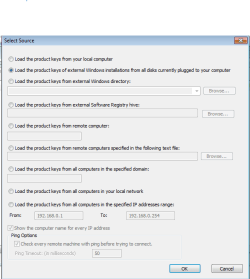
Run Produkey from your working system. Tick as below, then click OK.
Unfortunately this tool does not work for me. Whether it is because of chkdsk (still running, still on stage 4, replacing bad clusters like crazy, but also using 2GB - yes 2,000,000K - of my memory), or because of the state of the drive, is unknown. I am unable to provide screen captures at this point - it says 'Uploading File(s) - Please Wait', but it never finishes uploading - probably because of the memory tie up.
 
Last edited:

My Computer My Computer

At a glance

Windows 7 home premium 64 bitAMD K103.00GB Dual-Channel DDR3 @ 532MHzATI AMD M880G with ATI Mobility Radeon HD 425...
Computer type
Laptop
OS
Windows 7 home premium 64 bit
CPU
AMD K10
Motherboard
Hewlett-Packard 1444 (Socket S1G4)
Memory
3.00GB Dual-Channel DDR3 @ 532MHz
Graphics Card(s)
ATI AMD M880G with ATI Mobility Radeon HD 4250 (HP)
Sound Card
Realtek
Screen Resolution
1366 x 768
Hard Drives
465GB Western Digital
Antivirus
MSE
1. You do not need a COA key to install Windows 7. You do need it to activate Windows 7.
I appreciate the distinction but it has little practicable application since a non-activated Windows will expire in 30 days
2. A hard drive that is running out of free space can cause all kinds of problems. Windows 7 and maybe other programs need elbow room to work properly. Normally that is 10 to 15 %.
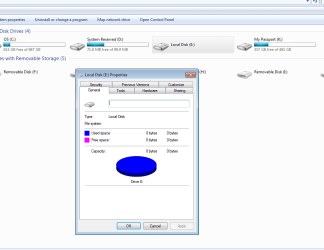
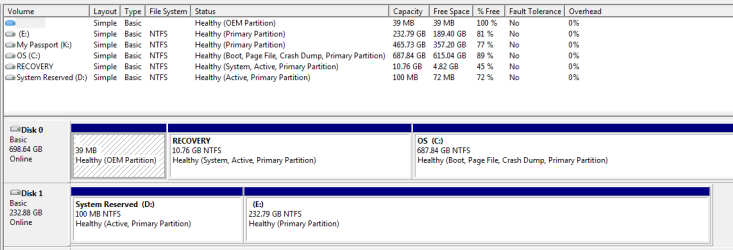
The E: drive, as it is now known did have 189GB of free space on a drive with a listed capacity of 250GB. In the last few minutes, while chkdsk is still running, the drive's properties have altered. It now shows a capacity of 0 bytes, used space of 0 bytes , and free space of 0 bytes. Chkdsk continues to run, but I expect it to give me the out of space msg when it tries to replace the next set of bad clusters.
*****
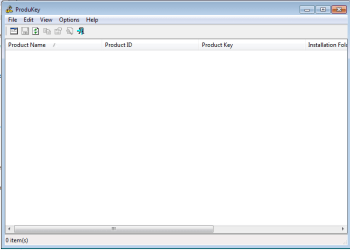
Hours later. The drive properties have not changed, and chkdsk seems like it will literally run for days. I killed the task, the memory freed up, and my drive properties are back to what they were before. Attached are several screen scans. I don't know how the 2 ProduKey images got out of order. Since ending chkdsk I tried that utility again, and again got no keys returned.

And how is it that Disk Management shows the E: drive as healthy? It's one of the unhealthiest drives I've ever seen.
 

Attachments

  • Capture1.PNG
    Capture1.PNG
    10.1 KB · Views: 38
  • Capture2.PNG
    Capture2.PNG
    5.8 KB · Views: 0
  • Capture3.PNG
    Capture3.PNG
    18.6 KB · Views: 3
  • Capture4.PNG
    Capture4.PNG
    6.7 KB · Views: 0
  • Capture5.PNG
    Capture5.PNG
    13.6 KB · Views: 1

My Computer My Computer

At a glance

Windows 7 home premium 64 bitAMD K103.00GB Dual-Channel DDR3 @ 532MHzATI AMD M880G with ATI Mobility Radeon HD 425...
Computer type
Laptop
OS
Windows 7 home premium 64 bit
CPU
AMD K10
Motherboard
Hewlett-Packard 1444 (Socket S1G4)
Memory
3.00GB Dual-Channel DDR3 @ 532MHz
Graphics Card(s)
ATI AMD M880G with ATI Mobility Radeon HD 4250 (HP)
Sound Card
Realtek
Screen Resolution
1366 x 768
Hard Drives
465GB Western Digital
Antivirus
MSE
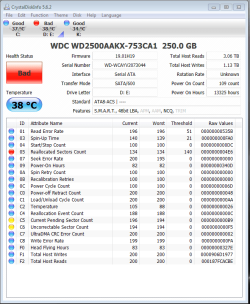
This is typical of a failing Hard Drive which Disk Check may have run into the ground trying to repair the file system. What was needed to know the exact condition of the drive itself (as opposed to the resident file system) is the HD Diagnostic run from boot disk or Windows while drive is slaved. You can still do that, or read the SMART status at a glance using CrystalDiskInfo - Software.

I understand you'd already started Disk Check but it is frustrating still that the cautious procedure I gave you was not followed. Your key might still have been read before Disk Check and may still yet but the likelihood has decreased since this looks like the same neverending Disk Check loop we get in Startup Repair when it cannot fix a failed file system due to drive failure.
 
I understand you'd already started Disk Check but it is frustrating still that the cautious procedure I gave you was not followed. Your key might still have been read before Disk Check and may still yet but the likelihood has decreased since this looks like the same neverending Disk Check loop we get in Startup Repair when it cannot fix a failed file system due to drive failure.
Some times I'm not very good at reading between the lines. Just ask my wife. A slap upside the head followed by bellowing in my ear 'Just end the check disk' is all that would've been required.
Attached Crystal Disk info
 

Attachments

  • Capture6.PNG
    Capture6.PNG
    35.7 KB · Views: 0

My Computer My Computer

At a glance

Windows 7 home premium 64 bitAMD K103.00GB Dual-Channel DDR3 @ 532MHzATI AMD M880G with ATI Mobility Radeon HD 425...
Computer type
Laptop
OS
Windows 7 home premium 64 bit
CPU
AMD K10
Motherboard
Hewlett-Packard 1444 (Socket S1G4)
Memory
3.00GB Dual-Channel DDR3 @ 532MHz
Graphics Card(s)
ATI AMD M880G with ATI Mobility Radeon HD 4250 (HP)
Sound Card
Realtek
Screen Resolution
1366 x 768
Hard Drives
465GB Western Digital
Antivirus
MSE
When would I ask your wife? :shock:

I'd try the Product Key scan again..

Do you have a spare hard drive to try a test image from the failing HD?

If not then since you have tons of space on the host PC HD, you can store the image there following Imaging with free Macrium - Windows 7 Help Forums , then apply the image to a test space you shrink to slightly larger size than image. Partition or Volume - Shrink

Then install EasyBCD (click Download - no Name or Email required) to host OS to add the newly imaged OS to a Dual Boot.

If it applies and will not start then Adjust Win7 to boot on new hardware with Paragon Adaptive Restore CD.

At any time you can Delete the test partition in Disk Mgmt and Extend C over it.


When would I ask your wife? :shock:
Either the next time you're over for Yuengling Lager...., or it was a rhetorical question
I'd try the Product Key scan again..
I still get nothing. Could I be using the wrong tool? I'm running something called produkey-x64, because THIS computer is 64 bit. But the slaved drive? I dunno, although I do not see a program files (x86) folder under Windows.
Edit - Downloaded the regular zip version. Still nothing.
 

My Computer My Computer

At a glance

Windows 7 home premium 64 bitAMD K103.00GB Dual-Channel DDR3 @ 532MHzATI AMD M880G with ATI Mobility Radeon HD 425...
Computer type
Laptop
OS
Windows 7 home premium 64 bit
CPU
AMD K10
Motherboard
Hewlett-Packard 1444 (Socket S1G4)
Memory
3.00GB Dual-Channel DDR3 @ 532MHz
Graphics Card(s)
ATI AMD M880G with ATI Mobility Radeon HD 4250 (HP)
Sound Card
Realtek
Screen Resolution
1366 x 768
Hard Drives
465GB Western Digital
Antivirus
MSE
Then it's 64 bit, with a plain Programs file and another x86.

Install Macrium and try to save an image.
 
OK, In order to try what had been suggested in the previous post you must make the faulty drive as the boot drive

Instead I would like you to try this with the faulty drive as a second internal drive in your present system as it is.

You should copy the "SOFTWARE" file(hive) on to a pendrive.

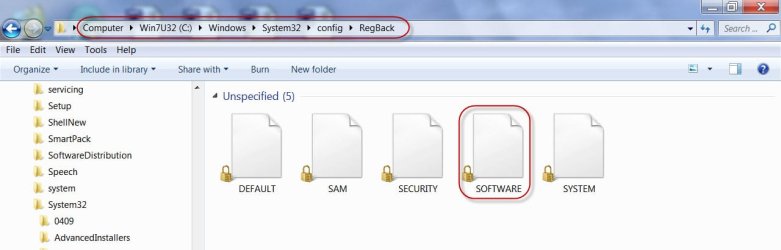
The screenshot below shows its location. ( This is in my working system drive so I cannot copy it since it is open. In your non-system drive you should be able to copy it)

29-06-2014 15-54-11.jpg

As I see in your Windows Disk Management Screen, it should be
Computer > E: > Windows > System 32 > config > RegBack

Copy the "SOFTWARE" file to a pendrive.

Now download MiTeC Windows Registry Recovery 1.5.2 under 'Forensic " in Components

Extract the downloaded WRR.zip to a folder and run WRR.exe as administrator.

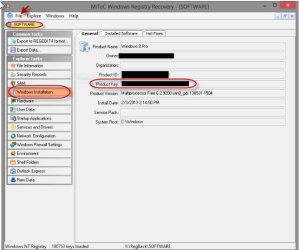
Open the "SOFTWARE" file you had copied to the pendrive in WRR.

29-06-2014 16-35-39.jpg

Hopefully you should be able to see all details including the Product Key - provided the aborted checkdisk hasn't played foul with it or it was corrupted even before.
 
Last edited:

My Computer My Computer

At a glance

Windows 7 Home Premium 32 bit
OS
Windows 7 Home Premium 32 bit
Hmm.. I hadn't tried the Windows Registry Recovery software before and so decided to give it a shot.

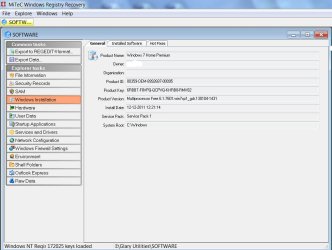
Here is a live screenshot showing the Product Key of DELL Windows 7 Home Premium 64 bit obtained by WRR.

My DELL laptop - which I never use - is dual boot with Windows 8. I booted into Windows 8 and copied the Windows 7 "SOFTWARE" hive from RegBack. Don't bother I am revealing the Product Key. It is the generic OEM key DELL uses for all Windows Home Premium OEM installs and it is no secret.:) ( Windows 8 is retail: I can't show you the key.:D)

So Windows Registry Recovery proved.

29-06-2014 18-28-36.jpg
 

My Computer My Computer

At a glance

Windows 7 Home Premium 32 bit
OS
Windows 7 Home Premium 32 bit
I'm still working on the re-image part of this FUBAR. I'll try your product key suggestions if and when it's determined that this imaging end of the project is a dead end...
 

Attachments

  • Capture7.PNG
    Capture7.PNG
    37.4 KB · Views: 0

My Computer My Computer

At a glance

Windows 7 home premium 64 bitAMD K103.00GB Dual-Channel DDR3 @ 532MHzATI AMD M880G with ATI Mobility Radeon HD 425...
Computer type
Laptop
OS
Windows 7 home premium 64 bit
CPU
AMD K10
Motherboard
Hewlett-Packard 1444 (Socket S1G4)
Memory
3.00GB Dual-Channel DDR3 @ 532MHz
Graphics Card(s)
ATI AMD M880G with ATI Mobility Radeon HD 4250 (HP)
Sound Card
Realtek
Screen Resolution
1366 x 768
Hard Drives
465GB Western Digital
Antivirus
MSE
I would think that's it for the reinstall.

Try the other Product Key reader.

Are the files are still visible in PW Explore or using Copy & Paste - in Windows Recovery Console or a Linux disk? One of the more advanced members like SIW2 or Jumanji might be able to help you break into the encrypted key file more directly.
 
OK, In order to try what had been suggested in the previous post you must make the faulty drive as the boot drive

Instead I would like you to try this with the faulty drive as a second internal drive in your present system as it is.

You should copy the "SOFTWARE" file(hive) on to a pendrive.
Hopefully you should be able to see all details including the Product Key - provided the aborted checkdisk hasn't played foul with it or it was corrupted even before.
Okay... FINALLY something that seems to work. I have the key. Or at least A key, with the requisite 25 character jumble of letters and numbers. And since the image process has gone south I guess I'll have to manually reinstall Windows 7 using the product key just obtained (and thanks for that!), then go to an ASUS site (they manufactured the motherboard) and download the drivers.

One thing confuses me - the machine I'm typing on now is a 64 bit Windows 7 Home Premium. When I go to the root directory for THIS PC, I have 2 program files folders. One is just Program Files. The other is Program Files (x86). The slaved HDD (the one that's bad) only has the one Program Files folder. There is no x86 folder. Doesn't this mean that the OS on the slaved drive is 32 bit? And without having a 32 bit W7 Home Premium disk can I use a 64 bit disk with the ASUS motherboard and the product key I just obtained?

And a legal question - does my friend have any legal recourse against the owners of the computer shop that installed W7 on her tower WITHOUT affixing a COA sticker with the new key? Years ago a friend upgraded from Vista to 7. He ordered 7 online, paid for it, got the download link in an email, burned it to a DVD, and got the product key in a separate email. He never received any official COA sticker. Of course he didn't resell the PC either....
 

My Computer My Computer

At a glance

Windows 7 home premium 64 bitAMD K103.00GB Dual-Channel DDR3 @ 532MHzATI AMD M880G with ATI Mobility Radeon HD 425...
Computer type
Laptop
OS
Windows 7 home premium 64 bit
CPU
AMD K10
Motherboard
Hewlett-Packard 1444 (Socket S1G4)
Memory
3.00GB Dual-Channel DDR3 @ 532MHz
Graphics Card(s)
ATI AMD M880G with ATI Mobility Radeon HD 4250 (HP)
Sound Card
Realtek
Screen Resolution
1366 x 768
Hard Drives
465GB Western Digital
Antivirus
MSE
Yes the slaved drive as you describe is likely 32 bit. I would continue with 32 bit if you have 4gb or less RAM for best performance. If more or you intend to upgrade RAM then use 64 bit.

If you stick with the same steps in Clean Reinstall - Factory OEM Windows 7 which provides the latest official installer, you will get and keep a perfect install for as long as you do. You can then image it so you never have to reinstall again so its worth getting this one perfect with our help.

Note how drivers are suggested to be handled best in Win7. Only import drivers are all updates are installed, with reboots, after enabling Automatically deliver drivers via Windows Update (Step 3). Put your network driver in your backup in case it's not provided during install so you can get online and go right to Updating, making sure to include the Optional drivers right away.

I would have your friend contact the computer shop and ask where the COA sticker is, that MS requires it by law for resale, and we are waiting to hear back the answer in the top tech forums.
 
I am retiring for the day now. Before that:

Try the SOFTWARE hive in the RegBack.

Windows Key will also be available in the SYSTEM hive in that folder. You can copy that also and open it in WRR.

You may also go down one level below, that is just open the config folder.

There also you will find the SOFTWARE and SYSTEM hives. You may copy those also and open in WRR > Windows Installation. (Since these have the same names as those in the RegBack folder, copy these to a different folder on the pendrive )

29-06-2014 23-05-38.jpg

I have no further ideas.

Good Luck.

EDIT: Oh! I see you got the key. That is good. Just check whether you get the same key in System Hive
 

My Computer My Computer

At a glance

Windows 7 Home Premium 32 bit
OS
Windows 7 Home Premium 32 bit
Yes, I would not delete the old drive at all until you have safely activated with the retrieved key, and I'd want it confirmed twice.
 
Do not bother about 32bit or 64 bit. The key is same for both.
 

My Computer My Computer

At a glance

Windows 7 Home Premium 32 bit
OS
Windows 7 Home Premium 32 bit
Back
Top