Solved Determining What Directory(s) and Registry Entries Program Creates

dw85745

New member
Member
VIP
Local time
10:29 PM
Messages
199
When Installing a new program -- Firefox for example - is there anyway to:
1) get or generate a listing on what directories and registry entries the program creates?
2) get or generate a listing on what directories and registry entries for already installed programs?

For security reasons it seems logical that one would need this to set security access for those objects.
 

My Computer My Computer

Computer type
PC/Desktop
Computer Manufacturer/Model Number
build -
OS
Win 7 Pro x32
CPU
Intel I5-4690K
Motherboard
ASUS H-97Plus
Memory
8 GB
Graphics Card(s)
On Board
Sound Card
On Board
Other Info
ASUS MOBO Issues never resolved even by ASUS:
1) MOBO will NOT boot from other than the Default HDD drive.
2) MOBO will NOT boot Most DOS based CDs
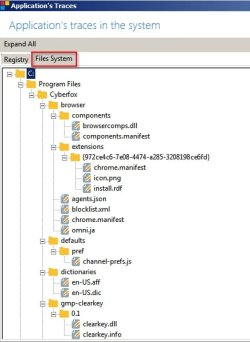
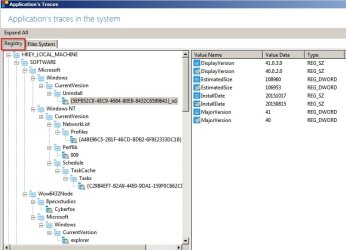
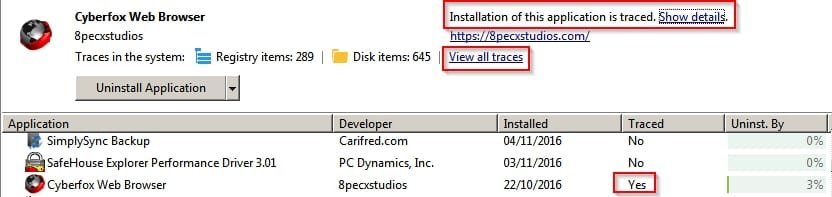
You can do that with software that traces installations.

Application Traced.jpg

Application's Traces.jpg

Application's Traces 2.jpg

I cannot say which software I use because it comes bundled with unwanted extras that are hard to avoid installing and hard to remove. Maybe you could search for similar software.

One alternative: DiffView Free Download - Official Website

However these types of applications monitor all file system and registry changes during install so you need to know which items to exclude. I'm not sure how you do that in DiffView as I have not used it for a while.
 

My Computer My Computer

Computer type
Laptop
Computer Manufacturer/Model Number
ASUS
OS
Microsoft Windows 7 Home Premium 64-bit 7601 Multiprocessor Free Service Pack 1
CPU
AMD C-60 APU with Radeon(tm) HD Graphics
Motherboard
ASUSTeK COMPUTER INC. X501U
Memory
4.00 GB
Graphics Card(s)
AMD Radeon HD 6290 Graphics
Sound Card
(1) AMD High Definition Audio Device (2) Realtek High Defi
Screen Resolution
1366 x 768 x 32 bits (4294967296 colors) @ 60 Hz
Hard Drives
Hitachi HTS545050A7E380 SATA Disk Device
Antivirus
Comodo CIS & FW, SecureAplus App Whitelisting, Threatfire
Browser
Cyberfox 64bit, Opera 64bit, Airfox
Other Info
Spy-The-Spy, HitmanPro.Alert, Norton Connect Safe, MJRegWatcher, BitDefender TrafficLight, Voodoo Shield, Zemana AntiMalware
The best collection of system utilities and diagnostic tools can be found at Windows Sysinternals. One particularly popular program (and one of my most prized tools when it comes to helping people out here on the forums), Process Monitor, records pretty much every action a process can do in verbose detail.

Process Monitor v3.31 description. See link for screenshots.
Process Monitor is an advanced monitoring tool for Windows that shows real-time file system, Registry and process/thread activity. It combines the features of two legacy Sysinternals utilities, Filemon and Regmon, and adds an extensive list of enhancements including rich and non-destructive filtering, comprehensive event properties such session IDs and user names, reliable process information, full thread stacks with integrated symbol support for each operation, simultaneous logging to a file, and much more. Its uniquely powerful features will make Process Monitor a core utility in your system troubleshooting and malware hunting toolkit.

Not only does it tell you in real time what registry or file system locations have been operated on, it will also tell you the data associated with that operation, or will indicate that the operation failed if so. I frequently use it to map GUI configuration settings to registry values, or file data, which then allows me to script the changes.
 
Last edited:

My Computer My Computer

Computer type
PC/Desktop
OS
Windows 10, Windows 8.1 Pro, Windows 7 Professional, OS X El Capitan
Thanks for responses Callender and Pyprohly.

Believe it or not have "played" with both in the past, but had forgot about them.
Process Monitor seems like a better choice and will give me an opportunity to hopefully "really" learn it.
FWIW I attempted to try and get an old program that ran under XP to run under Win 7 (compatability mode did not work) using Process Monitor but never was able to figure out exactly why it errored when executed. Most likely my lack of knowledge in this area.
Why Microsoft never built in an install tracer that is saved and available via Control Panel is beyond me.
 

My Computer My Computer

Computer type
PC/Desktop
Computer Manufacturer/Model Number
build -
OS
Win 7 Pro x32
CPU
Intel I5-4690K
Motherboard
ASUS H-97Plus
Memory
8 GB
Graphics Card(s)
On Board
Sound Card
On Board
Other Info
ASUS MOBO Issues never resolved even by ASUS:
1) MOBO will NOT boot from other than the Default HDD drive.
2) MOBO will NOT boot Most DOS based CDs
Back
Top