Running HP Pavillion m9040n with Windows 7. It started about 3 or 4 months ago. Don't know what started it.
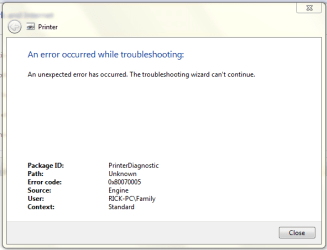
When I logged onto the administrative side of users and click on Computer, devices and printers all my devices show up in the window that opens. When I log out of there and go into the family side of users and click on Computer, devices and printers the window open and the page is blank, the green line at the top just keeps scrolling to the right. It used to show the same as on the administrative side did. It won't reconnize my HP Photosmart 309g scan ability but am still able to print from computer. Is this a Windows software problem as far as the devices and printer on showing up? Thanks
Install the drivers,software that came with the devices onto one of the family accounts that should fix that. If you do not have the disk's that came with the devices go to the company's website and they should be on there somewhere.
Regards,
Andrew
My Computer
Computer type
PC/Desktop
Computer Manufacturer/Model Number
Cyber Power
OS
Windows 8.1 PRO
CPU
AMD FX-4100 3.60 GHz Quad-Core AM3+ CPU 4MB
Motherboard
ASUS M5A78L-M/USB3 AMD 760G (780L)
Memory
8GB (2x4GB) Kingston
Graphics Card(s)
XfX HD R7850 AMD 2GB
Monitor(s) Displays
LG gaming flatron monitor
Screen Resolution
1920×1080
Hard Drives
1TB hitachi 7200RPM 64mb cache
1TB Western digital 7200RPM 64mb cache
PSU
500watt coolermaster gaming power supply
Case
Coolermaster elite gaming case 430
Cooling
CoolerMaster Hyper TX3 Evo + 5 case fans and GPU fan
I,ve reloaded the software from the original disk and the one they offer on the HP website several times on the administrative side and the family side. Every time it uninstalls the software that's on the computer at that time and does a clean install.
Also might I add that I read some where on the forum where a person should run SFC/ Scannow, when I paste that into my start line I can see a momentary black box flash and nothing seems to happen. Am I missing something there? Thanks
You could be... My aunt had the same problem like your having, when i re-installed the software onto the Admin side and and family side it all worked like a charm... I would say try everything you can think of, and what others are saying.
My Computer
Computer type
PC/Desktop
Computer Manufacturer/Model Number
Cyber Power
OS
Windows 8.1 PRO
CPU
AMD FX-4100 3.60 GHz Quad-Core AM3+ CPU 4MB
Motherboard
ASUS M5A78L-M/USB3 AMD 760G (780L)
Memory
8GB (2x4GB) Kingston
Graphics Card(s)
XfX HD R7850 AMD 2GB
Monitor(s) Displays
LG gaming flatron monitor
Screen Resolution
1920×1080
Hard Drives
1TB hitachi 7200RPM 64mb cache
1TB Western digital 7200RPM 64mb cache
PSU
500watt coolermaster gaming power supply
Case
Coolermaster elite gaming case 430
Cooling
CoolerMaster Hyper TX3 Evo + 5 case fans and GPU fan
Still can't get scanner to work when clicking on icon that HP install put on my desktop, HP Solution Center. Today for the first time after I've been haveing trouble trying to scan from computer, I tryed downloading pictures from my SD Card. Usually when I put the SD Card in it opens a window that asks how I want to load pictures and I click on import pictures and videos using Windows Live Photo Gallery, all works well. But to day when I put my SD Card in it opened a smal box down in lower right corner and it said something like something was wrong with first file and wanted to continue, skip, or something else, so I clicked on cancel and another window opened up and it had two icons in it. One was HP Photosmart 309g and the other was SD Card. I clicked on the printer icon just for curiousity sake and it opened the old fameller scan window, like it used to do when I click on scan. It would preview and then I clicked on scan and all worked great. So I closed out of there and tryed clicking the HP Solution Center icon on desktop and then scan and I got the error again.
I tryed going back in Control Panel>All control panel items>auto play and going back to default to try to duplicate that cenerio again but no luck. Does this give someone any ideals?
I'm also going to add a clip of my device manage clip.
See under IEEE 1284.4 compatible printer and then under Imaging devices, looks like there is 3 printers. Could this be some of the problem?
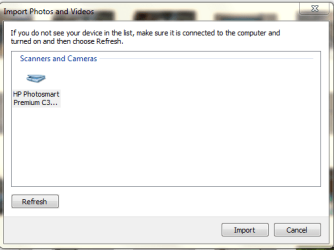
I just found out if I go into Windows Live Photo Gallery and click on the import button in the upper left corner it opens up a screen that says scanners and camera and in that window there is the icon for the printer only. If I click on it, it opens the old scan window that I like and previews and scans like it used too. How can I get this icon on the desktop like it used to be? Also in the scanner and camera window why doesn't it give me the SD Card reader, so I can import from there? Any suggestions appreciated. Thanks
There still is a blank window in Start>printer and devices
Go to Control Panel/Programs and Features and uninstall the HP software, then I would try Driver Sweeper (link in my sig) to uninstall all HP printer drivers. Alternatively you can use Revo Uninstaller to remove the HP stuff, link in sig too. Reboot.
Reinstall the HP drivers and software.
Last edited:
My Computer
Computer type
PC/Desktop
Computer Manufacturer/Model Number
Home Built Desktop By DataTech
OS
Windows 7 Ultimate X64 SP1
CPU
Intel i5-2550K, Differing ~4.4-4.8GHz No built in GPU
Motherboard
ASUS P8Z68-V PRO/GEN3
Memory
16GB G.Skill Sniper 1866MHz @ 2133MHz 2x8GB
Graphics Card(s)
ASUS GTX650TIB-DC2OC-2GD5, (650TI Boost)
Sound Card
Onboard Realtek 5-1
Monitor(s) Displays
Samsung P2570HD
Screen Resolution
1920x1080
Hard Drives
Samsung 840 Pro 256GB SSD for OS, 500GB Seagate Constellation (Enterprise drive) for Data
PSU
Corsair HX650W
Case
Inwin Dragon Rider
Cooling
Hyper 212 EVO w/two Noctua fans, push-pull, @1300 RPM
Keyboard
E-Z Eyes, bright yellow keys with large characters
Mouse
steelseries SENSEI Laser Pro Gaming
Internet Speed
48-51Mbs Mbs down, 11 Mbs up Xfinity Cable
Antivirus
Norton Internet Security 2013
Browser
IE 10, Opera, Pale Moon if needed
Other Info
4 case fans, LG BluRay-RE, ASUS DVD-RW, Mr. Fusion power supply, 1.21 gigawatts.
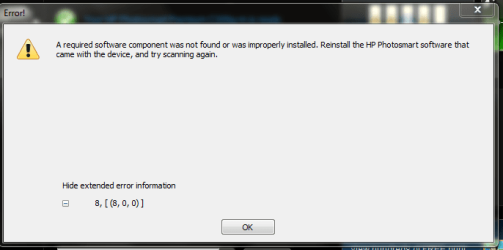
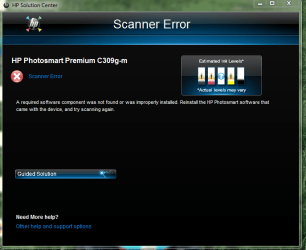
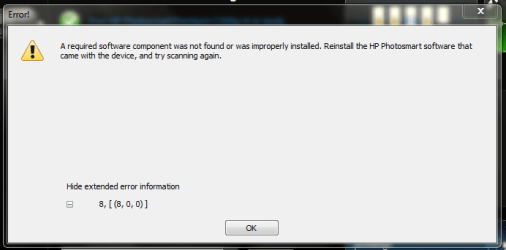
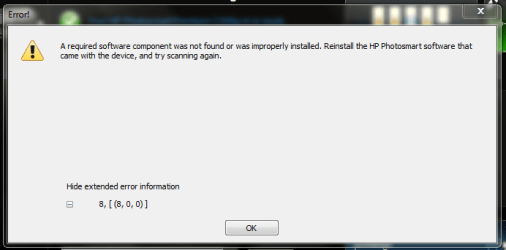
Well I did what you suggested. Then downloaded and installed Driver Sweeper and ran. Reinstalled HP software from disk and it is working like before. Click on HP Solution Center icon on desktop and get the following messages. I can still go into Windows Photo Gallery and click on import and it opens a window that lets me recognize HP Photosmart then it brings up familiar window and lets me preview then scan and it puts it in the right folder in Windows Photo Gallery. Also can open Microsoft Word and print out of there.
You know I was thinking that when I put the disk from HP Photosmart Printer there was a padlock symbol on the disk imagine. I never seen that before. I did login as administrator before install. So I just now put the disk back in and sure enough there is a padlock symbol on the little disk reader down at right corner. So I clicked on the option to open files on disk and it took me to the folders on the disk. I right clicked on the file .exe and it gave me the option to share with no one or to share with homegroup. I tried to click on homegroup and it said I didn't have permission to do that. Thanks
Could installing in Family side, right clicking and logging in as Administrator be my problem. The reason why I don't install on Administrative side is when it restarts after an install is it automatically reboots on family side, then I log off and sign in on Administrator side. Is there a way for me to get computer to have me log in on Administrator side on a software install reboot? Thanks
I think installing with the Admin account for all users would be the better choice. I think as long as there is more than a single account you'll always be given a choice at log in.
My Computer
Computer type
PC/Desktop
Computer Manufacturer/Model Number
Home Built Desktop By DataTech
OS
Windows 7 Ultimate X64 SP1
CPU
Intel i5-2550K, Differing ~4.4-4.8GHz No built in GPU
Motherboard
ASUS P8Z68-V PRO/GEN3
Memory
16GB G.Skill Sniper 1866MHz @ 2133MHz 2x8GB
Graphics Card(s)
ASUS GTX650TIB-DC2OC-2GD5, (650TI Boost)
Sound Card
Onboard Realtek 5-1
Monitor(s) Displays
Samsung P2570HD
Screen Resolution
1920x1080
Hard Drives
Samsung 840 Pro 256GB SSD for OS, 500GB Seagate Constellation (Enterprise drive) for Data
PSU
Corsair HX650W
Case
Inwin Dragon Rider
Cooling
Hyper 212 EVO w/two Noctua fans, push-pull, @1300 RPM
Keyboard
E-Z Eyes, bright yellow keys with large characters
Mouse
steelseries SENSEI Laser Pro Gaming
Internet Speed
48-51Mbs Mbs down, 11 Mbs up Xfinity Cable
Antivirus
Norton Internet Security 2013
Browser
IE 10, Opera, Pale Moon if needed
Other Info
4 case fans, LG BluRay-RE, ASUS DVD-RW, Mr. Fusion power supply, 1.21 gigawatts.
Well I uninstalled HP Printer again and ran Driver Sweeper. Got computer so it will give me the option to install in Admin. and then during reboot give me the option to reboot in Adim. again. Will try reinstalling HP Photosmart Premium 309g-m tomorrow. Do you think it would be better to go to web and download newer version of software from HP web site? Thanks


 I would say try everything you can think of, and what others are saying.