
\Device\Harddisk3\DR3 Error

hahawil

New member
Local time
3:07 PM
Messages
2
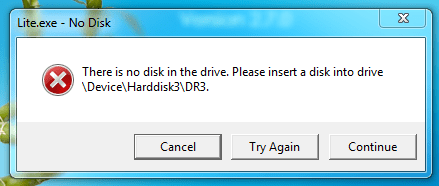
there is no Disk in the Drive. Please insert a disk into the drive \Device\Harddisk3\DR3.


this is a new Dell 560 PC straight out of the box except for xray viewing software downloaded from site

We installed a new PC and hooked it up to the network. X-ray viewing software was downloaded and installed. When we launch the application we get this error window.

This software also has the capabilities to burn a patients x-ray to CD. When the CD is opened on another PC this error will sometimes follow. I have tried it on other W7 Pro units and about half will flash the same error message.

We have been back to the software designers, they say it is a Windows issue.

I tried to diable speedboost, but do not have the tab available.
one post said to put the DVD burner on it own power cable from the PSU--it was already.

Any help is appreciated
 

Attachments
  • Capture.PNG
    Capture.PNG
    11.6 KB · Views: 61

My Computer

Computer Manufacturer/Model Number
Dell 560
OS
7 Pro 64 bit
That error is usually associated with an external USB connected device.

To determine what device is the problem one, open Disk Management and look to see what the 3rd hard disk is. The Disks are listed as Disk 0, Disk 1, Disk 2. Disk 2 is the 3rd Disk and the source of the error.

Let us know what it is and maybe that will give a clue to a cause.
 

My Computer

Computer type
PC/Desktop
Computer Manufacturer/Model Number
Home Built - Jan 2013
OS
Windows 7 64 Bit Home Premium SP1
CPU
i7-3820
Motherboard
Asus P9X79-PRO - Bios 4608
Memory
GSkill F3-14900CL9Q - 16GB
Graphics Card(s)
EVGA GeForce GTX660 - Driver 352.86
Sound Card
On board Realtek ALC898
Monitor(s) Displays
Acer S271HL
Screen Resolution
1920 x 1080
Hard Drives
#1- Samsung 840 Pro Series
#2- Western Digital WD1002FAEX Sata3 Black
#3- Western Digital WD1002FAEX Sata3 Black
PSU
Corsair CMPSU-850TX-V2 - 850 watt (by Seasonic)
Case
Corsair Obsidian 550D
Cooling
Standard 3 120mm case fans, Cooler Master Hyper 212 EVO
Keyboard
MS KC-0405
Mouse
Intellimouse 5-button
Internet Speed
56 Mbits/Sec (on a good day)
Antivirus
Avast & Malwarebytes
Browser
Firefox
Other Info
Asus DVD - DRW-24B1ST 24X
3rd Disk

Disk 0 is the hard drive 1TB 3 patitions (OEM partition, recovery, and C: at 913.66GB)

Disk 1, 2, 3, and 4 (E, F, G, H) all state Removable no Media

This sytem only has the one hardrive and DVD drive installed, one in Sata 0 and the other in Sata 3. i have tried different Sata ports with no help.

thanx so much
 

My Computer

Computer Manufacturer/Model Number
Dell 560
OS
7 Pro 64 bit
See if you can determine which device is being seen as Disk 3 by the system.

My guess is that it is a printer with a card reader that is seen as a disk drive.
 

My Computer

Computer type
PC/Desktop
Computer Manufacturer/Model Number
Home Built - Jan 2013
OS
Windows 7 64 Bit Home Premium SP1
CPU
i7-3820
Motherboard
Asus P9X79-PRO - Bios 4608
Memory
GSkill F3-14900CL9Q - 16GB
Graphics Card(s)
EVGA GeForce GTX660 - Driver 352.86
Sound Card
On board Realtek ALC898
Monitor(s) Displays
Acer S271HL
Screen Resolution
1920 x 1080
Hard Drives
#1- Samsung 840 Pro Series
#2- Western Digital WD1002FAEX Sata3 Black
#3- Western Digital WD1002FAEX Sata3 Black
PSU
Corsair CMPSU-850TX-V2 - 850 watt (by Seasonic)
Case
Corsair Obsidian 550D
Cooling
Standard 3 120mm case fans, Cooler Master Hyper 212 EVO
Keyboard
MS KC-0405
Mouse
Intellimouse 5-button
Internet Speed
56 Mbits/Sec (on a good day)
Antivirus
Avast & Malwarebytes
Browser
Firefox
Other Info
Asus DVD - DRW-24B1ST 24X
That error is usually associated with an external USB connected device.

To determine what device is the problem one, open Disk Management and look to see what the 3rd hard disk is. The Disks are listed as Disk 0, Disk 1, Disk 2. Disk 2 is the 3rd Disk and the source of the error...
The 2nd sentence above is not correct based on my recent experience with Windows 7. I just had an issue with \Device\Harddisk3\DR3 and I figured out it was actually the 4th disk in the Disk Management list, which was labeled "Disk 3" (Disk 0, Disk 1, Disk 2, Disk 3). There is also a program, dd, which will list the Windows block devices for you if you use "dd --list" at the command line.
 
Last edited:

My Computer

Computer type
PC/Desktop
Computer Manufacturer/Model Number
white box
OS
Windows 7 Ultimate x64
CPU
core i5-670
Motherboard
ASUS
Memory
16 GB
Graphics Card(s)
none
Antivirus
Symantec Internet Security
Browser
Firefox
[..... I just had an issue with \Device\Harddisk3\DR3 and I figured out it was actually the 4th disk in the Disk Management list, which was labeled "Disk 3" (Disk 0, Disk 1, Disk 2, Disk 3). There is also a program, dd, which will list the Windows block devices for you if you use "dd --list" at the command line.

This is more than a year old thread, that was left hanging by the OP who never returned.

Can you please elaborate how exactly you resolved the issue?

How does listing the devices with dd help resolve the issue, if it all it did??
 

My Computer

OS
Windows 7 Home Premium 32 bit
[..... I just had an issue with \Device\Harddisk3\DR3 and I figured out it was actually the 4th disk in the Disk Management list, which was labeled "Disk 3" (Disk 0, Disk 1, Disk 2, Disk 3). There is also a program, dd, which will list the Windows block devices for you if you use "dd --list" at the command line.

This is more than a year old thread, that was left hanging by the OP who never returned.

Can you please elaborate how exactly you resolved the issue?

How does listing the devices with dd help resolve the issue, if it all it did??
Yes, I understand it is an old thread, but it did come up in a google search of "\Device\Harddisk3\DR3", which I did in order to try and figure out which device / drive letter it was. In my case, this device turned out to be a flash card reader that was empty, but the drive letter that was assigned to that that drive (which I was trying to figure out since Windows wouldn't directly tell me(!)) was in my command path, so I was getting the same error as at the top of this thread every time I typed in a command ("There is no disk in the drive..."). I resolved my particular problem (not the same problem as in this thread) by changing the drive letter of that device in the Disk Management software (since I was not able to change my path). My intent here wasn't so much to answer the exact problem in this thread but instead to correct some misinformation for the next person who does the same search.

Since Windows uses "\Device\Harddisk#\DR#" in its event logs for disk errors (and for other disk diagnostics, as evidenced by this thread) and most people don't know what that means or what disk it refers to (it is one of the poorer diagnostic messages in Windows, IMHO), I wanted to point people to "dd --list" as a useful tool for figuring it out.
 

My Computer

Computer type
PC/Desktop
Computer Manufacturer/Model Number
white box
OS
Windows 7 Ultimate x64
CPU
core i5-670
Motherboard
ASUS
Memory
16 GB
Graphics Card(s)
none
Antivirus
Symantec Internet Security
Browser
Firefox
Was it an external USB Flash card reader?
 

My Computer

OS
Windows 7 Home Premium 32 bit

My Computer

Computer type
PC/Desktop
Computer Manufacturer/Model Number
white box
OS
Windows 7 Ultimate x64
CPU
core i5-670
Motherboard
ASUS
Memory
16 GB
Graphics Card(s)
none
Antivirus
Symantec Internet Security
Browser
Firefox
I am going to bombard you.:)

But that for tomorrow morning.
 

My Computer

OS
Windows 7 Home Premium 32 bit
You did your own research and resolved the issue you faced. I appreciate.

You also took time to share your experience that could help others. Good and welcome.

That is the pat and now the punch.:)

Even in your case the error was associated with an external USB device.

"That error is usually associated with an external USB connected device." No misinformation from TVeblen as quoted by you.

Next Disk 2 in the Disk Management will be the DR3 in the error message. Very correct and no misinformation here too.

I haven't used dd anytime and therefore would not comment on its efficacy to pinpoint the problem device as you have propounded except stating I generally abhor advising the command line way of doing things. It may suit a geek but not an ordinary average user and my common sense tells me that knowing that it is usually associated with connected USB devices one can safely pull those out to determine which one is causing that problem. Again that is not the solution but only exploration since the device itself is not a problem (in most cases).

Coming to the solution, you assigned a different drive letter and presto your problem was resolved. When you did a google search on this error message, I am sure you must have also come across "ghost devices" being mentioned and their elimination as one possible solution.. Windows gets confused with these non-present devices and at times and in rare cases even changing the drive letter also will not resolve the problem.:)

One such case here http://www.sevenforums.com/hardware...b-drives-not-recognised-not-drive-letter.html

In general, removing the non-present devices by doing a drive clean up as here http://www.sevenforums.com/hardware...-recognised-not-drive-letter.html#post2477076 in most cases should resolve this problem.

( It is a different story if some programs are set to look for a specific device with a specific drive letter and in those cases one has to be alert and check whether the intended device is getting the same drive letter and change it if necessary before running the program or resort to other means of setting the specific drive letter to that device automatically.)

What has gone in here should definitely help those looking for a solution for this problem and I wouldn't have entered this thread but for your post. So thank you for that.
 

My Computer

OS
Windows 7 Home Premium 32 bit
...Next Disk 2 in the Disk Management will be the DR3 in the error message. Very correct and no misinformation here too...
Not so in my case. DR3 was associated with Disk 3, not Disk 2. This lead me down the wrong path for quite a while and was the entire reason that I posted (and also mentioned dd). I have edited my first post to be more specific (changed "This" to "The second sentence above").
 
Last edited:

My Computer

Computer type
PC/Desktop
Computer Manufacturer/Model Number
white box
OS
Windows 7 Ultimate x64
CPU
core i5-670
Motherboard
ASUS
Memory
16 GB
Graphics Card(s)
none
Antivirus
Symantec Internet Security
Browser
Firefox
So you "determined which device is being seen as Disk 3 by the system"
Good job!
 

My Computer

Computer type
PC/Desktop
Computer Manufacturer/Model Number
Home Built - Jan 2013
OS
Windows 7 64 Bit Home Premium SP1
CPU
i7-3820
Motherboard
Asus P9X79-PRO - Bios 4608
Memory
GSkill F3-14900CL9Q - 16GB
Graphics Card(s)
EVGA GeForce GTX660 - Driver 352.86
Sound Card
On board Realtek ALC898
Monitor(s) Displays
Acer S271HL
Screen Resolution
1920 x 1080
Hard Drives
#1- Samsung 840 Pro Series
#2- Western Digital WD1002FAEX Sata3 Black
#3- Western Digital WD1002FAEX Sata3 Black
PSU
Corsair CMPSU-850TX-V2 - 850 watt (by Seasonic)
Case
Corsair Obsidian 550D
Cooling
Standard 3 120mm case fans, Cooler Master Hyper 212 EVO
Keyboard
MS KC-0405
Mouse
Intellimouse 5-button
Internet Speed
56 Mbits/Sec (on a good day)
Antivirus
Avast & Malwarebytes
Browser
Firefox
Other Info
Asus DVD - DRW-24B1ST 24X
So you "determined which device is being seen as Disk 3 by the system"
Good job!
Ah. I did not see that post, which isn't the same recommendation you gave in your previous post. Why did you change from Disk 2 to Disk 3 in your two posts?
 

My Computer

Computer type
PC/Desktop
Computer Manufacturer/Model Number
white box
OS
Windows 7 Ultimate x64
CPU
core i5-670
Motherboard
ASUS
Memory
16 GB
Graphics Card(s)
none
Antivirus
Symantec Internet Security
Browser
Firefox
It's post #4
 

My Computer

Computer type
PC/Desktop
Computer Manufacturer/Model Number
Home Built - Jan 2013
OS
Windows 7 64 Bit Home Premium SP1
CPU
i7-3820
Motherboard
Asus P9X79-PRO - Bios 4608
Memory
GSkill F3-14900CL9Q - 16GB
Graphics Card(s)
EVGA GeForce GTX660 - Driver 352.86
Sound Card
On board Realtek ALC898
Monitor(s) Displays
Acer S271HL
Screen Resolution
1920 x 1080
Hard Drives
#1- Samsung 840 Pro Series
#2- Western Digital WD1002FAEX Sata3 Black
#3- Western Digital WD1002FAEX Sata3 Black
PSU
Corsair CMPSU-850TX-V2 - 850 watt (by Seasonic)
Case
Corsair Obsidian 550D
Cooling
Standard 3 120mm case fans, Cooler Master Hyper 212 EVO
Keyboard
MS KC-0405
Mouse
Intellimouse 5-button
Internet Speed
56 Mbits/Sec (on a good day)
Antivirus
Avast & Malwarebytes
Browser
Firefox
Other Info
Asus DVD - DRW-24B1ST 24X

My Computer

Computer type
PC/Desktop
Computer Manufacturer/Model Number
white box
OS
Windows 7 Ultimate x64
CPU
core i5-670
Motherboard
ASUS
Memory
16 GB
Graphics Card(s)
none
Antivirus
Symantec Internet Security
Browser
Firefox
My first post was typed up in a general sense based upon available data.
My second post was typed up based upon additional data.
The search for the answer is seldom a straight line.
You sometimes need to be more flexible in your thinking.
 

My Computer

Computer type
PC/Desktop
Computer Manufacturer/Model Number
Home Built - Jan 2013
OS
Windows 7 64 Bit Home Premium SP1
CPU
i7-3820
Motherboard
Asus P9X79-PRO - Bios 4608
Memory
GSkill F3-14900CL9Q - 16GB
Graphics Card(s)
EVGA GeForce GTX660 - Driver 352.86
Sound Card
On board Realtek ALC898
Monitor(s) Displays
Acer S271HL
Screen Resolution
1920 x 1080
Hard Drives
#1- Samsung 840 Pro Series
#2- Western Digital WD1002FAEX Sata3 Black
#3- Western Digital WD1002FAEX Sata3 Black
PSU
Corsair CMPSU-850TX-V2 - 850 watt (by Seasonic)
Case
Corsair Obsidian 550D
Cooling
Standard 3 120mm case fans, Cooler Master Hyper 212 EVO
Keyboard
MS KC-0405
Mouse
Intellimouse 5-button
Internet Speed
56 Mbits/Sec (on a good day)
Antivirus
Avast & Malwarebytes
Browser
Firefox
Other Info
Asus DVD - DRW-24B1ST 24X
My first post was typed up in a general sense based upon available data.
My second post was typed up based upon additional data.
The search for the answer is seldom a straight line.
You sometimes need to be more flexible in your thinking.
Why not just edit post #2 and correct it?
 

My Computer

Computer type
PC/Desktop
Computer Manufacturer/Model Number
white box
OS
Windows 7 Ultimate x64
CPU
core i5-670
Motherboard
ASUS
Memory
16 GB
Graphics Card(s)
none
Antivirus
Symantec Internet Security
Browser
Firefox
That is considered bad "netiquette". A forum or newsgroup thread should proceed like a conversation. Editing past posts changes the conversation and makes the following posters look like fools.
It is always important to read the entire thread.
The only exception is when a thread goes off on some tangent. Like this one.
 

My Computer

Computer type
PC/Desktop
Computer Manufacturer/Model Number
Home Built - Jan 2013
OS
Windows 7 64 Bit Home Premium SP1
CPU
i7-3820
Motherboard
Asus P9X79-PRO - Bios 4608
Memory
GSkill F3-14900CL9Q - 16GB
Graphics Card(s)
EVGA GeForce GTX660 - Driver 352.86
Sound Card
On board Realtek ALC898
Monitor(s) Displays
Acer S271HL
Screen Resolution
1920 x 1080
Hard Drives
#1- Samsung 840 Pro Series
#2- Western Digital WD1002FAEX Sata3 Black
#3- Western Digital WD1002FAEX Sata3 Black
PSU
Corsair CMPSU-850TX-V2 - 850 watt (by Seasonic)
Case
Corsair Obsidian 550D
Cooling
Standard 3 120mm case fans, Cooler Master Hyper 212 EVO
Keyboard
MS KC-0405
Mouse
Intellimouse 5-button
Internet Speed
56 Mbits/Sec (on a good day)
Antivirus
Avast & Malwarebytes
Browser
Firefox
Other Info
Asus DVD - DRW-24B1ST 24X
That is considered bad "netiquette". A forum or newsgroup thread should proceed like a conversation. Editing past posts changes the conversation and makes the following posters look like fools.
It is always important to read the entire thread.
The only exception is when a thread goes off on some tangent. Like this one.

Exactly. I have the same notions. It was only recently that I jumped on an OP or poster who made drastic changes to his earlier post, that made whatever I wrote subsequently completely out of context and wayward that any one who read the thread would consider me an absolute idiot ( and how SevenForums could have given a medal for such an absolute idiot. ;) ). I am not. Incidentally it was the first time I lost my cool and used a :(. :)

I am a member of another Indian Forum which has strict standards on written English ( no slang, no net language or blabber, no mention of hacking and copying etc., etc.,) and no editing beyond 20 minutes of posting. If the poster has anything to modify beyond 20 minutes, he has to do it only on a new post in that thread.

And I have been seriously considering suggesting this to the Admin. I think it is time for Admin to take note of this.
 

My Computer

OS
Windows 7 Home Premium 32 bit
Back
Top