
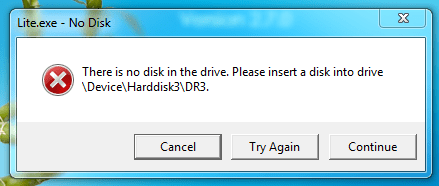
there is no Disk in the Drive. Please insert a disk into the drive \Device\Harddisk3\DR3.
this is a new Dell 560 PC straight out of the box except for xray viewing software downloaded from site
We installed a new PC and hooked it up to the network. X-ray viewing software was downloaded and installed. When we launch the application we get this error window.
This software also has the capabilities to burn a patients x-ray to CD. When the CD is opened on another PC this error will sometimes follow. I have tried it on other W7 Pro units and about half will flash the same error message.
We have been back to the software designers, they say it is a Windows issue.
I tried to diable speedboost, but do not have the tab available.
one post said to put the DVD burner on it own power cable from the PSU--it was already.
Any help is appreciated
this is a new Dell 560 PC straight out of the box except for xray viewing software downloaded from site
We installed a new PC and hooked it up to the network. X-ray viewing software was downloaded and installed. When we launch the application we get this error window.
This software also has the capabilities to burn a patients x-ray to CD. When the CD is opened on another PC this error will sometimes follow. I have tried it on other W7 Pro units and about half will flash the same error message.
We have been back to the software designers, they say it is a Windows issue.
I tried to diable speedboost, but do not have the tab available.
one post said to put the DVD burner on it own power cable from the PSU--it was already.
Any help is appreciated
Attachments
My Computer
- Computer Manufacturer/Model Number
- Dell 560
- OS
- 7 Pro 64 bit


 ). I am not. Incidentally it was the first time I lost my cool and used a
  .
.