Device Manager - Add or Remove from "My Computer" Context Menu

Device Manager - Add or Remove from "My Computer" Context Menu

Add "Device Manager" to "My Computer" Context Menu in Vista, Windows 7, and Windows 8

   Information
This will show you how to add or remove Device Manager to the "My Computer" context menu for all users in Vista, Windows 7, and Windows 8.

You must be logged in as an administrator to be able to do the steps in this tutorial.

   Note
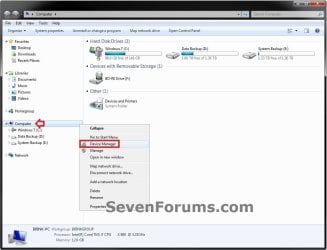
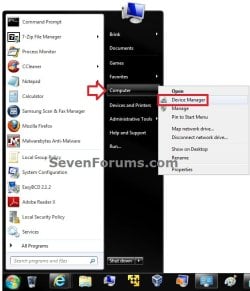
In Vista and Windows 7, this is for when users right click on Computer from the Start Menu, navigation pane in Windows Explorer, or desktop icon.

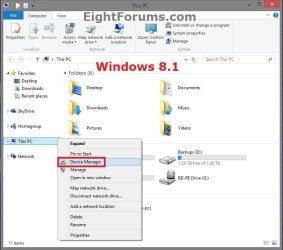
In Windows 8, Windows RT, Windows 8.1, and Windows RT 8.1, this is for when users right click or swipe down on This PC from the navigation pane in File Explorer, or the Computer desktop icon.


EXAMPLE: "Desktop Manager" added to "My Computer" Context Menu
NOTE: In Vista, the icons will not be displayed for the "Desktop Manager" context menu item as they do below in Windows 7.
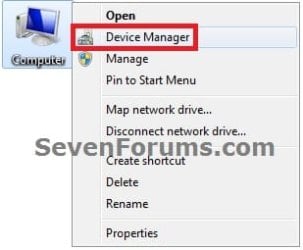
Computer_Desktop_Icon.jpg

Navigation_Pane.jpg

This_PC.jpg

Start_Menu.jpg
Here's How:
1. To Add "Device Manager" to "My Computer" Context Menu
A) Click/tap on the Download button below to download the file below, and go to step 3 below.
Add_Device_Manager_to_My_Computer_Context_Menu.reg

Download


2. To Remove "Device Manager" from "My Computer" Context Menu
NOTE: This is the default setting.
A) Click/tap on the Download button below to download the file below, and go to step 3 below.
Remove_Device_Manager_from_My_Computer_Context_Menu.reg

Download


3. Save the .reg file to your desktop.

4. Double click/tap on the downloaded .reg file to merge it.

5. If prompted, click on Run, Yes (UAC-Windows 7/8) or Continue (UAC-Vista), Yes, and OK to approve merging the .reg file.

6. You can now delete the downloaded .reg file if you like.
That's it
Shawn


Attachments

Last edited:
Another handy one Shawn

Thanks
 

My Computer

Computer Manufacturer/Model Number
acer aspire 5935g
OS
Windows 7 Home Premium x64 SP1
CPU
intel(R)core(TM)2 duo CPU T6600 @ 2.20GHz
Motherboard
intel gm45/gm47 revision 07
Memory
3 gb ddr3
Graphics Card(s)
ati radeon hd4570/512mb
Monitor(s) Displays
lop156wh2-tle1 15.3 flat
Screen Resolution
1366x768
Hard Drives
OCZ-Agility3 60gig ssd
320gig external hdd
500gig external hdd
Mouse
Optical
Internet Speed
30Mbps Down/30Mbps Up
Hey man thank you very much!!!! :)))) I just posted today this question and there you do the answer on my Facebook wall ;)
Thanks Brink
 

My Computer

Computer Manufacturer/Model Number
SONY VAIO VPCEB1S1E
OS
Windows 7 SP1 Ultimate x64
CPU
Intel Core i5 M430 2.27 GHz 2.27 GHz
Motherboard
Intel Ibex Peak-M HM55, Intel Arrandale
Memory
3952 MB (DDR3-1066 DDR3 SDRAM)
Graphics Card(s)
ATI Mobility Radeon HD 5650 (1024 MB)
Sound Card
Realtek ALC269 @ Intel Ibex Peak PCH - High Definition Audio
Monitor(s) Displays
Generic PnP Monitor [NoDB]
Screen Resolution
1366x768
Hard Drives
Toshiba MK-5055GSX 500 Gb
You're most welcome guys. :)
 

My Computer

Computer type
PC/Desktop
Computer Manufacturer/Model Number
Self built custom
OS
64-bit Windows 11 Pro for Workstations
CPU
Intel i7-8700K OC'd to 5 GHz
Motherboard
ASUS ROG Maximus XI Formula Z390
Memory
64 GB (4x16GB) G.SKILL TridentZ RGB DDR4 3600 MHz
Graphics Card(s)
ASUS ROG-STRIX-GTX1080TI-O11G-GAMING
Sound Card
Integrated
Monitor(s) Displays
2 x Samsung Odyssey G7 27"
Screen Resolution
2560x1440
Hard Drives
1TB Samsung 990 PRO M.2,
4TB Samsung 990 PRO PRO M.2,
TerraMaster F8 SSD Plus NAS
PSU
Seasonic Prime Titanium 850W
Case
Thermaltake Core P3
Cooling
Corsair Hydro H115i
Keyboard
Logitech wireless K800
Mouse
Logitech MX Master 4
Internet Speed
2 Gb/s Download and 100 Mb/s Upload
Antivirus
Malwarebyte Anti-Malware Premium
Browser
Google Chrome
Other Info
Logitech Z625 speaker system,
Logitech BRIO 4K Pro webcam,
HP Color LaserJet Pro MFP M477fdn,
APC SMART-UPS RT 1000 XL - SURT1000XLI,
Galaxy S23 Plus phone
Doesn't seem to work on Windows 7 64 bit, while the last line in the .reg file does work to open the device manager, for some reason the context menu entry doesn't show up when I right click on the 'Computer' icon on my desktop. I have the 'Manage' entry in my right click context menu and it works as expected, however this Device Manager tweak doesn't seem to work for me for some reason. I opened the relevant key in regedit and noticed several distinct differences in the information contained in the keys, I wonder if some of those differences might not be to blame for why it won't work for me. For example for the 'Manage' context menu entry there is a String Value named 'MUIVerb' with the following information in it "@%systemroot%\system32\mycomput.dll,-400", the 'Default' entry also contains the same information. Could this difference be the problem?
 

My Computer

Computer Manufacturer/Model Number
Custom Built
OS
Windows 7 Ultimate x64 w/SP1
CPU
AMD FX6100
Motherboard
Gigabyte 78LMT-S2P
Memory
8Gb DDR3-1333 (Kingston Hyper-X)
Graphics Card(s)
XFX nVidia GT520 PCIe w/2Gb Video Memory
Sound Card
OEM on board audio
Monitor(s) Displays
Acer X193w 19" widescreen lcd
Screen Resolution
1440x900 32bit color depth
Hard Drives
2x 1Tb Hitachi Deskstar SATA drives (HDS721010CLA332)
1x 500Gb Hitachi Deskstar SATA drive in external USB enclosure (HDS721050CLA362)
PSU
Antec 450 watt
Case
Antec Full Tower
Cooling
Air Cooled 4x 80mm case fans (2 front, 2 rear)
Keyboard
2nd hand eMachines PS2 Keyboard (model KB-0108)
Mouse
Kingston Pro-Fit Full Size wired mouse
Internet Speed
6Mb
A little troubleshooting I tried

Additionally if I recreate the MUIVerb entry in the key for the Device Manager entry and copy the data to the 'default' entry it shows up in my context menu now as a 2nd 'Manage' entry, however it also messes up the icon settings for my hard drives when I open Windows Explorer. If I strip away the ',-400' it then shows up in the context menu as 'Device Manager' as it should (and even works properly, as did the 2nd 'Manage' entry mentioned above). However I'm left with the same icon problem as before, the icons show up looking like a sheet of paper with the corner folded over and an image in the center that looks kind of like the right hand pane of windows explorer in 'Icon' view mode. Any idea what I'm missing here?
 

My Computer

Computer Manufacturer/Model Number
Custom Built
OS
Windows 7 Ultimate x64 w/SP1
CPU
AMD FX6100
Motherboard
Gigabyte 78LMT-S2P
Memory
8Gb DDR3-1333 (Kingston Hyper-X)
Graphics Card(s)
XFX nVidia GT520 PCIe w/2Gb Video Memory
Sound Card
OEM on board audio
Monitor(s) Displays
Acer X193w 19" widescreen lcd
Screen Resolution
1440x900 32bit color depth
Hard Drives
2x 1Tb Hitachi Deskstar SATA drives (HDS721010CLA332)
1x 500Gb Hitachi Deskstar SATA drive in external USB enclosure (HDS721050CLA362)
PSU
Antec 450 watt
Case
Antec Full Tower
Cooling
Air Cooled 4x 80mm case fans (2 front, 2 rear)
Keyboard
2nd hand eMachines PS2 Keyboard (model KB-0108)
Mouse
Kingston Pro-Fit Full Size wired mouse
Internet Speed
6Mb
Hello Bartman,

The differences with "Manage" make no difference. "Device Manager" works on both 32-bit and 64-bit Windows 7 as is.

Are you saying that it added "Device Manager" to your context menu, but doesn't do anything when you click on it?

How about from the other locations?

Are you logged in as an administrator?
 

My Computer

Computer type
PC/Desktop
Computer Manufacturer/Model Number
Self built custom
OS
64-bit Windows 11 Pro for Workstations
CPU
Intel i7-8700K OC'd to 5 GHz
Motherboard
ASUS ROG Maximus XI Formula Z390
Memory
64 GB (4x16GB) G.SKILL TridentZ RGB DDR4 3600 MHz
Graphics Card(s)
ASUS ROG-STRIX-GTX1080TI-O11G-GAMING
Sound Card
Integrated
Monitor(s) Displays
2 x Samsung Odyssey G7 27"
Screen Resolution
2560x1440
Hard Drives
1TB Samsung 990 PRO M.2,
4TB Samsung 990 PRO PRO M.2,
TerraMaster F8 SSD Plus NAS
PSU
Seasonic Prime Titanium 850W
Case
Thermaltake Core P3
Cooling
Corsair Hydro H115i
Keyboard
Logitech wireless K800
Mouse
Logitech MX Master 4
Internet Speed
2 Gb/s Download and 100 Mb/s Upload
Antivirus
Malwarebyte Anti-Malware Premium
Browser
Google Chrome
Other Info
Logitech Z625 speaker system,
Logitech BRIO 4K Pro webcam,
HP Color LaserJet Pro MFP M477fdn,
APC SMART-UPS RT 1000 XL - SURT1000XLI,
Galaxy S23 Plus phone
Bartman,

Give this .reg file below a try to see how it works for you. It's the same except using an "Expandable String Value" instead of "String Value" entries. It'll remove the old entry, and replace it with this one for expandable. :)
 

Attachments

My Computer

Computer type
PC/Desktop
Computer Manufacturer/Model Number
Self built custom
OS
64-bit Windows 11 Pro for Workstations
CPU
Intel i7-8700K OC'd to 5 GHz
Motherboard
ASUS ROG Maximus XI Formula Z390
Memory
64 GB (4x16GB) G.SKILL TridentZ RGB DDR4 3600 MHz
Graphics Card(s)
ASUS ROG-STRIX-GTX1080TI-O11G-GAMING
Sound Card
Integrated
Monitor(s) Displays
2 x Samsung Odyssey G7 27"
Screen Resolution
2560x1440
Hard Drives
1TB Samsung 990 PRO M.2,
4TB Samsung 990 PRO PRO M.2,
TerraMaster F8 SSD Plus NAS
PSU
Seasonic Prime Titanium 850W
Case
Thermaltake Core P3
Cooling
Corsair Hydro H115i
Keyboard
Logitech wireless K800
Mouse
Logitech MX Master 4
Internet Speed
2 Gb/s Download and 100 Mb/s Upload
Antivirus
Malwarebyte Anti-Malware Premium
Browser
Google Chrome
Other Info
Logitech Z625 speaker system,
Logitech BRIO 4K Pro webcam,
HP Color LaserJet Pro MFP M477fdn,
APC SMART-UPS RT 1000 XL - SURT1000XLI,
Galaxy S23 Plus phone
Thank you for taking the time to reply, let me clarify things a little.

When I first tried the .reg file from the main article on this thread it didn't add anything to my 'Computer' right click context menu, not a single new entry.

Then I tried playing around with the registry entries I mentioned and by copying the 2 values from the pre-existing 'Manage' context menu entry (the one that has the blue and yellow UAC style shield icon next to it). I was first able to get a second 'Manage' entry to appear in my 'Computer' context menu, this one had the icon depicted showing the little toolbox in front of a computer though, when I clicked this new 'Manage' entry it opened the Device Manager. The other one opened a window with a title of 'Computer Management'.

I was hoping it could get it to actually show as 'Device Manager' in my 'Computer' right click context menu so I tried removing the ",-400" from the copied values. This time after restarting it successfully showed up as 'Device Manager' and even had the correct icon still too. And this new 'Device Manager' entry functioned as the original .reg file was supposed to (even though it didn't for me until I started playing around with regestry entries within the key that they .reg file creates only, no other keys were modified by me).

Unfortunately around this time I noticed that my Hard Drive icons were 'missing' when I opened 'Computer'. The image below is clipped from a screen shot and depicts the drives listed in 'Computer', as you can see the icons for drive C:/D:/K: are missing their 'normal' icons.


The new test file you shared worked right off the bat to add the 'Device Manager' entry but even though I had deleted the changes I had made in the registry before using it I still have messed up drive icons.
 
Last edited by a moderator:

My Computer

Computer Manufacturer/Model Number
Custom Built
OS
Windows 7 Ultimate x64 w/SP1
CPU
AMD FX6100
Motherboard
Gigabyte 78LMT-S2P
Memory
8Gb DDR3-1333 (Kingston Hyper-X)
Graphics Card(s)
XFX nVidia GT520 PCIe w/2Gb Video Memory
Sound Card
OEM on board audio
Monitor(s) Displays
Acer X193w 19" widescreen lcd
Screen Resolution
1440x900 32bit color depth
Hard Drives
2x 1Tb Hitachi Deskstar SATA drives (HDS721010CLA332)
1x 500Gb Hitachi Deskstar SATA drive in external USB enclosure (HDS721050CLA362)
PSU
Antec 450 watt
Case
Antec Full Tower
Cooling
Air Cooled 4x 80mm case fans (2 front, 2 rear)
Keyboard
2nd hand eMachines PS2 Keyboard (model KB-0108)
Mouse
Kingston Pro-Fit Full Size wired mouse
Internet Speed
6Mb
I did uninstall one piece of software around the time this was giving me problems and I wonder if maybe that might be partly to blame for the problem now that I think of it (Trial version of Hard Drive Sentinel, I was hoping it would display S.M.A.R.T. data for an external drive I have that I think is on the brink of failing since it makes some odd noises occasionally). But I used a pretty popular removal tool that I've had excellent results with in the past to clean up any leftovers from it (IObit Uninstaller, many reviews rate it even higher than Revo Uninstaller, and it's a much cleaner and easier to use program too).

I tried rebuilding the icon cache too hoping it would restore the default hard drive icons on reboot. It's a little odd I think that it only seems to be hard drives that are affected, not flash drives, or cd/dvd drives (which is what is really making me lean towards Hard Drive Sentinel as the cause now).
 
Last edited:

My Computer

Computer Manufacturer/Model Number
Custom Built
OS
Windows 7 Ultimate x64 w/SP1
CPU
AMD FX6100
Motherboard
Gigabyte 78LMT-S2P
Memory
8Gb DDR3-1333 (Kingston Hyper-X)
Graphics Card(s)
XFX nVidia GT520 PCIe w/2Gb Video Memory
Sound Card
OEM on board audio
Monitor(s) Displays
Acer X193w 19" widescreen lcd
Screen Resolution
1440x900 32bit color depth
Hard Drives
2x 1Tb Hitachi Deskstar SATA drives (HDS721010CLA332)
1x 500Gb Hitachi Deskstar SATA drive in external USB enclosure (HDS721050CLA362)
PSU
Antec 450 watt
Case
Antec Full Tower
Cooling
Air Cooled 4x 80mm case fans (2 front, 2 rear)
Keyboard
2nd hand eMachines PS2 Keyboard (model KB-0108)
Mouse
Kingston Pro-Fit Full Size wired mouse
Internet Speed
6Mb
Yep, it sounds like the "Hard Drive Sentinel" may have done something since there's nothing in the .reg files from this tutorial that would affect drive icons.

As a test, download and merge the .reg files for the listed Drive and Directory options listed in the tutorial below. They will restore the default associations for these items, and hopefully the default icon as well.

http://www.sevenforums.com/tutorials/19449-default-file-type-associations-restore.html
 

My Computer

Computer type
PC/Desktop
Computer Manufacturer/Model Number
Self built custom
OS
64-bit Windows 11 Pro for Workstations
CPU
Intel i7-8700K OC'd to 5 GHz
Motherboard
ASUS ROG Maximus XI Formula Z390
Memory
64 GB (4x16GB) G.SKILL TridentZ RGB DDR4 3600 MHz
Graphics Card(s)
ASUS ROG-STRIX-GTX1080TI-O11G-GAMING
Sound Card
Integrated
Monitor(s) Displays
2 x Samsung Odyssey G7 27"
Screen Resolution
2560x1440
Hard Drives
1TB Samsung 990 PRO M.2,
4TB Samsung 990 PRO PRO M.2,
TerraMaster F8 SSD Plus NAS
PSU
Seasonic Prime Titanium 850W
Case
Thermaltake Core P3
Cooling
Corsair Hydro H115i
Keyboard
Logitech wireless K800
Mouse
Logitech MX Master 4
Internet Speed
2 Gb/s Download and 100 Mb/s Upload
Antivirus
Malwarebyte Anti-Malware Premium
Browser
Google Chrome
Other Info
Logitech Z625 speaker system,
Logitech BRIO 4K Pro webcam,
HP Color LaserJet Pro MFP M477fdn,
APC SMART-UPS RT 1000 XL - SURT1000XLI,
Galaxy S23 Plus phone
Ok, got my drive icons fixed, the idiots who created Hard Drive Sentinel have a feature that changes the default drive icons for some reason, and the feature is enabled by default but when you uninstall the software it doesn't restore the default icons for you, you have to first go into HD Sentinel's options and uncheck the feature to change the drive icons and THEN you can uninstall the software and not have problems with the drive icons being messed up.

Though this doesn't change the fact that initially the .reg file that's supposed to add a 'Device Manager' context menu entry did not work at all for me, and only worked after I 'mucked around a bit' with some registry settings that I probably shouldn't have.

But the 'Add_test.reg' file that Brink posted worked fine for me after I cleaned up the previous entry using the 'Remove_Device_Manager_from_My_Computer_Context_Menu.reg' file above. I don't know why the original one wouldn't work, but at least now I have the context menu entry and it works to open the device manager the way I wanted. Though I can't help but wonder if it wouldn't have been easier to have it simply launch "devmgmt.msc" instead of the whole convoluted 'rundll.exe...........' method.
 

My Computer

Computer Manufacturer/Model Number
Custom Built
OS
Windows 7 Ultimate x64 w/SP1
CPU
AMD FX6100
Motherboard
Gigabyte 78LMT-S2P
Memory
8Gb DDR3-1333 (Kingston Hyper-X)
Graphics Card(s)
XFX nVidia GT520 PCIe w/2Gb Video Memory
Sound Card
OEM on board audio
Monitor(s) Displays
Acer X193w 19" widescreen lcd
Screen Resolution
1440x900 32bit color depth
Hard Drives
2x 1Tb Hitachi Deskstar SATA drives (HDS721010CLA332)
1x 500Gb Hitachi Deskstar SATA drive in external USB enclosure (HDS721050CLA362)
PSU
Antec 450 watt
Case
Antec Full Tower
Cooling
Air Cooled 4x 80mm case fans (2 front, 2 rear)
Keyboard
2nd hand eMachines PS2 Keyboard (model KB-0108)
Mouse
Kingston Pro-Fit Full Size wired mouse
Internet Speed
6Mb
I'm happy to hear that you got it all sorted and working now.

If you use just devmgmt.msc instead in the registry, you'll get an error instead of Device Manager opening. This is even though running devmgmt.msc normally works.
 

My Computer

Computer type
PC/Desktop
Computer Manufacturer/Model Number
Self built custom
OS
64-bit Windows 11 Pro for Workstations
CPU
Intel i7-8700K OC'd to 5 GHz
Motherboard
ASUS ROG Maximus XI Formula Z390
Memory
64 GB (4x16GB) G.SKILL TridentZ RGB DDR4 3600 MHz
Graphics Card(s)
ASUS ROG-STRIX-GTX1080TI-O11G-GAMING
Sound Card
Integrated
Monitor(s) Displays
2 x Samsung Odyssey G7 27"
Screen Resolution
2560x1440
Hard Drives
1TB Samsung 990 PRO M.2,
4TB Samsung 990 PRO PRO M.2,
TerraMaster F8 SSD Plus NAS
PSU
Seasonic Prime Titanium 850W
Case
Thermaltake Core P3
Cooling
Corsair Hydro H115i
Keyboard
Logitech wireless K800
Mouse
Logitech MX Master 4
Internet Speed
2 Gb/s Download and 100 Mb/s Upload
Antivirus
Malwarebyte Anti-Malware Premium
Browser
Google Chrome
Other Info
Logitech Z625 speaker system,
Logitech BRIO 4K Pro webcam,
HP Color LaserJet Pro MFP M477fdn,
APC SMART-UPS RT 1000 XL - SURT1000XLI,
Galaxy S23 Plus phone
Hello Brink.
Will this work with Windows 8/8.1 as well ?
Thanks
 

My Computer

Computer Manufacturer/Model Number
SONY VAIO VPCEB1S1E
OS
Windows 7 SP1 Ultimate x64
CPU
Intel Core i5 M430 2.27 GHz 2.27 GHz
Motherboard
Intel Ibex Peak-M HM55, Intel Arrandale
Memory
3952 MB (DDR3-1066 DDR3 SDRAM)
Graphics Card(s)
ATI Mobility Radeon HD 5650 (1024 MB)
Sound Card
Realtek ALC269 @ Intel Ibex Peak PCH - High Definition Audio
Monitor(s) Displays
Generic PnP Monitor [NoDB]
Screen Resolution
1366x768
Hard Drives
Toshiba MK-5055GSX 500 Gb
Hello Hikeman,

Yes, this will work in Windows 8/8.1 as well. :)
 

My Computer

Computer type
PC/Desktop
Computer Manufacturer/Model Number
Self built custom
OS
64-bit Windows 11 Pro for Workstations
CPU
Intel i7-8700K OC'd to 5 GHz
Motherboard
ASUS ROG Maximus XI Formula Z390
Memory
64 GB (4x16GB) G.SKILL TridentZ RGB DDR4 3600 MHz
Graphics Card(s)
ASUS ROG-STRIX-GTX1080TI-O11G-GAMING
Sound Card
Integrated
Monitor(s) Displays
2 x Samsung Odyssey G7 27"
Screen Resolution
2560x1440
Hard Drives
1TB Samsung 990 PRO M.2,
4TB Samsung 990 PRO PRO M.2,
TerraMaster F8 SSD Plus NAS
PSU
Seasonic Prime Titanium 850W
Case
Thermaltake Core P3
Cooling
Corsair Hydro H115i
Keyboard
Logitech wireless K800
Mouse
Logitech MX Master 4
Internet Speed
2 Gb/s Download and 100 Mb/s Upload
Antivirus
Malwarebyte Anti-Malware Premium
Browser
Google Chrome
Other Info
Logitech Z625 speaker system,
Logitech BRIO 4K Pro webcam,
HP Color LaserJet Pro MFP M477fdn,
APC SMART-UPS RT 1000 XL - SURT1000XLI,
Galaxy S23 Plus phone
This will work, even if you have Start8 installed on your Windows 8/8.1,, meaning if you right click on the "Computer" in the start menu of the Start8 you will see the Device Manage!!

Thanks Brink
 

My Computer

Computer Manufacturer/Model Number
SONY VAIO VPCEB1S1E
OS
Windows 7 SP1 Ultimate x64
CPU
Intel Core i5 M430 2.27 GHz 2.27 GHz
Motherboard
Intel Ibex Peak-M HM55, Intel Arrandale
Memory
3952 MB (DDR3-1066 DDR3 SDRAM)
Graphics Card(s)
ATI Mobility Radeon HD 5650 (1024 MB)
Sound Card
Realtek ALC269 @ Intel Ibex Peak PCH - High Definition Audio
Monitor(s) Displays
Generic PnP Monitor [NoDB]
Screen Resolution
1366x768
Hard Drives
Toshiba MK-5055GSX 500 Gb
You're welcome. :)
 

My Computer

Computer type
PC/Desktop
Computer Manufacturer/Model Number
Self built custom
OS
64-bit Windows 11 Pro for Workstations
CPU
Intel i7-8700K OC'd to 5 GHz
Motherboard
ASUS ROG Maximus XI Formula Z390
Memory
64 GB (4x16GB) G.SKILL TridentZ RGB DDR4 3600 MHz
Graphics Card(s)
ASUS ROG-STRIX-GTX1080TI-O11G-GAMING
Sound Card
Integrated
Monitor(s) Displays
2 x Samsung Odyssey G7 27"
Screen Resolution
2560x1440
Hard Drives
1TB Samsung 990 PRO M.2,
4TB Samsung 990 PRO PRO M.2,
TerraMaster F8 SSD Plus NAS
PSU
Seasonic Prime Titanium 850W
Case
Thermaltake Core P3
Cooling
Corsair Hydro H115i
Keyboard
Logitech wireless K800
Mouse
Logitech MX Master 4
Internet Speed
2 Gb/s Download and 100 Mb/s Upload
Antivirus
Malwarebyte Anti-Malware Premium
Browser
Google Chrome
Other Info
Logitech Z625 speaker system,
Logitech BRIO 4K Pro webcam,
HP Color LaserJet Pro MFP M477fdn,
APC SMART-UPS RT 1000 XL - SURT1000XLI,
Galaxy S23 Plus phone
Back
Top