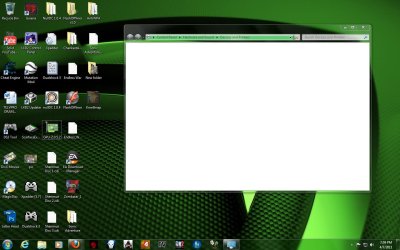
device & printer panel does not load?

Nothing seems to be working for me

Hello folks,

new to the forum and fairly new to Win7, so please be patient with me :D

I have this very problem on my Dell XPS8100 with Win7 Home Premium, but ONLY on one of the regular user accounts. The admin, guest and another user account all loads "Devices & Printer" regularly. On the one user account where it does not work, I get the usual green progress bar going on forever and the window is never populated with Devices and Printers. As others have mentioned, the printer and all other devices (iPod, camera etc.) works fine with ALL accounts.

I have been searching the web for several weeks and I believe I have tried all the solutions that have worked for many, but not for me:

- I activated the bluetooth service
- I played with turning on/off the spooler service
- I re-registered the I8 DLLs
- I run "sfc /scannow"
- I run check disk

What drives me crazy is that I can't figure out what is the difference between the user account not working and ALL others where the "Devices & Printer" panel loads perfectly!!!

Is there anything else that could be the cause of this? Short of a repair install, I do not know what else to do.

I have been using Windows since 3.1 (and DOS before that, yeah, I'm getting old :o), I have another computer running XP, one running Vista and all of them dual boot with Linux and this is the one thing that is eluding ANY attempt to fix it. Very frustrating. Before my ego is permanently damaged, would please somebody out there help me out

Thanks in advance.
 

My Computer

Computer Manufacturer/Model Number
Dell XPS8100
OS
Windows 7 Home Premium 64
CPU
Intel Quad Core i7
Memory
8Gb DD3
Graphics Card(s)
nVidia
Monitor(s) Displays
Dell LCD 23"
Hard Drives
1Tb
Internet Speed
3Mb DSL
it finally worked for me too,
after disabling the bluetooth and the print spooler, i have also kill the "explorer" process from task manager, restarted it (File> New Process > type explorer and hit enter) and started both bluetooth and print spooler services, everything works just fine right now

thanks guys for your tips ;)
 

My Computer

Computer type
PC/Desktop
Computer Manufacturer/Model Number
2015 Home Made with Great Performance
OS
Windows 8.1 x64 Enterprise
CPU
i5 4690K
Motherboard
Gigabyte GA-Z87X-UD5H
Memory
Corsair 16 GB DDR3 2000Mhz
Graphics Card(s)
Asus GTX760 2GB 256bit
Sound Card
Realtek OnBoard
Monitor(s) Displays
Samsung SyncMaster SA350 + LG 42LA660S
Screen Resolution
1920x1080 Full HD
Hard Drives
1x 640GB Western Digital SATA
1x 4TB Western Digital Green SATA
3x 2TB Western Digital Caviar Green RS SATA
1x 3TB Western Digital Caviar Green SATA
1x 128GB Corsair Force Red SSD
PSU
Corsair CX 600W
Case
Nexus Prominent 5
Cooling
CPU: Artic Cooler Freezer 13 + 5x120mm Case Fans @ 700RPM
Keyboard
Microsoft Wired Keyboard 600
Mouse
Microsoft Wireless Mobile Mouse 1000
Internet Speed
FO 1 Gbit/s
Antivirus
ESET / Malwarebytes
Browser
Opera / Chrome
Other Info
- Fan Controller Aerocool X-Vision 5
- 1x 1TB Hitachi DeskPlus External USB
- 1x 1TB Western Digital Passport External USB3
Thanks so much-this fixed my issues!
 

My Computer

Computer Manufacturer/Model Number
HP p6310f
OS
Windows 7 Home Premium Edition (64-bit)
CPU
AMD Athlon II X4 630 processor 2.80 GHz
Motherboard
Pegatron Violet6 Chipset vNidia MCP78/77/72
Memory
2.0 GB RAM 2048 MB DDR3-SDRAM(1333 MHz) Elpida (3) Total 6.0
Graphics Card(s)
NVIDIA GeForce 9100 256.0 MB
Sound Card
Realtek High Definition Audio
Monitor(s) Displays
EMachines E19T6W (Generic PnP Monitor) Analog
Screen Resolution
1440X900 (32-bit) (60Hz)
Hard Drives
WDC WD10 EADS-65M2B1 SCSI Disk Device
Size 931.5 GB
Cache 32.0 MB
File System NTFS

Separated into C Drive Volume name HP 920.49 GB
D Drive Volume name FACTORY_IMAGE 10.92 GB
Keyboard
Dell HID Keyboard Device Microsoft
Mouse
Dell HID-compliant mouse Microsoft
Internet Speed
NVIDIA nForce 10/100 Mbps Ethernet Current Speed 100.00 Mbps
Other Info
DVD/CD-ROM drives
HP DVD A DH16AAL SCSI CdRom Device
Thanks - this worked for me too. My BT service was set to disabled (not sure why?) but setting to auto fixed the issues immediately.
(Fujitsu S7110, Win7 Ultimate 32)
 

My Computer

OS
Windows 7 Ultimate 64/32
Can anybody help me and make It clearer ,step by step ,on how to check the BT services to see how to enable it and ,also step by step instructions to get my Print Spooler back on line without knocking my Device printers offline. Everytime I turn on the Printer Spooler Services it goes back to loading slow and, finally giving me a blank page.I did what was instructed on this Forum and in going to Task manager and turning off the Explorer processes I lost my desktop completely and had to use System Restore to put the OS back online. Being that Im learning slowly about this OS,for the last 6 months,this problem happenned when I tried to put some HP Printer files in for my OS and it messed up my OS System and I had to turn off the spooler services to uninstall the files because the would not uninstall at all even from the HP Website. So in me getting the correct information through Microsoft to fix my Spooler Services so it wont interfere with my Device Printers would be a great help......
 

My Computer

Computer Manufacturer/Model Number
Gateway Custom Built
OS
Windows 7 Ultimate 32 bit
CPU
Intel(R)Pentium(R)4CPU 3.00GHz
Motherboard
Midway
Memory
4 Gig
Graphics Card(s)
Nivida GEForce 6200
Sound Card
C Media PCI Audio Device SRS Audio Essentials
Monitor(s) Displays
INC 19 inch Display
Screen Resolution
768 /1024
Hard Drives
WCD WD 10EARS-00Y5B1 ATA Device(0.91TB)
WCD WD1600 AAJB-00PVA0
PSU
Eagle 600 PCU
Case
Ultra
Cooling
PCU fan/Motherboard Double ballbearing fan/AOC System Blower
Keyboard
Microsoft Wireless Multimedia Keyboard 1.1
Mouse
Microsoft Wireless Optical Mouse 2000
Internet Speed
Cable Broadband /Belkin network Router 600
Other Info
Custom built,everything new. using the same Gateway Bios got case from Police Auction in KC Kansas
Start> "compmgmt.msc"
Services and Applications > Services > Bluetooth Support Service.
rt-click> Properties
set Start Type to Manual or Automatic.
 

My Computer

OS
Windows 7 Ultimate 64/32
CGO Hello; I already set the Bluetooth Services eariler by reading the Forum and when I restarted the Print Spooler Services the Device Printers still got knocked offline and wouldn't load so I had to go back in and turn yhose services off to put the Device printers back online.Still have the problem. I understand that Microsoft created a Hotfix for a kernel problem in the registry that Win 7 and 2004 Server users have been experincing and I applied for the Hotfix but when I try to download it Ikeep getting a error message code 40 so some advice would be helpful in eliminating these problems in Win 7 once and for all.And thanks for your help and in trying to assist me in becoming a better Computer Geek.....Peace my Friend.Manbreed [email protected] :confused:
 

My Computer

Computer Manufacturer/Model Number
Gateway Custom Built
OS
Windows 7 Ultimate 32 bit
CPU
Intel(R)Pentium(R)4CPU 3.00GHz
Motherboard
Midway
Memory
4 Gig
Graphics Card(s)
Nivida GEForce 6200
Sound Card
C Media PCI Audio Device SRS Audio Essentials
Monitor(s) Displays
INC 19 inch Display
Screen Resolution
768 /1024
Hard Drives
WCD WD 10EARS-00Y5B1 ATA Device(0.91TB)
WCD WD1600 AAJB-00PVA0
PSU
Eagle 600 PCU
Case
Ultra
Cooling
PCU fan/Motherboard Double ballbearing fan/AOC System Blower
Keyboard
Microsoft Wireless Multimedia Keyboard 1.1
Mouse
Microsoft Wireless Optical Mouse 2000
Internet Speed
Cable Broadband /Belkin network Router 600
Other Info
Custom built,everything new. using the same Gateway Bios got case from Police Auction in KC Kansas
Print spooler reboots can be related to printer drivers.. try uninstalling drivers -- particularly any from HP. Other than that, just try googling the print spooler issue.
 

My Computer

OS
Windows 7 Ultimate 64/32
Hello CGO, I did uninstall the drivers first before i carried on the trying to go through the paces, of fixing my problem with restarting the Print Spooler Services and to no avail, it still wont work right at all, so at this moment I have turned off all Spooler Services .I allready tried the Googling and it was a waste of time, that's when I figured that It only makes sense to get the right information from the Forum that made and designed the OS so I could learn the right way to fix my PC's when the problems arise.With the Spooler Services turned off the Device Printer Loads,so until I can find the right way to fix my PC It'll be turned off,I have a Printer but it's a HP 6310xi all in one,it's not connected to the PC so,I can only Print or Scan Directly to the Printer for now....but Thanks for trying anyway.....Manbreed AW.....
 

My Computer

Computer Manufacturer/Model Number
Gateway Custom Built
OS
Windows 7 Ultimate 32 bit
CPU
Intel(R)Pentium(R)4CPU 3.00GHz
Motherboard
Midway
Memory
4 Gig
Graphics Card(s)
Nivida GEForce 6200
Sound Card
C Media PCI Audio Device SRS Audio Essentials
Monitor(s) Displays
INC 19 inch Display
Screen Resolution
768 /1024
Hard Drives
WCD WD 10EARS-00Y5B1 ATA Device(0.91TB)
WCD WD1600 AAJB-00PVA0
PSU
Eagle 600 PCU
Case
Ultra
Cooling
PCU fan/Motherboard Double ballbearing fan/AOC System Blower
Keyboard
Microsoft Wireless Multimedia Keyboard 1.1
Mouse
Microsoft Wireless Optical Mouse 2000
Internet Speed
Cable Broadband /Belkin network Router 600
Other Info
Custom built,everything new. using the same Gateway Bios got case from Police Auction in KC Kansas
I had the same problem. Today I restarted the computer, uninstalled the printer, turned it off before that, after that turned the prnter on, and when windows automagically installed the printer everything worked fine. Printer, and devices and printer panel.
Hope it will stay the same.
Still didn't figure it why this happens.

maybe this will help someone.
 

My Computer

OS
Windows 7
Some assistance a well Trained Adminstrator is Appriciated.

I've already done the procedure you suggested about 7 to 8 time's already, I do appreciate your concern and help in this particular manner and it still won't work. Especially with HP printers,the Win 7 32 bit has a problem with HP software,I found out the hard way with my wifes 6500 all in one, that Window's has a all of the drivers from the Microsoft Website to run different various type's of printer's threw your Window's 7 32 & 64 bit OS software.That's how I got my wife's printer online. Right now I'm getting ready to put a new Western Digital 1 tb SATA Hardrive to replace my PATA IDE Maxtor 160 gig hardrive but, I need to find the step by step instructions ,to use the Windows 7 OS to clone my 160 gig to my 1 TB gig using my USB to SATA/IDE Adapter to handle this proceedure before I mount internally my new 1 TB Hardrive. I understand that Win 7 can do the cloning better than any 3 party cloning software with much less problems. Then if I am successful, then I will replace the Video card to a Nivida 9500 GT 1gig card,I am not happy with the 9700 ATI 256 Video card that I have for the last 7 month's,it's compatible with Win 7 but, ATI quit upgrading the drivers and Microsoft but I've been entertained with freezing problems,with the ATI video card and it's suppossed to be compatible with Win 7 32 bit and 64 bit but hell I caint tell, been having nothing but problems with this ATI card.So 7 months is enough time for a upgrade.So when I work out some of the assigned accomplishments I willl attempt to go back and try to get my PC to accept my HP 6300 xi all in one that Im having problems getting online,the HP Software from HP directly from the HP Solutions website.wouldn't work correctly on Win 7 so, in me contacting Microsoft and getting them to assist me in giving me the right instructions to use the Win 7 OS to go through Microsoft to get my printer back on line using there software and drivers they won't contact me about the issue,regardless Ive sent them 4 E-Mails about the problem and they won't contact me at all although the Win 7 Ultimate has a 12 month warranty in case you have a problem with the OS,which isn't right. Make's a individual think about switching OS systems to Snow Leopard or something that when you have a problem somebody will help you from where you bought the OS at least they will honor the warranty instead of leaving you hangin,and not responding to the warrenty.Being that Ive got 3 Win 7 PC's all 32 bit, and one 64 bit Home Premium Vista Im trying to put confidence in Microsoft but,situations like this doesn't make it easy. But I would be very appreciative if somebody could help me with the Cloning the hardrive situation so I could learn how to handle this without always relying on 3rd party software to handle some thing that Win 7 is capable of doing within the system.Thanks to all who shown concern and interest in my situation. Manbreed AW.....
 

My Computer

Computer Manufacturer/Model Number
Gateway Custom Built
OS
Windows 7 Ultimate 32 bit
CPU
Intel(R)Pentium(R)4CPU 3.00GHz
Motherboard
Midway
Memory
4 Gig
Graphics Card(s)
Nivida GEForce 6200
Sound Card
C Media PCI Audio Device SRS Audio Essentials
Monitor(s) Displays
INC 19 inch Display
Screen Resolution
768 /1024
Hard Drives
WCD WD 10EARS-00Y5B1 ATA Device(0.91TB)
WCD WD1600 AAJB-00PVA0
PSU
Eagle 600 PCU
Case
Ultra
Cooling
PCU fan/Motherboard Double ballbearing fan/AOC System Blower
Keyboard
Microsoft Wireless Multimedia Keyboard 1.1
Mouse
Microsoft Wireless Optical Mouse 2000
Internet Speed
Cable Broadband /Belkin network Router 600
Other Info
Custom built,everything new. using the same Gateway Bios got case from Police Auction in KC Kansas
Nothing Works Listed here

I have tried everything listed in this thread concerning loading "Devices and Printers" and nothing works. All I get is the long green line and it never loads. If this isn't bad enough, I have two Win 7 computers on my home network and they both do the same thing, never load. I cannot get to any printer definitions to add, delete or change anything. Any other ideas anyone?:cry::(
 

My Computer

OS
Windows 7
Try this procedure:
1. Uninstall printer from every computer
2. Reboot and install printer again
If that doesn't work
1. The same as above
2. Unjoin the homegroup in every computer
3. Join homegroup
4. Install printer

Sometimes the order is what count, sometimes not :)
Hope this will help
 

My Computer

OS
Windows 7
i tried:
1. start bluetooth support service
2. stop/start printer spooler
3. restart the machine
but still does NOT work for me.
anyone got ideas........ please
 

My Computer

OS
wins7
Look what have you installed recently.
If you installed service pack 1, uninstall it.
For me SP1 don't work.
 

My Computer

OS
Windows 7
device and printer doesn't load

Why does devices and printer doesn't show anything and keeps on searching and stuck at the end, even my bluetooth support service is start. My os is Windows Ultimate Ultimate x64. i don't whats the problem :(
 

Attachments

  • Untitled.jpg
    Untitled.jpg
    280.9 KB · Views: 51

My Computer

OS
Windows 7 Ultimate x64
CPU
Intel(R) Core(TM) i3 @2.93Ghz
Motherboard
Intel DH55TC AAE70932-204
Memory
2 x 2GB Kingston DDR3 1033Mhz
Graphics Card(s)
NVIDIA GeForce GT 220 1GB GDDR3
Sound Card
Realtek Semiconductor
Monitor(s) Displays
Samsung SyncMaster B1930 19"
Screen Resolution
1440 x 900
Hard Drives
SeaGate Barracuda 320GB 7200rpm
Keyboard
Logitech Classic New Touch Keyboad 200 USB
Mouse
A4tech Run On Shine X5
Internet Speed
256kbps
W7 64bit has some issue with drivers, especially if they weren't signed.
Check for driver signing problems.
 

My Computer

OS
Windows 7
For individuals that still have problems with Device Printer's

I hope that this will help, I had the same problem awhile back,for 3 to 4 month's and the quick fixes of going to Start, then Service's and turning on the Bluetooth and turning on the Print Spooler just kept the Device Printers from loading. But when I turned it off, the Device Printer Section would load with no problem.So eventually I had to totally reformat my Win 7 Ultimate 32 bit,but when I got my OS back online I went back into Start and to Service's again to make sure that the blue tooth and all other services connected to the Printer were correct and on line properly. Then I went to the printer Wizard in the Action Center and used the Microsoft's printer driver's to put my HP 6300xi All in one online and eliminated my problem issues.The Microsoft Printer Wizard works better for the Win 7 program than the original Driver's,that you get on a disc from the Printer Manufacturer.Warning for anybody that own's HP printer's DO NOT USE HP'S PRINTER SOFTWARE it will corrupt your files in your computer and,confuse your apps for using and configuring your Printer. Being that I have two HP Printer's in my home,a 6500 all in one 709e Series and a 6300xi all in one Series, connected to 4 PC's two Desktop's and two laptop's,3 are Win7 32 bit and one Vista Home Premium 64bit.I had to argue Fuss and fight with some of HP's Tech's to get the right information and in the end, to be tech's they couldn't even get the HP files out that corrupted my computers,it took me two days to go into each file and find the HP files and delete them outta my PC's.Then I got a call from the leading tech at HP and he showed me how to use the Microsoft OS to get my Wife's 6500 online correctly, the other tech's beneath him were trained in the same area, but were too lazy to use the same technique to resolve the problem.So for what I have had to go through I would't wish this experience on my worst enemy,I know that the reformatting is a pain but If you back up your files first,and reformat like suggested in the begining of this notation,and go through and check your Services to make sure everything is right before you load your Printer Driver's and apply your Printer to your PC you should have eliminated all of your problem's and issues. I hope that this will help all who don't know, that Microsoft has it's own formula for this particular OS it's called Printer Wizard in the Action Center........Great Luck You All :cool:
 

My Computer

Computer Manufacturer/Model Number
Gateway Custom Built
OS
Windows 7 Ultimate 32 bit
CPU
Intel(R)Pentium(R)4CPU 3.00GHz
Motherboard
Midway
Memory
4 Gig
Graphics Card(s)
Nivida GEForce 6200
Sound Card
C Media PCI Audio Device SRS Audio Essentials
Monitor(s) Displays
INC 19 inch Display
Screen Resolution
768 /1024
Hard Drives
WCD WD 10EARS-00Y5B1 ATA Device(0.91TB)
WCD WD1600 AAJB-00PVA0
PSU
Eagle 600 PCU
Case
Ultra
Cooling
PCU fan/Motherboard Double ballbearing fan/AOC System Blower
Keyboard
Microsoft Wireless Multimedia Keyboard 1.1
Mouse
Microsoft Wireless Optical Mouse 2000
Internet Speed
Cable Broadband /Belkin network Router 600
Other Info
Custom built,everything new. using the same Gateway Bios got case from Police Auction in KC Kansas
Solution for devices and printers not loading

Hi,
The problem of drivers and printers not showing in windows 7 sometimes may occur due to your Bluetooth radio device. Try the following steps to overcome this problem. This process helped me 100%. It may help you too.

Click start
type services in the search box. Double click on the searched item.
A windows showing all services in its right panel will be opened. In that go to services(local)
select Bluetooth support service and right click on it. goto properties and in general tab set startup type to 'Automatic'.
Below that u can find service status. set it to 'start'. click ok and u r done.
 

My Computer

Computer Manufacturer/Model Number
Acer Aspire
OS
Windows ultimate 32bit
Ghost301 - After working for 2 years, my device and printer pane would not open. Years later, the advice you posted in 2009 is still helping. Thanks.

I see others here are still having a problem. Wish I could help, but the old advice worked for me. I didn't change that setting, and have 2 networked printers installed. I wonder what happened.

Really weird, when selecting Devices and Printers (Device Stage) in the menu the progress bar would take forever and never display anything - just blank.

Finally discovered it was actually a bluetooth issue in services. I don't even know why I looked there - -

THE FIX at least for me..

Click Start button, type "services" into the search program and files box. This brings up a list in the menu, select Services. This should open a list of local services on your system.., Find 'Bluetooth Service" and make sure it has started, right click and set to 'automatic' (mine was already set), Select "Bluetooth Support Service" and start, set to automatic (mine was set on manual) --

This fixed my issue, hopefully yours as well..

Originally posted by slappydog
 

My Computer

Computer Manufacturer/Model Number
HP Touchsmart
OS
XP Media Edition / Vista /Win 7 Home Premium
CPU
Win 7 Machine: Intel Core 2 Duo T5850 @ 2.16GHz Merom 65nm
Motherboard
Pegatron Corp. EVE Model
Memory
4GB Dual Channel DDR2 @ 333MHz 5-5-5-15
Graphics Card(s)
Nvidia Defaul 1920X1200 256MB GeForce 9300M
Sound Card
SoundMAX Integrated Digital HD Audio
Monitor(s) Displays
HP 25" Flat Panel Touch Screen
Screen Resolution
1900X1200
Hard Drives
500 GB Seagate ST3500620as (Sata) 1.5 TB Seagate External
Keyboard
HP Model RK713A
Internet Speed
3.0Gb
Back
Top