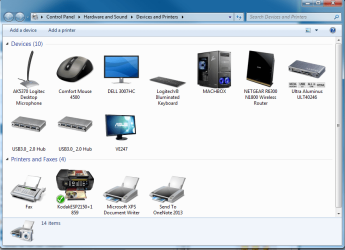
Devices and Printers - Change Device Icons with Custom Icons

How to Change Icons in "Devices and Printers" with Custom Icons

   Information
This tutorial will cover how to change the icons in Devices and Printers with a custom icon of your choosing and be device specific, eliminating resource hacking and/or overwriting Windows 7 default icons.

   Note
You'll need to be familiar with making multi-resolution icons to complete this tutorial. Many tutorials already exist, and one can be found at SevenForums here. Please take the time to familiarize yourself with the procedure before moving onto this tutorial.

   Tip
The icons used in this method must contain the following sizes:

256x256 32bit + Alpha​

48x48: 32bit + Alpha
48x48: 8bit 256
48x48: 4bit 16​

32x32: 32bit + Alpha
32x32: 8bit 256
32x32: 4bit 16​

24x24: 32bit + Alpha
24x24: 8bit 256
24x24: 4bit 16​

16x16: 32bit + Alpha
16x16: 8bit 256
16x16: 4bit 16​

More information about icon design can be found on MSDN.


Final Example: Custom Computer Icon
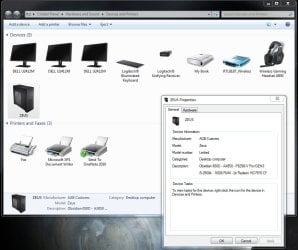
final.jpg


Step 1.
Create a multi-resolutioned icon, containing the appropriate sizes, using the tutorial mentioned in the Note pane above.
Step 2.
Download and install the Devices and Printers Metadata Authoring Wizard from MSDN.
Step 3.
Once installed, you'll have an added option called 'create metadata package' in your context menu for each device. Choose that option for the device icon you'd like to change.
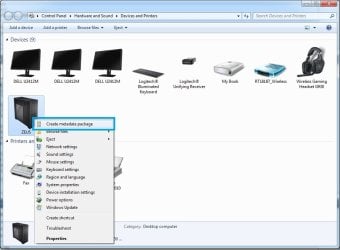
metascreen.jpg
Step 4.
Drag your created icon to the drop target area of the Icon Tab.
dndicon.jpg
Choose Next.
   Information
If your icon doesn't meet the required criteria, you'll be met with the following window. Adjust your icon as necessary.
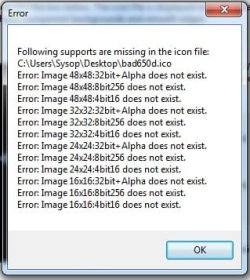
badicon.jpg
Step 5.
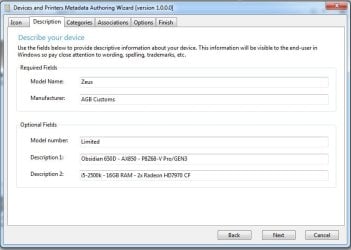
Fill out the fields in the Description Tab to your liking.
descrip.jpg
Choose Next.
Step 6.
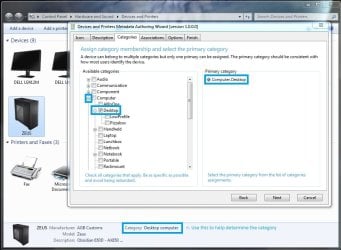
Under the Categories Tab, select the category appropriate for your device. In this example, we're replacing the Desktop Computer icon.
category.jpg
Choose Next.
Step 7. - See Other Devices section, below, for devices other than the Computer.
Under the Associations Tab, choose the proper association(s). For this example, the Computer icon, choose the 7 ComputerMetadata strings at the top of the Hardware ID list.
Assoc.jpg
Choose Next.
Other Devices
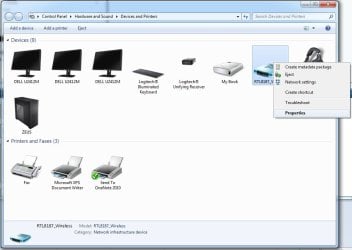
To determine the Hardware ID string for devices other than the Computer, use the following method to locate it.
A. From the Devices and Printers window, Right-Click your device and choose properties.
props1.jpg
B. From the Properties window, seclect the Hardware Tab at the top, and choose the Properties Button at the bottom.
props2.jpg
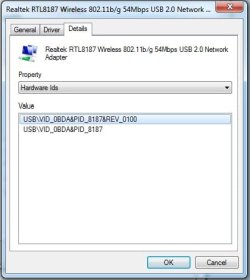
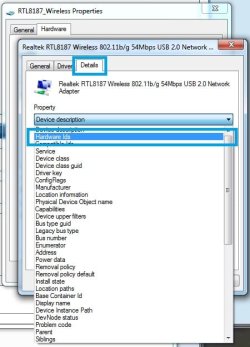
C. In the Properties Window, select the Details Tab at the top, and from the Property Pulldown menu, select Hardware Ids.
hids.jpg

hidstring.jpg
D. Using the Id from the previous step, you can verify the proper strings in the tool if multiple's are listed.
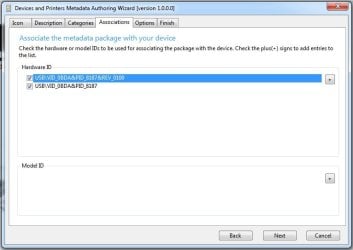
verified.jpg
Step 8.
You can select your locale from Options Tab. If you prefer USB, hot-swappable, etc. devices to be shown while disconnected, tick the Show device in disconnected state. For our example we'll leave it unchecked.
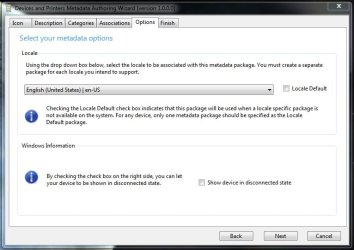
options.jpg
Choose Next.
Step 9.
From the Finish Tab, make sure to tick the Copy package to your system's local metadata store if you would like this to take immediate effect upon a refresh of your Devices and Printers window.
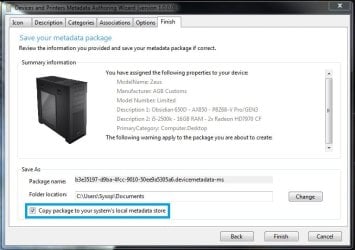
finish.jpg

   Tip
A backup of the package will be copied to your Documents folder for later use, i.e. after clean install. Copy the package to the following directory to install it if you didn't choose to tick Copy package to your system's local metadata store.
Code:
%PROGRAMDATA%\Microsoft\Windows\DeviceMetadataStore

That's it!
Ageeb


Last edited by a moderator:
I have solved the issue. The app doesn't support spaces in directory names.
 

My Computer My Computer

At a glance

Windows 7 Ultiamte x64
OS
Windows 7 Ultiamte x64
Metadata Authoring Wizard Doesn't Create File

I have solved the issue. The app doesn't support spaces in directory names.

Could you be a bit more specific? The default directory doesn't have spaces: C:\ProgramData\Microsoft\Windows\DeviceMetadataStore\en-US

And I still can't get anything to appear in there after I press finish. Nothing goes into either directory.

Windows 7 Pro x64
Running on an admin account
No errors indicated during the process
 

My Computer My Computer

At a glance

Windows 7 Profesisonal x64Intel i7 920 Nehalem 2.66GHz LGA 1366 130W mo...OCZ Gold 12GB (6 x 2GB) 240-Pin DDR3 SDRAM DD...EVGA 896-P3-1262-AR GeForce GTX 260 896MB 448...
OS
Windows 7 Profesisonal x64
CPU
Intel i7 920 Nehalem 2.66GHz LGA 1366 130W model BX80601920
Motherboard
GIGABYTE GA-EX58-UD5 LGA 1366 Intel X58
Memory
OCZ Gold 12GB (6 x 2GB) 240-Pin DDR3 SDRAM DDR3 1600
Graphics Card(s)
EVGA 896-P3-1262-AR GeForce GTX 260 896MB 448-bit GDDR3
Sound Card
Realtek HD Auido - built in to MoBo
Hard Drives
OCZ Vertex Series OCZSSD2-1VTX120G 2.5" 120GB SATA II MLC Internal SSD
PSU
ZALMAN ZM850-HP 850W Modular
Case
Antec 902
Cooling
Vigor Monsoon III LT Dual 120mm Fan
Internet Speed
25Mbps down 15Mbps up (Verizon FiOS)
Can you change virtual printer icons?

Such as adobe Adobe Acrobat and Fine Print. I'm trying to distinguish one from the other. But since they don't have a hardware ID, the MS metadata program won't work. Any ideas??:rolleyes:
 

My Computer My Computer

At a glance

Won't tell
OS
Won't tell
Such as adobe Adobe Acrobat and Fine Print. I'm trying to distinguish one from the other. But since they don't have a hardware ID, the MS metadata program won't work. Any ideas??:rolleyes:

I'm having a similiar issue. I'd like to use the utility to edit a network printer but since it's not a physical device there is not HardwareID to associate with. Anyone have a solution for when there is no HardwareID? I tried just creating my own and making it up but that didn't work. Thanks so much!
 

My Computer My Computer

At a glance

Windows 7 Pro x64
OS
Windows 7 Pro x64
Great work with this OP :cool:

Just one question: I have the device metadata package for my Microsoft mouse (package was created by Microsoft). When I updated the mouse drivers, the icon and metadata went back to the default. How can I associate the old metadata package with the my mouse. I imagine it would involve opening the package and changing the device ID and well as the package name to point Windows to the old metadata package, yes? Let me know. Thanks.
 

My Computer My Computer

At a glance

Windows 7 Ultimate x64Intel Core i7-920xm8GB Vengeance PC3-12800 DDR3 RAMAMD Radeon HD 5870M
Computer type
PC/Desktop
Computer Manufacturer/Model Number
Alienware M17x R2
OS
Windows 7 Ultimate x64
CPU
Intel Core i7-920xm
Motherboard
Intel PM55 Alienware
Memory
8GB Vengeance PC3-12800 DDR3 RAM
Graphics Card(s)
AMD Radeon HD 5870M
Sound Card
Sound Blaster Recon3D (USB)
Monitor(s) Displays
1920x1200 LCD, Sony Bravia 42" HDTV
Screen Resolution
Laptop LCD - 1920x1200, HDTV - 1920x1080
Hard Drives
Samsung 840 256GB SSD (Boot Drive)
2 x Western Digital Scorpio Black HDDs - 1.36TB (RAID 0)
PSU
220W Flextronic
Case
N/a
Cooling
Notepal Cooler Master U3
Keyboard
Standard
Mouse
Synaptics Touchpad, Razer Orochi
Internet Speed
Cox Internet
Antivirus
Kaspersky
Browser
Firefox
Hi, I'm looking for a way as well to easily change system icons. The one for my keyboard for example looks so different to my real one.
Reading this tutorial I find it like rockets science to be honest. Then I found this via google. Haven't tried it out yet, has anyone here experience with this? Besides this I was looking for kind of a data base with lots of icons. Found this, this and this but there doesn't seem to be a collection of icons with most of the common hardware?
 

My Computer My Computer

At a glance

Windos 7 x64i5 3570K2 x 8GB G.SkillHD4000
OS
Windos 7 x64
CPU
i5 3570K
Motherboard
Intel DH77DF
Memory
2 x 8GB G.Skill
Graphics Card(s)
HD4000
Sound Card
on board
Monitor(s) Displays
LG IPS236 x 2
Screen Resolution
1920 x 1200
Hard Drives
Samsung 840 Pro 256GB
PSU
BeQuiet 480 E9 CM Modular
Case
Lian Li PC-Q25 Silver
Cooling
Titan
Keyboard
Dell
Mouse
Microsoft Basic Optical Mouse
Internet Speed
6 MB
Other Info
Don't talk if you can't improve the silence.
A+ Spot on.

Just wanted to say Thank you for the Tutorial. I was able to create the package Straight away using this tutorial AFTER I used another on ICON creation with GIMP.

Creating a multi-resolution favicon including transparency with the GIMP | Egressive

The above link details the steps to making multi-layered, transparent Icons for use for another purpose. Use that tutorial with this post and you can NOT fail.

I do have a question about the tutorial:

Why when we are being shown the way to create a DESKTOP replacement do you suddenly change to the Wireless Card to show obtaining the HARDWARE ID? Is it because that step doesn't actually work for the desktop? I went through the properties and found the SYSTEM DEVICE and it does not have a HEX ID like other devices.

Anyway, it doesn't matter, I was just curious.

Thanks again for taking the time to make this tutorial. Does anyone have a good method of creating a 256 x 256 32B image and then getting a utility to save it down as the reduced sizes required in a batch format? I mean some process or porgram? Can GIMP be configured to export to multiple sizes and color depths required by the Metedata Authoring Wizard?
 

Attachments

  • 2013-01-13 10_04_01-Devices and Printers.png
    2013-01-13 10_04_01-Devices and Printers.png
    50 KB · Views: 1,469
Last edited:

My Computer My Computer

At a glance

Windows 7 Ultimate x64Core I7 920 (First Generation)12 GB Corsair Extreme XMS3NVIDIA GTX 295 1792MB
Computer Manufacturer/Model Number
Custom - Self Built
OS
Windows 7 Ultimate x64
CPU
Core I7 920 (First Generation)
Motherboard
Asus P6T6 WS Revloution
Memory
12 GB Corsair Extreme XMS3
Graphics Card(s)
NVIDIA GTX 295 1792MB
Sound Card
Integrated Sound Max
Monitor(s) Displays
Dell 30" 3007 HC - ASUS 24" VE247
Hard Drives
1 x INTEL SSDSA2BW160G3H (BOOT)
3 x WDC WD1001FALS-00J7B0 (3TB Spindle Storage)
PSU
Tagan BZ1100 Modular PS
Case
ZALMAN Z-MACHINE GT-1000 Titanium 5m Aluminum
Cooling
Noctua NH-U12P
Help Im addicted!
 

Attachments

  • 2013-01-13 12_02_31-Devices and Printers.png
    2013-01-13 12_02_31-Devices and Printers.png
    50.4 KB · Views: 947

My Computer My Computer

At a glance

Windows 7 Ultimate x64Core I7 920 (First Generation)12 GB Corsair Extreme XMS3NVIDIA GTX 295 1792MB
Computer Manufacturer/Model Number
Custom - Self Built
OS
Windows 7 Ultimate x64
CPU
Core I7 920 (First Generation)
Motherboard
Asus P6T6 WS Revloution
Memory
12 GB Corsair Extreme XMS3
Graphics Card(s)
NVIDIA GTX 295 1792MB
Sound Card
Integrated Sound Max
Monitor(s) Displays
Dell 30" 3007 HC - ASUS 24" VE247
Hard Drives
1 x INTEL SSDSA2BW160G3H (BOOT)
3 x WDC WD1001FALS-00J7B0 (3TB Spindle Storage)
PSU
Tagan BZ1100 Modular PS
Case
ZALMAN Z-MACHINE GT-1000 Titanium 5m Aluminum
Cooling
Noctua NH-U12P
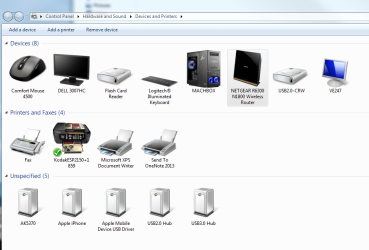
OMG I CAN:cry:NOT STOP!
 

Attachments

  • 2013-01-20 12_25_44-Devices and Printers.png
    2013-01-20 12_25_44-Devices and Printers.png
    54.5 KB · Views: 1,348

My Computer My Computer

At a glance

Windows 7 Ultimate x64Core I7 920 (First Generation)12 GB Corsair Extreme XMS3NVIDIA GTX 295 1792MB
Computer Manufacturer/Model Number
Custom - Self Built
OS
Windows 7 Ultimate x64
CPU
Core I7 920 (First Generation)
Motherboard
Asus P6T6 WS Revloution
Memory
12 GB Corsair Extreme XMS3
Graphics Card(s)
NVIDIA GTX 295 1792MB
Sound Card
Integrated Sound Max
Monitor(s) Displays
Dell 30" 3007 HC - ASUS 24" VE247
Hard Drives
1 x INTEL SSDSA2BW160G3H (BOOT)
3 x WDC WD1001FALS-00J7B0 (3TB Spindle Storage)
PSU
Tagan BZ1100 Modular PS
Case
ZALMAN Z-MACHINE GT-1000 Titanium 5m Aluminum
Cooling
Noctua NH-U12P
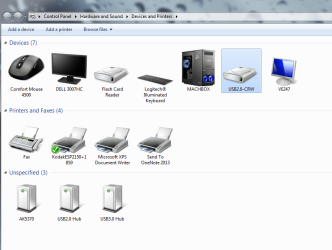
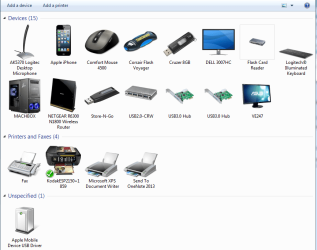
Updated Pics - You know you love em!

And I am still going. The USB ports and Hubs have proved the trickiest to assess and then select associations for to date.
 

Attachments

  • 2013-01-22 09_51_49-Windows 7 Forums - Edit Post - Internet Explorer, optimized for Bing and MSN.png
    2013-01-22 09_51_49-Windows 7 Forums - Edit Post - Internet Explorer, optimized for Bing and MSN.png
    58.7 KB · Views: 8,784

My Computer My Computer

At a glance

Windows 7 Ultimate x64Core I7 920 (First Generation)12 GB Corsair Extreme XMS3NVIDIA GTX 295 1792MB
Computer Manufacturer/Model Number
Custom - Self Built
OS
Windows 7 Ultimate x64
CPU
Core I7 920 (First Generation)
Motherboard
Asus P6T6 WS Revloution
Memory
12 GB Corsair Extreme XMS3
Graphics Card(s)
NVIDIA GTX 295 1792MB
Sound Card
Integrated Sound Max
Monitor(s) Displays
Dell 30" 3007 HC - ASUS 24" VE247
Hard Drives
1 x INTEL SSDSA2BW160G3H (BOOT)
3 x WDC WD1001FALS-00J7B0 (3TB Spindle Storage)
PSU
Tagan BZ1100 Modular PS
Case
ZALMAN Z-MACHINE GT-1000 Titanium 5m Aluminum
Cooling
Noctua NH-U12P
I made every step, but I can't see the new icon for my USB device.
There is no new entry in C:\Users\DevIconChanger\AppData\Local\Microsoft\Device Metadata\dmrccache. Not in \de-DE nor in \en-us. Do I need special permissions?
(There was an UAC-Popup for the xcopy-command from the MS tool, which I have accepted).
Or do I have to reboot my machine?

Any other ideas?
 

My Computer My Computer

At a glance

Windows 7 Ultimate 64bit
OS
Windows 7 Ultimate 64bit
Maybe I found a possible problem:
The original xcopy command from the MS tool DOESN'T copy the metadata package to C:\Users\DevIconChanger\AppData\Local\Microsoft\Device Metadata\dmrccache in my Win7 Ultimate 64bit.

It creates a copy in C:\ProgramData\Microsoft\Windows\DeviceMetadataStore\de-DE
(strangely enough not in my very first attempt, using the 'local' called "Deutschland (Deutschland) | de" <- no idea why... :huh:)
In my second attempt with the 'local' "Deutschland (Deutschland) | de-DE" the above entry was created and the new icon appeared after pressing F5 in the 'devices and printers' panel.

Has someone more informations about this local (second last tab 'Options' in the MS tool)?
 

My Computer My Computer

At a glance

Windows 7 Ultimate 64bit
OS
Windows 7 Ultimate 64bit
You can search through the Metadata store listings in c:\users\ until you find the directory and subfolder missing the icon and then copy the icon. This fixed a problem with my DELL 30 Inch monitor for me. I built the package and for some reason the icon was missing in the profile area not the Program Data store. :geek: I copied the Icon manually to that location and that fixed the issue. The packages are created via the Metadata Authoring Wizard and land in c:\Program Data but for some reason the dmrccache (icon cache) has to update as well.
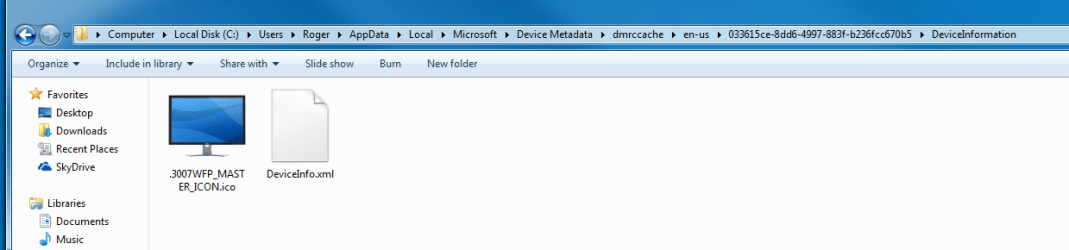
 

Attachments

  • 2013-01-26 11_29_32-DeviceInformation.png
    2013-01-26 11_29_32-DeviceInformation.png
    24.3 KB · Views: 557

My Computer My Computer

At a glance

Windows 7 Ultimate x64Core I7 920 (First Generation)12 GB Corsair Extreme XMS3NVIDIA GTX 295 1792MB
Computer Manufacturer/Model Number
Custom - Self Built
OS
Windows 7 Ultimate x64
CPU
Core I7 920 (First Generation)
Motherboard
Asus P6T6 WS Revloution
Memory
12 GB Corsair Extreme XMS3
Graphics Card(s)
NVIDIA GTX 295 1792MB
Sound Card
Integrated Sound Max
Monitor(s) Displays
Dell 30" 3007 HC - ASUS 24" VE247
Hard Drives
1 x INTEL SSDSA2BW160G3H (BOOT)
3 x WDC WD1001FALS-00J7B0 (3TB Spindle Storage)
PSU
Tagan BZ1100 Modular PS
Case
ZALMAN Z-MACHINE GT-1000 Titanium 5m Aluminum
Cooling
Noctua NH-U12P

My Computer My Computer

At a glance

Windows 7 Ultimate x64Core I7 920 (First Generation)12 GB Corsair Extreme XMS3NVIDIA GTX 295 1792MB
Computer Manufacturer/Model Number
Custom - Self Built
OS
Windows 7 Ultimate x64
CPU
Core I7 920 (First Generation)
Motherboard
Asus P6T6 WS Revloution
Memory
12 GB Corsair Extreme XMS3
Graphics Card(s)
NVIDIA GTX 295 1792MB
Sound Card
Integrated Sound Max
Monitor(s) Displays
Dell 30" 3007 HC - ASUS 24" VE247
Hard Drives
1 x INTEL SSDSA2BW160G3H (BOOT)
3 x WDC WD1001FALS-00J7B0 (3TB Spindle Storage)
PSU
Tagan BZ1100 Modular PS
Case
ZALMAN Z-MACHINE GT-1000 Titanium 5m Aluminum
Cooling
Noctua NH-U12P
Small Problem:

What's the Hardware ID of the Computer? I mean, I want to change the Icon, But I don't get the right Hardware ID, because whenever I click on "Properties" I get information of the devices installed on my computer :(

What should I write into the section: Hardware ID in orer to change my Computer icon?
 

My Computer My Computer

At a glance

Windows 8
OS
Windows 8
Read step 7 again
Under the Associations Tab, choose the proper association(s). For this example, the Computer icon, choose the 7 ComputerMetadata strings at the top of the Hardware ID list.
 

My Computer My Computer

At a glance

Windows 7 Home Premium x64 SP1intel(R)core(TM)2 duo CPU T6600 @ 2.20GHz3 gb ddr3ati radeon hd4570/512mb
Computer Manufacturer/Model Number
acer aspire 5935g
OS
Windows 7 Home Premium x64 SP1
CPU
intel(R)core(TM)2 duo CPU T6600 @ 2.20GHz
Motherboard
intel gm45/gm47 revision 07
Memory
3 gb ddr3
Graphics Card(s)
ati radeon hd4570/512mb
Monitor(s) Displays
lop156wh2-tle1 15.3 flat
Screen Resolution
1366x768
Hard Drives
OCZ-Agility3 60gig ssd
320gig external hdd
500gig external hdd
Mouse
Optical
Internet Speed
30Mbps Down/30Mbps Up
Hey, of course I followed the Stap 7 - BUT there are no 7 Strings in my Hardware list - I can only include manually some strings but I don't know them!
 

My Computer My Computer

At a glance

Windows 8
OS
Windows 8
Hey, of course I followed the Stap 7 - BUT there are no 7 Strings in my Hardware list - I can only include manually some strings but I don't know them!

No one can give you the correct strings to use as they are different on every pc. Follow the tutorial again and double check each step
 

My Computer My Computer

At a glance

Windows 7 Home Premium x64 SP1intel(R)core(TM)2 duo CPU T6600 @ 2.20GHz3 gb ddr3ati radeon hd4570/512mb
Computer Manufacturer/Model Number
acer aspire 5935g
OS
Windows 7 Home Premium x64 SP1
CPU
intel(R)core(TM)2 duo CPU T6600 @ 2.20GHz
Motherboard
intel gm45/gm47 revision 07
Memory
3 gb ddr3
Graphics Card(s)
ati radeon hd4570/512mb
Monitor(s) Displays
lop156wh2-tle1 15.3 flat
Screen Resolution
1366x768
Hard Drives
OCZ-Agility3 60gig ssd
320gig external hdd
500gig external hdd
Mouse
Optical
Internet Speed
30Mbps Down/30Mbps Up
I double Checked EVERYTHING! This Strings simply don't appear in my list :(
 

My Computer My Computer

At a glance

Windows 8
OS
Windows 8
I double Checked EVERYTHING! This Strings simply don't appear in my list :(

Can you post a screenshot of the list you get at step 7 of the tutorial.
 

My Computer My Computer

At a glance

Windows 7 Home Premium x64 SP1intel(R)core(TM)2 duo CPU T6600 @ 2.20GHz3 gb ddr3ati radeon hd4570/512mb
Computer Manufacturer/Model Number
acer aspire 5935g
OS
Windows 7 Home Premium x64 SP1
CPU
intel(R)core(TM)2 duo CPU T6600 @ 2.20GHz
Motherboard
intel gm45/gm47 revision 07
Memory
3 gb ddr3
Graphics Card(s)
ati radeon hd4570/512mb
Monitor(s) Displays
lop156wh2-tle1 15.3 flat
Screen Resolution
1366x768
Hard Drives
OCZ-Agility3 60gig ssd
320gig external hdd
500gig external hdd
Mouse
Optical
Internet Speed
30Mbps Down/30Mbps Up
Back
Top