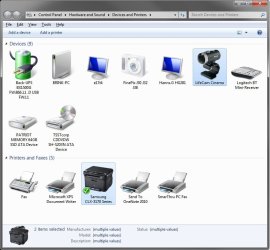
Solved Devices and Printers icons (Device Stage)

orangepit

New member
Local time
8:11 AM
Messages
11
Hi everybody.

Quick question.

Are the icons in the Devices and Printers window (Device Stage) replaced immediately upon any system update, or do they just show up and get replaced at random whenever Win7 feels like doing it?

I recently did a fresh install of Win7 on two different machines (Ultimate x64 on one machine and Enterprise x64 on another) and the devices listed show the stock icons even though the drivers for those peripheral units are installed... All "Update" settings are set to recommended and automatic on both machines.

Weird thing is before I re-installed Ultimate on the first machine, the true icons showed up in Devices and Printers for my monitor, keyboard (MS keyboard), Canon scanner, Brother printer... I didn't quite pay attention how/when that happened, but I was pleasantly surprised with the extra access I had by just clicking that life-like icon.

Now, since the re-install, all I get are the stock icons.

Funny thing is when I hit "Properties", say - for the keyboard, which is a Microsoft 3000 kbd, the info simply reads: "Unknown Manufacturer", "HID keyboard Device". The MS drivers are installed though. :shock:

Same thing for my monitors (Dell 2209WA). Windows downloaded the drivers, but the properties info shows the monitor as "uknown manufacturer". How weird is that?


Something I'm missing???? Or is this Device Stage fubared somehow?

Cheers
Steve
 

My Computer My Computer

Computer Manufacturer/Model Number
Main machine custom-built
OS
Windows 7 Ultimate x64
CPU
Intel C2D [email protected]
Motherboard
Asus P5Q-E
Memory
OCZ Platinum 4x2GB 1066Mhz
Graphics Card(s)
nVidia EN8900GT UL 512MB
Sound Card
Creative SB x-FI Fatal1ty
Monitor(s) Displays
2x Dell 22" 2209WA
Screen Resolution
1680x1050
Hard Drives
1x1TB Seagate 7200.12
1x640GB WD Black
1x320GB Seagate 7200.10
PSU
Antec TruePower 650W
Case
Antec SOHO Performance II
Cooling
Zalman CPU; 5x80mm case
Keyboard
MS Digital Media 3000
Mouse
Logitech G5
Internet Speed
10Mb/s down - 1.1Mb/s up
Hello Steve,

You need to make sure that you have either step 3 or have Replace generic device icons with enhanced icons checked in step 5 in the tutorial below first to allow the icons to be changed. I have not noticed any pattern as to when it decides to update the icons. Usually after X times of running Windows Update.

http://www.sevenforums.com/tutorials/2803-device-installation-settings.html

Hope this helps,
Shawn
 

My Computer My Computer

Computer type
PC/Desktop
Computer Manufacturer/Model Number
Self built custom
OS
64-bit Windows 11 Pro for Workstations
CPU
Intel i7-8700K OC'd to 5 GHz
Motherboard
ASUS ROG Maximus XI Formula Z390
Memory
64 GB (4x16GB) G.SKILL TridentZ RGB DDR4 3600 MHz
Graphics Card(s)
ASUS ROG-STRIX-GTX1080TI-O11G-GAMING
Sound Card
Integrated
Monitor(s) Displays
2 x Samsung Odyssey G7 27"
Screen Resolution
2560x1440
Hard Drives
1TB Samsung 990 PRO M.2,
4TB Samsung 990 PRO PRO M.2,
TerraMaster F8 SSD Plus NAS
PSU
Seasonic Prime Titanium 850W
Case
Thermaltake Core P3
Cooling
Corsair Hydro H115i
Keyboard
Logitech wireless K800
Mouse
Logitech MX Master 4
Internet Speed
2 Gb/s Download and 100 Mb/s Upload
Antivirus
Malwarebyte Anti-Malware Premium
Browser
Google Chrome
Other Info
Logitech Z625 speaker system,
Logitech BRIO 4K Pro webcam,
HP Color LaserJet Pro MFP M477fdn,
APC SMART-UPS RT 1000 XL - SURT1000XLI,
Galaxy S23 Plus phone
Thanks Shawn for the quick reply.

Indeed, I've checked the tutorials before addressing the masses here (long-time lurker to these forums). The settings on my machine are checked for image retrieval.

Seems strange, however, to have the proper x64 drivers/software installed for a particular device, yet the OS still reports the device as being "generic". The most ironic part of it is this applies to Microsoft's own hardware!!!

Thanks again
Steve
 

My Computer My Computer

Computer Manufacturer/Model Number
Main machine custom-built
OS
Windows 7 Ultimate x64
CPU
Intel C2D [email protected]
Motherboard
Asus P5Q-E
Memory
OCZ Platinum 4x2GB 1066Mhz
Graphics Card(s)
nVidia EN8900GT UL 512MB
Sound Card
Creative SB x-FI Fatal1ty
Monitor(s) Displays
2x Dell 22" 2209WA
Screen Resolution
1680x1050
Hard Drives
1x1TB Seagate 7200.12
1x640GB WD Black
1x320GB Seagate 7200.10
PSU
Antec TruePower 650W
Case
Antec SOHO Performance II
Cooling
Zalman CPU; 5x80mm case
Keyboard
MS Digital Media 3000
Mouse
Logitech G5
Internet Speed
10Mb/s down - 1.1Mb/s up
Microsoft doesn't always have the correct image for all devices. This is especially true for old hardware.

I have a HP deskjet printer that is seven years old, and I think Windows just doesn't have the image for something that old.
 

My Computer My Computer

Computer Manufacturer/Model Number
Custom
OS
Windows 7 Home Premium 64
CPU
Core i7 870 2.93 GHz
Motherboard
Gigabyte P55A-UD3
Memory
16 GB G-Skills DDR3 1333
Graphics Card(s)
ASUS GTX 680 DirectCu-II Top
Sound Card
Realtek 5.1 audio
Monitor(s) Displays
Samsung 23" widescreen
Screen Resolution
2048x1152
Hard Drives
OCZ Vertex III 128 GB (primary)
OCZ Vertex II 128 GB (data)
PSU
Corsair 650W
Case
CoolerMaster HAF 920
Cooling
Arctic Cooling Freezer 7 Pro
Keyboard
DAS Model S Ultimate keyboard
Mouse
Logitech G5 gaming mouse
Internet Speed
Cable
Browser
Chrome
Other Info
Built in December 2010
Yeah, I agree with Satchmo. Not all of them will have a new custom icon available for them. So far, I only had two that changed.

Devices.jpg
 

My Computer My Computer

Computer type
PC/Desktop
Computer Manufacturer/Model Number
Self built custom
OS
64-bit Windows 11 Pro for Workstations
CPU
Intel i7-8700K OC'd to 5 GHz
Motherboard
ASUS ROG Maximus XI Formula Z390
Memory
64 GB (4x16GB) G.SKILL TridentZ RGB DDR4 3600 MHz
Graphics Card(s)
ASUS ROG-STRIX-GTX1080TI-O11G-GAMING
Sound Card
Integrated
Monitor(s) Displays
2 x Samsung Odyssey G7 27"
Screen Resolution
2560x1440
Hard Drives
1TB Samsung 990 PRO M.2,
4TB Samsung 990 PRO PRO M.2,
TerraMaster F8 SSD Plus NAS
PSU
Seasonic Prime Titanium 850W
Case
Thermaltake Core P3
Cooling
Corsair Hydro H115i
Keyboard
Logitech wireless K800
Mouse
Logitech MX Master 4
Internet Speed
2 Gb/s Download and 100 Mb/s Upload
Antivirus
Malwarebyte Anti-Malware Premium
Browser
Google Chrome
Other Info
Logitech Z625 speaker system,
Logitech BRIO 4K Pro webcam,
HP Color LaserJet Pro MFP M477fdn,
APC SMART-UPS RT 1000 XL - SURT1000XLI,
Galaxy S23 Plus phone
Oh I understand that.

Here's the reason for asking the question in the first place.

I installed Win7 Ultimate x64 a while ago (MSDN) and everything worked out very nicely. My monitor, keyboard, mouse, printer and camera all had those "life-like" icons. The system settings were all set for "automatic and recommended update download".

Just last week, I ditched a failing 500GB drive and installed a 640GB drive in its place. Re-installed Win7Ux64 but all the icons in the "Devices and Printers" are stock icons even though Win found and installed drivers for the hardware.

Weirdest part is all the hardware that worked before and was recognized by manufacturer and model are now only recognized as "generic"... i.e., HID-compliant mouse, HID keyboard, Monitor .... even though the drivers are all installed directly from the manufacturer. With all else being equal, this shouldn't happen.

To be honest, I've installed Win7 over 5 times now and each install seems different in some way - at times the mainboard devices aren't recognized, other times Windows installs the drivers automatically, etc... These inconsistencies make me wonder what the heck Win7 is installing each time to make it different.

Really bizarre.

(I have a different issue with another machine and Win7 Enterprise x64 not recognizing the mainboard SATA configuration properly)...

Steve
 

My Computer My Computer

Computer Manufacturer/Model Number
Main machine custom-built
OS
Windows 7 Ultimate x64
CPU
Intel C2D [email protected]
Motherboard
Asus P5Q-E
Memory
OCZ Platinum 4x2GB 1066Mhz
Graphics Card(s)
nVidia EN8900GT UL 512MB
Sound Card
Creative SB x-FI Fatal1ty
Monitor(s) Displays
2x Dell 22" 2209WA
Screen Resolution
1680x1050
Hard Drives
1x1TB Seagate 7200.12
1x640GB WD Black
1x320GB Seagate 7200.10
PSU
Antec TruePower 650W
Case
Antec SOHO Performance II
Cooling
Zalman CPU; 5x80mm case
Keyboard
MS Digital Media 3000
Mouse
Logitech G5
Internet Speed
10Mb/s down - 1.1Mb/s up
Strange indeed.

I did notice myself that my Logitech webcam wasn't recognized by Windows 7 in the first 3-4 days after OS installation, but it was recognized (with the correct hardware picture) within a week.

I had to manually download the latest driver for the webcam and install it though.
 

My Computer My Computer

Computer Manufacturer/Model Number
Custom
OS
Windows 7 Home Premium 64
CPU
Core i7 870 2.93 GHz
Motherboard
Gigabyte P55A-UD3
Memory
16 GB G-Skills DDR3 1333
Graphics Card(s)
ASUS GTX 680 DirectCu-II Top
Sound Card
Realtek 5.1 audio
Monitor(s) Displays
Samsung 23" widescreen
Screen Resolution
2048x1152
Hard Drives
OCZ Vertex III 128 GB (primary)
OCZ Vertex II 128 GB (data)
PSU
Corsair 650W
Case
CoolerMaster HAF 920
Cooling
Arctic Cooling Freezer 7 Pro
Keyboard
DAS Model S Ultimate keyboard
Mouse
Logitech G5 gaming mouse
Internet Speed
Cable
Browser
Chrome
Other Info
Built in December 2010
Thanks gents for your input and suggestions - much appreciated.

I'll just plug away and install the rest of the goodies on the machine and get going with work that needs to be done. As long as the hardware works, I'll be happy.

Cheers
Steve
 

My Computer My Computer

Computer Manufacturer/Model Number
Main machine custom-built
OS
Windows 7 Ultimate x64
CPU
Intel C2D [email protected]
Motherboard
Asus P5Q-E
Memory
OCZ Platinum 4x2GB 1066Mhz
Graphics Card(s)
nVidia EN8900GT UL 512MB
Sound Card
Creative SB x-FI Fatal1ty
Monitor(s) Displays
2x Dell 22" 2209WA
Screen Resolution
1680x1050
Hard Drives
1x1TB Seagate 7200.12
1x640GB WD Black
1x320GB Seagate 7200.10
PSU
Antec TruePower 650W
Case
Antec SOHO Performance II
Cooling
Zalman CPU; 5x80mm case
Keyboard
MS Digital Media 3000
Mouse
Logitech G5
Internet Speed
10Mb/s down - 1.1Mb/s up
You're welcome Steve. Please let us know if they ever change for you. :)
 

My Computer My Computer

Computer type
PC/Desktop
Computer Manufacturer/Model Number
Self built custom
OS
64-bit Windows 11 Pro for Workstations
CPU
Intel i7-8700K OC'd to 5 GHz
Motherboard
ASUS ROG Maximus XI Formula Z390
Memory
64 GB (4x16GB) G.SKILL TridentZ RGB DDR4 3600 MHz
Graphics Card(s)
ASUS ROG-STRIX-GTX1080TI-O11G-GAMING
Sound Card
Integrated
Monitor(s) Displays
2 x Samsung Odyssey G7 27"
Screen Resolution
2560x1440
Hard Drives
1TB Samsung 990 PRO M.2,
4TB Samsung 990 PRO PRO M.2,
TerraMaster F8 SSD Plus NAS
PSU
Seasonic Prime Titanium 850W
Case
Thermaltake Core P3
Cooling
Corsair Hydro H115i
Keyboard
Logitech wireless K800
Mouse
Logitech MX Master 4
Internet Speed
2 Gb/s Download and 100 Mb/s Upload
Antivirus
Malwarebyte Anti-Malware Premium
Browser
Google Chrome
Other Info
Logitech Z625 speaker system,
Logitech BRIO 4K Pro webcam,
HP Color LaserJet Pro MFP M477fdn,
APC SMART-UPS RT 1000 XL - SURT1000XLI,
Galaxy S23 Plus phone
Will do.

Last time I checked, no changes yet. :huh:

Wonder if the changes take place over a period of a number of updates. Would be nice if the device stage info got updated on device installation, but looks like it isn't so.

Anyways... lots of tweaking to do in the meantime.

Thanks again to all.
 

My Computer My Computer

Computer Manufacturer/Model Number
Main machine custom-built
OS
Windows 7 Ultimate x64
CPU
Intel C2D [email protected]
Motherboard
Asus P5Q-E
Memory
OCZ Platinum 4x2GB 1066Mhz
Graphics Card(s)
nVidia EN8900GT UL 512MB
Sound Card
Creative SB x-FI Fatal1ty
Monitor(s) Displays
2x Dell 22" 2209WA
Screen Resolution
1680x1050
Hard Drives
1x1TB Seagate 7200.12
1x640GB WD Black
1x320GB Seagate 7200.10
PSU
Antec TruePower 650W
Case
Antec SOHO Performance II
Cooling
Zalman CPU; 5x80mm case
Keyboard
MS Digital Media 3000
Mouse
Logitech G5
Internet Speed
10Mb/s down - 1.1Mb/s up
Good luck.
 

My Computer My Computer

Computer Manufacturer/Model Number
Custom
OS
Windows 7 Home Premium 64
CPU
Core i7 870 2.93 GHz
Motherboard
Gigabyte P55A-UD3
Memory
16 GB G-Skills DDR3 1333
Graphics Card(s)
ASUS GTX 680 DirectCu-II Top
Sound Card
Realtek 5.1 audio
Monitor(s) Displays
Samsung 23" widescreen
Screen Resolution
2048x1152
Hard Drives
OCZ Vertex III 128 GB (primary)
OCZ Vertex II 128 GB (data)
PSU
Corsair 650W
Case
CoolerMaster HAF 920
Cooling
Arctic Cooling Freezer 7 Pro
Keyboard
DAS Model S Ultimate keyboard
Mouse
Logitech G5 gaming mouse
Internet Speed
Cable
Browser
Chrome
Other Info
Built in December 2010
Right,

Well, I promised you folks an update when/if something happened to change in the device stage.

In short - it's all good. But there's something odd about how Device Stage looks for an embeds information regarding devices hooked up to the computer.

After more than a week and a half, going on two weeks with no changes apparent in the "Devices and Printers", I was resigned that somehow the initial installation was a fluke and included the info by default.

However, I found some interesting correlation between the Device Stage info update and IP renewal - as a consequence of my router going down inexplicably one day. Turns out that the devices shown in the Devices and Printers are not updated solely based on the choice of selection (Update automatically setting in the OS)... But as soon as the IP is renewed through the router, the changes occur automatically.

I've replicated the issue twice on two different systems with different hardware.

Here's what I found:
- on a new installation, with Windows activated, I renewed the IP and the Device Stage updated hardware information immediately
- on a new installation, Windows not being activated and renewed IP, the Device Stage did not update the hardware information
- on a new installation, Windows activated, no IP renewal = no upate to hardware information.

Rather strange how IP renewal would affect updates on Win 7.

:geek:
 

My Computer My Computer

Computer Manufacturer/Model Number
Main machine custom-built
OS
Windows 7 Ultimate x64
CPU
Intel C2D [email protected]
Motherboard
Asus P5Q-E
Memory
OCZ Platinum 4x2GB 1066Mhz
Graphics Card(s)
nVidia EN8900GT UL 512MB
Sound Card
Creative SB x-FI Fatal1ty
Monitor(s) Displays
2x Dell 22" 2209WA
Screen Resolution
1680x1050
Hard Drives
1x1TB Seagate 7200.12
1x640GB WD Black
1x320GB Seagate 7200.10
PSU
Antec TruePower 650W
Case
Antec SOHO Performance II
Cooling
Zalman CPU; 5x80mm case
Keyboard
MS Digital Media 3000
Mouse
Logitech G5
Internet Speed
10Mb/s down - 1.1Mb/s up
Interesting. Thanks for the update. I learned something.
 

My Computer My Computer

Computer Manufacturer/Model Number
Custom
OS
Windows 7 Home Premium 64
CPU
Core i7 870 2.93 GHz
Motherboard
Gigabyte P55A-UD3
Memory
16 GB G-Skills DDR3 1333
Graphics Card(s)
ASUS GTX 680 DirectCu-II Top
Sound Card
Realtek 5.1 audio
Monitor(s) Displays
Samsung 23" widescreen
Screen Resolution
2048x1152
Hard Drives
OCZ Vertex III 128 GB (primary)
OCZ Vertex II 128 GB (data)
PSU
Corsair 650W
Case
CoolerMaster HAF 920
Cooling
Arctic Cooling Freezer 7 Pro
Keyboard
DAS Model S Ultimate keyboard
Mouse
Logitech G5 gaming mouse
Internet Speed
Cable
Browser
Chrome
Other Info
Built in December 2010
That is interesting Orangepit. Thank you for posting back your results on this. :)
 

My Computer My Computer

Computer type
PC/Desktop
Computer Manufacturer/Model Number
Self built custom
OS
64-bit Windows 11 Pro for Workstations
CPU
Intel i7-8700K OC'd to 5 GHz
Motherboard
ASUS ROG Maximus XI Formula Z390
Memory
64 GB (4x16GB) G.SKILL TridentZ RGB DDR4 3600 MHz
Graphics Card(s)
ASUS ROG-STRIX-GTX1080TI-O11G-GAMING
Sound Card
Integrated
Monitor(s) Displays
2 x Samsung Odyssey G7 27"
Screen Resolution
2560x1440
Hard Drives
1TB Samsung 990 PRO M.2,
4TB Samsung 990 PRO PRO M.2,
TerraMaster F8 SSD Plus NAS
PSU
Seasonic Prime Titanium 850W
Case
Thermaltake Core P3
Cooling
Corsair Hydro H115i
Keyboard
Logitech wireless K800
Mouse
Logitech MX Master 4
Internet Speed
2 Gb/s Download and 100 Mb/s Upload
Antivirus
Malwarebyte Anti-Malware Premium
Browser
Google Chrome
Other Info
Logitech Z625 speaker system,
Logitech BRIO 4K Pro webcam,
HP Color LaserJet Pro MFP M477fdn,
APC SMART-UPS RT 1000 XL - SURT1000XLI,
Galaxy S23 Plus phone
Still having this issue?

Hi Orangepit

Are you still having this issue you had back in 2009?
It still seems to be a common problem, as I can find many questions about this on the net, but no real answers.. I just did a clean install on my system and have the same problem. At the same time I did a clean install on my Notebook but do not have this problem there. Did you ever find more out about this?

Oh, and the IP renew also did not solve this strange problem.

Very frustrating indeed...

Cheers!:geek:
 
Last edited:

My Computer My Computer

OS
Windows 7 Ultimate x64
CPU
Intel QuadCore
Motherboard
ASUS P5WS PRO
Memory
8GB Kingston
Graphics Card(s)
NVidia
Monitor(s) Displays
Samsung/Eizo
Hard Drives
OCZ SSD Vertex-2
PSU
Corsair 750W
Case
CoolerMaster Stacker
Keyboard
Logitech K750
Mouse
Logitech Performance Darkfield
Same thing happened on my system with this latest install & none of the Win update settings helped.

I had to uninstall the drivers and run CCleaner as well as a few other things but can't be certain what eventually made the nice icons appear.

Is there any definite cause & or solution to this?
 

My Computer My Computer

OS
Windows 7 Home Premium x64
CPU
i7 5930K
Motherboard
Asus X99-A
Memory
Corsair Dominator, DDR4 16GB
Graphics Card(s)
EVGA GTX 980 SLI
Sound Card
Onboard Realtek HD
Monitor(s) Displays
Dell U3011
Screen Resolution
2560x1600 (16:10, as god intended)
Hard Drives
Samsung 850 EVO 1TB SSD (Boot OS)
2 x Hitachi 7K3000 2TB (Storage)
PSU
Seasonic 1250W
Case
Corsair 900D
Cooling
Corsair H110 280
Keyboard
Logitech Wireless Illuminated keyboard K800
Mouse
Loigitech M950 Performance
Internet Speed
ADSL 2+
Antivirus
MS SE
Browser
Chrome
Back
Top