Solved Devices and Printers only showing physical printers

SlimXero

New member
Local time
1:32 PM
Messages
10
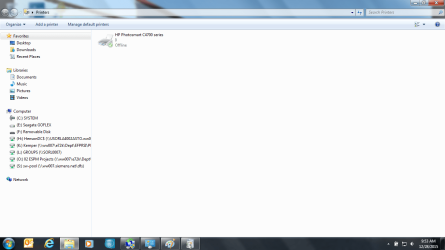
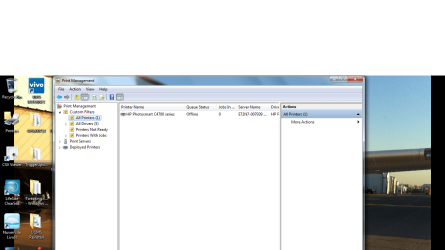
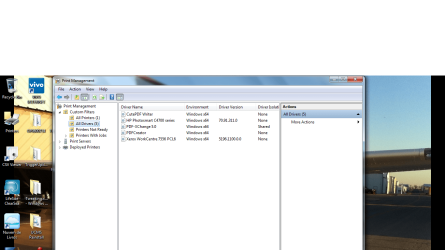
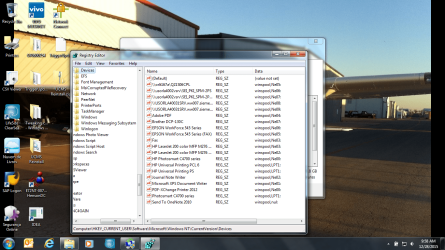
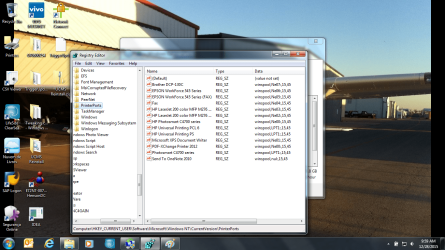
As the title says, I have a user's machine here that is displaying some weird behavior. There are multiple printer driver's installed, but only a single HP printer is showing up in Devices and Printers. Printmanagement.msc shows a single printer, but 5 drivers (including PDF, OneNote, etc.). No amount of reinstalling and uninstalling has done a lick of good. I've gone through and uninstalled all the bloat that comes with the multiple printers he had installed in the past, no dice. I've checked the registry (HKCU\Software\Microsoft\Windows NT\CurrentVersion\Devices and PrinterPorts) and everything appears normal. I've reset the spooler, stopped it, cleared the windows\system32\spool\Printers, restarted, nothing. I've gone through everything I can think of. I really, REALLY don't want to format this machine over a printer issue (especially a virtual printer), but I'm getting to the point where the time i've spent on the task is outweighing the time it would've taken to reimage.

If anyone can point me in the right direction, I'd sincerely appreciate it.
 

My Computer My Computer

At a glance

Windows 7 Enterprise 64bit
Computer type
Laptop
Computer Manufacturer/Model Number
HP ProBook 6560b (work)
OS
Windows 7 Enterprise 64bit
How many physical printers do you want or are trying to see?
 

My Computer My Computer

At a glance

Windows 7
Computer type
Laptop
OS
Windows 7
There is only 1 physical printer, which displays just fine. I don't know if it works, as the user is remote (I'm in Florida, he's in Texas) and he shipped me his laptop as another tech was unable to repair it remotely. It's the "Send to OneNote 2010", "Microsoft XPS Document Writer", "PDF-Exchange Printer 2012", etc. that are missing. They don't show up in the print dialogue boxes for the programs either (I saw a few cases where they wouldn't show up in Devices and Printers but could still be utilized in the dialogue boxes of the programs).
 

My Computer My Computer

At a glance

Windows 7 Enterprise 64bit
Computer type
Laptop
Computer Manufacturer/Model Number
HP ProBook 6560b (work)
OS
Windows 7 Enterprise 64bit
The 'sendto' menu you can fix if you type "shell:sendto" into Start/Search and hit Enter. You will get the sendto folder where you can add additional shortcuts.
 
Last edited:

My Computer My Computer

At a glance

Vista, Windows7, Mint Mate, Zorin, Windows 8from 1.6GHz Duo to i7
Computer Manufacturer/Model Number
HP, Dell, Gateway, Toshiba - 4 laptops and 2 desktops
OS
Vista, Windows7, Mint Mate, Zorin, Windows 8
CPU
from 1.6GHz Duo to i7
Monitor(s) Displays
2x HP w2207
Hard Drives
5x HDD, 7x SSD, 12x Externals
Keyboard
with trackball - no mices
Mouse
Trackball mice
Internet Speed
DSL 6000
I guess add a device or add a printer in Devices and Printers screen changes nothing?
Seems if drivers are installed correctly those devices would show physically connected or not.
Something glitched in that area. Tried any of the older System Restore points?
No, I won't say it.:zip: (already said it 3 times in my sig at bottom) :banghead:
 

My Computer My Computer

At a glance

Windows 7
Computer type
Laptop
OS
Windows 7
Not sure what you're getting at with the sendto info.

Baddog22556: Correct, Add Printer does nothing. I was hoping to avoid that if at all possible, but it seems like I don't have a choice in the matter as time is running out. Thanks for the help and sorry for the long delay in response, Holidays.
 

My Computer My Computer

At a glance

Windows 7 Enterprise 64bit
Computer type
Laptop
Computer Manufacturer/Model Number
HP ProBook 6560b (work)
OS
Windows 7 Enterprise 64bit
printer

Hi Slim,
in regard to the XPS printer if its not there somebody has removed it, its there by default.

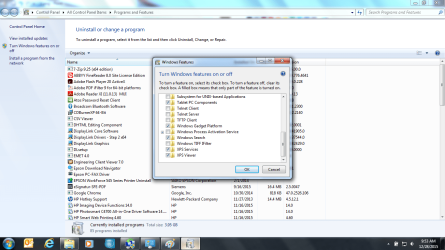
It might be usefull if you check the settings for XPS
see screenshot

Roy
 

Attachments

  • xpsdata.PNG
    xpsdata.PNG
    40.4 KB · Views: 0

My Computer My Computer

At a glance

W7 home premium 32bit/W7HP 64bit/w10 tp insid...E5300 dual core3gbNvidia Geforce 7100 Nforce 630i
Computer type
PC/Desktop
Computer Manufacturer/Model Number
medionl/Aspire 6930G/acer x55a
OS
W7 home premium 32bit/W7HP 64bit/w10 tp insider ring
CPU
E5300 dual core
Motherboard
medion MS7366
Memory
3gb
Graphics Card(s)
Nvidia Geforce 7100 Nforce 630i
Monitor(s) Displays
avixc
Internet Speed
n (isp resticted to 72)
Antivirus
mse/pands
Browser
palemoon
Other Info
Belkin Fd7050 n USB using Railink RT2870 drivers, more upto date
Attached are screen shots of all relevant screens. XPS is installed.
 

Attachments

  • 1.png
    1.png
    53.1 KB · Views: 2
  • 2.png
    2.png
    96.8 KB · Views: 1
  • 3.png
    3.png
    32.7 KB · Views: 1
  • 4.png
    4.png
    101.9 KB · Views: 1
  • 5.png
    5.png
    103.3 KB · Views: 1
  • 6.png
    6.png
    267.3 KB · Views: 1
  • 7.png
    7.png
    264.1 KB · Views: 1

My Computer My Computer

At a glance

Windows 7 Enterprise 64bit
Computer type
Laptop
Computer Manufacturer/Model Number
HP ProBook 6560b (work)
OS
Windows 7 Enterprise 64bit
just want to comfirm,
If you Right click the printer in devices, does it give you a submenu of the "lost" ones.

Roy
 

My Computer My Computer

At a glance

W7 home premium 32bit/W7HP 64bit/w10 tp insid...E5300 dual core3gbNvidia Geforce 7100 Nforce 630i
Computer type
PC/Desktop
Computer Manufacturer/Model Number
medionl/Aspire 6930G/acer x55a
OS
W7 home premium 32bit/W7HP 64bit/w10 tp insider ring
CPU
E5300 dual core
Motherboard
medion MS7366
Memory
3gb
Graphics Card(s)
Nvidia Geforce 7100 Nforce 630i
Monitor(s) Displays
avixc
Internet Speed
n (isp resticted to 72)
Antivirus
mse/pands
Browser
palemoon
Other Info
Belkin Fd7050 n USB using Railink RT2870 drivers, more upto date
Negative. I saw that and tried it, but no dice.
 

My Computer My Computer

At a glance

Windows 7 Enterprise 64bit
Computer type
Laptop
Computer Manufacturer/Model Number
HP ProBook 6560b (work)
OS
Windows 7 Enterprise 64bit
Also saw tweaking on your screenshot, would have thought its more directed towards home users.
Have a look in its log, see what its changed.

looking around the net other suggestions include checking that print spooler is set to auto, and that sometimes Bluetooth causes problems.
Roy
 

My Computer My Computer

At a glance

W7 home premium 32bit/W7HP 64bit/w10 tp insid...E5300 dual core3gbNvidia Geforce 7100 Nforce 630i
Computer type
PC/Desktop
Computer Manufacturer/Model Number
medionl/Aspire 6930G/acer x55a
OS
W7 home premium 32bit/W7HP 64bit/w10 tp insider ring
CPU
E5300 dual core
Motherboard
medion MS7366
Memory
3gb
Graphics Card(s)
Nvidia Geforce 7100 Nforce 630i
Monitor(s) Displays
avixc
Internet Speed
n (isp resticted to 72)
Antivirus
mse/pands
Browser
palemoon
Other Info
Belkin Fd7050 n USB using Railink RT2870 drivers, more upto date
Print spooler is set to auto, bluetooth settings are correct per the several different websites that dictate the settings for bluetooth services to be specially configured. Tweaking was used to attempt to repair the print spooler.

Thanks for the help guys, due to time constraints i'm forced to reimage the machine. I appreciate everyone's help!
 

My Computer My Computer

At a glance

Windows 7 Enterprise 64bit
Computer type
Laptop
Computer Manufacturer/Model Number
HP ProBook 6560b (work)
OS
Windows 7 Enterprise 64bit
Back
Top