Solved Devices and Printers Question

GMCauchemar

New member
Local time
11:12 AM
Messages
7
Location
Los Angeles, CA
Why is it that i don't see my network listed in that area of the control panel?
I do however see a wireless setup NETGEAR WNDR4300 RangeMax N300 Wireless Router, which i can't seem to removed. I right click, hit remove and nothing happens. And it says its connected. Which is weird because I'm not using wireless and the only thing which is using wireless is a tablet. Could that be it?
also the netgear modem is not plugged up, so any ideas what is going on?

I happen to believe the netgear thing listed if messing with my internet speed. Idk for sure, just wondering could it be. My internet drivers are from intel, so shouldn't the intel network thing be listed there instead of the netgear thing?
 

My Computer

Computer type
PC/Desktop
Computer Manufacturer/Model Number
Custom Build
OS
Windows 7 64bit
CPU
Intel Q6600 2.4ghz
Motherboard
Cheap HP, Which caught on fire, but still works like a charm
Memory
4GB DDR2 Memory
Graphics Card(s)
PNY GTX 550 TI 1GB GDDR5
Sound Card
Onboard
Monitor(s) Displays
Acer 21inch LCD
Screen Resolution
1920x1080
Hard Drives
3x Hard Drives, 500GB, 500GB, 500GB
PSU
Thermaltake 500 Watts
Case
Custom
Cooling
5 fans
Keyboard
Gateway Black
Mouse
Compaq red glow
Internet Speed
7mpbs/636kbs
Antivirus
None
Browser
Firefox Dev Beta
Other Info
https://www.facebook.com/HDDVS
Hello and welcome GM now I am not real sure what you are seeing can you send a pic?

How to Use the Snipping Tool in Vista

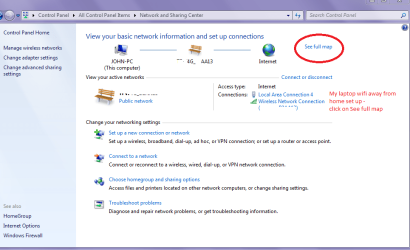
See my pic and try clicking the See full map and what comes up.
 

Attachments

  • NETWORK2.PNG
    NETWORK2.PNG
    38.5 KB · Views: 2

My Computer

Computer type
PC/Desktop
Computer Manufacturer/Model Number
Own build (new) Desk1 / Asus ROG Win 7 / Desk2 1st build
OS
Desk1 7 Home Prem / Desk2 10 Pro / Main lap Asus ROG 10 Pro 2 laptop Toshiba 7 Pro Asus P2520 7 & 10
CPU
Desk1 i5 3750K / Laptop i7 GTX 860M / Desk2 i5 2500
Motherboard
Desk1 Asus P877-V / Desk2 Gigabyte H67 UD3H / Laptop ?
Memory
Desk1 8GB (1866) / Desk2 16GB (1333) / Laptop 8Gb DDR3
Graphics Card(s)
Desk 1& 2NVidia GTX 650 & Laptops on board Intel
Sound Card
Desk 1 & 2 -XONAR DG Realtek High Def audio Laptop
Monitor(s) Displays
Desk 1 Benq HD 2450 / Desk2 Philips 24" / Laptop 17.5"
Screen Resolution
1920x1080 D1 & D2 & Laptop 1
Hard Drives
Desk1 Samsung 120GB 830 SSD
Asus ROG 256GB 850 Pro SSD
Desk2 Samsung 840 256 SSD
Toshiba 120GB EVO
PSU
Desk 1 Corsair HX 1050/ Laptop ? / Desk 2 Corsair HX 650
Case
Desk 1 Cooler HAF XM ? Toshiba laptop / Desk2 Coolermaster
Cooling
Fans on all Desk1 -2 Desk2 - all Coolermasters 5 Laptop ?
Keyboard
Desk 1 MS Sidewinder X6 Desk 2 MS Sidewinder X 4
Mouse
Desk 1&2 - Gigabyte MS 900 gamer - laptop - Logitec wireless
Internet Speed
ADSL2+
Other Info
One other Desktop (tester) and spare Toshba laptop both with SSD's
Running Kaspersky 2016 ISS on all machines config'd identically
Logitec audio stereo systems on each machine (x3)
Canon MG5250MFC
Router/modem TP-Link running WPA2SK
Alright, here's the netgear thing. I can't seem to removed it, unless that is the thing hooked up to my tablet? But i don't see any netgear drivers or anything install on my computer.
netgear.jpg


Here's my next question, on the modem I'm using now it says 1Gigabit, but in this picture with my internet provider modem it says. So if i install the netgear modem where it says speed is 1Gigabit , will that increase my internet speed from 7mpbs/636kb?
100mps.jpg
 

My Computer

Computer type
PC/Desktop
Computer Manufacturer/Model Number
Custom Build
OS
Windows 7 64bit
CPU
Intel Q6600 2.4ghz
Motherboard
Cheap HP, Which caught on fire, but still works like a charm
Memory
4GB DDR2 Memory
Graphics Card(s)
PNY GTX 550 TI 1GB GDDR5
Sound Card
Onboard
Monitor(s) Displays
Acer 21inch LCD
Screen Resolution
1920x1080
Hard Drives
3x Hard Drives, 500GB, 500GB, 500GB
PSU
Thermaltake 500 Watts
Case
Custom
Cooling
5 fans
Keyboard
Gateway Black
Mouse
Compaq red glow
Internet Speed
7mpbs/636kbs
Antivirus
None
Browser
Firefox Dev Beta
Other Info
https://www.facebook.com/HDDVS
Sorry late reply my own portable wifi is so slow and buggy.

Now the modem should be showing but the USB part has got me foxed.

To check the speed of the modem - or your provider try this Speedtest.net by Ookla - The Global Broadband Speed Test it might take a little while to run but it will give you up and down speeds.

In the meantime I will ask a friend who is better at this stuff than I am to have a look.
 

My Computer

Computer type
PC/Desktop
Computer Manufacturer/Model Number
Own build (new) Desk1 / Asus ROG Win 7 / Desk2 1st build
OS
Desk1 7 Home Prem / Desk2 10 Pro / Main lap Asus ROG 10 Pro 2 laptop Toshiba 7 Pro Asus P2520 7 & 10
CPU
Desk1 i5 3750K / Laptop i7 GTX 860M / Desk2 i5 2500
Motherboard
Desk1 Asus P877-V / Desk2 Gigabyte H67 UD3H / Laptop ?
Memory
Desk1 8GB (1866) / Desk2 16GB (1333) / Laptop 8Gb DDR3
Graphics Card(s)
Desk 1& 2NVidia GTX 650 & Laptops on board Intel
Sound Card
Desk 1 & 2 -XONAR DG Realtek High Def audio Laptop
Monitor(s) Displays
Desk 1 Benq HD 2450 / Desk2 Philips 24" / Laptop 17.5"
Screen Resolution
1920x1080 D1 & D2 & Laptop 1
Hard Drives
Desk1 Samsung 120GB 830 SSD
Asus ROG 256GB 850 Pro SSD
Desk2 Samsung 840 256 SSD
Toshiba 120GB EVO
PSU
Desk 1 Corsair HX 1050/ Laptop ? / Desk 2 Corsair HX 650
Case
Desk 1 Cooler HAF XM ? Toshiba laptop / Desk2 Coolermaster
Cooling
Fans on all Desk1 -2 Desk2 - all Coolermasters 5 Laptop ?
Keyboard
Desk 1 MS Sidewinder X6 Desk 2 MS Sidewinder X 4
Mouse
Desk 1&2 - Gigabyte MS 900 gamer - laptop - Logitec wireless
Internet Speed
ADSL2+
Other Info
One other Desktop (tester) and spare Toshba laptop both with SSD's
Running Kaspersky 2016 ISS on all machines config'd identically
Logitec audio stereo systems on each machine (x3)
Canon MG5250MFC
Router/modem TP-Link running WPA2SK
The USB thing is my xbox/usb recording device. But the netgear should not be showing, I'm using verizion modem, not a netgear modem. I'm just trying to remove it. My netgear modem is not even hooked up lol.

Quick question though, does upgrading to a gigabyte modem increase internet speed from my modem which is only 100mpbs?
 

My Computer

Computer type
PC/Desktop
Computer Manufacturer/Model Number
Custom Build
OS
Windows 7 64bit
CPU
Intel Q6600 2.4ghz
Motherboard
Cheap HP, Which caught on fire, but still works like a charm
Memory
4GB DDR2 Memory
Graphics Card(s)
PNY GTX 550 TI 1GB GDDR5
Sound Card
Onboard
Monitor(s) Displays
Acer 21inch LCD
Screen Resolution
1920x1080
Hard Drives
3x Hard Drives, 500GB, 500GB, 500GB
PSU
Thermaltake 500 Watts
Case
Custom
Cooling
5 fans
Keyboard
Gateway Black
Mouse
Compaq red glow
Internet Speed
7mpbs/636kbs
Antivirus
None
Browser
Firefox Dev Beta
Other Info
https://www.facebook.com/HDDVS
Why is it that i don't see my network listed in that area of the control panel?
I do however see a wireless setup NETGEAR WNDR4300 RangeMax N300 Wireless Router, which i can't seem to removed. I right click, hit remove and nothing happens. And it says its connected. Which is weird because I'm not using wireless and the only thing which is using wireless is a tablet. Could that be it?
also the netgear modem is not plugged up, so any ideas what is going on?

I believe that the only devices that you can see are those that belong to your HOmeGroup or Workgroup. I an aware of this because I have, on at least one occasion, taken advantage of this feature to hide a machine from another person in my office who kept accidentally sending confidential documents to my printer, then wondering where they went.

I happen to believe the netgear thing listed if messing with my internet speed. Idk for sure, just wondering could it be. My internet drivers are from intel, so shouldn't the intel network thing be listed there instead of the netgear thing?

If you have both wireless and wired networks, there is a fair chance that Windows is favoring the wireless network, which is typically the slower of the two. There is a setting to establish a preference for the wired network, although I cannot remember where it was, and I haven't been able to find it today. I know is exists, because I used it when I first installed this machine.
 

My Computer

Computer type
PC/Desktop
Computer Manufacturer/Model Number
Gateway
OS
Windows 7 SP Professional 1, 64 bit
CPU
Intel Pentium G630 @ 2.7 GHz
Motherboard
Gateway
Memory
4.0 GB
Graphics Card(s)
Intel HD Graphics
Hard Drives
1 TB SATA
Antivirus
Microsoft Antimalware
Browser
Google Chrome, Windows Internet Explorer 11
Hi there,

In addition.... I think that you're referring to a gig port, and this will not improve the speed of the internet but will improve the wired transfer rate if there's file sharing enabled in your network. You may try connecting your Netgear to the Verizon Modem as your Netgear is a dual band router and it might help isolate the 5GHz and 2.4GHz wifi devices in your network for a better performance. Although it always help to have a higher bandwidth if you have a few devices connected to your network specially if that are heavily utilizing the bandwidth thru heavy gaming, streaming videos, etc...
Quick question though, does upgrading to a gigabyte modem increase internet speed from my modem which is only 100mpbs?
You may try to Power Cycle your devices and see if the Netgear disappears.
But the netgear should not be showing, I'm using verizion modem, not a netgear modem. I'm just trying to remove it. My netgear modem is not even hooked up lol.

Hope this helps.
 

My Computer

Computer Manufacturer/Model Number
Lenovo Desktop/Samsung Laptop
OS
Win7 & Win8 64bit
CPU
Intel i5
Internet Speed
Charter-20 Mbps
Antivirus
Avast
Browser
FF, IE9 and Chrome
The USB thing is my xbox/usb recording device. But the netgear should not be showing, I'm using verizion modem, not a netgear modem. I'm just trying to remove it. My netgear modem is not even hooked up lol.

Quick question though, does upgrading to a gigabyte modem increase internet speed from my modem which is only 100mpbs?
Hmm my mistake I thought that was the modem and I am hoping what 2xg has asked may help. The modem just for my curiosity is in you residence? and is it being used by someone else.

Now has the Netgear has been on the computer? if so I am wondering if you should try removing the drivers now if you cannot find the drivers in any listing then they might just still be in the registry in the HKEY's - LOCAL MACHINE & CURRENT USER > Software section/s. In those spots they should be listed as Netgear but if not you might need to track down who makes Netgear devices and then search for that manufacturer in those reg keys. Once you find them and this is really up to you is do as I do with stubborn stuff is to right click that entry and delete it altogether.
Now just as a precaution for the event that things go south with the reg I use this http://www.sevenforums.com/tutorials/4230-registry-backup-restore.html as a back up should I want to go back.


I ask because when travelling I use the wifi of wherever it is I stay and actually where I live right now I pick up the wife's of other places around me.

To be honest I am not a great fan of wifi though I have to use it travelling and where I live with my partner - at my own place everything is hard wired (cabled).
 

My Computer

Computer type
PC/Desktop
Computer Manufacturer/Model Number
Own build (new) Desk1 / Asus ROG Win 7 / Desk2 1st build
OS
Desk1 7 Home Prem / Desk2 10 Pro / Main lap Asus ROG 10 Pro 2 laptop Toshiba 7 Pro Asus P2520 7 & 10
CPU
Desk1 i5 3750K / Laptop i7 GTX 860M / Desk2 i5 2500
Motherboard
Desk1 Asus P877-V / Desk2 Gigabyte H67 UD3H / Laptop ?
Memory
Desk1 8GB (1866) / Desk2 16GB (1333) / Laptop 8Gb DDR3
Graphics Card(s)
Desk 1& 2NVidia GTX 650 & Laptops on board Intel
Sound Card
Desk 1 & 2 -XONAR DG Realtek High Def audio Laptop
Monitor(s) Displays
Desk 1 Benq HD 2450 / Desk2 Philips 24" / Laptop 17.5"
Screen Resolution
1920x1080 D1 & D2 & Laptop 1
Hard Drives
Desk1 Samsung 120GB 830 SSD
Asus ROG 256GB 850 Pro SSD
Desk2 Samsung 840 256 SSD
Toshiba 120GB EVO
PSU
Desk 1 Corsair HX 1050/ Laptop ? / Desk 2 Corsair HX 650
Case
Desk 1 Cooler HAF XM ? Toshiba laptop / Desk2 Coolermaster
Cooling
Fans on all Desk1 -2 Desk2 - all Coolermasters 5 Laptop ?
Keyboard
Desk 1 MS Sidewinder X6 Desk 2 MS Sidewinder X 4
Mouse
Desk 1&2 - Gigabyte MS 900 gamer - laptop - Logitec wireless
Internet Speed
ADSL2+
Other Info
One other Desktop (tester) and spare Toshba laptop both with SSD's
Running Kaspersky 2016 ISS on all machines config'd identically
Logitec audio stereo systems on each machine (x3)
Canon MG5250MFC
Router/modem TP-Link running WPA2SK
Guys, thanks for all the help. The problem is about to be solved, Verizon sucks slow speeds, going with Comcast way faster speeds, problem solved. lol. As for the net gear thing, i guess i have to reinstall windows to get rid of it, which i have no intention on doing right now. but the speed issue was my main concern and as i said Verizon is a terrible company .

peace
 

My Computer

Computer type
PC/Desktop
Computer Manufacturer/Model Number
Custom Build
OS
Windows 7 64bit
CPU
Intel Q6600 2.4ghz
Motherboard
Cheap HP, Which caught on fire, but still works like a charm
Memory
4GB DDR2 Memory
Graphics Card(s)
PNY GTX 550 TI 1GB GDDR5
Sound Card
Onboard
Monitor(s) Displays
Acer 21inch LCD
Screen Resolution
1920x1080
Hard Drives
3x Hard Drives, 500GB, 500GB, 500GB
PSU
Thermaltake 500 Watts
Case
Custom
Cooling
5 fans
Keyboard
Gateway Black
Mouse
Compaq red glow
Internet Speed
7mpbs/636kbs
Antivirus
None
Browser
Firefox Dev Beta
Other Info
https://www.facebook.com/HDDVS
Glad it is fixed mate;)
 

My Computer

Computer type
PC/Desktop
Computer Manufacturer/Model Number
Own build (new) Desk1 / Asus ROG Win 7 / Desk2 1st build
OS
Desk1 7 Home Prem / Desk2 10 Pro / Main lap Asus ROG 10 Pro 2 laptop Toshiba 7 Pro Asus P2520 7 & 10
CPU
Desk1 i5 3750K / Laptop i7 GTX 860M / Desk2 i5 2500
Motherboard
Desk1 Asus P877-V / Desk2 Gigabyte H67 UD3H / Laptop ?
Memory
Desk1 8GB (1866) / Desk2 16GB (1333) / Laptop 8Gb DDR3
Graphics Card(s)
Desk 1& 2NVidia GTX 650 & Laptops on board Intel
Sound Card
Desk 1 & 2 -XONAR DG Realtek High Def audio Laptop
Monitor(s) Displays
Desk 1 Benq HD 2450 / Desk2 Philips 24" / Laptop 17.5"
Screen Resolution
1920x1080 D1 & D2 & Laptop 1
Hard Drives
Desk1 Samsung 120GB 830 SSD
Asus ROG 256GB 850 Pro SSD
Desk2 Samsung 840 256 SSD
Toshiba 120GB EVO
PSU
Desk 1 Corsair HX 1050/ Laptop ? / Desk 2 Corsair HX 650
Case
Desk 1 Cooler HAF XM ? Toshiba laptop / Desk2 Coolermaster
Cooling
Fans on all Desk1 -2 Desk2 - all Coolermasters 5 Laptop ?
Keyboard
Desk 1 MS Sidewinder X6 Desk 2 MS Sidewinder X 4
Mouse
Desk 1&2 - Gigabyte MS 900 gamer - laptop - Logitec wireless
Internet Speed
ADSL2+
Other Info
One other Desktop (tester) and spare Toshba laptop both with SSD's
Running Kaspersky 2016 ISS on all machines config'd identically
Logitec audio stereo systems on each machine (x3)
Canon MG5250MFC
Router/modem TP-Link running WPA2SK
Sorry for the late reply, I was on a vacation.... anyways.... glad to hear that your issue is now resolved. :)
 

My Computer

Computer Manufacturer/Model Number
Lenovo Desktop/Samsung Laptop
OS
Win7 & Win8 64bit
CPU
Intel i5
Internet Speed
Charter-20 Mbps
Antivirus
Avast
Browser
FF, IE9 and Chrome
Back
Top