"Devices & Printers" Completely Hangs - Nothing Appears

SGREENE978

New member
Local time
7:56 PM
Messages
2
Good morning. I've read an older thread that a particular installed printer does not appear in Devices & Printers. And I tried all the recommendations there. However, as the thread title states. we suddenly lost the ability to have Devices & Printers run to completion. In our case, the green line crawls across the dialogue box, but never completes and the box remains empty.

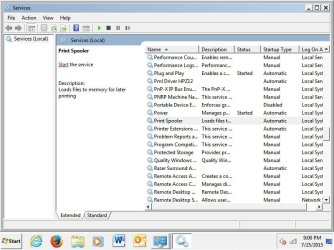
I've attempted the suggestions in Services to set Bluetooth to Start and Automatic. I also made sure the same was true for the Print Spooler. I then attempted to uninstall the printer drivers, but there's a problem with that, too. Though the system acts as though it's trying to remove the driver, it never does and I'm unable to uninstall any of the other HP printer drivers.

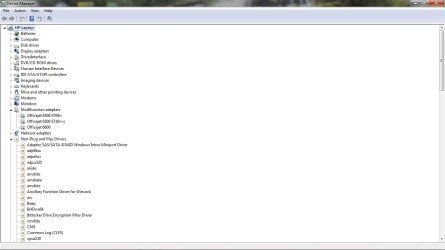
On top of that, I'm unable to print to the XMS printer. I've tried, but it hangs the page and I'm forced to end the process. In Device Driver, the printer which is an HP Officejet 6500 E709, does appear when I select, "View - Hidden Items."

On Thursday 7/23/15, I allowed the latest "critical" Windows update to install with the hope that it might correct the error. Nada! So I've basically run out of ideas as what else I can do, short of resetting Windows. I'd truly appreciate any help or advice.
Thanks & Enjoy your weekend.
SG
C
 

Attachments

  • Device Manager with Hidden 25JUL15.jpg
    Device Manager with Hidden 25JUL15.jpg
    53.5 KB · Views: 1

My Computer

Computer type
PC/Desktop
Computer Manufacturer/Model Number
HP pAVILION g60
OS
Windows 7 Home Premium SP1
Memory
4GB
Antivirus
Norton 360 Premium
Browser
IE 11
Get Malwarebytes Anti-Malware free (enable rootkit scanning - settings - detections) and scan with it.

Then if clean , try disabling Windows Defender.
Also see if it is working in Safe Mode.

Also run cmd as admin and enter:
Code:
sfc /scannow
then after it is finished and restarted, enter in cmd:
Code:
findstr /c:"[SR]" %windir%\logs\cbs\cbs.log >"%userprofile%\desktop\sfcdetails.txt"
attach the sfcdetails.txt here
 

My Computer

Computer type
PC/Desktop
Computer Manufacturer/Model Number
Custom Build
OS
Windows 7 Ultimate x64 SP1
CPU
AMD Phenom 2 1090T
Motherboard
Gigabyte GA-890FXA-UD5
Memory
2x8GB Kingston HyperX Fury Black 1600Mhz Unganged
Graphics Card(s)
MSI GTX 970 Gaming 4G
Sound Card
Realtek On-Board HD 7.1 Audio / Logitech G35
Monitor(s) Displays
3xAcer GD245HQ
Screen Resolution
1920x1080
Hard Drives
Samsung 850 Pro 512GB SSD - OS /
WD Caviar Black SATA 3 - 1 TBx2 - Dynamic RAID 0 /
WD Caviar Green SATA 2 - 640GBx2 - Dynamic RAID 0 /
WD Caviar Green SATA 2 - 640GB - Internal Backup /
Seagate Barracude SATA 3 - 3TB - External Backup/ Sync
PSU
HighPower 1000W
Case
Cooler Master HAF 932
Cooling
Noctua NH-D14
Keyboard
Logitech G19
Mouse
Logitech G500
Internet Speed
100/4 Mbit Cable (100GB quota)
Antivirus
ZoneAlarm Extreme Security / MBAM Pro / MBAE Free / SAS Free
Browser
IE 11 - Firefox - Chrome
Other Info
Logitech F710/ G27/ G940/ Z5500 // TrackIR 5 // Nvidia 3D Surround Vision
A Good Try - No Positive Results

GokAy - Thank you for your recommendations. I follow each one through. The only small bit of good news is that I was able to run Devices & Printers in Safe Mode, but it would not allow me to add a printer. It told me the Print Spooler wasn't running. I then went back into Services and re-Started the Spooler and set it to Automatic.

Then I ran the second scan from the CMD and it found nothing.

I'm not sure what else to do except for backing data up and perform a reset.

The pictures are below

Thanks again,
Steve
 

Attachments

  • Post-Scan Run.jpg
    Post-Scan Run.jpg
    88.4 KB · Views: 1
  • Scan Results.jpg
    Scan Results.jpg
    140.5 KB · Views: 1
  • Services Listed.jpg
    Services Listed.jpg
    70.3 KB · Views: 1

My Computer

Computer type
PC/Desktop
Computer Manufacturer/Model Number
HP pAVILION g60
OS
Windows 7 Home Premium SP1
Memory
4GB
Antivirus
Norton 360 Premium
Browser
IE 11
2nd command only works if you have run the 1st one. You have to do them in order, but seeing sfc /scannow found no errors, there is no need for the 2nd one.

Safe Mode was for testing to see if you could see the devices (too many services shut down in Safe Mode to install them).

Try a clean startup (disable everything in startup and all non-MS services, even firewall and AV) but please disconnect from the Internet - turn off router. http://www.sevenforums.com/tutorial...ation-conflicts-performing-clean-startup.html
 

My Computer

Computer type
PC/Desktop
Computer Manufacturer/Model Number
Custom Build
OS
Windows 7 Ultimate x64 SP1
CPU
AMD Phenom 2 1090T
Motherboard
Gigabyte GA-890FXA-UD5
Memory
2x8GB Kingston HyperX Fury Black 1600Mhz Unganged
Graphics Card(s)
MSI GTX 970 Gaming 4G
Sound Card
Realtek On-Board HD 7.1 Audio / Logitech G35
Monitor(s) Displays
3xAcer GD245HQ
Screen Resolution
1920x1080
Hard Drives
Samsung 850 Pro 512GB SSD - OS /
WD Caviar Black SATA 3 - 1 TBx2 - Dynamic RAID 0 /
WD Caviar Green SATA 2 - 640GBx2 - Dynamic RAID 0 /
WD Caviar Green SATA 2 - 640GB - Internal Backup /
Seagate Barracude SATA 3 - 3TB - External Backup/ Sync
PSU
HighPower 1000W
Case
Cooler Master HAF 932
Cooling
Noctua NH-D14
Keyboard
Logitech G19
Mouse
Logitech G500
Internet Speed
100/4 Mbit Cable (100GB quota)
Antivirus
ZoneAlarm Extreme Security / MBAM Pro / MBAE Free / SAS Free
Browser
IE 11 - Firefox - Chrome
Other Info
Logitech F710/ G27/ G940/ Z5500 // TrackIR 5 // Nvidia 3D Surround Vision
Back
Top