Solved diagnostics help windows behaving oddly

AdamKristian

New member
Local time
10:46 PM
Messages
10
Hi Sevenfoum

i have an issue with my computer!! :mad: it started last night whilst watching youtube , my computer just shut down (typical bsod)! i managed to get the computer to start up using the startup repair option and chkdsk and it now turns on! :geek: now i have a new list of problems :mad:

everytime i start windows it always goes through the preparing desktop as if the computer is new, & then tells me it failed to connect to the windows service event notification service??

my wireless drivers dont seem to be present along with sound, despite the windows sound playing after logging in.

my recovery partition seems to have disappeared despite it showing in disk management.

not only that but when i try to do anything which requires administrative rights i.e open cmd it denies me access saying the system could not find the enviroment option that was entered.

on top of all that the visuals on the computer have reverted back to classic.(not important)

if it is a software issue how would i go about fixing this, i think the windows files are corrupted or there might be damage to the harddrive, having said that there has been no dropping or damage to the laptop in anyway it just as i say shut down last night.

can hard drives just die without any prevoking?

any help / suggestions would be great and much appreciated. this is starting to stress me out and im getting it in the neck from the missus!:mad: :mad: :cry:

AdamKristian NEW MEMBER!
 

My Computer

OS
windows 7 64bit home
Blue screen never appeared long enough to see any error codes.
I just ran chkdsk and startup repair which got the computer turning on but then have me loads of additional issues.
Strange
 

My Computer

OS
windows 7 64bit home

My Computer

Computer type
Laptop
The blue screen was literally on screen for a millisecond and wasn't long enough for anyone to read it let alone myself. Would it be stored in system event log?
 

My Computer

OS
windows 7 64bit home
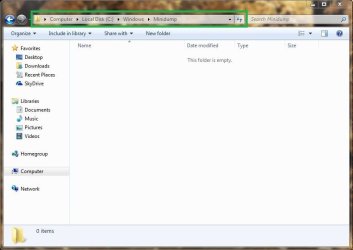
%SystemRoot%/Windows/Minidump

Substitute the %SystemRoot% for the partition whereby your operating system is located, which is usually the C:/ drive.

Hope this helps,

Harry
 

My Computer

Computer type
Laptop
How do I go about doing that via cmd ? I can't access the edit system variables.
Thanks for your help hopefully it works.
 

My Computer

OS
windows 7 64bit home
Just use Windows Explorer, just upload a screenshot for you to follow, you don't need to change any environmental variables:

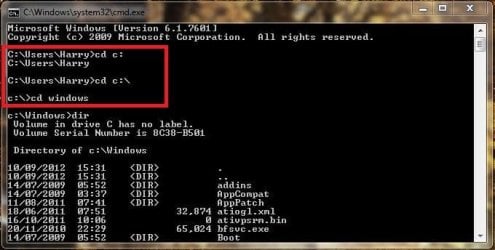
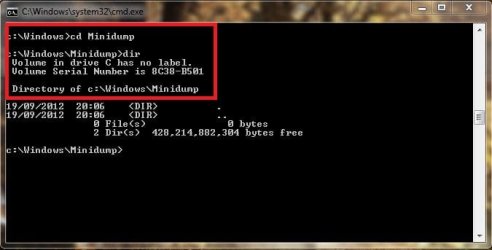
I've uploaded the Command Prompt method, if you have to use Safe Mode
 

Attachments

  • Dump.JPG
    Dump.JPG
    41.9 KB · Views: 12
  • cmd.JPG
    cmd.JPG
    44.3 KB · Views: 7
  • cmd#2.JPG
    cmd#2.JPG
    30.7 KB · Views: 7

My Computer

Computer type
Laptop
Ok so I have 2 files in c:/windows/minidump both with dates Over a month ago. I don't quite understand what you want me to do with this minidump file.
Thanks for your help.
 

My Computer

OS
windows 7 64bit home
Ok so I have 2 files in c:/windows/minidump both with dates Over a month ago. I don't quite understand what you want me to do with this minidump file.
Thanks for your help.

Zip up the files and then post them within this thread (create a zipped folder), this may of be use to you: http://www.sevenforums.com/crashes-debugging/96879-blue-screen-death-bsod-posting-instructions.html

Have you performed a anti-virus scan recently, and made sure the security definitions are fully updated?

What anti-virus are you using?
 

My Computer

Computer type
Laptop
i have attached the logs. i am just using windows microsoft essentials but it will not allow me to do a scan and gives me the error code 0x80070424
 

Attachments

My Computer

OS
windows 7 64bit home
Code:
[B]DRIVER_POWER_STATE_FAILURE (9f)[/B]
A driver has failed to complete a power IRP within a specific time (usually 10 minutes).
Arguments:
Arg1: 0000000000000004, The power transition timed out waiting to synchronize with the Pnp
	subsystem.
Arg2: 0000000000000258, Timeout in seconds.
Arg3: fffffa80021cb040, The thread currently holding on to the Pnp lock.
Arg4: fffff80000b9c510, nt!TRIAGE_9F_PNP on Win7

Usual causes: Device driver

Code:
[B]PAGE_FAULT_IN_NONPAGED_AREA (50)[/B]
Invalid system memory was referenced.  This cannot be protected by try-except,
it must be protected by a Probe.  Typically the address is just plain bad or it
is pointing at freed memory.
Arguments:
Arg1: ffffffffc386d650, memory referenced.
Arg2: 0000000000000000, value 0 = read operation, 1 = write operation.
Arg3: fffff800035b1f8c, If non-zero, the instruction address which referenced the bad memory
	address.
Arg4: 0000000000000002, (reserved)

Usual causes: Defective hardware (particularly memory - but not just RAM), Faulty system service, Antivirus, Device driver, NTFS corruption, BIOS

--------------------------------​

Run a Memory Test, many BSOD's are caused by faulty memory modules or slots on the motherboard, the link can be found in my signature below.

Hope this helps,

Harry
 

My Computer

Computer type
Laptop
i have performing a memory test using windows memory diagnostics tool now and will update you when its finished.
i cant see any link in signature :(
 

My Computer

OS
windows 7 64bit home
ok so i have run the memory diagnostics tool, but upon windows starting up the memory diagnostics didnt show up, i try to open event viewer to no avail all it comes up with is the following error message

windows cannot find windirsystem32mmc.exe. make sure you typed the name correctly, and then try again?

any suggestions?
would a repair disk be the way forward to repair any windows issues first ? stuck.com
 

My Computer

OS
windows 7 64bit home
ok so i have run the memory diagnostics tool, but upon windows starting up the memory diagnostics didnt show up, i try to open event viewer to no avail all it comes up with is the following error message

windows cannot find windirsystem32mmc.exe. make sure you typed the name correctly, and then try again?

any suggestions?
would a repair disk be the way forward to repair any windows issues first ? stuck.com

Did you run MemTest86+?

Try gregrocker's troubleshooting steps.

Hope this helps,

Harry
 

My Computer

Computer type
Laptop
I did do a memory test but due to errors in windows files I was unable to view the results.
Instead of ripping my hair out I performed back-up and restored windows and all of its components.
I now have a working computer :D .

Now I am going to perform hardware test on hdd memory ect, despite it looking like everything's ok and working properly. :s

Thank you harry for all your assistance even when at times I appeared a newbie!
 

My Computer

OS
windows 7 64bit home
I used windows memory diagnostics tool? i Didn't use memtest. Ran memory test using windows diagnostic tool and when it finishes results are usually displayed upon system startup. That never happened because event viewer wouldn't open and no log was shown.
It's sorted now anyway problem solved and thanks again for your assistance.

Adam kristian
 

My Computer

OS
windows 7 64bit home
I used windows memory diagnostics tool? i Didn't use memtest. Ran memory test using windows diagnostic tool and when it finishes results are usually displayed upon system startup. That never happened because event viewer wouldn't open and no log was shown.
It's sorted now anyway problem solved and thanks again for your assistance.

Adam kristian

Okay good to know, but I meant MemTest86+ as Greg suggested in his post, but never-mind you have a working computer now.
 

My Computer

Computer type
Laptop
Back
Top