Dialog box colour?

scoobz

New member
Local time
10:29 PM
Messages
18
Hi all,

I wondered if anyone could tell me how to change the colour of the main dialog box (eg: save as, download progress, "are you sure?" etc). It's not configurable from Personalization>Advanced window settings. I'm using the notoo theme and have recently (read: yesterday) discovered reshack but don't know if it's needed in this instance.

If anyone could shed some light that would be great.

Thanks

S :D
 

My Computer

OS
Win 7 Home Premium 64
Welcome to the Seven Forums
First would you post a screenshot of the dialog box, save as, download progress, are you sure. So we both know what you are talking about thank you.
http://www.sevenforums.com/tutorials/9733-screenshots-files-upload-post-seven-forums.html
http://www.sevenforums.com/tutorials/9717-screenshot-paint.html
How to Use the Snipping Tool in Vista - Vista Forums
Second would you post a link to the theme so I can look at it I may be able to provide the image numbers for you then you may be able to customize them.
Jerry
 

My Computer

Computer type
Laptop
Computer Manufacturer/Model Number
Sager NP9170
OS
Win 7 Pro x64 / Win 10 Pro
CPU
Intel(R) Core(TM) i7-3630QM CPU @ 2.40GHz
Motherboard
CLEVO P170EM
Memory
12 GB
Graphics Card(s)
(1) Intel(R) HD Graphics 4000 (2) NVIDIA GeForce GTX 675M
Sound Card
(1) Realtek High Definition Audio (2) Intel(R) Display Aud
Monitor(s) Displays
17.3
Screen Resolution
1920x1080
Hard Drives
(1) Samsung 860 EVO 500GB(OS) (1) Samsung 860 EVO 500GB(Data)
Keyboard
Backlite
Antivirus
MSE, Malwarebytes Pro
Browser
Firefox
Other Info
DESKTOP: Custom-built.
OS: Win 10 Pro x64.
CASE: Rosewill R5.
CPU: Intel I5 4670K CPU @ 3.40GHz.
CPU COOLER: Cool Master Hyper 212 EVO.
MOTHERBOARD: Asus Z87-A.
MEMORY: Kingston HyperX 2x4 GB.
GPU: Nvidia Geforce 650 TI.
PSU: Corsair TX750.
DRIVES: (1) Samsung 840 120 GB SSD (2) Western Digital blue 500 GB 7200 RPM.
Hi Jerry,

Thanks for getting back to me. This should be the dialog box....

2a8olkm.jpg


And this should be the link to the theme.....

NOOTO VS by ~lassekongo83 on deviantART

Any pointers would be appreciated,

Thanks

S
 

My Computer

OS
Win 7 Home Premium 64
Are you sure that is the right link that is XP theme
is this the one you're talking about
NOOTO port to Win7 by =Satukoro on deviantART
Anyway I am having to ask the experts at another forum where the location is at I will get back to you when I find out.
Jerry
 

My Computer

Computer type
Laptop
Computer Manufacturer/Model Number
Sager NP9170
OS
Win 7 Pro x64 / Win 10 Pro
CPU
Intel(R) Core(TM) i7-3630QM CPU @ 2.40GHz
Motherboard
CLEVO P170EM
Memory
12 GB
Graphics Card(s)
(1) Intel(R) HD Graphics 4000 (2) NVIDIA GeForce GTX 675M
Sound Card
(1) Realtek High Definition Audio (2) Intel(R) Display Aud
Monitor(s) Displays
17.3
Screen Resolution
1920x1080
Hard Drives
(1) Samsung 860 EVO 500GB(OS) (1) Samsung 860 EVO 500GB(Data)
Keyboard
Backlite
Antivirus
MSE, Malwarebytes Pro
Browser
Firefox
Other Info
DESKTOP: Custom-built.
OS: Win 10 Pro x64.
CASE: Rosewill R5.
CPU: Intel I5 4670K CPU @ 3.40GHz.
CPU COOLER: Cool Master Hyper 212 EVO.
MOTHERBOARD: Asus Z87-A.
MEMORY: Kingston HyperX 2x4 GB.
GPU: Nvidia Geforce 650 TI.
PSU: Corsair TX750.
DRIVES: (1) Samsung 840 120 GB SSD (2) Western Digital blue 500 GB 7200 RPM.
No, you're right, this is the right link....

NOOTO port to Win7 by =Satukoro on deviantART

Sorry for the confusion.

Basically my optician has said to get rid of all the white I can on my computer so I'm changing backgrounds (explorer.exe for example) to dark grey and the text to near white but there's a knockon effect with things like the dialog box etc.

Thanks for helping :D
 

My Computer

OS
Win 7 Home Premium 64
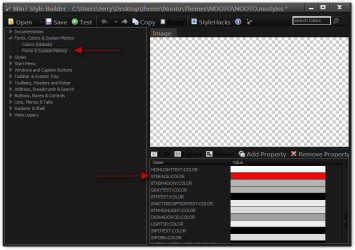
Good news bad news, the good news is I found the location the bad news is you will need to ask the theme maker to change it for you or purchase Ave's Windows7 Style Builder To change it yourself (that's why I bought it), or and I'm not sure how to do it but you can hex edit the theme.msstyles. I found out it is not an image but fill color.
If you like dark themes with whitish gray text have a look at this one charleston2378's deviantART gallery it's one I use all the time.
Let me know if I can do anything more for you.
Jerry
z.pngx.png
 

My Computer

Computer type
Laptop
Computer Manufacturer/Model Number
Sager NP9170
OS
Win 7 Pro x64 / Win 10 Pro
CPU
Intel(R) Core(TM) i7-3630QM CPU @ 2.40GHz
Motherboard
CLEVO P170EM
Memory
12 GB
Graphics Card(s)
(1) Intel(R) HD Graphics 4000 (2) NVIDIA GeForce GTX 675M
Sound Card
(1) Realtek High Definition Audio (2) Intel(R) Display Aud
Monitor(s) Displays
17.3
Screen Resolution
1920x1080
Hard Drives
(1) Samsung 860 EVO 500GB(OS) (1) Samsung 860 EVO 500GB(Data)
Keyboard
Backlite
Antivirus
MSE, Malwarebytes Pro
Browser
Firefox
Other Info
DESKTOP: Custom-built.
OS: Win 10 Pro x64.
CASE: Rosewill R5.
CPU: Intel I5 4670K CPU @ 3.40GHz.
CPU COOLER: Cool Master Hyper 212 EVO.
MOTHERBOARD: Asus Z87-A.
MEMORY: Kingston HyperX 2x4 GB.
GPU: Nvidia Geforce 650 TI.
PSU: Corsair TX750.
DRIVES: (1) Samsung 840 120 GB SSD (2) Western Digital blue 500 GB 7200 RPM.
Thanks again Jerry,
I've installed that theme, seemed the easier route. Thanks for the heads up.

The thing I liked about the notoo theme was the font, Avantgarde LT medium which I've tried to change in the advanced settings but 'explorer.exe' seems to have the fonts locked in somehow. Is there a quick and easy way to change that?

Lee
 

My Computer

OS
Win 7 Home Premium 64
Thanks again Jerry,
I've installed that theme, seemed the easier route. Thanks for the heads up.

The thing I liked about the notoo theme was the font, Avantgarde LT medium which I've tried to change in the advanced settings but 'explorer.exe' seems to have the fonts locked in somehow. Is there a quick and easy way to change that?

Lee
Yes there is
1st go here and signup it's free Virtual Customs • Home • Customize Your Virtual World! we have a lot of member there.
2nd then go to this thread Virtual Customs • View topic - Change all Fonts in WSB easily. • Customize Your Virtual World! and follow it.
You can get a 30 day trial of Restorator 2007 here Restorator - Bome Software - Restorator - the resource editor for customization, localization, and translation.
And Notepad ++ here Notepad++ Home
If you need help let me know.
Jerry
 

My Computer

Computer type
Laptop
Computer Manufacturer/Model Number
Sager NP9170
OS
Win 7 Pro x64 / Win 10 Pro
CPU
Intel(R) Core(TM) i7-3630QM CPU @ 2.40GHz
Motherboard
CLEVO P170EM
Memory
12 GB
Graphics Card(s)
(1) Intel(R) HD Graphics 4000 (2) NVIDIA GeForce GTX 675M
Sound Card
(1) Realtek High Definition Audio (2) Intel(R) Display Aud
Monitor(s) Displays
17.3
Screen Resolution
1920x1080
Hard Drives
(1) Samsung 860 EVO 500GB(OS) (1) Samsung 860 EVO 500GB(Data)
Keyboard
Backlite
Antivirus
MSE, Malwarebytes Pro
Browser
Firefox
Other Info
DESKTOP: Custom-built.
OS: Win 10 Pro x64.
CASE: Rosewill R5.
CPU: Intel I5 4670K CPU @ 3.40GHz.
CPU COOLER: Cool Master Hyper 212 EVO.
MOTHERBOARD: Asus Z87-A.
MEMORY: Kingston HyperX 2x4 GB.
GPU: Nvidia Geforce 650 TI.
PSU: Corsair TX750.
DRIVES: (1) Samsung 840 120 GB SSD (2) Western Digital blue 500 GB 7200 RPM.
Lee be sure to switch to a different theme and logoff/logon then work on the theme.
Jerry
 

My Computer

Computer type
Laptop
Computer Manufacturer/Model Number
Sager NP9170
OS
Win 7 Pro x64 / Win 10 Pro
CPU
Intel(R) Core(TM) i7-3630QM CPU @ 2.40GHz
Motherboard
CLEVO P170EM
Memory
12 GB
Graphics Card(s)
(1) Intel(R) HD Graphics 4000 (2) NVIDIA GeForce GTX 675M
Sound Card
(1) Realtek High Definition Audio (2) Intel(R) Display Aud
Monitor(s) Displays
17.3
Screen Resolution
1920x1080
Hard Drives
(1) Samsung 860 EVO 500GB(OS) (1) Samsung 860 EVO 500GB(Data)
Keyboard
Backlite
Antivirus
MSE, Malwarebytes Pro
Browser
Firefox
Other Info
DESKTOP: Custom-built.
OS: Win 10 Pro x64.
CASE: Rosewill R5.
CPU: Intel I5 4670K CPU @ 3.40GHz.
CPU COOLER: Cool Master Hyper 212 EVO.
MOTHERBOARD: Asus Z87-A.
MEMORY: Kingston HyperX 2x4 GB.
GPU: Nvidia Geforce 650 TI.
PSU: Corsair TX750.
DRIVES: (1) Samsung 840 120 GB SSD (2) Western Digital blue 500 GB 7200 RPM.
Well that was a bit of a mission but all turned out well in the end! :D

explorerblack.jpg


Couldn't have done it without ya Jerry, you're a legend, thanks for taking the time.

Maybe now I won't go blind lol

(Now if only I could find a way to make WLM to look the same I'd be set ;) )
 

My Computer

OS
Win 7 Home Premium 64
Well that was a bit of a mission but all turned out well in the end! :D

explorerblack.jpg


Couldn't have done it without ya Jerry, you're a legend, thanks for taking the time.

Maybe now I won't go blind lol

(Now if only I could find a way to make WLM to look the same I'd be set ;) )
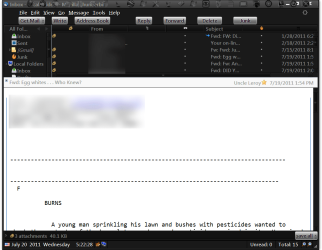
You're Welcome - Well done on the font change that Tutorial makes it easy. I don't use WLM so I can't help, I use ThunderBird 5 with my Personas to get this look.
Mozilla Thunderbird.png

Jerry
 

My Computer

Computer type
Laptop
Computer Manufacturer/Model Number
Sager NP9170
OS
Win 7 Pro x64 / Win 10 Pro
CPU
Intel(R) Core(TM) i7-3630QM CPU @ 2.40GHz
Motherboard
CLEVO P170EM
Memory
12 GB
Graphics Card(s)
(1) Intel(R) HD Graphics 4000 (2) NVIDIA GeForce GTX 675M
Sound Card
(1) Realtek High Definition Audio (2) Intel(R) Display Aud
Monitor(s) Displays
17.3
Screen Resolution
1920x1080
Hard Drives
(1) Samsung 860 EVO 500GB(OS) (1) Samsung 860 EVO 500GB(Data)
Keyboard
Backlite
Antivirus
MSE, Malwarebytes Pro
Browser
Firefox
Other Info
DESKTOP: Custom-built.
OS: Win 10 Pro x64.
CASE: Rosewill R5.
CPU: Intel I5 4670K CPU @ 3.40GHz.
CPU COOLER: Cool Master Hyper 212 EVO.
MOTHERBOARD: Asus Z87-A.
MEMORY: Kingston HyperX 2x4 GB.
GPU: Nvidia Geforce 650 TI.
PSU: Corsair TX750.
DRIVES: (1) Samsung 840 120 GB SSD (2) Western Digital blue 500 GB 7200 RPM.
Back
Top