"Save As" and "Open" dialog boxes blank/not showing up

DaoNayt

New member
Local time
10:56 PM
Messages
4
"Save As" and "Open" dialog boxes blank/not showing up

Guys, I have an extremely annoying problem, that is basically turning some of my programs useless. I click on Open or Save As, and nothing happens. The program window loses focus, as it would if it worked properly, but the dialog doesnt appear. At that point I cant even close the program by clicking on the X, and it doesnt even respond to trying to close from the taskbar. The only thing that works is End Now in Task Manager.

Sometimes, I manage to 'catch' the Open dialog with Alt+Spacebar, it gives me the min/max options. I have attached the screenshot of the useless maximized dialog.
This is the Bordelands 2 save editor in the screenshot, not an essential program in my life, but it also happens in SubtitleEdit, which I need for work, but it has basically been rendered useless now.

Here are the things I tried after hours of googling:
- sfc /scannow (reports everything OK)
- checking the disk for errors (reports everything OK)
- checking for windows updates (everything updated)
- repaired all instalations of .NET and VC
- reset all folder options to defaults
- tried the default theme and the basic theme
- found a possible solution regarding unavailable network drives, so I deleted all network shortcuts and network drives from My Computer, and disabled Network Discovery in Advanced Sharing Settings

None of this worked.

This Windows installation is two weeks old, and everything worked perfectly post-install. Also, I remember having the same issue on a previous installation, but it went away on it's own somehow.
I am out of options here, besides reinstalling Windows again, but that's no guarantee that the problem won't show up again.
 

Attachments

  • Capture.PNG
    Capture.PNG
    42.7 KB · Views: 1

My Computer My Computer

At a glance

Win7 x64 Home Premium
Computer type
PC/Desktop
OS
Win7 x64 Home Premium
Hi DaoNayt, welcome to the Forum.

Bordelands 2 is a game, so have you tried uninstalling it & see if the problem still exists. After you reinstalled Windows all seemed to work properly & the problem has now shown up again. So what programs have you installed since the Windows reinstall?.
 

My Computer My Computer

At a glance

Windows 7 Home Premium 64 bit sp1Intel i5 3570 3.4Ghz Ivy Bridge SKT 1155 quad...G-Skill Rip Jaws 16Gb (8x2) DDR3 -1600 PC3 12...Gigabyte NVIDIA GT610 1Gb DDR3 810/1200 PCI-E...
Computer type
PC/Desktop
Computer Manufacturer/Model Number
Self built using existing case
OS
Windows 7 Home Premium 64 bit sp1
CPU
Intel i5 3570 3.4Ghz Ivy Bridge SKT 1155 quad core
Motherboard
Gigabyte Z77-HD3 SKT 1155 2xSata 3, 4x USB 3.0
Memory
G-Skill Rip Jaws 16Gb (8x2) DDR3 -1600 PC3 12800 CL 10 red
Graphics Card(s)
Gigabyte NVIDIA GT610 1Gb DDR3 810/1200 PCI-E 2.0 Silent
Sound Card
NVIDIA High Definition & Realtech High Definition Audio
Monitor(s) Displays
2 x Philips 226V4L 16:9 aspect ratio
Screen Resolution
1920 x 1080 HD
Hard Drives
Samsung 840 Pro 256gb SSD, SATA 3.
Hitachi Touro Portable 1tb, USB 3.0 HDD used for image b/ups.
PSU
Corsair VS450
Case
Codeng
Cooling
PSU fan & CPU fan
Keyboard
Logitech
Mouse
Logitech Wireless trackball M570
Internet Speed
Wireless 3G. 3mg down & 550kb up.
Antivirus
Bitdefender Internet Security 2020
Browser
Opera (Current Version) & Firefox
Other Info
MS Office 2013 Pro. Davis weather station software. MGE Nova 600 avr UPS.
Hi Ranger

This program is not part of the game, it's a standalone portable save editor. I have tried reinstalling SubtitleEdit, the other program suffering from this issue, but it didn't help.

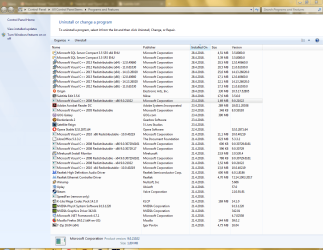
I have attached the list of installed programs. The 28th are the reinstalls that I mentioned above.

I guess I could unistall all of them and see if it would help, but I was hoping that such brute force approach wouldn't be necessary.
 

Attachments

  • Capture1.PNG
    Capture1.PNG
    71.3 KB · Views: 3

My Computer My Computer

At a glance

Win7 x64 Home Premium
Computer type
PC/Desktop
OS
Win7 x64 Home Premium
My search of the web shows Borderlands 2 as a video game by Gearbox software. This Wikipedia website confirms that.

Borderlands 2 - Wikipedia

Try just uninstalling any program that you installed on April 28, except the Microsoft ones, leave them installed & see if that helps.

Also have a look in Device Manager to see if there are any yellow flashes next to anything.
 

My Computer My Computer

At a glance

Windows 7 Home Premium 64 bit sp1Intel i5 3570 3.4Ghz Ivy Bridge SKT 1155 quad...G-Skill Rip Jaws 16Gb (8x2) DDR3 -1600 PC3 12...Gigabyte NVIDIA GT610 1Gb DDR3 810/1200 PCI-E...
Computer type
PC/Desktop
Computer Manufacturer/Model Number
Self built using existing case
OS
Windows 7 Home Premium 64 bit sp1
CPU
Intel i5 3570 3.4Ghz Ivy Bridge SKT 1155 quad core
Motherboard
Gigabyte Z77-HD3 SKT 1155 2xSata 3, 4x USB 3.0
Memory
G-Skill Rip Jaws 16Gb (8x2) DDR3 -1600 PC3 12800 CL 10 red
Graphics Card(s)
Gigabyte NVIDIA GT610 1Gb DDR3 810/1200 PCI-E 2.0 Silent
Sound Card
NVIDIA High Definition & Realtech High Definition Audio
Monitor(s) Displays
2 x Philips 226V4L 16:9 aspect ratio
Screen Resolution
1920 x 1080 HD
Hard Drives
Samsung 840 Pro 256gb SSD, SATA 3.
Hitachi Touro Portable 1tb, USB 3.0 HDD used for image b/ups.
PSU
Corsair VS450
Case
Codeng
Cooling
PSU fan & CPU fan
Keyboard
Logitech
Mouse
Logitech Wireless trackball M570
Internet Speed
Wireless 3G. 3mg down & 550kb up.
Antivirus
Bitdefender Internet Security 2020
Browser
Opera (Current Version) & Firefox
Other Info
MS Office 2013 Pro. Davis weather station software. MGE Nova 600 avr UPS.
Nah man, that's a separate third-party editor that has nothing to do with the game itself. I only used it as an example of the problem.
Honestly, if I'm just gonna do massive uninstalls and reinstalls, I might as well do a new fresh install, and then keep an eye out for the problem reappearing after every single change I do. Also, constant installing/reinstalling is just asking for more trouble.

I got an error in Winamp now, acces violation in ntdll.dll. This problem wasn't pressent in the previous install. Ten days and Windows is already broken, smh...

Everything is OK in Device Manager. I haven't been installing any new devices or drivers, besides those directly after the fresh Windows install.

EDIT: I created a new user to test, and the issue is present on that profile as well. The issue is not present in Safe Mode.
 
Last edited:

My Computer My Computer

At a glance

Win7 x64 Home Premium
Computer type
PC/Desktop
OS
Win7 x64 Home Premium
If the issue is not present in Safe Mode, then the problem is related to either installed software or a driver problem that is associated with one of the non Microsoft programs.

As I mentioned above, just uninstall those software programs that you installed on the 28 April. Uninstall them one by one, with a computer reboot each time.

Just doing fresh Windows reinstalls is not going to fix the problem until you find out what program is causing it. From what you have said it seems obvious that it's one of those added software programs that you have installed.
 

My Computer My Computer

At a glance

Windows 7 Home Premium 64 bit sp1Intel i5 3570 3.4Ghz Ivy Bridge SKT 1155 quad...G-Skill Rip Jaws 16Gb (8x2) DDR3 -1600 PC3 12...Gigabyte NVIDIA GT610 1Gb DDR3 810/1200 PCI-E...
Computer type
PC/Desktop
Computer Manufacturer/Model Number
Self built using existing case
OS
Windows 7 Home Premium 64 bit sp1
CPU
Intel i5 3570 3.4Ghz Ivy Bridge SKT 1155 quad core
Motherboard
Gigabyte Z77-HD3 SKT 1155 2xSata 3, 4x USB 3.0
Memory
G-Skill Rip Jaws 16Gb (8x2) DDR3 -1600 PC3 12800 CL 10 red
Graphics Card(s)
Gigabyte NVIDIA GT610 1Gb DDR3 810/1200 PCI-E 2.0 Silent
Sound Card
NVIDIA High Definition & Realtech High Definition Audio
Monitor(s) Displays
2 x Philips 226V4L 16:9 aspect ratio
Screen Resolution
1920 x 1080 HD
Hard Drives
Samsung 840 Pro 256gb SSD, SATA 3.
Hitachi Touro Portable 1tb, USB 3.0 HDD used for image b/ups.
PSU
Corsair VS450
Case
Codeng
Cooling
PSU fan & CPU fan
Keyboard
Logitech
Mouse
Logitech Wireless trackball M570
Internet Speed
Wireless 3G. 3mg down & 550kb up.
Antivirus
Bitdefender Internet Security 2020
Browser
Opera (Current Version) & Firefox
Other Info
MS Office 2013 Pro. Davis weather station software. MGE Nova 600 avr UPS.
So I uninstalled almost everything with restarts in between and, as expected, it didn't help. Uninstalling a program is no guaranteee that it will undo the changes it has made to the system; developers do not care for such common courtesy anymore. I was hoping someone here would have a specific fix for this speciffic issue.

I got bored of the pointless guessing game and reinstalled Windows again, since at that point it was basically empty anyway. Now I'm checking for the problem 2x/day plus every time I make a change or install something.
If I catch the reason for this, I will update the thread.
 

My Computer My Computer

At a glance

Win7 x64 Home Premium
Computer type
PC/Desktop
OS
Win7 x64 Home Premium
Thanks for the update. You should be able to find the offending problem doing what you are doing.
 

My Computer My Computer

At a glance

Windows 7 Home Premium 64 bit sp1Intel i5 3570 3.4Ghz Ivy Bridge SKT 1155 quad...G-Skill Rip Jaws 16Gb (8x2) DDR3 -1600 PC3 12...Gigabyte NVIDIA GT610 1Gb DDR3 810/1200 PCI-E...
Computer type
PC/Desktop
Computer Manufacturer/Model Number
Self built using existing case
OS
Windows 7 Home Premium 64 bit sp1
CPU
Intel i5 3570 3.4Ghz Ivy Bridge SKT 1155 quad core
Motherboard
Gigabyte Z77-HD3 SKT 1155 2xSata 3, 4x USB 3.0
Memory
G-Skill Rip Jaws 16Gb (8x2) DDR3 -1600 PC3 12800 CL 10 red
Graphics Card(s)
Gigabyte NVIDIA GT610 1Gb DDR3 810/1200 PCI-E 2.0 Silent
Sound Card
NVIDIA High Definition & Realtech High Definition Audio
Monitor(s) Displays
2 x Philips 226V4L 16:9 aspect ratio
Screen Resolution
1920 x 1080 HD
Hard Drives
Samsung 840 Pro 256gb SSD, SATA 3.
Hitachi Touro Portable 1tb, USB 3.0 HDD used for image b/ups.
PSU
Corsair VS450
Case
Codeng
Cooling
PSU fan & CPU fan
Keyboard
Logitech
Mouse
Logitech Wireless trackball M570
Internet Speed
Wireless 3G. 3mg down & 550kb up.
Antivirus
Bitdefender Internet Security 2020
Browser
Opera (Current Version) & Firefox
Other Info
MS Office 2013 Pro. Davis weather station software. MGE Nova 600 avr UPS.
Back
Top