
Did I mess up my Permissions?

linda092

New member
Local time
3:36 PM
Messages
12
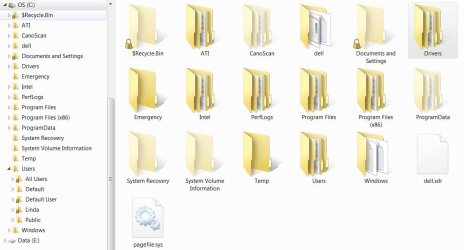
I'm thinking I may need to just do a Factory Restore. My computer is very new, so it wouldn't be a big deal. Already went through undoing partition resizing, changing drive letters and fixing my mistakes, but take a look at this screenshot and tell me if this is what it's supposed to look like... (I'm used to XP) I am the only User, and should have admin rights throughout the system.
 

Attachments
  • permission.JPG
    permission.JPG
    73.3 KB · Views: 13

My Computer My Computer

At a glance

Windows 7 64i5-7508 gbRadeon 4800 or so
Computer Manufacturer/Model Number
Dell XPS Studio
OS
Windows 7 64
CPU
i5-750
Memory
8 gb
Graphics Card(s)
Radeon 4800 or so
Sound Card
old

My Computer My Computer

At a glance

Windows 10, Home Clean InstallIntel Core2 processsor Q8200(2.33Ghz 1333FSB)...6 gbATI Radeon 256MB HD3650
Computer type
PC/Desktop
Computer Manufacturer/Model Number
Dell XPS 420
OS
Windows 10, Home Clean Install
CPU
Intel Core2 processsor Q8200(2.33Ghz 1333FSB) Quad Core Tech
Motherboard
Dell
Memory
6 gb
Graphics Card(s)
ATI Radeon 256MB HD3650
Sound Card
Intergrated 7.1 Channel Audio
Monitor(s) Displays
Dell SP2009W 20"
Hard Drives
640 GB Serial ATA Hard drive
Cooling
Fan
Keyboard
Dell USB Keyboard
Mouse
Dell Premium Optical USB
Internet Speed
DSL 2.85
Well, I like seeing the Hidden files. But I am concerned that so many Folders are showing the Locked Icon, and I can't browse them. It seems a little weird that my Documents folder, and most of the User folders are locked. I can't remember if they looked like that when I first loaded Win7 for the first time (about 2 weeks ago).
 

My Computer My Computer

At a glance

Windows 7 64i5-7508 gbRadeon 4800 or so
Computer Manufacturer/Model Number
Dell XPS Studio
OS
Windows 7 64
CPU
i5-750
Memory
8 gb
Graphics Card(s)
Radeon 4800 or so
Sound Card
old
If you refer the "Document and Settings" folder, it is forever locked. Windows 7 use "Users" folder instead, the "Document and Settings" folder is a "folder junction", it's there for compatibility reasons.

zzz2496
 

My Computer My Computer

At a glance

Windows7 Ultimate 64bitIntel Core 2 Quad Q6600DDR2 Adata 4GBNvidia GeForce GTX 285 1024 and Nvidia GeForc...
Computer Manufacturer/Model Number
Self Built
OS
Windows7 Ultimate 64bit
CPU
Intel Core 2 Quad Q6600
Motherboard
Abit IN9-32X-MMAX
Memory
DDR2 Adata 4GB
Graphics Card(s)
Nvidia GeForce GTX 285 1024 and Nvidia GeForce 8800GT 512
Sound Card
Asus Xonar HDAV 1.3
Monitor(s) Displays
Dell 2407WFP and BenQ 2400v and Philips 150v3
Screen Resolution
3840x1200 and 1024x768
Hard Drives
2 WDC 1TB
1 WDC 1.5TB
1 WDC 640GB
1 WDC 320GB
1 Seagate 200GB
PSU
Corsair TX 850W
Case
Cooler Master HAF932
Cooling
Arctic Cooling Freezer Extreme and plenty of fans...
Keyboard
MicrosoftNaturalKeyboard 4000/Apple Alu keyboard/Dinovo mini
Mouse
Logitech G5/MarbleMouseTrackball/PerformanceMX/SpacePilotPRO
Internet Speed
1.5Mbps down/384Kbps up
Other Info
APC SURT 1000XL
Logitech Z-560
Wiimote
Mikrotik Router
Linksys (now Cisco) SD2008 8 port Gigabit switch
Linksys WRT54G (acting as AP)
Apple wireless Aluminium keyboard
Apple Magic Mouse
Xbox360 wired controller
You are correct those locks are not normal. You just have to give ownership and permision to your user account.

how do I get a lock icon on my folder to come off?

http://www.sevenforums.com/tutorials/24232-sharing-permissions.html

http://www.vistax64.com/tutorials/67717-take-ownership-file.html

The information in these tutorials should make you good again. After you read them, feel free to ask any other questions that you may have.

As stated above documets and setting will not be accessible.
 

My Computer My Computer

At a glance

Windows 10, Home Clean InstallIntel Core2 processsor Q8200(2.33Ghz 1333FSB)...6 gbATI Radeon 256MB HD3650
Computer type
PC/Desktop
Computer Manufacturer/Model Number
Dell XPS 420
OS
Windows 10, Home Clean Install
CPU
Intel Core2 processsor Q8200(2.33Ghz 1333FSB) Quad Core Tech
Motherboard
Dell
Memory
6 gb
Graphics Card(s)
ATI Radeon 256MB HD3650
Sound Card
Intergrated 7.1 Channel Audio
Monitor(s) Displays
Dell SP2009W 20"
Hard Drives
640 GB Serial ATA Hard drive
Cooling
Fan
Keyboard
Dell USB Keyboard
Mouse
Dell Premium Optical USB
Internet Speed
DSL 2.85
Back
Top