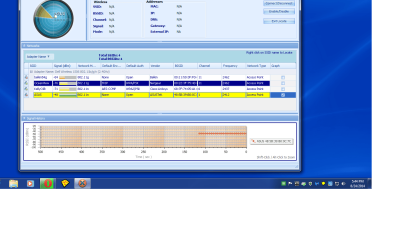
Did the wi fi test as requested , bad results.

jonnyhillow

Banned
Local time
12:36 PM
Messages
637
Location
NJ native & NC
I am having major trouble getting a wireless connection, the below are results of the test . It's a win 7 64 bit sp1 machine, an asus RTN 10 router and my ip provider is ATMC of N.C /modem is a Smart RG .

I desperately need help . thank you for any assistance
 

Attachments

  • Untitled.jpg
    Untitled.jpg
    106.7 KB · Views: 5
  • Untitled.png
    Untitled.png
    67.1 KB · Views: 2

My Computer My Computer

Computer type
Laptop
Computer Manufacturer/Model Number
Asus laptop U56E
OS
Microsoft Windows 7 Home Premium 64-bit 7601 Multiprocessor Free Service Pack 1
CPU
Intel(R) Core(TM) i5-2430M CPU @ 2.40GHz
Motherboard
ASUSTeK Computer Inc. U56E
Memory
6.00 GB
Graphics Card(s)
Intel(R) HD Graphics 3000
Sound Card
(1) High Definition Audio Device (2) High Definition Audio
Screen Resolution
1366 x 768 x 32 bits (4294967296 colors) @ 60 Hz
Hard Drives
WDC WD6400BPVT-80HXZT3
Here is more of my info


Windows IP Configuration

Host Name . . . . . . . . . . . . : chuck-PC
Primary Dns Suffix . . . . . . . :
Node Type . . . . . . . . . . . . : Hybrid
IP Routing Enabled. . . . . . . . : No
WINS Proxy Enabled. . . . . . . . : No
DNS Suffix Search List. . . . . . : Home

Wireless LAN adapter Wireless Network Connection:

Media State . . . . . . . . . . . : Media disconnected
Connection-specific DNS Suffix . :
Description . . . . . . . . . . . : Dell Wireless 1506 802.11b/g/n (2.4GHz)
Physical Address. . . . . . . . . : 70-18-8B-63-56-A3
DHCP Enabled. . . . . . . . . . . : Yes
Autoconfiguration Enabled . . . . : Yes

Ethernet adapter Local Area Connection:

Connection-specific DNS Suffix . : Home
Description . . . . . . . . . . . : Realtek PCIe GBE Family Controller
Physical Address. . . . . . . . . : C8-1F-66-0D-E0-A7
DHCP Enabled. . . . . . . . . . . : Yes
Autoconfiguration Enabled . . . . : Yes
Link-local IPv6 Address . . . . . : fe80::a0b5:a29c:2371:8220%11(Preferred)
IPv4 Address. . . . . . . . . . . : 192.168.50.10(Preferred)
Subnet Mask . . . . . . . . . . . : 255.255.255.0
Lease Obtained. . . . . . . . . . : Sunday, August 24, 2014 5:29:37 PM
Lease Expires . . . . . . . . . . : Monday, August 25, 2014 5:29:36 PM
Default Gateway . . . . . . . . . : 192.168.50.1
DHCP Server . . . . . . . . . . . : 192.168.50.1
DHCPv6 IAID . . . . . . . . . . . : 348659558
DHCPv6 Client DUID. . . . . . . . : 00-01-00-01-1B-8C-0F-F9-C8-1F-66-0D-E0-A7
DNS Servers . . . . . . . . . . . : 192.168.50.1
NetBIOS over Tcpip. . . . . . . . : Enabled

Tunnel adapter isatap.{E3A42B9E-949C-49A1-8151-13F7C1DAEFA8}:

Media State . . . . . . . . . . . : Media disconnected
Connection-specific DNS Suffix . :
Description . . . . . . . . . . . : Microsoft ISATAP Adapter
Physical Address. . . . . . . . . : 00-00-00-00-00-00-00-E0
DHCP Enabled. . . . . . . . . . . : No
Autoconfiguration Enabled . . . . : Yes

Tunnel adapter Teredo Tunneling Pseudo-Interface:

Connection-specific DNS Suffix . :
Description . . . . . . . . . . . : Teredo Tunneling Pseudo-Interface
Physical Address. . . . . . . . . : 00-00-00-00-00-00-00-E0
DHCP Enabled. . . . . . . . . . . : No
Autoconfiguration Enabled . . . . : Yes
IPv6 Address. . . . . . . . . . . : 2001:0:9d38:6abd:2080:8da:3f57:cdf5(Preferred)
Link-local IPv6 Address . . . . . : fe80::2080:8da:3f57:cdf5%12(Preferred)
Default Gateway . . . . . . . . . : ::
NetBIOS over Tcpip. . . . . . . . : Disabled

Tunnel adapter isatap.Home:

Media State . . . . . . . . . . . : Media disconnected
Connection-specific DNS Suffix . : Home
Description . . . . . . . . . . . : Microsoft ISATAP Adapter #3
Physical Address. . . . . . . . . : 00-00-00-00-00-00-00-E0
DHCP Enabled. . . . . . . . . . . : No
Autoconfiguration Enabled . . . . : Yes


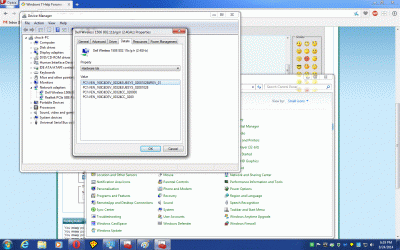
Here is the dell wireless adapter hardware ID info , device manager says it's up to date and working fine.
 

Attachments

  • Untitled.gif
    Untitled.gif
    253.2 KB · Views: 1
Last edited:

My Computer My Computer

Computer type
Laptop
Computer Manufacturer/Model Number
Asus laptop U56E
OS
Microsoft Windows 7 Home Premium 64-bit 7601 Multiprocessor Free Service Pack 1
CPU
Intel(R) Core(TM) i5-2430M CPU @ 2.40GHz
Motherboard
ASUSTeK Computer Inc. U56E
Memory
6.00 GB
Graphics Card(s)
Intel(R) HD Graphics 3000
Sound Card
(1) High Definition Audio Device (2) High Definition Audio
Screen Resolution
1366 x 768 x 32 bits (4294967296 colors) @ 60 Hz
Hard Drives
WDC WD6400BPVT-80HXZT3
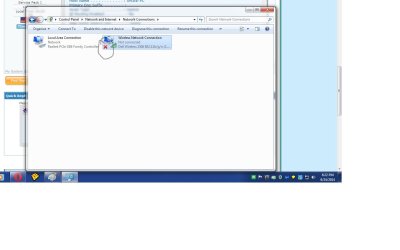
Here is what the dell adapter looks like , not sure why it has an X there.
 

Attachments

  • Untitled.jpg
    Untitled.jpg
    53.9 KB · Views: 4

My Computer My Computer

Computer type
Laptop
Computer Manufacturer/Model Number
Asus laptop U56E
OS
Microsoft Windows 7 Home Premium 64-bit 7601 Multiprocessor Free Service Pack 1
CPU
Intel(R) Core(TM) i5-2430M CPU @ 2.40GHz
Motherboard
ASUSTeK Computer Inc. U56E
Memory
6.00 GB
Graphics Card(s)
Intel(R) HD Graphics 3000
Sound Card
(1) High Definition Audio Device (2) High Definition Audio
Screen Resolution
1366 x 768 x 32 bits (4294967296 colors) @ 60 Hz
Hard Drives
WDC WD6400BPVT-80HXZT3
The red X on your wireless network connection object means it's "not connected". This is also confirmed by your detail info.

Do you have the machine simultaneously connected with an ethernet cable, through its wired connection? That looks to be active and functional, which is how you got an address of 192.168.50.10 for the computer, with 192.168.50.1 as the DNS (gateway). Your router is definitely visible, and if the wireless connection is not operational you must be going through wired.

If you disconnect the ethernet cable from PC to router and re-boot, does the wireless connection offer you your router's WiFi SSID for you to connect to?
 

My Computer My Computer

Computer type
PC/Desktop
Computer Manufacturer/Model Number
Home-built, two systems (1) and (2)
OS
Windows 7 Pro x64 (1), Win7 Pro X64 (2)
CPU
i5-3350p 3.1Ghz/6MB-cache (1); E8400 3.0Ghz/6MB-cache (2)
Motherboard
ASUS P8Z77-V Pro (1); ASUS P5Q3 (2)
Memory
8GB PC3-12800 DDR3 (1); 4GB PC3-10600 DDR3 (2)
Graphics Card(s)
ATI HD7750 (1), (see TV cards); ATI R7 250 (2)
Sound Card
Realtek ALC892 HD Audio (1); Realtek ALC1200 HD Audio (2)
Monitor(s) Displays
Eizo HD2441W LCD, Eizo S2433W (1); Eizo 24" S2433W (2)
Screen Resolution
1920x1200, 1920x1200 (1); 1920x1200 (2)
Hard Drives
(1) 1TB SATA-II (7200RPM), 2x2TB SATA-III (7200RPM), 250GB SATA-III (10000RPM) for OS; 2x2TB external USB 3.0

(2) 320GB SATA-II (7200RPM), 750GB SATA-II (7200RPM), 150GB SATA-II (10000RPM) for OS; 2TB external USB 3.0
PSU
Nesteq ECS-6001 600W (1); Nesteq ECS-5001 500W (2)
Case
Acousti-Case 360 (1) and (2)
Cooling
Noctua NH-U12P SE2 for CPU, 2x120mm case fans (1) and (2)
Keyboard
IBM PS/2 (1) and (2)
Mouse
Logitech MX Revolution wireless (1); Microsoft wired (2)
Internet Speed
100mbps down / 10mbps up
Antivirus
Microsoft Security Essentials; Malwarebyte Anti-Malware Pro
Browser
Firefox
Other Info
Ceton InfiniTV 4-tuner cablecard-enabled TV card as well as Hauppauge HVR-2250 OTA/ATSC 2-tuner TV card in (1), running under Win7 WMC
The red X on your wireless network connection object means it's "not connected". This is also confirmed by your detail info.

Do you have the machine simultaneously connected with an ethernet cable, through its wired connection? That looks to be active and functional, which is how you got an address of 192.168.50.10 for the computer, with 192.168.50.1 as the DNS (gateway). Your router is definitely visible, and if the wireless connection is not operational you must be going through wired.

If you disconnect the ethernet cable from PC to router and re-boot, does the wireless connection offer you your router's WiFi SSID for you to connect to?


I am going to try right now and find out , thanks for the reply.
 

My Computer My Computer

Computer type
Laptop
Computer Manufacturer/Model Number
Asus laptop U56E
OS
Microsoft Windows 7 Home Premium 64-bit 7601 Multiprocessor Free Service Pack 1
CPU
Intel(R) Core(TM) i5-2430M CPU @ 2.40GHz
Motherboard
ASUSTeK Computer Inc. U56E
Memory
6.00 GB
Graphics Card(s)
Intel(R) HD Graphics 3000
Sound Card
(1) High Definition Audio Device (2) High Definition Audio
Screen Resolution
1366 x 768 x 32 bits (4294967296 colors) @ 60 Hz
Hard Drives
WDC WD6400BPVT-80HXZT3
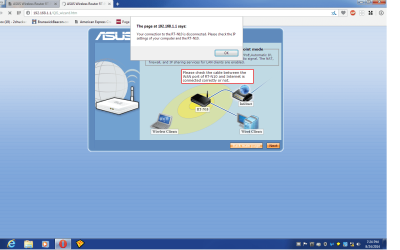
Well i tried and no it's not , i get the below screen.
 

Attachments

  • Untitled.png
    Untitled.png
    57.4 KB · Views: 3

My Computer My Computer

Computer type
Laptop
Computer Manufacturer/Model Number
Asus laptop U56E
OS
Microsoft Windows 7 Home Premium 64-bit 7601 Multiprocessor Free Service Pack 1
CPU
Intel(R) Core(TM) i5-2430M CPU @ 2.40GHz
Motherboard
ASUSTeK Computer Inc. U56E
Memory
6.00 GB
Graphics Card(s)
Intel(R) HD Graphics 3000
Sound Card
(1) High Definition Audio Device (2) High Definition Audio
Screen Resolution
1366 x 768 x 32 bits (4294967296 colors) @ 60 Hz
Hard Drives
WDC WD6400BPVT-80HXZT3
Let's start from the beginning. Your System Specs say you have an ASUS laptop, but your posts suggest a Dell machine. Can you please provide your current machine configuration specifics.

Did you install Win7 yourself from scratch, or did it come from Dell (or wherever you bought it) that way with Win7 pre-installed?

Did you get all of the driver downloads from the Dell site, including for the wireless adapter? That's the driver which is currently installed... the latest one from Dell?

Has your ASUS RTN-10 router ever been used successfully in wireless mode before? Or did you just buy it and just configured it for the first time, and this Dell laptop is your first attempt at running wireless to it? Is this a new laptop? Has it ever been used successfully before in wireless mode?

Your screenshots suggest everything was working ok when you had an ethernet cable running from PC to the router. Is that true? When you have a wire from PC to the router the wireless connection normally would NOT also be active, as Windows prefers to use the wire if available. So did you configure the RTN-10 while wired?

I've downloaded the user manual for the router, so I can refer to it. But you may need to re-connect the laptop to the router with that ethernet cable again (at least temporarily) and re-boot, in order to double-check your setup configuration for the router. If you could post screenshots of the setup screens for the router dealing with wireless network setup, that probably would be useful.


As you can see, a bit more background info from you as to how you got from where you started to where you are right now would be very helpful in understanding what might be going on.

Incidentally, your earlier screenshots show "open" for the security on your ASUS wireless network. This is something I definitely would NOT recommend. I will suggest you enable wireless security, for sure. But that's just something to do. Let's solve the primary problem first, to let you connect wirelessly to the router's SSID network.
 

My Computer My Computer

Computer type
PC/Desktop
Computer Manufacturer/Model Number
Home-built, two systems (1) and (2)
OS
Windows 7 Pro x64 (1), Win7 Pro X64 (2)
CPU
i5-3350p 3.1Ghz/6MB-cache (1); E8400 3.0Ghz/6MB-cache (2)
Motherboard
ASUS P8Z77-V Pro (1); ASUS P5Q3 (2)
Memory
8GB PC3-12800 DDR3 (1); 4GB PC3-10600 DDR3 (2)
Graphics Card(s)
ATI HD7750 (1), (see TV cards); ATI R7 250 (2)
Sound Card
Realtek ALC892 HD Audio (1); Realtek ALC1200 HD Audio (2)
Monitor(s) Displays
Eizo HD2441W LCD, Eizo S2433W (1); Eizo 24" S2433W (2)
Screen Resolution
1920x1200, 1920x1200 (1); 1920x1200 (2)
Hard Drives
(1) 1TB SATA-II (7200RPM), 2x2TB SATA-III (7200RPM), 250GB SATA-III (10000RPM) for OS; 2x2TB external USB 3.0

(2) 320GB SATA-II (7200RPM), 750GB SATA-II (7200RPM), 150GB SATA-II (10000RPM) for OS; 2TB external USB 3.0
PSU
Nesteq ECS-6001 600W (1); Nesteq ECS-5001 500W (2)
Case
Acousti-Case 360 (1) and (2)
Cooling
Noctua NH-U12P SE2 for CPU, 2x120mm case fans (1) and (2)
Keyboard
IBM PS/2 (1) and (2)
Mouse
Logitech MX Revolution wireless (1); Microsoft wired (2)
Internet Speed
100mbps down / 10mbps up
Antivirus
Microsoft Security Essentials; Malwarebyte Anti-Malware Pro
Browser
Firefox
Other Info
Ceton InfiniTV 4-tuner cablecard-enabled TV card as well as Hauppauge HVR-2250 OTA/ATSC 2-tuner TV card in (1), running under Win7 WMC
Yes , sorry about the confusion. It's a Dell machine and Asus router , the computer was running fine for the longest time and got good wireless .

One day my father called and said he lost his wireless connection so thats where we should start. Unfortunately he doesn't know how or why , either do i.

All drivers are up to date and so is AV and the computer works great except for the wireless connection.

He has always had the ethernet cable plugged in to the modem from the computer and then connected to the router .

I think it's a simple screw up with wires and where they go , i am not knowledgeable in wireless networking either .

If i can figure a way to check the ip address with what the router is set at i think all will be fine.

This is not a laptop , it's a desktop which uses a Asus router
 

My Computer My Computer

Computer type
Laptop
Computer Manufacturer/Model Number
Asus laptop U56E
OS
Microsoft Windows 7 Home Premium 64-bit 7601 Multiprocessor Free Service Pack 1
CPU
Intel(R) Core(TM) i5-2430M CPU @ 2.40GHz
Motherboard
ASUSTeK Computer Inc. U56E
Memory
6.00 GB
Graphics Card(s)
Intel(R) HD Graphics 3000
Sound Card
(1) High Definition Audio Device (2) High Definition Audio
Screen Resolution
1366 x 768 x 32 bits (4294967296 colors) @ 60 Hz
Hard Drives
WDC WD6400BPVT-80HXZT3
Looking more closely at your screenshots, I have to admit I'm confused.

Your last screenshot shows some output from 192.168.1.1. But your earlier IPCONFIG info shows that your router was 192.168.50.1. Did you set this address, or was it the default address factory configured by ASUS when you took the router out of the carton and turned it on for the first time?

Why are these router IP address values different?? How did you take that last screenshot which mentions 192.168.1.1?? And what was the story with 192.168.50.1?

When you re-boot with NO ethernet cable connected from laptop to router, if your right-click on the "network" icon in the System Tray, do you not get a popup offering you the same four wireless SSID networks shown in your original post screenshot? Can you not see the ASUSTEK network, and if you left-click on it is there not a "connect" box button presented?
 

My Computer My Computer

Computer type
PC/Desktop
Computer Manufacturer/Model Number
Home-built, two systems (1) and (2)
OS
Windows 7 Pro x64 (1), Win7 Pro X64 (2)
CPU
i5-3350p 3.1Ghz/6MB-cache (1); E8400 3.0Ghz/6MB-cache (2)
Motherboard
ASUS P8Z77-V Pro (1); ASUS P5Q3 (2)
Memory
8GB PC3-12800 DDR3 (1); 4GB PC3-10600 DDR3 (2)
Graphics Card(s)
ATI HD7750 (1), (see TV cards); ATI R7 250 (2)
Sound Card
Realtek ALC892 HD Audio (1); Realtek ALC1200 HD Audio (2)
Monitor(s) Displays
Eizo HD2441W LCD, Eizo S2433W (1); Eizo 24" S2433W (2)
Screen Resolution
1920x1200, 1920x1200 (1); 1920x1200 (2)
Hard Drives
(1) 1TB SATA-II (7200RPM), 2x2TB SATA-III (7200RPM), 250GB SATA-III (10000RPM) for OS; 2x2TB external USB 3.0

(2) 320GB SATA-II (7200RPM), 750GB SATA-II (7200RPM), 150GB SATA-II (10000RPM) for OS; 2TB external USB 3.0
PSU
Nesteq ECS-6001 600W (1); Nesteq ECS-5001 500W (2)
Case
Acousti-Case 360 (1) and (2)
Cooling
Noctua NH-U12P SE2 for CPU, 2x120mm case fans (1) and (2)
Keyboard
IBM PS/2 (1) and (2)
Mouse
Logitech MX Revolution wireless (1); Microsoft wired (2)
Internet Speed
100mbps down / 10mbps up
Antivirus
Microsoft Security Essentials; Malwarebyte Anti-Malware Pro
Browser
Firefox
Other Info
Ceton InfiniTV 4-tuner cablecard-enabled TV card as well as Hauppauge HVR-2250 OTA/ATSC 2-tuner TV card in (1), running under Win7 WMC
Yes , sorry about the confusion. It's a Dell machine
What model?

and Asus router , the computer was running fine for the longest time and got good wireless .

One day my father called and said he lost his wireless connection so thats where we should start. Unfortunately he doesn't know how or why , either do i.

All drivers are up to date and so is AV and the computer works great except for the wireless connection.

He has always had the ethernet cable plugged in to the modem from the computer and then connected to the router.
I'm very confused now. You're using mixed terminology and describing something that doesn't make sense. But this may be a harmless confusion in wording.

The modem from your ATMC of NC ISP should be connected to the coax screwed onto it, coming from the wall. Then there should be one ethernet cable going from the one ethernet port on the modem to the ethernet WAN port on your ASUS router. Then your computer can be connected "wired" to any of the four ethernet LAN ports on the router, if you want to use that "wired" approach for best performance.

The laptop is not supposed to be plugged into the modem as you described above, so you may just have made a typo here in trying to describe the setup. If you have a router, it is the router which is plugged into the modem (on the router's WAN connection), and then you plug the computer into any of the four LAN ports on the router. This provides "wired" connectivity from any of the four potential devices possibly connected to the four LAN ports on the router, completely separate from any of the large number of "wireless" connections the router also supports simultaneously along with these four possible "wired" connections.

Or, if you want to run "wireless" for the PC so that the laptop can be moved around your house easily, then your PC should NOT be connected "wired" to one of the four LAN ports on the router. It should be "free floating" and operating in "wireless mode" only. If you do have the PC also connected "wired" then Windows will use that wired connection, preferring it over the wireless option. You won't be utilizing "wireless" at all. Only if the laptop is truly in wireless-only mode (with no ethernet cable connecting it to the router) will the true wireless connection from the laptop to the router be enabled.

What is needed now is for you to "talk to the router" through a browser (e.g. Firefox) and take screenshots of the setup screens for wireless operation. I assume you have the user manual (either printed, or in PDF form on your PC or on the CD that came from ASUS with the router) but if you don't you can download it from here. Scroll down to the English version of the PDF manual and download it for future use and reference. Of course you should refer to the instructions inside it to double-check that what it currently looks like is actually what it should be, per the manual.

Again, I wouldn't run a wireless network "open" (i.e. with no security authorization encryption and password) but that's up to you.

You still need to straighten me out as to the IP address of your router... is it 192.168.50.1, or is it 192.168.1.1?
 

My Computer My Computer

Computer type
PC/Desktop
Computer Manufacturer/Model Number
Home-built, two systems (1) and (2)
OS
Windows 7 Pro x64 (1), Win7 Pro X64 (2)
CPU
i5-3350p 3.1Ghz/6MB-cache (1); E8400 3.0Ghz/6MB-cache (2)
Motherboard
ASUS P8Z77-V Pro (1); ASUS P5Q3 (2)
Memory
8GB PC3-12800 DDR3 (1); 4GB PC3-10600 DDR3 (2)
Graphics Card(s)
ATI HD7750 (1), (see TV cards); ATI R7 250 (2)
Sound Card
Realtek ALC892 HD Audio (1); Realtek ALC1200 HD Audio (2)
Monitor(s) Displays
Eizo HD2441W LCD, Eizo S2433W (1); Eizo 24" S2433W (2)
Screen Resolution
1920x1200, 1920x1200 (1); 1920x1200 (2)
Hard Drives
(1) 1TB SATA-II (7200RPM), 2x2TB SATA-III (7200RPM), 250GB SATA-III (10000RPM) for OS; 2x2TB external USB 3.0

(2) 320GB SATA-II (7200RPM), 750GB SATA-II (7200RPM), 150GB SATA-II (10000RPM) for OS; 2TB external USB 3.0
PSU
Nesteq ECS-6001 600W (1); Nesteq ECS-5001 500W (2)
Case
Acousti-Case 360 (1) and (2)
Cooling
Noctua NH-U12P SE2 for CPU, 2x120mm case fans (1) and (2)
Keyboard
IBM PS/2 (1) and (2)
Mouse
Logitech MX Revolution wireless (1); Microsoft wired (2)
Internet Speed
100mbps down / 10mbps up
Antivirus
Microsoft Security Essentials; Malwarebyte Anti-Malware Pro
Browser
Firefox
Other Info
Ceton InfiniTV 4-tuner cablecard-enabled TV card as well as Hauppauge HVR-2250 OTA/ATSC 2-tuner TV card in (1), running under Win7 WMC
Yes , sorry about the confusion. It's a Dell machine and Asus router , the computer was running fine for the longest time and got good wireless .

This is not a Dell laptop , it's a Dell desktop which connects to an Asus router
Well now I'm REALLY confused.

Exactly what model is this computer. I thought it was a laptop, but now you say it's a desktop. And this desktop was previously NOT connected via ethernet cable to the router, but instead was operating "wireless" to the router? The Dell desktop machine has both wired and wireless network adapters (as your Properties -> Device Manager screenshot showed), but you were previously using the wireless connection choice?

How did any wires get moved around? Did your father move things, and re-connected cables himself, and you think he just made a mistake?

Again, wall coax from your ISP screws on to the RF connector of the modem. Ethernet cable from the one ethernet port on the modem goes to the WAN port on the router. Then if you have any devices (including the desktop PC) that you want to connect "wired" to the router, they connect via ethernet cable to one of the four LAN ports on the router. If you instead want to connect "wireless" to the router, you must just ensure that the router is configured properly to operate in wireless mode, and that the PC is configured to "connect" to the WiFi network SSID which should appear in the popup list when you right-click on the network icon in the System Tray.

For "wireless" mode operation, the computer should NOT be connected to ANYTHING via ethernet cable.

So, exactly what happens when the desktop PC is booted (with NO ethernet cable connecting it anywhere, not to the router and not to the modem) and you right-click on the network icon in the System Tray?

NOTE: the error message in your latest screenshot asked to be sure the modem was connected to the Internet. This really means the wiring must be like I described above. The computer should NOT be connected via ethernet cable to either modem or router, if you're operating in "wireless" mode. The wall coax goes to modem, an ethernet cable goes from modem to router WAN port, and the computer then should be able to connect "wireless" to the router's SSID network as you've set it up.
 

My Computer My Computer

Computer type
PC/Desktop
Computer Manufacturer/Model Number
Home-built, two systems (1) and (2)
OS
Windows 7 Pro x64 (1), Win7 Pro X64 (2)
CPU
i5-3350p 3.1Ghz/6MB-cache (1); E8400 3.0Ghz/6MB-cache (2)
Motherboard
ASUS P8Z77-V Pro (1); ASUS P5Q3 (2)
Memory
8GB PC3-12800 DDR3 (1); 4GB PC3-10600 DDR3 (2)
Graphics Card(s)
ATI HD7750 (1), (see TV cards); ATI R7 250 (2)
Sound Card
Realtek ALC892 HD Audio (1); Realtek ALC1200 HD Audio (2)
Monitor(s) Displays
Eizo HD2441W LCD, Eizo S2433W (1); Eizo 24" S2433W (2)
Screen Resolution
1920x1200, 1920x1200 (1); 1920x1200 (2)
Hard Drives
(1) 1TB SATA-II (7200RPM), 2x2TB SATA-III (7200RPM), 250GB SATA-III (10000RPM) for OS; 2x2TB external USB 3.0

(2) 320GB SATA-II (7200RPM), 750GB SATA-II (7200RPM), 150GB SATA-II (10000RPM) for OS; 2TB external USB 3.0
PSU
Nesteq ECS-6001 600W (1); Nesteq ECS-5001 500W (2)
Case
Acousti-Case 360 (1) and (2)
Cooling
Noctua NH-U12P SE2 for CPU, 2x120mm case fans (1) and (2)
Keyboard
IBM PS/2 (1) and (2)
Mouse
Logitech MX Revolution wireless (1); Microsoft wired (2)
Internet Speed
100mbps down / 10mbps up
Antivirus
Microsoft Security Essentials; Malwarebyte Anti-Malware Pro
Browser
Firefox
Other Info
Ceton InfiniTV 4-tuner cablecard-enabled TV card as well as Hauppauge HVR-2250 OTA/ATSC 2-tuner TV card in (1), running under Win7 WMC
Here is where i am at , when i unplug the ethernet cable from the router i get wireless , thank you , thats a improvement .

My modem must be very different than what your used to , there is no coax option , you are supposed to plug the ethernet cable into it , thats how everyones modem is through ATMC . It has a power cable , a lan 123 and 4 and a phone line , thats it .

The router has an antenna , power cable, lan 123& 4 and a wan .
 

My Computer My Computer

Computer type
Laptop
Computer Manufacturer/Model Number
Asus laptop U56E
OS
Microsoft Windows 7 Home Premium 64-bit 7601 Multiprocessor Free Service Pack 1
CPU
Intel(R) Core(TM) i5-2430M CPU @ 2.40GHz
Motherboard
ASUSTeK Computer Inc. U56E
Memory
6.00 GB
Graphics Card(s)
Intel(R) HD Graphics 3000
Sound Card
(1) High Definition Audio Device (2) High Definition Audio
Screen Resolution
1366 x 768 x 32 bits (4294967296 colors) @ 60 Hz
Hard Drives
WDC WD6400BPVT-80HXZT3
Yes , sorry about the confusion. It's a Dell machine and Asus router , the computer was running fine for the longest time and got good wireless .

This is not a Dell laptop , it's a Dell desktop which connects to an Asus router
Well now I'm REALLY confused.

Exactly what model is this computer. I thought it was a laptop, but now you say it's a desktop. And this desktop was previously NOT connected via ethernet cable to the router, but instead was operating "wireless" to the router? The Dell desktop machine has both wired and wireless network adapters (as your Properties -> Device Manager screenshot showed), but you were previously using the wireless connection choice?

How did any wires get moved around? Did your father move things, and re-connected cables himself, and you think he just made a mistake?

Again, wall coax from your ISP screws on to the RF connector of the modem. Ethernet cable from the one ethernet port on the modem goes to the WAN port on the router. Then if you have any devices (including the desktop PC) that you want to connect "wired" to the router, they connect via ethernet cable to one of the four LAN ports on the router. If you instead want to connect "wireless" to the router, you must just ensure that the router is configured properly to operate in wireless mode, and that the PC is configured to "connect" to the WiFi network SSID which should appear in the popup list when you right-click on the network icon in the System Tray.

For "wireless" mode operation, the computer should NOT be connected to ANYTHING via ethernet cable.

So, exactly what happens when the desktop PC is booted (with NO ethernet cable connecting it anywhere, not to the router and not to the modem) and you right-click on the network icon in the System Tray?

NOTE: the error message in your latest screenshot asked to be sure the modem was connected to the Internet. This really means the wiring must be like I described above. The computer should NOT be connected via ethernet cable to either modem or router, if you're operating in "wireless" mode. The wall coax goes to modem, an ethernet cable goes from modem to router WAN port, and the computer then should be able to connect "wireless" to the router's SSID network as you've set it up.


Amazingly i get wireless , i never had that ethernet cable unplugged before.
 

My Computer My Computer

Computer type
Laptop
Computer Manufacturer/Model Number
Asus laptop U56E
OS
Microsoft Windows 7 Home Premium 64-bit 7601 Multiprocessor Free Service Pack 1
CPU
Intel(R) Core(TM) i5-2430M CPU @ 2.40GHz
Motherboard
ASUSTeK Computer Inc. U56E
Memory
6.00 GB
Graphics Card(s)
Intel(R) HD Graphics 3000
Sound Card
(1) High Definition Audio Device (2) High Definition Audio
Screen Resolution
1366 x 768 x 32 bits (4294967296 colors) @ 60 Hz
Hard Drives
WDC WD6400BPVT-80HXZT3
I think you figured it out , no more ethernet cable from the computer to either the router or modem. I am just testing everything out but i can't thank you enough , really .

Your efforts are very much appreciated.
 

My Computer My Computer

Computer type
Laptop
Computer Manufacturer/Model Number
Asus laptop U56E
OS
Microsoft Windows 7 Home Premium 64-bit 7601 Multiprocessor Free Service Pack 1
CPU
Intel(R) Core(TM) i5-2430M CPU @ 2.40GHz
Motherboard
ASUSTeK Computer Inc. U56E
Memory
6.00 GB
Graphics Card(s)
Intel(R) HD Graphics 3000
Sound Card
(1) High Definition Audio Device (2) High Definition Audio
Screen Resolution
1366 x 768 x 32 bits (4294967296 colors) @ 60 Hz
Hard Drives
WDC WD6400BPVT-80HXZT3
Here is where i am at , when i unplug the ethernet cable from the router i get wireless , thank you , thats a improvement .
Again, I thought this PC was previously always operating wireless? Why would there now be an ethernet cable connecting it to the router, which wasn't there before? Was this done only after the wireless connectivity mysteriously disappeared, to just get something to work?

Was that cable going from PC to the router (correct), or from PC to the modem (incorrect)?

And if you've now disconnected the recently attached ethernet cable going from PC to router (presumably once again making things look like they always used to be) and you've not changed anything else, how is it that suddenly you once again have wireless connectivity whereas you didn't have it earlier (when you started this thread)??

Maybe it was the re-boot after removing the ethernet cable going to the router that kick started everything back to the way it always used to look. Don't know.


My modem must be very different than what your used to , there is no coax option
My mistake, if you are on DSL from the phone company rather than Broadband from a cable company. I was describing a cable modem, which has an RF screwon connector for coax. If you have a DSL modem from the phone company it would get a telephone wire, not a coax. Sorry for the confusion.

Ok. Are you saying everything is now once again working perfectly?

And the only thing you did is unplug the ethernet cable from the desktop PC? That cable must have been connected to something at the other end. What was it?

Please tell me what the other end of the ethernet cable was connected to... one of the 1/2/3/4 LAN ports on the router? Or was it connected to the ethernet port on your DSL modem?? Or what?

So just to confirm, everything is now working perfectly again... in wireless mode?? Case closed? Problem completely solved? No lingering mysteries or questions?

 

My Computer My Computer

Computer type
PC/Desktop
Computer Manufacturer/Model Number
Home-built, two systems (1) and (2)
OS
Windows 7 Pro x64 (1), Win7 Pro X64 (2)
CPU
i5-3350p 3.1Ghz/6MB-cache (1); E8400 3.0Ghz/6MB-cache (2)
Motherboard
ASUS P8Z77-V Pro (1); ASUS P5Q3 (2)
Memory
8GB PC3-12800 DDR3 (1); 4GB PC3-10600 DDR3 (2)
Graphics Card(s)
ATI HD7750 (1), (see TV cards); ATI R7 250 (2)
Sound Card
Realtek ALC892 HD Audio (1); Realtek ALC1200 HD Audio (2)
Monitor(s) Displays
Eizo HD2441W LCD, Eizo S2433W (1); Eizo 24" S2433W (2)
Screen Resolution
1920x1200, 1920x1200 (1); 1920x1200 (2)
Hard Drives
(1) 1TB SATA-II (7200RPM), 2x2TB SATA-III (7200RPM), 250GB SATA-III (10000RPM) for OS; 2x2TB external USB 3.0

(2) 320GB SATA-II (7200RPM), 750GB SATA-II (7200RPM), 150GB SATA-II (10000RPM) for OS; 2TB external USB 3.0
PSU
Nesteq ECS-6001 600W (1); Nesteq ECS-5001 500W (2)
Case
Acousti-Case 360 (1) and (2)
Cooling
Noctua NH-U12P SE2 for CPU, 2x120mm case fans (1) and (2)
Keyboard
IBM PS/2 (1) and (2)
Mouse
Logitech MX Revolution wireless (1); Microsoft wired (2)
Internet Speed
100mbps down / 10mbps up
Antivirus
Microsoft Security Essentials; Malwarebyte Anti-Malware Pro
Browser
Firefox
Other Info
Ceton InfiniTV 4-tuner cablecard-enabled TV card as well as Hauppauge HVR-2250 OTA/ATSC 2-tuner TV card in (1), running under Win7 WMC
Here is where i am at , when i unplug the ethernet cable from the router i get wireless , thank you , thats a improvement .
Again, I thought this PC was previously always operating wireless? Why would there now be an ethernet cable connecting it to the router, which wasn't there before? Was this done only after the wireless connectivity mysteriously disappeared, to just get something to work?

Was that cable going from PC to the router (correct), or from PC to the modem (incorrect)?

And if you've now disconnected the recently attached ethernet cable going from PC to router (presumably once again making things look like they always used to be) and you've not changed anything else, how is it that suddenly you once again have wireless connectivity whereas you didn't have it earlier (when you started this thread)??

Maybe it was the re-boot after removing the ethernet cable going to the router that kick started everything back to the way it always used to look. Don't know.


My modem must be very different than what your used to , there is no coax option
My mistake, if you are on DSL from the phone company rather than Broadband from a cable company. I was describing a cable modem, which has an RF screwon connector for coax. If you have a DSL modem from the phone company it would get a telephone wire, not a coax. Sorry for the confusion.

Ok. Are you saying everything is now once again working perfectly?

And the only thing you did is unplug the ethernet cable from the desktop PC? That cable must have been connected to something at the other end. What was it?

Please tell me what the other end of the ethernet cable was connected to... one of the 1/2/3/4 LAN ports on the router? Or was it connected to the ethernet port on your DSL modem?? Or what?

So just to confirm, everything is now working perfectly again... in wireless mode?? Case closed? Problem completely solved? No lingering mysteries or questions?

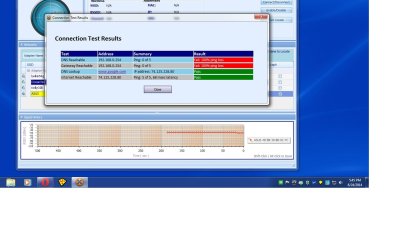
I think when we were working on it cables must have been plugged into places where they shouldn't have been . I had a feeling it was something with the setup and you confirmed it .
 

My Computer My Computer

Computer type
Laptop
Computer Manufacturer/Model Number
Asus laptop U56E
OS
Microsoft Windows 7 Home Premium 64-bit 7601 Multiprocessor Free Service Pack 1
CPU
Intel(R) Core(TM) i5-2430M CPU @ 2.40GHz
Motherboard
ASUSTeK Computer Inc. U56E
Memory
6.00 GB
Graphics Card(s)
Intel(R) HD Graphics 3000
Sound Card
(1) High Definition Audio Device (2) High Definition Audio
Screen Resolution
1366 x 768 x 32 bits (4294967296 colors) @ 60 Hz
Hard Drives
WDC WD6400BPVT-80HXZT3
Ok. Glad you got this all sorted out.

The bottom line is that if the PC is to run in "wireless" mode then you don't have any ethernet cables involved. That's what "wireless" means... no wires from the PC. The connection is "wireless" from PC to the router (not to the modem).

If you do plug an ethernet cable into the PC (and the other end of the cable to the 1/2/3/4 LAN ports on the router), well now you've indicated to Windows that you want to be connected using the "wired" connection method rather than "wireless". So even though both options are available, Windows will just prefer to use the "wired" connection path.

However if you want to use the router, then it's the router that connects to the modem via ethernet cable, with the PC connecting to the router (either wired with an ethernet cable to 1/2/3/4 ports, or just wireless). The PC should never be connected to the modem unless you have no interest in the functionality of having a router in your setup, which of course provides shared use of the modem for up to four wired devices as well as essentially an unlimited number of wireless device connections, all simultaneously and all sharing the modem's Internet access. That's what a router provides, and that's why you use one... to support shared access to the Internet using either wired or wireless connections from ethernet-enabled devices (e.g. smart TV's, smart phone's, smart BluRay players, smart gaming devices, laptops, desktops, etc.) to the router.

I still suggest that you reconfigure your router setup to enable "security", with encryption (e.g. WPA2-PSK [AES]) and a password. This is really to try and best protect your LAN computers from outside neighbor or drive-by intrusion and hacking, which is particularly possible when you're running a wireless network.
 

My Computer My Computer

Computer type
PC/Desktop
Computer Manufacturer/Model Number
Home-built, two systems (1) and (2)
OS
Windows 7 Pro x64 (1), Win7 Pro X64 (2)
CPU
i5-3350p 3.1Ghz/6MB-cache (1); E8400 3.0Ghz/6MB-cache (2)
Motherboard
ASUS P8Z77-V Pro (1); ASUS P5Q3 (2)
Memory
8GB PC3-12800 DDR3 (1); 4GB PC3-10600 DDR3 (2)
Graphics Card(s)
ATI HD7750 (1), (see TV cards); ATI R7 250 (2)
Sound Card
Realtek ALC892 HD Audio (1); Realtek ALC1200 HD Audio (2)
Monitor(s) Displays
Eizo HD2441W LCD, Eizo S2433W (1); Eizo 24" S2433W (2)
Screen Resolution
1920x1200, 1920x1200 (1); 1920x1200 (2)
Hard Drives
(1) 1TB SATA-II (7200RPM), 2x2TB SATA-III (7200RPM), 250GB SATA-III (10000RPM) for OS; 2x2TB external USB 3.0

(2) 320GB SATA-II (7200RPM), 750GB SATA-II (7200RPM), 150GB SATA-II (10000RPM) for OS; 2TB external USB 3.0
PSU
Nesteq ECS-6001 600W (1); Nesteq ECS-5001 500W (2)
Case
Acousti-Case 360 (1) and (2)
Cooling
Noctua NH-U12P SE2 for CPU, 2x120mm case fans (1) and (2)
Keyboard
IBM PS/2 (1) and (2)
Mouse
Logitech MX Revolution wireless (1); Microsoft wired (2)
Internet Speed
100mbps down / 10mbps up
Antivirus
Microsoft Security Essentials; Malwarebyte Anti-Malware Pro
Browser
Firefox
Other Info
Ceton InfiniTV 4-tuner cablecard-enabled TV card as well as Hauppauge HVR-2250 OTA/ATSC 2-tuner TV card in (1), running under Win7 WMC
Thanks again , you really showed patience and a lot of professionalism and i appreciate it.
 

My Computer My Computer

Computer type
Laptop
Computer Manufacturer/Model Number
Asus laptop U56E
OS
Microsoft Windows 7 Home Premium 64-bit 7601 Multiprocessor Free Service Pack 1
CPU
Intel(R) Core(TM) i5-2430M CPU @ 2.40GHz
Motherboard
ASUSTeK Computer Inc. U56E
Memory
6.00 GB
Graphics Card(s)
Intel(R) HD Graphics 3000
Sound Card
(1) High Definition Audio Device (2) High Definition Audio
Screen Resolution
1366 x 768 x 32 bits (4294967296 colors) @ 60 Hz
Hard Drives
WDC WD6400BPVT-80HXZT3
Back
Top