Did Windows 7 manager changed value

DigDeep

New member
Member
VIP
Local time
8:31 PM
Messages
101
Location
Kočevje
Today I installed windows 7 manager program from Yamicsoft

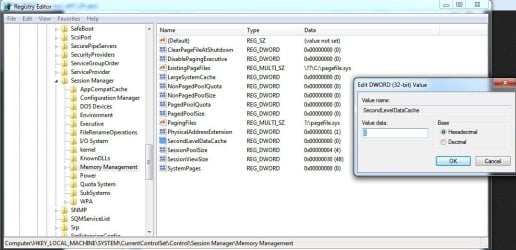
One thing cached my eye, Its registry tweak for level 2 cache ,where you can change value from 256kb-12mb I did not change anything because it was little fishy to me. In program the value was set to 256kb, so I think when i changed another tweak it saved this one too, because I have now 100 (256) value in registry under

HKLM\SYSTEM\CurrentControlSet\Control\Session Manager\Memory Management

SecondLevelDataCache=100(256)

HKLM\SYSTEM\CurrentControlSet001\Control\Session Manager\Memory Management

SecondLevelDataCache=100(256)


under

HKLM\SYSTEM\CurrentControlSet002\Control\Session Manager\Memory Management

SecondLevelDataCache=0

wich I think is default acorrding to M$

Detailed Explanation of SecondLevelDataCache

So I would like to ask users to check their values, so I can be 100% sure that its 0.
 

My Computer

Computer type
PC/Desktop
Computer Manufacturer/Model Number
Custom build
OS
Windows 7 SP1 x64 Ultimate
CPU
FX 8320 4ghz
Motherboard
Gigabyte 970A UD3P
Memory
Crucial Ballistix Tactical 8GB 240-Pin DDR3 1600 Mhz
Graphics Card(s)
Sapphire R9 270 Dual X
Sound Card
VIA HD Audio
Monitor(s) Displays
Samsung SyncMaster 2032BW
Screen Resolution
1680 * 1050
Hard Drives
WD Blue WD10EZEX
PSU
Energon 650w
Case
Aerocool Strike X One
Cooling
Xigmatek Dark Knight SD1283 Night Hawk Edition
Keyboard
Typhoon CarbonKey
Mouse
Trust GXT 25 Gaming Mouse
Internet Speed
120mb/4mb
Antivirus
Comodo Internet Security 8.1
Browser
Firefox
Other Info
CfosSpeed 10
i dont get it, can you simply say what do you want? visually please
 

My Computer

OS
Windows 7 Ultimate x64
CPU
core i7.
what are your values of "SecondLevelDataCache" under

HKLM\SYSTEM\CurrentControlSet\Control\Session Manager\Memory Management
HKLM\SYSTEM\CurrentControlSet001\Control\Session Manager\Memory Management
HKLM\SYSTEM\CurrentControlSet002\Control\Session Manager\Memory Management
 

Attachments

  • sshot-1.png
    sshot-1.png
    138.4 KB · Views: 14

My Computer

Computer type
PC/Desktop
Computer Manufacturer/Model Number
Custom build
OS
Windows 7 SP1 x64 Ultimate
CPU
FX 8320 4ghz
Motherboard
Gigabyte 970A UD3P
Memory
Crucial Ballistix Tactical 8GB 240-Pin DDR3 1600 Mhz
Graphics Card(s)
Sapphire R9 270 Dual X
Sound Card
VIA HD Audio
Monitor(s) Displays
Samsung SyncMaster 2032BW
Screen Resolution
1680 * 1050
Hard Drives
WD Blue WD10EZEX
PSU
Energon 650w
Case
Aerocool Strike X One
Cooling
Xigmatek Dark Knight SD1283 Night Hawk Edition
Keyboard
Typhoon CarbonKey
Mouse
Trust GXT 25 Gaming Mouse
Internet Speed
120mb/4mb
Antivirus
Comodo Internet Security 8.1
Browser
Firefox
Other Info
CfosSpeed 10
what are your values of "SecondLevelDataCache" under

HKLM\SYSTEM\CurrentControlSet\Control\Session Manager\Memory Management
HKLM\SYSTEM\CurrentControlSet001\Control\Session Manager\Memory Management
HKLM\SYSTEM\CurrentControlSet002\Control\Session Manager\Memory Management
there is no CurrentControlSet001,2 its ControlSet001,2:
can you describe what are these? what are you going to do?
 

Attachments

  • 1-5-2013 12-46-21 AM.jpg
    1-5-2013 12-46-21 AM.jpg
    219 KB · Views: 5

My Computer

OS
Windows 7 Ultimate x64
CPU
core i7.
You are right, my mistake.

what are you going to do?

I think program changed default values. So I want to know what are the default values of these registry entries

HKLM\SYSTEM\CurrentControlSet\Control\Session Manager\Memory Management\SecondLevelDataCache ?
HKLM\SYSTEM\ControlSet001\Control\Session Manager\Memory Management\SecondLevelDataCache ?
HKLM\SYSTEM\ControlSet002\Control\Session Manager\Memory ManagementqSecondLevelDataCache ?


According to MS they are set to 0

Detailed Explanation of SecondLevelDataCache
 

My Computer

Computer type
PC/Desktop
Computer Manufacturer/Model Number
Custom build
OS
Windows 7 SP1 x64 Ultimate
CPU
FX 8320 4ghz
Motherboard
Gigabyte 970A UD3P
Memory
Crucial Ballistix Tactical 8GB 240-Pin DDR3 1600 Mhz
Graphics Card(s)
Sapphire R9 270 Dual X
Sound Card
VIA HD Audio
Monitor(s) Displays
Samsung SyncMaster 2032BW
Screen Resolution
1680 * 1050
Hard Drives
WD Blue WD10EZEX
PSU
Energon 650w
Case
Aerocool Strike X One
Cooling
Xigmatek Dark Knight SD1283 Night Hawk Edition
Keyboard
Typhoon CarbonKey
Mouse
Trust GXT 25 Gaming Mouse
Internet Speed
120mb/4mb
Antivirus
Comodo Internet Security 8.1
Browser
Firefox
Other Info
CfosSpeed 10
Small suggestion. Remove Yamicsoft. Go back to a restore point before you installed
Yamicsoft. These do all, fix all, speed up programs are snake oil.
 

My Computer

Computer type
PC/Desktop
Computer Manufacturer/Model Number
Home made Desktop
OS
Windows 10 Pro. 64/ version 1709 Windows 7 Pro/64
CPU
Intel i7-6800K @ 4.3
Motherboard
ASUS X-99 Deluxe II
Memory
Corsair Platinum 16 gig @2400
Graphics Card(s)
EVGA GTX 1070 OC
Monitor(s) Displays
Asus 27" LED LCD/VE278Q
Screen Resolution
1920-1080 or 1280-720 HDMI
Hard Drives
INTEL SSD 730-240 Gb Sata 3.0/
PSU
EVGA Platium 1200W
Case
Phanteks Luxe Tempered Glass 8 fans/ one radiator
Cooling
XSPC/ Water Cooled CPU
Keyboard
Das 4 Professional
Mouse
Logitech M705/MX Anywhere 2-S
Internet Speed
100 mbits
Antivirus
Microsoft Security Essentials/ Malwarebytes Premium 3.0/ SAS
Browser
I.E. 11 default/Firefox/ ISP Time Warner Cable/Spectrum
Other Info
LG BluRay Burner/
Sound system-KLipsch-THX/
Icy Dock ssd Hot Swap bays.
Leave it alone. It is not used on modern machines. Its a left over from old CPUs before Pentium II.
This is not related to the hardware; it is only useful for computers with direct-mapped L2 caches. Pentium II and later processors do not have direct-mapped L2 caches.
 

My Computer

Computer type
PC/Desktop
Computer Manufacturer/Model Number
Alienware Aurora ALX R4
OS
Windows 10 Pro (x64)
CPU
Intel Core i7-3930K (3.2GHz - 4.5GHz)
Motherboard
Alienware Aurora-R4 x79
Memory
4x Samsung 4GB PC3-12800 DDR3 (16GB 1600MHz)
Graphics Card(s)
Nvidia Geforce GTX 690
Sound Card
SteelSeries Siberia Elite
Monitor(s) Displays
Dell UltraSharp U3011
Screen Resolution
2560x1600
Hard Drives
Samsung 850 Pro 256 GB, Seagate 1TB Desktop Hybrid HDD, 2x Western Digital 4TB Green HDD
PSU
875W Some Dell PSU <.<
Case
Alienware Aurora ALX
Cooling
Custom Liquid Cooling (EK CPU & GPU blocks) dual EK 480RAD
Keyboard
Logitech G710+ Mechanical
Mouse
Logitech G700s
Internet Speed
Verizon Fios (50 mbps average)
Other Info
Server: Intel NUC D54250WYK: i5-4250U, 16GB, 256 GB mSATA, Windows Server 2012 R2
Small suggestion. Remove Yamicsoft. Go back to a restore point before you installed
Yamicsoft. These do all, fix all, speed up programs are snake oil.
I don't post very often just to say I agree, but now I have to.

Windows 7 does not need any optimizers. You are most probably doing more harm in the long run with your "Tweak this, fix that" software than you had never thought.

Windows 7 is fully capable to take care of itself without third party optimizers.

Kari
 

My Computer

Computer type
Laptop
Computer Manufacturer/Model Number
HP ENVY 17-1150eg
OS
Windows 10 Pro x64 EN-GB
CPU
1.6 GHz Intel Core i7-720QM Processor
Memory
6 GB
Graphics Card(s)
ATI Mobility Radeon HD 5850 Graphics
Sound Card
Beats sound system with integrated subwoofer
Monitor(s) Displays
17" laptop display, 22" LED and 32" Full HD TV through HDMI
Screen Resolution
1600*900 (1), 1920*1080 (2&3)
Hard Drives
Internal: 2 x 500 GB SATA Hard Disk Drive 7200 rpm
External: 2TB for backups, 3TB USB3 network drive for media
Cooling
As Envy runs a bit warm, I have it on a Cooler Master pad
Keyboard
Logitech diNovo Media Desktop Laser (bluetooth)
Mouse
Logitech Performance Mouse MX
Internet Speed
50/10 Mbps VDSL
Antivirus
Windows Defender 4.3.9431.0
Browser
Maxthon 3.5.2., IE11
I have all

SecondLevelDataCache se to 0 now.


Can anyone look in registry, so I can sleep better.
 

My Computer

Computer type
PC/Desktop
Computer Manufacturer/Model Number
Custom build
OS
Windows 7 SP1 x64 Ultimate
CPU
FX 8320 4ghz
Motherboard
Gigabyte 970A UD3P
Memory
Crucial Ballistix Tactical 8GB 240-Pin DDR3 1600 Mhz
Graphics Card(s)
Sapphire R9 270 Dual X
Sound Card
VIA HD Audio
Monitor(s) Displays
Samsung SyncMaster 2032BW
Screen Resolution
1680 * 1050
Hard Drives
WD Blue WD10EZEX
PSU
Energon 650w
Case
Aerocool Strike X One
Cooling
Xigmatek Dark Knight SD1283 Night Hawk Edition
Keyboard
Typhoon CarbonKey
Mouse
Trust GXT 25 Gaming Mouse
Internet Speed
120mb/4mb
Antivirus
Comodo Internet Security 8.1
Browser
Firefox
Other Info
CfosSpeed 10
I have all

SecondLevelDataCache se to 0 now.


Can anyone look in registry, so I can sleep better.

Honestly the only thing that can make sense of the Registry is Windows itself. Windows 7 is very good at maintaining it's registry, and any third party program will simply do more harm than good.


It's actually scary the number of people who in the past few weeks have been popping up here saying that they use registry cleaners.
 

My Computer

Computer type
PC/Desktop
Computer Manufacturer/Model Number
Apple 17" iMac MA199LL (Early 2006)
OS
Windows 8 Pro (32-bit)
CPU
1.83GHz Intel Core Duo
Memory
2GB 667MHz DDR2 SDRAM (PC2-5300) (upgrade)
Graphics Card(s)
ATI Radeon X1600 with 128MB GDDR3 memory
Monitor(s) Displays
17-inch TFT active-matrix LCD, millions of colors
Screen Resolution
1440 x 900
Hard Drives
Hitachi 320GB HDT721032SLA360 7200RPM SATA II (upgrade)
Keyboard
Microsoft Wired Keyboard 600
Mouse
Microsoft Basic Optical Mouse v2.0
Internet Speed
4 Mbps
Antivirus
Microsoft Security Essentials
Browser
Google Chrome
Other Info
WEI:
Base Score: 3.9 Processor: 4.4 Memory 4.7
Graphics: 3.9 Gaming Graphics: 4.1 Primary HD: 5.9
I have all

SecondLevelDataCache se to 0 now.


Can anyone look in registry, so I can sleep better.

Honestly the only thing that can make sense of the Registry is Windows itself. Windows 7 is very good at maintaining it's registry, and any third party program will simply do more harm than good.


It's actually scary the number of people who in the past few weeks have been popping up here saying that they use registry cleaners.

I normaly dont use those kind of tweaks. But Im uploader and I was testing this program, to see if everything works ok.
Thats how I found that thing. I use only few tweaks on windows, wich I know cant do any harm, but they speed up things. Registry cleaners in my opinion are good, but you must know what each setting does, so you dont do more harm then good. Program that I recommend is Your uninstaller, wich after uninstallation cleans the registry too, so you dont have any leftovers from program in registry. This way you registry is allways fresh.
 

My Computer

Computer type
PC/Desktop
Computer Manufacturer/Model Number
Custom build
OS
Windows 7 SP1 x64 Ultimate
CPU
FX 8320 4ghz
Motherboard
Gigabyte 970A UD3P
Memory
Crucial Ballistix Tactical 8GB 240-Pin DDR3 1600 Mhz
Graphics Card(s)
Sapphire R9 270 Dual X
Sound Card
VIA HD Audio
Monitor(s) Displays
Samsung SyncMaster 2032BW
Screen Resolution
1680 * 1050
Hard Drives
WD Blue WD10EZEX
PSU
Energon 650w
Case
Aerocool Strike X One
Cooling
Xigmatek Dark Knight SD1283 Night Hawk Edition
Keyboard
Typhoon CarbonKey
Mouse
Trust GXT 25 Gaming Mouse
Internet Speed
120mb/4mb
Antivirus
Comodo Internet Security 8.1
Browser
Firefox
Other Info
CfosSpeed 10
Back
Top