Windows 7 Manager v1.2.1 released

Abhishek Ghosh

Dr. is in the house
Guru
VIP
Local time
9:36 AM
Messages
936
I have using a licensed copy of Windows 7 manager 1.1.7 after reading from the compatible 64 bit software thread.
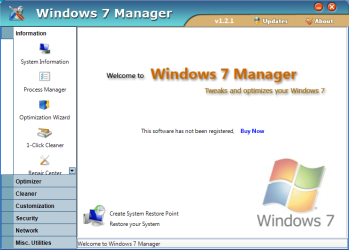
Accidentally I discovered they have introduced this new version.As my habit of checking new softwares,just installed it yesterday to find out "whats new?":party:

Just in Brief,I think our forum members already knows about it.
What in new version:
+Loads faster
+One click cleaner has been improved greatly,I felt that it cleans more "deeply" than older version.I scanned my lappy with the older version just 5days ago,it showed there are about 600 junk files (and I cleaned them),yesterday it showed about 5000 junk files are there.I use Opera browser,I found many temp files are there from Opera temp folder those are more than months old.
I personally like the old option "shut down computer after cleaning is complete" (It was there from beginning) now added "dont show dialogue after cleaning is complete"
By the way the cleaning took horrible 2 hours to complete.
+The Ram Cleaner bundled with it has been better interface than before.

-New version,though not major,a slight increase in price,now its price is 39.95 $

This is the official site : Windows 7 manager
 

Attachments
  • Capture.PNG
    Capture.PNG
    34.5 KB · Views: 18
Last edited:

My Computer

Computer Manufacturer/Model Number
COMPAQ Presario Laptop
OS
Windows 7 Ultimate 64 bit, Mac OS X 10.6
CPU
Intel Pentium Dual Core @2.0GHz
Motherboard
Compaq Generic
Memory
12GB
Graphics Card(s)
NVIDIA Graphics For Mobile 512MB VRAM
Sound Card
IDT High definition Audio
Monitor(s) Displays
Laptop LCD Display
Screen Resolution
1280*800 Bright View Widescreen
Hard Drives
500 GB Primary Master@7200rpm + 1 TB External HDD
Cooling
Direct ; generic fan
Keyboard
Generic Laptop Keyboard
Mouse
Touch Pad
Internet Speed
3.1 Mbps wireless Broadband
Other Info
Generic Dock
I have never used this software so I am not criticizing it.

The RAM cleaner is pure snake oil. Windows Seven, unlike XP, does a superb job of managing memory. A so called RAM cleaner can actually slow your system down. Windows keeps things in memory as needed where something can be instantly retrieved. A RAM cleaner will force Windows to write to the page file and when that something is needed, it will have to be read from the page file back into memory. That slows things down and causes needless use of the hard drive. Not only is a RAM cleaner not necessary, it can actually degrade system performance.
 

My Computer

Computer Manufacturer/Model Number
Home built
OS
Windows 7 Ultimate 32 bit
CPU
Intel(R) Pentium(R) 4 CPU 3.00GHz
Motherboard
ASUS P4P800-VM Motherboard Chipset: Intel 865G + ICH5
Memory
2.50 GB RAM
Graphics Card(s)
NVIDIA GeForce 7600 GS
Sound Card
SoundMax Integrated Digital Audio (Chip)
Monitor(s) Displays
ViewSonic VX 1962 wm
Screen Resolution
1680 X 1050
Hard Drives
Seagate Barracuda 7200.10 80 GB
ST380215A ATA Device 18.6 GB
Western Digital "My Book" external hard drive 750 GB
Cooling
Fan based
Keyboard
Microsoft Comfort Curve Keyboard 2000 v10 USB
Mouse
Logitec optic USB
Internet Speed
3.01 Mb/s download 0.64 Mb/s upload
I have never used this software so I am not criticizing it.

The RAM cleaner is pure snake oil. Windows Seven, unlike XP, does a superb job of managing memory. A so called RAM cleaner can actually slow your system down. Windows keeps things in memory as needed where something can be instantly retrieved. A RAM cleaner will force Windows to write to the page file and when that something is needed, it will have to be read from the page file back into memory. That slows things down and causes needless use of the hard drive. Not only is a RAM cleaner not necessary, it can actually degrade system performance.

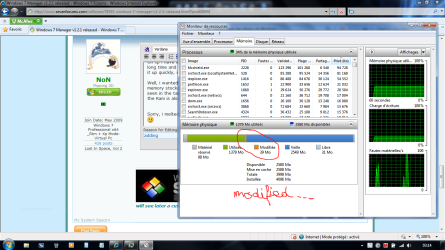
Do you mean it can altered the so call "modified ram" we can find in the task manager=>monitoring ressources?...

I'm using sometimes a registry cleaner, then when the job is done i do defrag the ram...

I can find sometimes like more of 200 invalid keys from Apps upgraded or uninstalled, which let holes in the registry. Maybe a reboot is just OK to re-unified the ram after cleaning?
 

My Computer

Computer type
PC/Desktop
Computer Manufacturer/Model Number
Custom Build
OS
Windows 7 Professional SP1 - x64 [Non-UEFI Boot]
CPU
Ivy Bridge Core i5 3570K (Delidded)
Motherboard
Asus P8Z77-V LE PLUS
Memory
G.Skill "Ares" DDR3 PC3-12800 - 1600MHz (16Gb)
Graphics Card(s)
Asus Dual-RX480-O4G
Sound Card
Creative Sound Blaster Z w/5.1 sound system
Monitor(s) Displays
Asus IPS 23"
Screen Resolution
16/9
Hard Drives
Internal:
500Go Sata 6Gb/s (x2)
500Go Sata 3Gb/s (x2)
SSD 60Go Sata 6Gb/s
PSU
In Win C 900W Series 80+ Platinum
Case
Thermaltake Chaser A71
Cooling
Custom Water Cooling Loop
Keyboard
Cooler Master QuickFire XTi
Mouse
Razer Imperator 2012 (4G)
Antivirus
MSE
Browser
IE 11.0.xxx Rtm
Other Info
"Raid0" with Intel Smart Response Technology (HDD/SSD)
NoN, I may not quite understand your post.

The registry is stored in a file on the HD. Cleaning (deleting) registry keys affects the file, not the RAM which is memory. RAM=Random Access Memory. If you make changes to your registry,ie, change the value of key, delete a key, add a key, etc, the changes do not take effect until you reboot and the system reloads into memory (RAM).

When you turn off your computer and reboot the RAM is flushed. Nothing is stored there until you reboot. There is no reason to defrag the RAM. Windows 7 manages the RAM just fine. The old "rules" and tricks we did in XP do not apply to Win 7.

Now as to the value or lack thereof of cleaning the registry has been well hashed over in other threads. So I won't go into that except to say that I have only done so once. Win 7 handles the registry much differently than XP and the OS's preceding XP did. Deleting a few dozen registry keys or even a couple of hundred is minuscule compared to the overall size of the registry. Win 7 is a new and different OS and much, much more efficient at managing memory, the registry, and services. It is considerably less of a memory hog than XP or Vista.
 

My Computer

Computer Manufacturer/Model Number
Home built
OS
Windows 7 Ultimate 32 bit
CPU
Intel(R) Pentium(R) 4 CPU 3.00GHz
Motherboard
ASUS P4P800-VM Motherboard Chipset: Intel 865G + ICH5
Memory
2.50 GB RAM
Graphics Card(s)
NVIDIA GeForce 7600 GS
Sound Card
SoundMax Integrated Digital Audio (Chip)
Monitor(s) Displays
ViewSonic VX 1962 wm
Screen Resolution
1680 X 1050
Hard Drives
Seagate Barracuda 7200.10 80 GB
ST380215A ATA Device 18.6 GB
Western Digital "My Book" external hard drive 750 GB
Cooling
Fan based
Keyboard
Microsoft Comfort Curve Keyboard 2000 v10 USB
Mouse
Logitec optic USB
Internet Speed
3.01 Mb/s download 0.64 Mb/s upload
NoN, I may not quite understand your post.

The registry is stored in a file on the HD. Cleaning (deleting) registry keys affects the file, not the RAM which is memory. RAM=Random Access Memory. If you make changes to your registry,ie, change the value of key, delete a key, add a key, etc, the changes do not take effect until you reboot and the system reloads into memory (RAM).

When you turn off your computer and reboot the RAM is flushed. Nothing is stored there until you reboot. There is no reason to defrag the RAM. Windows 7 manages the RAM just fine. The old "rules" and tricks we did in XP do not apply to Win 7.

Now as to the value or lack thereof of cleaning the registry has been well hashed over in other threads. So I won't go into that except to say that I have only done so once. Win 7 handles the registry much differently than XP and the OS's preceding XP did. Deleting a few dozen registry keys or even a couple of hundred is minuscule compared to the overall size of the registry. Win 7 is a new and different OS and much, much more efficient at managing memory, the registry, and services. It is considerably less of a memory hog than XP or Vista.

Hello CarlTR6,

I should have been more clear.

I forgot to tell about defrag Ram memory like such tool can do as "Smart defrag" 's doing (I'm not using it at all by now).
That was the first point of the first line i wrote...if this will damage the "modified ram".

On xp i have always noticed about defrag Ram, is that it never stays really defragmented a long time and the tool to do it had to be reload many time during open session...so i' gave it up quickly, i knew the ram was flushed on reboot, so was a little pointless to do.

Well, i wanted to know if on a win 7 OS using such manner, can altered a part of the Ram memory stocked during an open session to better understand how Ram handles as it can be seen in the task manager better than the other MS Os. I know it is a bit tricky thread as the Ram is also part of the virtual memory that can be assigned by the OS system in the Perfomance Options.


Sorry, i melted both post, registry and ram memory. But, you have part answered my post.:)
 

Attachments

  • Capture.PNG
    Capture.PNG
    88.3 KB · Views: 16
Last edited:

My Computer

Computer type
PC/Desktop
Computer Manufacturer/Model Number
Custom Build
OS
Windows 7 Professional SP1 - x64 [Non-UEFI Boot]
CPU
Ivy Bridge Core i5 3570K (Delidded)
Motherboard
Asus P8Z77-V LE PLUS
Memory
G.Skill "Ares" DDR3 PC3-12800 - 1600MHz (16Gb)
Graphics Card(s)
Asus Dual-RX480-O4G
Sound Card
Creative Sound Blaster Z w/5.1 sound system
Monitor(s) Displays
Asus IPS 23"
Screen Resolution
16/9
Hard Drives
Internal:
500Go Sata 6Gb/s (x2)
500Go Sata 3Gb/s (x2)
SSD 60Go Sata 6Gb/s
PSU
In Win C 900W Series 80+ Platinum
Case
Thermaltake Chaser A71
Cooling
Custom Water Cooling Loop
Keyboard
Cooler Master QuickFire XTi
Mouse
Razer Imperator 2012 (4G)
Antivirus
MSE
Browser
IE 11.0.xxx Rtm
Other Info
"Raid0" with Intel Smart Response Technology (HDD/SSD)
Back
Top