Diff.between "available" and "free" physical memory?

Well, I have Windows 7 64bit and 4GB of RAM 512MB being used by on board Radeon and often have FREE memory around 15-20 and sometimes single digits but what I can' figure out (if anyone can shed some light on this) is why if I have anywhere from about 900MB -over 1GB, like 1200MB or so, I am getting constant 'Out of Memory' warnings while running Google Chrome and also the old 'Low memory' Telling my I should close 'The Program' and then it usually list 'Google Chrome' or 'Desktop Gadgets' or some offending, memory hogging program. I don't see why it would warn me I am running out of memory consider I still have around or close to 30% of the memory still available.

This problem has driven me crazy ever since I have installed Windows.

More information is needed.
Posing a screenshot of Task Manager -Performance tab when the problem occurs would be a big help.
 

My Computer

Computer type
PC/Desktop
Computer Manufacturer/Model Number
HP
OS
Windows 7 Pro 64 bit
CPU
Xeon W3520
Memory
8 GB
Graphics Card(s)
Nvidia Geforce 210
I am getting constant 'Out of Memory' warnings while running Google Chrome
I've see in other forums that this is about the release of "free" memory in Win7, Google Chrome seems to be in the black list of applications that don't play fair and don't release this kind of memory as they should.
 

My Computer

Computer type
PC/Desktop
OS
Win7 Enterprise 64bit

My Computer

Computer type
PC/Desktop
Computer Manufacturer/Model Number
Golden Mk. I.4
OS
Windows 10 Pro x64 ; Xubuntu x64
CPU
Intel i7 860 @ 2.80 GHz O/C'ed to 4.0GHz
Motherboard
Gigabyte P55A-UD3R Rev.1. Award BIOS F13
Memory
16GB Corsair Vengance DDR3 @ 661 MHz Dual Channel (9-9-9-24)
Graphics Card(s)
EVGA NVidia GTX 560 1024MB
Sound Card
Realtek Integrated
Monitor(s) Displays
Dual Samsung SyncMaster 2494HS
Screen Resolution
1920*1080 and 1920*1080
Hard Drives
1*Samsung 840 EVO 120GB SSD;
1*OCZ Vertex 2 60GB SSD;
2*Samsung F3 SpinPoint 1TB in RAID0;
1*Samsung F1 SpinPoint 1TB;
2*Western Digital 1TB External USB 3.0
1*Western Digital 500GB External USB 3.0
1*Seagate 500GB External USB 2.0
PSU
Thermaltake ToughPower QFan 750W
Case
Thermaltake Element S VK60001W2Z
Cooling
Corsair H60 Water Cooling, 2*230mm and 2*80mm case fans
Keyboard
Logitech G110
Mouse
Logitech MX518
Thanks to all who replied

LMILLER7 - I'll have to reproduce the problem and then post a scrn shot of the task manager for you as I have been keeping programs closed and trying to keep open browser tabs to a minimum so that it DOES NOT occur.

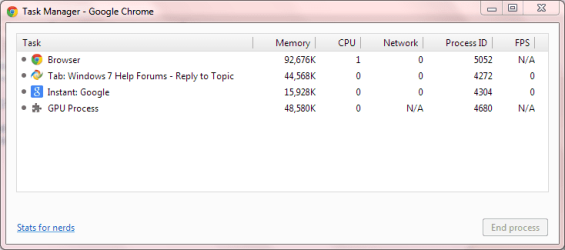
Golden - CTRL+SHIFT+ESC did not open any Chrome task manager

To all - I think if I remember correctly that I had the same problem when I was running 64 bit Waterfox exclusively for browsing the web. It wouldn't be hard to believe that Chrome doesn't play well with releasing memory but then if Windows Task Manager says that there is still around 1GB of memory available that I shouldn't be getting 'Out of Memory' warnings as from what I understand is that 'Available' memory is as ready to use as 'Free' memory and most forums state that since Windows 7 loads frequently used programs for faster launching, your Free memory should always be either in the single or no more than double digit range.
 

My Computer

Computer type
PC/Desktop
Computer Manufacturer/Model Number
CUSTOM BUILD
OS
Windows 7 Ultimate x64
CPU
AMD Phenom B55 3200MHz
Motherboard
Gigabyte MA785GM-US2H
Memory
4GB
Graphics Card(s)
On Board
Sound Card
On Board 8.1 HD
Monitor(s) Displays
(1) Samsung 713N, (2) IBM Thinkvision
Screen Resolution
1280x1024
Hard Drives
Hitachi, Seagate, Maxtor
PSU
CoolerMaster
Case
CoolerMaster
Cooling
CoolerMaster Hyper 212+
Keyboard
Dell QuietKey
Mouse
Logitech
Internet Speed
20-40Mb/s
Antivirus
Kapersky
Browser
Waterfox, Chrome, Opera
Golden - CTRL+SHIFT+ESC did not open any Chrome task manager

Try SHIFT+ESC or the long way:

1. Click the Chrome settings icon 1.PNG
2. Now navigate to Tools > Task manager

2.PNG
 

My Computer

Computer type
PC/Desktop
Computer Manufacturer/Model Number
Golden Mk. I.4
OS
Windows 10 Pro x64 ; Xubuntu x64
CPU
Intel i7 860 @ 2.80 GHz O/C'ed to 4.0GHz
Motherboard
Gigabyte P55A-UD3R Rev.1. Award BIOS F13
Memory
16GB Corsair Vengance DDR3 @ 661 MHz Dual Channel (9-9-9-24)
Graphics Card(s)
EVGA NVidia GTX 560 1024MB
Sound Card
Realtek Integrated
Monitor(s) Displays
Dual Samsung SyncMaster 2494HS
Screen Resolution
1920*1080 and 1920*1080
Hard Drives
1*Samsung 840 EVO 120GB SSD;
1*OCZ Vertex 2 60GB SSD;
2*Samsung F3 SpinPoint 1TB in RAID0;
1*Samsung F1 SpinPoint 1TB;
2*Western Digital 1TB External USB 3.0
1*Western Digital 500GB External USB 3.0
1*Seagate 500GB External USB 2.0
PSU
Thermaltake ToughPower QFan 750W
Case
Thermaltake Element S VK60001W2Z
Cooling
Corsair H60 Water Cooling, 2*230mm and 2*80mm case fans
Keyboard
Logitech G110
Mouse
Logitech MX518
WOW ..... CTRL+SHIFT+ESC brought up Windows Taks manager after I rebooted but SHIFT+ESC brought up the Google TM. I didn't know that Google had this feature and is very helpful. Thanks, i will have to look at this closer.

What I find interesting is that I had Chrome close several times because of low memory. Whn close I had in excess of 2GB available. After opening it would use almost all of that and leave around 150-200MB available. After rebooting and opening Chrome to the last state with the same 120 tabs that were open before and adding up what is in the Google Task Manager I find it is only using 309MB and has the system still has 1658MB available. It appears that as the system stays up over many days that there is some kind of memory leak or chrome isn't releasing memory it doesn't need anymore.

Now my question is, what use is google chrome? For the first year or two of its inception it offered faster browsing with its smaller code and footprint. But I just today opened IE 9 and it opened web pages much faster than chrome. So now, with google's mega conglomerate advertising super machine with the change to their adwords and such (which is probably what is slowing it down) I see it as a once was of a 'had been' and think I am going back to Waterfox as my browser of choice.
 
Last edited:

My Computer

Computer type
PC/Desktop
Computer Manufacturer/Model Number
CUSTOM BUILD
OS
Windows 7 Ultimate x64
CPU
AMD Phenom B55 3200MHz
Motherboard
Gigabyte MA785GM-US2H
Memory
4GB
Graphics Card(s)
On Board
Sound Card
On Board 8.1 HD
Monitor(s) Displays
(1) Samsung 713N, (2) IBM Thinkvision
Screen Resolution
1280x1024
Hard Drives
Hitachi, Seagate, Maxtor
PSU
CoolerMaster
Case
CoolerMaster
Cooling
CoolerMaster Hyper 212+
Keyboard
Dell QuietKey
Mouse
Logitech
Internet Speed
20-40Mb/s
Antivirus
Kapersky
Browser
Waterfox, Chrome, Opera
Sorry, I don't have these problems with Chrome......its way faster than IE for me :rolleyes:

The only thing I can suggest is to examine the services and programs in your startup.
 

My Computer

Computer type
PC/Desktop
Computer Manufacturer/Model Number
Golden Mk. I.4
OS
Windows 10 Pro x64 ; Xubuntu x64
CPU
Intel i7 860 @ 2.80 GHz O/C'ed to 4.0GHz
Motherboard
Gigabyte P55A-UD3R Rev.1. Award BIOS F13
Memory
16GB Corsair Vengance DDR3 @ 661 MHz Dual Channel (9-9-9-24)
Graphics Card(s)
EVGA NVidia GTX 560 1024MB
Sound Card
Realtek Integrated
Monitor(s) Displays
Dual Samsung SyncMaster 2494HS
Screen Resolution
1920*1080 and 1920*1080
Hard Drives
1*Samsung 840 EVO 120GB SSD;
1*OCZ Vertex 2 60GB SSD;
2*Samsung F3 SpinPoint 1TB in RAID0;
1*Samsung F1 SpinPoint 1TB;
2*Western Digital 1TB External USB 3.0
1*Western Digital 500GB External USB 3.0
1*Seagate 500GB External USB 2.0
PSU
Thermaltake ToughPower QFan 750W
Case
Thermaltake Element S VK60001W2Z
Cooling
Corsair H60 Water Cooling, 2*230mm and 2*80mm case fans
Keyboard
Logitech G110
Mouse
Logitech MX518
Hi there ... Part of your problem is you have far to many Tabs open .. Cannot imagine why you would need as many open .. Cut down on the Tabs it will use less memory .. And don't leave your computer on for days on end
 

My Computer

Computer Manufacturer/Model Number
W530-3630QM1
OS
windows 7 home 64bit
CPU
INTEL-CORE I7
Memory
16GB
Hard Drives
750GB
Browser
Chrome
Sorry, I don't have these problems with Chrome......its way faster than IE for me :rolleyes:

The only thing I can suggest is to examine the services and programs in your startup.

Golden, Thanks for the sudgestion as I try to check these periodically but sometimes it skips my mind and haven't looked at them in a while.
However, Startup tab under msconfig has nothing in it that I didn't put there.
Services only has one entry that I don't recognize which is "QosServM.exe" but upon research I found that this executable is usually linked with Avaya IP softphone which software I did install so that doesn't appear to be out of the ordinary and I can't find anything else in Services that is out of the ordinary.

Hi there ... Part of your problem is you have far to many Tabs open .. Cannot imagine why you would need as many open .. Cut down on the Tabs it will use less memory .. And don't leave your computer on for days on end

Maxie, Are you serious? I do not agree with this as a person should be able to do with a computer anything that a computer is capable of doing without resulting in resigning himself to a mode of limited use. In the days when I was running Windows XP and we didn't even have "Tabbed" browsing (which is supposed to be easier on system resources) I could routinely have 200 browser WINDOWS open without having memory issues and that was all with 384MB or RAM. Oh and the reason why people have more than the 2-3 browser tabs that you apparently only allow open is that its a browser capability and when one is doing research and are constantly referring back and forth it prevents them from having to open and close tabs 150 times. Shutting down a computer every day? This is also not necessary as I have worked in corporate environments and those pc's rarely get shut down and are on 24/7. I have had my own computer on for 9 months without being shut down and no slowing down or other issues. Of course I am always on the machine but the only reason a pc would need to be shut down is something reacquiring a reboot or to reset poorly designed software that may have issues and need the system reset. But then that isn't the pc's fault, its the software designer's.
 

My Computer

Computer type
PC/Desktop
Computer Manufacturer/Model Number
CUSTOM BUILD
OS
Windows 7 Ultimate x64
CPU
AMD Phenom B55 3200MHz
Motherboard
Gigabyte MA785GM-US2H
Memory
4GB
Graphics Card(s)
On Board
Sound Card
On Board 8.1 HD
Monitor(s) Displays
(1) Samsung 713N, (2) IBM Thinkvision
Screen Resolution
1280x1024
Hard Drives
Hitachi, Seagate, Maxtor
PSU
CoolerMaster
Case
CoolerMaster
Cooling
CoolerMaster Hyper 212+
Keyboard
Dell QuietKey
Mouse
Logitech
Internet Speed
20-40Mb/s
Antivirus
Kapersky
Browser
Waterfox, Chrome, Opera
Page faults also important

On my Lenovo T420i, task manager shows:
Total: 3979, Cached: 2156, Available: 2105, Free: 1 (MB)
Everything seems to slow right down if I try to print something from Adobe Reader or Word.

If I run System Internals process explorer, I see the page faults jump from < 500 to about 27,000, so I'm guessing that if I add another 4Gb of memory I will create a lot more free memory and reduce the amount of page faults/swapping...which I presume is at the root of the slowdowns.
 

My Computer

Computer type
PC/Desktop
Computer Manufacturer/Model Number
Lenovo
OS
Windows 7 Enterprise 64
CPU
i3-2350M
Memory
4Gb

My Computer

Computer type
Laptop
Computer Manufacturer/Model Number
Employer provided Dell Latitude
OS
W7 Pro SP1 64bit
CPU
i7
Memory
8GB
Graphics Card(s)
Intel HD Graphics
Hard Drives
crappy SSD
Antivirus
Employer mandated Symantec Endpoint Protection
Browser
Pale Moon 64bit, IE11 64bit & Chrome 64bit
coghlan
Did you have this problem before Windows Enterprise was installed?
Where did you get Enterprise from?
 
Last edited:

My Computer

Computer type
PC/Desktop
Computer Manufacturer/Model Number
Home made Desktop
OS
Windows 10 Pro. 64/ version 1709 Windows 7 Pro/64
CPU
Intel i7-6800K @ 4.3
Motherboard
ASUS X-99 Deluxe II
Memory
Corsair Platinum 16 gig @2400
Graphics Card(s)
EVGA GTX 1070 OC
Monitor(s) Displays
Asus 27" LED LCD/VE278Q
Screen Resolution
1920-1080 or 1280-720 HDMI
Hard Drives
INTEL SSD 730-240 Gb Sata 3.0/
PSU
EVGA Platium 1200W
Case
Phanteks Luxe Tempered Glass 8 fans/ one radiator
Cooling
XSPC/ Water Cooled CPU
Keyboard
Das 4 Professional
Mouse
Logitech M705/MX Anywhere 2-S
Internet Speed
100 mbits
Antivirus
Microsoft Security Essentials/ Malwarebytes Premium 3.0/ SAS
Browser
I.E. 11 default/Firefox/ ISP Time Warner Cable/Spectrum
Other Info
LG BluRay Burner/
Sound system-KLipsch-THX/
Icy Dock ssd Hot Swap bays.
Our desktop admins control patches

I don't see this hotfix under installed updates, but it's not clear if my processor (i3-2350M) is NUMA-based and therefore affected.

Is it likely that my machine suffers from this problem regardless?
 

My Computer

Computer type
PC/Desktop
Computer Manufacturer/Model Number
Lenovo
OS
Windows 7 Enterprise 64
CPU
i3-2350M
Memory
4Gb
Did you have this problem before Windows Enterprise was installed?
Where did you get Enterprise from?
I work for a federal gov't agency and our desktop support people upgraded me to Win 7 about 6 months ago. I had never heard of Windows 7 Enterprise before.

I only ran Win XP for a short while after I received this laptop so I can't be sure of the genesis of this problem. All I know is that, when I start up a print job or a new app, it's a pig, with not responding showing up in various title bars.
 

My Computer

Computer type
PC/Desktop
Computer Manufacturer/Model Number
Lenovo
OS
Windows 7 Enterprise 64
CPU
i3-2350M
Memory
4Gb
The reason I asked coghlan is from your specs.

OS Windows 7 Enterprise 64

Have you tried to get help from your desktop support people.
With a corporate or government agency it best to use your I.T. Department to do such repairs. They normally don't like or want others messing with their computers and the way it is set up.
 

My Computer

Computer type
PC/Desktop
Computer Manufacturer/Model Number
Home made Desktop
OS
Windows 10 Pro. 64/ version 1709 Windows 7 Pro/64
CPU
Intel i7-6800K @ 4.3
Motherboard
ASUS X-99 Deluxe II
Memory
Corsair Platinum 16 gig @2400
Graphics Card(s)
EVGA GTX 1070 OC
Monitor(s) Displays
Asus 27" LED LCD/VE278Q
Screen Resolution
1920-1080 or 1280-720 HDMI
Hard Drives
INTEL SSD 730-240 Gb Sata 3.0/
PSU
EVGA Platium 1200W
Case
Phanteks Luxe Tempered Glass 8 fans/ one radiator
Cooling
XSPC/ Water Cooled CPU
Keyboard
Das 4 Professional
Mouse
Logitech M705/MX Anywhere 2-S
Internet Speed
100 mbits
Antivirus
Microsoft Security Essentials/ Malwarebytes Premium 3.0/ SAS
Browser
I.E. 11 default/Firefox/ ISP Time Warner Cable/Spectrum
Other Info
LG BluRay Burner/
Sound system-KLipsch-THX/
Icy Dock ssd Hot Swap bays.
I don't see this hotfix under installed updates, but it's not clear if my processor (i3-2350M) is NUMA-based and therefore affected.

Is it likely that my machine suffers from this problem regardless?
The i3 family of CPUs is not NUMA based... so no need for the hotfix. You might want to consult with your IT department about which processes can be prevented from automatically loaded... or get more RAM as you mentioned :-)

Of course, more RAM can reduce battery life :-(
 

My Computer

Computer type
Laptop
Computer Manufacturer/Model Number
Employer provided Dell Latitude
OS
W7 Pro SP1 64bit
CPU
i7
Memory
8GB
Graphics Card(s)
Intel HD Graphics
Hard Drives
crappy SSD
Antivirus
Employer mandated Symantec Endpoint Protection
Browser
Pale Moon 64bit, IE11 64bit & Chrome 64bit
Having a significant amount of free memory is neither necessary nor desirable. The OS was designed to operate with little or no free memory, this in fact being the optimum situation. The important number is available memory and this seems to be quite adequate. Having a large number of page faults in itself is not a bad thing as most are likely to be soft faults which require no disk access. Based on the information provided there seems little reason to believe the problem is memory related.
 

My Computer

Computer type
PC/Desktop
Computer Manufacturer/Model Number
HP
OS
Windows 7 Pro 64 bit
CPU
Xeon W3520
Memory
8 GB
Graphics Card(s)
Nvidia Geforce 210
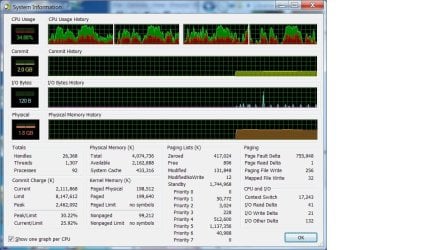
Here's a screen shot of over 700,000 page faults/sec, however, I notice that the peak commit charge (apparently RAM + paging file used) is 2.4Gb, so I presume nothing is being paged to disk.

Is it safe to assume that if peak is below the amount of physical RAM, adding more memory isn't going to help prevent the extreme sluggishness I see at various times during the day?
 

Attachments

  • Paging.jpg
    Paging.jpg
    115.4 KB · Views: 5

My Computer

Computer type
PC/Desktop
Computer Manufacturer/Model Number
Lenovo
OS
Windows 7 Enterprise 64
CPU
i3-2350M
Memory
4Gb
Here's a screen shot of over 700,000 page faults/sec, however, I notice that the peak commit charge (apparently RAM + paging file used) is 2.4Gb, so I presume nothing is being paged to disk.

Is it safe to assume that if peak is below the amount of physical RAM, adding more memory isn't going to help prevent the extreme sluggishness I see at various times during the day?

No

The idea that if peak commit charge is less than RAM size then no paging will occur is one that is often seen. But the concept is based on a flawed understanding of what commit charge means and has no real validity. Commit charge is NOT a measure of RAM usage, pagefile usage, or any combination of the two. There really is no direct relationship between commit charge and performance. It is possible to have a high commit charge with good performance. It is also possible to have a low commit charge and poor performance. The commit charge is important but all you really need to know is to ensure that the commit peak is well below the commit limit. A high commit charge could also indicate a memory leak but there is no evidence of that here. Understanding the commit charge is complex and I won't attempt to explain it here.

The number of page faults is very high but clearly they are of the soft variety and do not involve disk access.

This is something that really needs to be looked into by the IT staff.
 

My Computer

Computer type
PC/Desktop
Computer Manufacturer/Model Number
HP
OS
Windows 7 Pro 64 bit
CPU
Xeon W3520
Memory
8 GB
Graphics Card(s)
Nvidia Geforce 210
I think I'm on my own w.r.t. this issue. We don't get much more than component swapping from our desktop IT people.

I was recently given a copy of this process explorer tool, so when I start seeing performance degrade I will try to get a better idea of what is happening. I know that CPU usage is not excessive (<50%), and things tend to go south when I start a new activity (print a PDF, open Word etc.), so it's somehow related to things being loaded into RAM.
 

My Computer

Computer type
PC/Desktop
Computer Manufacturer/Model Number
Lenovo
OS
Windows 7 Enterprise 64
CPU
i3-2350M
Memory
4Gb
Back
Top