Diff.between "available" and "free" physical memory?

And the culprit is...

...mcshield.exe?

165,000,000 (yes, million) page faults today.

Can this thing be locked in memory somewhere???
 

My Computer

Computer type
PC/Desktop
Computer Manufacturer/Model Number
Lenovo
OS
Windows 7 Enterprise 64
CPU
i3-2350M
Memory
4Gb
Having a significant amount of free memory is neither necessary nor desirable. The OS was designed to operate with little or no free memory, this in fact being the optimum situation. The important number is available memory and this seems to be quite adequate. Having a large number of page faults in itself is not a bad thing as most are likely to be soft faults which require no disk access. Based on the information provided there seems little reason to believe the problem is memory related.
Well, I think I have to agree that while everything fits into 4Gb, however, after the addition of 4Gb more RAM, my Win 7 Enterprise machine is noticeably faster. My initial guess is that there is a lot less virtual memory management (moving pages in/out of address space) happening with the extra RAM.

As I indicated in another post, mcshield.exe seems to generate a HUGE number of (soft) page faults, but it seems that the counts for page faults for this service are also way down. I'll have a better idea after I've had the chance to use my computer for a full day, but first impressions are very positive.
 

My Computer

Computer type
PC/Desktop
Computer Manufacturer/Model Number
Lenovo
OS
Windows 7 Enterprise 64
CPU
i3-2350M
Memory
4Gb
LMiller7

LMiller7
So like I said ...... when I get 'Out of Memory' warnings I have about 1GB of 'AVAILABLE' memory. I was not talking about Free memory. So, as I understand from what your saying is I should not be getting these warnings in this instance. Correct?
 

My Computer

Computer type
PC/Desktop
Computer Manufacturer/Model Number
CUSTOM BUILD
OS
Windows 7 Ultimate x64
CPU
AMD Phenom B55 3200MHz
Motherboard
Gigabyte MA785GM-US2H
Memory
4GB
Graphics Card(s)
On Board
Sound Card
On Board 8.1 HD
Monitor(s) Displays
(1) Samsung 713N, (2) IBM Thinkvision
Screen Resolution
1280x1024
Hard Drives
Hitachi, Seagate, Maxtor
PSU
CoolerMaster
Case
CoolerMaster
Cooling
CoolerMaster Hyper 212+
Keyboard
Dell QuietKey
Mouse
Logitech
Internet Speed
20-40Mb/s
Antivirus
Kapersky
Browser
Waterfox, Chrome, Opera
I really dislike that "Out of memory" error. It seems to almost go out of it's way to cause confusion. I know this is counter intuitive but such errors are rarely due to a lack of physical memory (RAM). With 1 GB RAM available that would seem very unlikely. The amount of "Free" memory is largely irrelevant. These errors are usually caused by the commit charge hitting the commit limit or exhaustion of the process private virtual address space.
 

My Computer

Computer type
PC/Desktop
Computer Manufacturer/Model Number
HP
OS
Windows 7 Pro 64 bit
CPU
Xeon W3520
Memory
8 GB
Graphics Card(s)
Nvidia Geforce 210
Hi there ... Part of your problem is you have far to many Tabs open .. Cannot imagine why you would need as many open .. Cut down on the Tabs it will use less memory .. And don't leave your computer on for days on end

Your incorrect in your assumption as I have had 200 Chrome tabs open for a couple days with NO 'Out of memory' alerts and then all of a sudden they start. I have closed half of the tabs and eventually start getting the 'Out of memory' alerts again. Even get them with a couple dozen tabs open so it doesn't seam to matter mow many tabs are open. It is another issue.

Well, I think I have to agree that while everything fits into 4Gb, however, after the addition of 4Gb more RAM, my Win 7 Enterprise machine is noticeably faster. My initial guess is that there is a lot less virtual memory management (moving pages in/out of address space) happening with the extra RAM.

As I indicated in another post, mcshield.exe seems to generate a HUGE number of (soft) page faults, but it seems that the counts for page faults for this service are also way down. I'll have a better idea after I've had the chance to use my computer for a full day, but first impressions are very positive.
Did you try a memory test?
How much RAM did you have before adding the 4GB, or how much total? I had 4GB and added 2GB more totaling 6GB and it didn't make a difference in my 'out of memory' alerts. At least no difference that I could quantify.
 

My Computer

Computer type
PC/Desktop
Computer Manufacturer/Model Number
CUSTOM BUILD
OS
Windows 7 Ultimate x64
CPU
AMD Phenom B55 3200MHz
Motherboard
Gigabyte MA785GM-US2H
Memory
4GB
Graphics Card(s)
On Board
Sound Card
On Board 8.1 HD
Monitor(s) Displays
(1) Samsung 713N, (2) IBM Thinkvision
Screen Resolution
1280x1024
Hard Drives
Hitachi, Seagate, Maxtor
PSU
CoolerMaster
Case
CoolerMaster
Cooling
CoolerMaster Hyper 212+
Keyboard
Dell QuietKey
Mouse
Logitech
Internet Speed
20-40Mb/s
Antivirus
Kapersky
Browser
Waterfox, Chrome, Opera

This is what I found about NUMA and seams to apply to mostly server CPUs and would not effect desktop consumer based systems ...... like what I have.
Here is what I found from Wikipedia:
As of 2011, ccNUMA systems are multiprocessor systems based on the AMD Opteron processor, which can be implemented without external logic, and the Intel Itanium processor, which requires the chipset to support NUMA. Examples of ccNUMA-enabled chipsets are the SGI Shub (Super hub), the Intel E8870, the HP sx2000 (used in the Integrity and Superdome servers), and those found in NEC Itanium-based systems. Earlier ccNUMA systems such as those from Silicon Graphics were based on MIPS processors and the DEC Alpha 21364 (EV7) processor.

I really dislike that "Out of memory" error. It seems to almost go out of it's way to cause confusion. I know this is counter intuitive but such errors are rarely due to a lack of physical memory (RAM). With 1 GB RAM available that would seem very unlikely. The amount of "Free" memory is largely irrelevant. These errors are usually caused by the commit charge hitting the commit limit or exhaustion of the process private virtual address space.

I am not sure what all that means or how to fix it.
 

My Computer

Computer type
PC/Desktop
Computer Manufacturer/Model Number
CUSTOM BUILD
OS
Windows 7 Ultimate x64
CPU
AMD Phenom B55 3200MHz
Motherboard
Gigabyte MA785GM-US2H
Memory
4GB
Graphics Card(s)
On Board
Sound Card
On Board 8.1 HD
Monitor(s) Displays
(1) Samsung 713N, (2) IBM Thinkvision
Screen Resolution
1280x1024
Hard Drives
Hitachi, Seagate, Maxtor
PSU
CoolerMaster
Case
CoolerMaster
Cooling
CoolerMaster Hyper 212+
Keyboard
Dell QuietKey
Mouse
Logitech
Internet Speed
20-40Mb/s
Antivirus
Kapersky
Browser
Waterfox, Chrome, Opera
Unfortunately there is a bug in Windows 7 related to NUMA (non-uniform memory architecture) that will cause issues on certain platforms when the amount of Free memory goes down. For instance, on my Thinkpad T410 with 8GB of RAM the Free memory will approach zero when I load a large VM. When I stop the VM and exit VMWare, the Free memory does not recover - the memory remains allocated by the cache.
The problem with NUMA is that it prefers to allocate memory from banks that are attached to a CPU core (hence non-uniform, i.e. not all memory is considered equal). Unfortunately, the Windows 7 NUMA bug prevents memory from being allocated that is in the Available pool in this scenario. Since I have no Free memory, the machine begins to swap madly when I restart the VM (the same or another one does not matter) and freezes up for minutes - even though there are over 4GB "Available".
So, despite of what the others have said, the amount of "Free" memory is more important than what's in the "Available" pool.

There is a hotfix for this issue:
Poor performance occurs on a computer that has NUMA-based processors and that is running Windows Server 2008 R2 or Windows 7 if a thread requests lots of memory that is within the first 4 GB of memory

Seams to me this would be more of a software developer issue where some specific software is programed to look at the 'Free' memory column and complain to the OS (Windows 7) that it doesn't have enough memory and the the OS throws out an 'Out of memory' alert for the offending program when in fact there is plenty of memory in the 'Available' column, which is what it or any program may need but is just not taught (or programed) to look for.
 

My Computer

Computer type
PC/Desktop
Computer Manufacturer/Model Number
CUSTOM BUILD
OS
Windows 7 Ultimate x64
CPU
AMD Phenom B55 3200MHz
Motherboard
Gigabyte MA785GM-US2H
Memory
4GB
Graphics Card(s)
On Board
Sound Card
On Board 8.1 HD
Monitor(s) Displays
(1) Samsung 713N, (2) IBM Thinkvision
Screen Resolution
1280x1024
Hard Drives
Hitachi, Seagate, Maxtor
PSU
CoolerMaster
Case
CoolerMaster
Cooling
CoolerMaster Hyper 212+
Keyboard
Dell QuietKey
Mouse
Logitech
Internet Speed
20-40Mb/s
Antivirus
Kapersky
Browser
Waterfox, Chrome, Opera

This is what I found about NUMA and seams to apply to mostly server CPUs and would not effect desktop consumer based systems ...... like what I have.
Here is what I found from Wikipedia:
As of 2011, ccNUMA systems are multiprocessor systems based on the AMD Opteron processor, which can be implemented without external logic, and the Intel Itanium processor, which requires the chipset to support NUMA. Examples of ccNUMA-enabled chipsets are the SGI Shub (Super hub), the Intel E8870, the HP sx2000 (used in the Integrity and Superdome servers), and those found in NEC Itanium-based systems. Earlier ccNUMA systems such as those from Silicon Graphics were based on MIPS processors and the DEC Alpha 21364 (EV7) processor.
~~~
That post of mine was directed at coghlan's first post the the Seven Forums here. Some documentation that I found somewhere lead me to believe that coghlan's laptop used NUMA.
 

My Computer

Computer type
Laptop
Computer Manufacturer/Model Number
Employer provided Dell Latitude
OS
W7 Pro SP1 64bit
CPU
i7
Memory
8GB
Graphics Card(s)
Intel HD Graphics
Hard Drives
crappy SSD
Antivirus
Employer mandated Symantec Endpoint Protection
Browser
Pale Moon 64bit, IE11 64bit & Chrome 64bit

This is what I found about NUMA and seams to apply to mostly server CPUs and would not effect desktop consumer based systems ...... like what I have.
Here is what I found from Wikipedia:
As of 2011, ccNUMA systems are multiprocessor systems based on the AMD Opteron processor, which can be implemented without external logic, and the Intel Itanium processor, which requires the chipset to support NUMA. Examples of ccNUMA-enabled chipsets are the SGI Shub (Super hub), the Intel E8870, the HP sx2000 (used in the Integrity and Superdome servers), and those found in NEC Itanium-based systems. Earlier ccNUMA systems such as those from Silicon Graphics were based on MIPS processors and the DEC Alpha 21364 (EV7) processor.
~~~
That post of mine was directed at coghlan's first post the the Seven Forums here. Some documentation that I found somewhere lead me to believe that coghlan's laptop used NUMA.

Yeh, well, the more I looked up about NUMA (too much info to post here ) the more confused I became. What do you know about it? Was my original assumption correct about it applying to only certain server CPU's or do you know about as little as I do? From what some of the things I found, was sounding like possibly that it started out that only certain server CPU's were NUMA based and then that spread to most or all CPUs implementing NUMA since the early to middle 2000's onward. I tried to look up some info or way to find out ....... 'How to know if your CPU is NUMA based' and found nothing as of yet. . MS was no help in their KB except to say to NOT install the patch on a Non-NUMA based system.
 

My Computer

Computer type
PC/Desktop
Computer Manufacturer/Model Number
CUSTOM BUILD
OS
Windows 7 Ultimate x64
CPU
AMD Phenom B55 3200MHz
Motherboard
Gigabyte MA785GM-US2H
Memory
4GB
Graphics Card(s)
On Board
Sound Card
On Board 8.1 HD
Monitor(s) Displays
(1) Samsung 713N, (2) IBM Thinkvision
Screen Resolution
1280x1024
Hard Drives
Hitachi, Seagate, Maxtor
PSU
CoolerMaster
Case
CoolerMaster
Cooling
CoolerMaster Hyper 212+
Keyboard
Dell QuietKey
Mouse
Logitech
Internet Speed
20-40Mb/s
Antivirus
Kapersky
Browser
Waterfox, Chrome, Opera
I'm not sure which CPU chip sets are NUMA based.

I know what you mean about MS info not helping much...
...but in this case, I'm not much help either :-(
 

My Computer

Computer type
Laptop
Computer Manufacturer/Model Number
Employer provided Dell Latitude
OS
W7 Pro SP1 64bit
CPU
i7
Memory
8GB
Graphics Card(s)
Intel HD Graphics
Hard Drives
crappy SSD
Antivirus
Employer mandated Symantec Endpoint Protection
Browser
Pale Moon 64bit, IE11 64bit & Chrome 64bit
As for me, myself and I, I think my problem started when I changed my VM setting from 'Widows Managed' to a set number like I used to do with XP so that it wouldn't expand the page file, all in itself should not have been a problem. But I find these days that there are far too many memory leaks and memory leaking applications as I had started using MS Vice Rec software and found that after I booted up one time it was using some massive 10-12 GB of VM I only had a total VM of 18GB so with the ram I was using that put my usage to 15GB. I guess if you have you have to close and reopen memory hogging apps or set your VM to 'System Managed' and allow it to be told by apps they need more memory and have it grow your page file to an astronomical size.
 

My Computer

Computer type
PC/Desktop
Computer Manufacturer/Model Number
CUSTOM BUILD
OS
Windows 7 Ultimate x64
CPU
AMD Phenom B55 3200MHz
Motherboard
Gigabyte MA785GM-US2H
Memory
4GB
Graphics Card(s)
On Board
Sound Card
On Board 8.1 HD
Monitor(s) Displays
(1) Samsung 713N, (2) IBM Thinkvision
Screen Resolution
1280x1024
Hard Drives
Hitachi, Seagate, Maxtor
PSU
CoolerMaster
Case
CoolerMaster
Cooling
CoolerMaster Hyper 212+
Keyboard
Dell QuietKey
Mouse
Logitech
Internet Speed
20-40Mb/s
Antivirus
Kapersky
Browser
Waterfox, Chrome, Opera
Because I'm simple I will keep it simple.
Windows 7 is not XP.
You do not need to do all those little dings,dongs, tweak, ect. in Windows 7.
If you let Windows 7 control your memory and have enough memory you won't have these things come up.
Don't try to out smart Windows 7; learn how to use Windows 7.
 

My Computer

Computer type
PC/Desktop
Computer Manufacturer/Model Number
Home made Desktop
OS
Windows 10 Pro. 64/ version 1709 Windows 7 Pro/64
CPU
Intel i7-6800K @ 4.3
Motherboard
ASUS X-99 Deluxe II
Memory
Corsair Platinum 16 gig @2400
Graphics Card(s)
EVGA GTX 1070 OC
Monitor(s) Displays
Asus 27" LED LCD/VE278Q
Screen Resolution
1920-1080 or 1280-720 HDMI
Hard Drives
INTEL SSD 730-240 Gb Sata 3.0/
PSU
EVGA Platium 1200W
Case
Phanteks Luxe Tempered Glass 8 fans/ one radiator
Cooling
XSPC/ Water Cooled CPU
Keyboard
Das 4 Professional
Mouse
Logitech M705/MX Anywhere 2-S
Internet Speed
100 mbits
Antivirus
Microsoft Security Essentials/ Malwarebytes Premium 3.0/ SAS
Browser
I.E. 11 default/Firefox/ ISP Time Warner Cable/Spectrum
Other Info
LG BluRay Burner/
Sound system-KLipsch-THX/
Icy Dock ssd Hot Swap bays.
I have an 8gb of RAM, and I have about 2 gb free. This is a value that can be set, right? Since my memory usage rarely exceeds 30%, should I raise that free value? What would that do? Or should I lower it. I'm not sure what the parameter is for.
 

My Computer

Computer type
Laptop
Computer Manufacturer/Model Number
compaq
OS
windows 7 home premium 64 bit
Motherboard
AMD V140
Memory
2gb
Internet Speed
30mb
Other Info
malwarebytes
I have an 8gb of RAM, and I have about 2 gb free. This is a value that can be set, right?

No.

The idea that a large amount free memory is beneficial is hopelessly outdated. All modern operating systems try to find some use for as much memory as possible, even if it is only of trivial value. Unused memory is wasted memory. The ideal would be zero free memory at all times. Unfortunately we are not there yet.

This is not some new idea but has been in use in computers for many years, the basic principles dating back to the 1950's. All Microsoft operating systems have followed these principles for more than 20 years. It would have been longer but the early hardware was to primitive to support such a sophisticated operating system. Linux and Mac OS follow similar principles.

You do not have direct control over the amount of free memory. There are misconceived programs that can increase it but they are harmful and should be avoided.
 

My Computer

Computer type
PC/Desktop
Computer Manufacturer/Model Number
HP
OS
Windows 7 Pro 64 bit
CPU
Xeon W3520
Memory
8 GB
Graphics Card(s)
Nvidia Geforce 210
Thanks, all. I'm not doing anything.
 

My Computer

Computer type
Laptop
Computer Manufacturer/Model Number
compaq
OS
windows 7 home premium 64 bit
Motherboard
AMD V140
Memory
2gb
Internet Speed
30mb
Other Info
malwarebytes
My related question is how can I tell from the task manager if I really would profit from doing an install of win 7 64bit and adding more ram. Because I don't really fancy doing a reinstall of windows if I can avoid it.

Thanks
 

My Computer

Computer type
PC/Desktop
Computer Manufacturer/Model Number
dell t3400
OS
w7 pro 64bit
Memory
8G
Screen Resolution
1920 1080
My related question is how can I tell from the task manager if I really would profit from doing an install of win 7 64bit and adding more ram. Because I don't really fancy doing a reinstall of windows if I can avoid it.

Thanks

Look at the "available" number under "physical memory" when you are doing something strenuous on the PC--something that uses a lot of memory, given the applications you use and the way you use them.

Unless you are crowding that number down toward zero, more memory wouldn't help. If it reads "1000" available and you add 4 GB more RAM, it would read about "5000" under the same workload. Instead of having 1000 mb of unused RAM, you'd have 5000 mb unused. No benefit.
 

My Computer

Computer type
PC/Desktop
Computer Manufacturer/Model Number
Ignatz Special; 4 speed manual gearbox; factory air conditioning; one of one
OS
Windows 7 Home Premium SP1, 64-bit
CPU
Intel Skylake i5-6600K, not overclocked
Motherboard
AsRock Z170M Extreme 4, micro ATX
Memory
8 GB HyperX DDR4-2666 (2 x 4 GB)
Graphics Card(s)
none; graphics are integrated on CPU
Sound Card
onboard: Realtek ALC1150; external: USB Behringer UF0-202
Monitor(s) Displays
Dell S2340M 23 inch IPS
Screen Resolution
1600 x 900
Hard Drives
System: Crucial MX100 series SSD, 128 GB;
Data: Samsung Spinpoint 103SJ, 1 TB;
Backup: WD Caviar Green WD30EZRX-00D8PB0, 3 TB
PSU
Rosewill SilentNight 500 watt fanless, semi-modular
Case
Antec Solo II
Cooling
Noctua NH-U12S; Noctua F12 intake, Noctua S12A exhaust
Keyboard
Microsoft 200 6JH-00001 USB
Mouse
Dell or Microsoft optical wired; USB
Antivirus
Microsoft Security Essentials and Malwarebytes Premium
Browser
Pale Moon
Other Info
All fans PWM; speeds at idle: CPU circa 500 rpm; intake circa 600 rpm; exhaust circa 600 rpm; CPU temps 27 idle and 47 C load in a warm room (27 C/81 F) when running Intel Extreme Tuning Utility stress test.
It's interesting. I started replying and had 251 available. I thought ok I'll add excel and maxview to reproduce a typical heavier load, and actually available went UP a touch to 280 (30 free).

All ways round <10% available sounds as if more ram would be good,do you agree?

Thanks
 

My Computer

Computer type
PC/Desktop
Computer Manufacturer/Model Number
dell t3400
OS
w7 pro 64bit
Memory
8G
Screen Resolution
1920 1080
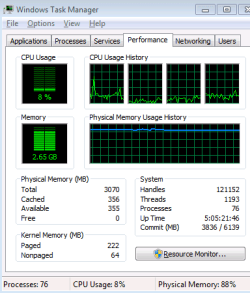
Windows memory manager always maintains control over memory management, always with the goal of maximizing overall system performance. It will always try to maintain what it considers a reasonable amount of available memory under the current situation. This is all very complex so I will not go into the details. It is desirable that Windows does not have to work too hard to accomplish this. I would like to see a minimum of about 40% memory available. This is just a very rough guide. The lower this value becomes the harder the memory manager has had to work. At 10% and lower memory available it has probably had to resort to some of the more drastic methods. At that level you really do need more memory.

It would help if we know how much memory you have. Understand that with a 32 bit OS 4 GB is the maximum.
 

My Computer

Computer type
PC/Desktop
Computer Manufacturer/Model Number
HP
OS
Windows 7 Pro 64 bit
CPU
Xeon W3520
Memory
8 GB
Graphics Card(s)
Nvidia Geforce 210
I currently have 4Gb fitted of which Win7 32 uses 3

task manager performance screenshot attached
 

Attachments

  • perfmon.PNG
    perfmon.PNG
    9.8 KB · Views: 11

My Computer

Computer type
PC/Desktop
Computer Manufacturer/Model Number
dell t3400
OS
w7 pro 64bit
Memory
8G
Screen Resolution
1920 1080
Back
Top