Difficult folder merge - need ideas

trumpy81

New member
Local time
4:00 AM
Messages
17
OK guys, I have 2 Hard drives, both drives contain the same folders but with different files in each folder.

What I need to do is combine the contents of both drives somehow without physically merging the files on those drives so that they can be backed up to a single location on one of my NAS.

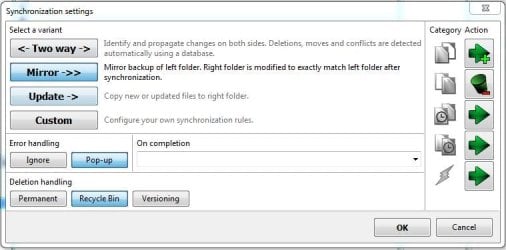
I use Beyond Compare to do my backups but when I attempt to do what I want, the folder sync operation wants to delete the files from one drive or the other, depending on which drive is selected at the time. I can set up file ignore rules, but there is just too damn many files to deal with. I have similar issues with other backup software also.

EG:

Drive D: ------> Single Folder On NAS 2
Drive E: -^

Drive D: ------> NAS 1

The files on Drive D: are uploaded to two different NAS's one of which is full. So no files can be added to D: and therefore any additional files are added to Drive E:. The files on Drive E: are uploaded to only one NAS which has room to spare.

Anyone have any suggestions?
 

My Computer

Computer type
PC/Desktop
Computer Manufacturer/Model Number
Custom Build
OS
Windows 7 Professional x64
CPU
i7 4770K
Motherboard
Z87 Deluxe Dual
Memory
Corsair Vengeance Pro CMY32GX3M4A2133C11 32GB Total
Graphics Card(s)
Sapphire R9 290x
Hard Drives
3x Seagate ST4000VN000
1x Seagate ST3000DM001
1x Samsung SSD 830 256GB
Antivirus
MSE - ClamWin - Spybot S&D
Browser
Firefox - IE
As I understand the question, I just create 2 Folders on my NAS, open a second copy of Windows Explorer, set them side by side, go the Folder to be copied and drag it to the first WE window. One of the reasons I do it that way is that it's much faster later to move files from one Folder to another Folder on the same drive as desired and the other is to run a duplicate checking program on them which seems to be always faster than checking one HDD against another. I do have to be careful with the drag and drop that I get the right target.
 

My Computer

Computer type
PC/Desktop
Computer Manufacturer/Model Number
Customs, Dell, Gateway, HP, Toshiba, Acer, ASUS
OS
Windows 7 Ultimate 64-bit, Windows 8.1 64-bit, Mac OS X 10.10, Linux Mint 17, Windows 10 Pro TP
Keyboard
Microsoft
Mouse
Microsoft
Yeah that could work, but I need to keep an eye on what is copied and what is not and to where, so that I know when I need to update the backup and so on.

Dealing with TB's of files can take a lot of time copying from one place to another even if they are located on the same physical drive which is one of the reasons I'm looking for a better solution ... lol
 

My Computer

Computer type
PC/Desktop
Computer Manufacturer/Model Number
Custom Build
OS
Windows 7 Professional x64
CPU
i7 4770K
Motherboard
Z87 Deluxe Dual
Memory
Corsair Vengeance Pro CMY32GX3M4A2133C11 32GB Total
Graphics Card(s)
Sapphire R9 290x
Hard Drives
3x Seagate ST4000VN000
1x Seagate ST3000DM001
1x Samsung SSD 830 256GB
Antivirus
MSE - ClamWin - Spybot S&D
Browser
Firefox - IE
Copy only changed files

Well I tend to use the software mention here:

http://www.sevenforums.com/general-...program-compare-source-destination-files.html

If I want to move folders and files so that they are identical in specified locations. Note: Test copy will show expected results without actually moving the files. Not sure about speed when copying a huge number of files as I've never had a backup that was totally out of sync.
 

My Computer

Computer type
Laptop
Computer Manufacturer/Model Number
ASUS
OS
Microsoft Windows 7 Home Premium 64-bit 7601 Multiprocessor Free Service Pack 1
CPU
AMD C-60 APU with Radeon(tm) HD Graphics
Motherboard
ASUSTeK COMPUTER INC. X501U
Memory
4.00 GB
Graphics Card(s)
AMD Radeon HD 6290 Graphics
Sound Card
(1) AMD High Definition Audio Device (2) Realtek High Defi
Screen Resolution
1366 x 768 x 32 bits (4294967296 colors) @ 60 Hz
Hard Drives
Hitachi HTS545050A7E380 SATA Disk Device
Antivirus
Comodo CIS & FW, SecureAplus App Whitelisting, Threatfire
Browser
Cyberfox 64bit, Opera 64bit, Airfox
Other Info
Spy-The-Spy, HitmanPro.Alert, Norton Connect Safe, MJRegWatcher, BitDefender TrafficLight, Voodoo Shield, Zemana AntiMalware
Renaming the files is not an option?

You may want to give Acronis a shot.
 

My Computer

Computer type
PC/Desktop
OS
Windows 7 Pro
@Callender, Teracopy doesn't work the way I need it to at all. If memory serves it is similar to beyond compare as far as file syncing goes.

@Doctore, No, renaming the files is not an option.

Yeah I have tried Acronis and quite a few others, they all suffer from the same issue. If you are 'syncing' files from one drive and there are files from the other drive present, they want to delete the files that are already there.
 

My Computer

Computer type
PC/Desktop
Computer Manufacturer/Model Number
Custom Build
OS
Windows 7 Professional x64
CPU
i7 4770K
Motherboard
Z87 Deluxe Dual
Memory
Corsair Vengeance Pro CMY32GX3M4A2133C11 32GB Total
Graphics Card(s)
Sapphire R9 290x
Hard Drives
3x Seagate ST4000VN000
1x Seagate ST3000DM001
1x Samsung SSD 830 256GB
Antivirus
MSE - ClamWin - Spybot S&D
Browser
Firefox - IE

My Computer

Computer type
PC/Desktop
Computer Manufacturer/Model Number
Pauly Special
OS
Win7 Ultimate X64
CPU
Intel i5 3570K
Motherboard
Gigabyte Z77X-DS3H
Memory
8GB DDR3 1600
Graphics Card(s)
Onboard
Sound Card
Onboard
Screen Resolution
1280x1024
Hard Drives
Samsung 840 Evo SSD (OS)
1TB Spinner (Data)
PSU
800W Arctic
Case
Cooler Master
Cooling
3x120mm Fans
Keyboard
MS Wireless
Mouse
MS Wireless
Internet Speed
20M

My Computer

Computer type
Laptop
Computer Manufacturer/Model Number
ASUS
OS
Microsoft Windows 7 Home Premium 64-bit 7601 Multiprocessor Free Service Pack 1
CPU
AMD C-60 APU with Radeon(tm) HD Graphics
Motherboard
ASUSTeK COMPUTER INC. X501U
Memory
4.00 GB
Graphics Card(s)
AMD Radeon HD 6290 Graphics
Sound Card
(1) AMD High Definition Audio Device (2) Realtek High Defi
Screen Resolution
1366 x 768 x 32 bits (4294967296 colors) @ 60 Hz
Hard Drives
Hitachi HTS545050A7E380 SATA Disk Device
Antivirus
Comodo CIS & FW, SecureAplus App Whitelisting, Threatfire
Browser
Cyberfox 64bit, Opera 64bit, Airfox
Other Info
Spy-The-Spy, HitmanPro.Alert, Norton Connect Safe, MJRegWatcher, BitDefender TrafficLight, Voodoo Shield, Zemana AntiMalware
You see the biggest problem with all of these programs is that they only copy from A to B.

I need something that copies from A & B to C.

Thanks for the replies so far though guys, there are some good suggestions among them.

I found a small program called FolderMerge on SourceForge and it does half of what I need, that is, it will copy from A & B to C but there is no way to compare C with A & B to make sure everything is up to date and no duplicates etc.
 

My Computer

Computer type
PC/Desktop
Computer Manufacturer/Model Number
Custom Build
OS
Windows 7 Professional x64
CPU
i7 4770K
Motherboard
Z87 Deluxe Dual
Memory
Corsair Vengeance Pro CMY32GX3M4A2133C11 32GB Total
Graphics Card(s)
Sapphire R9 290x
Hard Drives
3x Seagate ST4000VN000
1x Seagate ST3000DM001
1x Samsung SSD 830 256GB
Antivirus
MSE - ClamWin - Spybot S&D
Browser
Firefox - IE
File Copy multiple drives

You see the biggest problem with all of these programs is that they only copy from A to B.

I need something that copies from A & B to C.

Thanks for the replies so far though guys, there are some good suggestions among them.

I found a small program called FolderMerge on SourceForge and it does half of what I need, that is, it will copy from A & B to C but there is no way to compare C with A & B to make sure everything is up to date and no duplicates etc.

It should be possible to copy from A to C. Then copy from B to C excluding duplicates that exist on C already using TSR Copy Changed Files. Only you can't do it in one step.

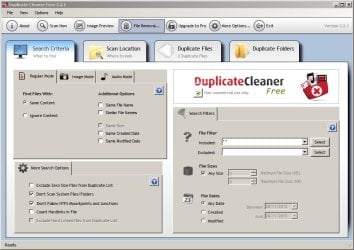
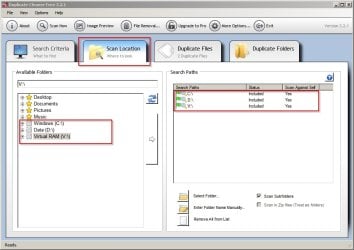
Try Duplicate Cleaner Free to search for duplicates in multiple locations/ drives.

Duplicate Cleaner Free 1.jpg

Duplicate Cleaner Free 2.jpg

Edit: Also check out AutoVer.

Beanland: AutoVer

I've used this at work on aa network drive but don't have it installed on my home computer. It's tricky to set up and needs to be left running in the background but it can make real time copies every time file or folder content is changed. Configuring the "Watcher" is the hard part.
 
Last edited:

My Computer

Computer type
Laptop
Computer Manufacturer/Model Number
ASUS
OS
Microsoft Windows 7 Home Premium 64-bit 7601 Multiprocessor Free Service Pack 1
CPU
AMD C-60 APU with Radeon(tm) HD Graphics
Motherboard
ASUSTeK COMPUTER INC. X501U
Memory
4.00 GB
Graphics Card(s)
AMD Radeon HD 6290 Graphics
Sound Card
(1) AMD High Definition Audio Device (2) Realtek High Defi
Screen Resolution
1366 x 768 x 32 bits (4294967296 colors) @ 60 Hz
Hard Drives
Hitachi HTS545050A7E380 SATA Disk Device
Antivirus
Comodo CIS & FW, SecureAplus App Whitelisting, Threatfire
Browser
Cyberfox 64bit, Opera 64bit, Airfox
Other Info
Spy-The-Spy, HitmanPro.Alert, Norton Connect Safe, MJRegWatcher, BitDefender TrafficLight, Voodoo Shield, Zemana AntiMalware
@Callender, Yes, I can copy manually or otherwise from A & B to C, but there is no way to compare C to A & B. That is the problem, no compare. I need to know what is contained in all 3 locations in order to avoid duplicates and missing files. Don't forget we are talking a lot of files that add up to TB's worth of data.

Your proposal would work, but it requires a lot of steps to be performed manually and leaves room for error.
 

My Computer

Computer type
PC/Desktop
Computer Manufacturer/Model Number
Custom Build
OS
Windows 7 Professional x64
CPU
i7 4770K
Motherboard
Z87 Deluxe Dual
Memory
Corsair Vengeance Pro CMY32GX3M4A2133C11 32GB Total
Graphics Card(s)
Sapphire R9 290x
Hard Drives
3x Seagate ST4000VN000
1x Seagate ST3000DM001
1x Samsung SSD 830 256GB
Antivirus
MSE - ClamWin - Spybot S&D
Browser
Firefox - IE
WinMerge unofficial build

Well just for the sake of it I'm going to install WinMerge (unsupported build) 3 way merge just to see what it can do. I'm not sure that it will do what you ask - compare C with combined contents of A and B but who knows?

Unofficial WinMerge builds
 

My Computer

Computer type
Laptop
Computer Manufacturer/Model Number
ASUS
OS
Microsoft Windows 7 Home Premium 64-bit 7601 Multiprocessor Free Service Pack 1
CPU
AMD C-60 APU with Radeon(tm) HD Graphics
Motherboard
ASUSTeK COMPUTER INC. X501U
Memory
4.00 GB
Graphics Card(s)
AMD Radeon HD 6290 Graphics
Sound Card
(1) AMD High Definition Audio Device (2) Realtek High Defi
Screen Resolution
1366 x 768 x 32 bits (4294967296 colors) @ 60 Hz
Hard Drives
Hitachi HTS545050A7E380 SATA Disk Device
Antivirus
Comodo CIS & FW, SecureAplus App Whitelisting, Threatfire
Browser
Cyberfox 64bit, Opera 64bit, Airfox
Other Info
Spy-The-Spy, HitmanPro.Alert, Norton Connect Safe, MJRegWatcher, BitDefender TrafficLight, Voodoo Shield, Zemana AntiMalware
@Callender, thanks for that, the 3 way merge in Winmerge sounds promising. I have installed WinMerge before but it did not do what I needed, maybe this unofficial version will do the trick. Fingers crossed ... :D
 

My Computer

Computer type
PC/Desktop
Computer Manufacturer/Model Number
Custom Build
OS
Windows 7 Professional x64
CPU
i7 4770K
Motherboard
Z87 Deluxe Dual
Memory
Corsair Vengeance Pro CMY32GX3M4A2133C11 32GB Total
Graphics Card(s)
Sapphire R9 290x
Hard Drives
3x Seagate ST4000VN000
1x Seagate ST3000DM001
1x Samsung SSD 830 256GB
Antivirus
MSE - ClamWin - Spybot S&D
Browser
Firefox - IE
@Callender, I installed the 3 way version, but it did not do what I needed. It is more geared to text file compare rather than folder compare. :(
 

My Computer

Computer type
PC/Desktop
Computer Manufacturer/Model Number
Custom Build
OS
Windows 7 Professional x64
CPU
i7 4770K
Motherboard
Z87 Deluxe Dual
Memory
Corsair Vengeance Pro CMY32GX3M4A2133C11 32GB Total
Graphics Card(s)
Sapphire R9 290x
Hard Drives
3x Seagate ST4000VN000
1x Seagate ST3000DM001
1x Samsung SSD 830 256GB
Antivirus
MSE - ClamWin - Spybot S&D
Browser
Firefox - IE
WinMerge 3 way

@Callender, I installed the 3 way version, but it did not do what I needed. It is more geared to text file compare rather than folder compare. :(

Funny that - I've just installed it myself and it can indeed compare drives/ folders and files. Where are you going wrong?

Compared 3 non identical drives (for test purposes).

Created a folder named Portable Apps on all 3 drives with some file differences in the Undelete Navigator folder.

Here's what I see:

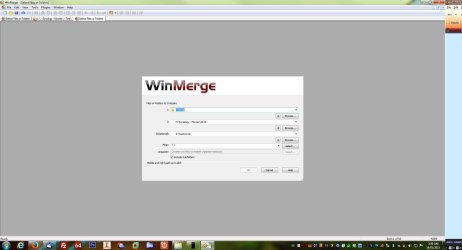
Select Drives - type the drive letters

WinMerge - [Select Files or Folders].jpg

Results show missing or identical files and folders (only files shown in this screenshot)

WinMerge - [C__ - D__ - V__].jpg

The test folder (Portable Apps) with differences shown:

WinMerge - [Portable Apps_ - D__ - V__].jpg

Will upload another screenshot in a minute or two showing folder difference in all 3 drives for Portable Apps folder and add it to this post.
 

My Computer

Computer type
Laptop
Computer Manufacturer/Model Number
ASUS
OS
Microsoft Windows 7 Home Premium 64-bit 7601 Multiprocessor Free Service Pack 1
CPU
AMD C-60 APU with Radeon(tm) HD Graphics
Motherboard
ASUSTeK COMPUTER INC. X501U
Memory
4.00 GB
Graphics Card(s)
AMD Radeon HD 6290 Graphics
Sound Card
(1) AMD High Definition Audio Device (2) Realtek High Defi
Screen Resolution
1366 x 768 x 32 bits (4294967296 colors) @ 60 Hz
Hard Drives
Hitachi HTS545050A7E380 SATA Disk Device
Antivirus
Comodo CIS & FW, SecureAplus App Whitelisting, Threatfire
Browser
Cyberfox 64bit, Opera 64bit, Airfox
Other Info
Spy-The-Spy, HitmanPro.Alert, Norton Connect Safe, MJRegWatcher, BitDefender TrafficLight, Voodoo Shield, Zemana AntiMalware
@Callender, For me, the third location is a network share. WinMerge doesn't like network shares.
 

My Computer

Computer type
PC/Desktop
Computer Manufacturer/Model Number
Custom Build
OS
Windows 7 Professional x64
CPU
i7 4770K
Motherboard
Z87 Deluxe Dual
Memory
Corsair Vengeance Pro CMY32GX3M4A2133C11 32GB Total
Graphics Card(s)
Sapphire R9 290x
Hard Drives
3x Seagate ST4000VN000
1x Seagate ST3000DM001
1x Samsung SSD 830 256GB
Antivirus
MSE - ClamWin - Spybot S&D
Browser
Firefox - IE
Folder differences

Okay skip what I said about attaching another screenshot. What it does is:

If folders are identical in all 3 locations including files contained in those folders - they're not shown in the results.

If folders do not exist in all 3 locations folder differences shown in the results.

If file content is not identical in all 3 locations those files are shown in the results.

Must choose the option to include subfolders.

Additionally there are options to copy or move files and folders.
 

My Computer

Computer type
Laptop
Computer Manufacturer/Model Number
ASUS
OS
Microsoft Windows 7 Home Premium 64-bit 7601 Multiprocessor Free Service Pack 1
CPU
AMD C-60 APU with Radeon(tm) HD Graphics
Motherboard
ASUSTeK COMPUTER INC. X501U
Memory
4.00 GB
Graphics Card(s)
AMD Radeon HD 6290 Graphics
Sound Card
(1) AMD High Definition Audio Device (2) Realtek High Defi
Screen Resolution
1366 x 768 x 32 bits (4294967296 colors) @ 60 Hz
Hard Drives
Hitachi HTS545050A7E380 SATA Disk Device
Antivirus
Comodo CIS & FW, SecureAplus App Whitelisting, Threatfire
Browser
Cyberfox 64bit, Opera 64bit, Airfox
Other Info
Spy-The-Spy, HitmanPro.Alert, Norton Connect Safe, MJRegWatcher, BitDefender TrafficLight, Voodoo Shield, Zemana AntiMalware
@Callender, nope it doesn't work for me at all. I mapped a folder on the NAS as Z: but it still won't accept my folder locations.
 

Attachments

  • Compare.jpg
    Compare.jpg
    77.8 KB · Views: 3

My Computer

Computer type
PC/Desktop
Computer Manufacturer/Model Number
Custom Build
OS
Windows 7 Professional x64
CPU
i7 4770K
Motherboard
Z87 Deluxe Dual
Memory
Corsair Vengeance Pro CMY32GX3M4A2133C11 32GB Total
Graphics Card(s)
Sapphire R9 290x
Hard Drives
3x Seagate ST4000VN000
1x Seagate ST3000DM001
1x Samsung SSD 830 256GB
Antivirus
MSE - ClamWin - Spybot S&D
Browser
Firefox - IE
Network Share

@Callender, For me, the third location is a network share. WinMerge doesn't like network shares.

Okay - sorry I can't test that from here but you must be right! A quick search of the documentation reveals that network shares are supported in the regular version but that won't meet your needs.

I can find paid for solutions that I have not used. Maybe take a look at:

Araxis Merge â
 

My Computer

Computer type
Laptop
Computer Manufacturer/Model Number
ASUS
OS
Microsoft Windows 7 Home Premium 64-bit 7601 Multiprocessor Free Service Pack 1
CPU
AMD C-60 APU with Radeon(tm) HD Graphics
Motherboard
ASUSTeK COMPUTER INC. X501U
Memory
4.00 GB
Graphics Card(s)
AMD Radeon HD 6290 Graphics
Sound Card
(1) AMD High Definition Audio Device (2) Realtek High Defi
Screen Resolution
1366 x 768 x 32 bits (4294967296 colors) @ 60 Hz
Hard Drives
Hitachi HTS545050A7E380 SATA Disk Device
Antivirus
Comodo CIS & FW, SecureAplus App Whitelisting, Threatfire
Browser
Cyberfox 64bit, Opera 64bit, Airfox
Other Info
Spy-The-Spy, HitmanPro.Alert, Norton Connect Safe, MJRegWatcher, BitDefender TrafficLight, Voodoo Shield, Zemana AntiMalware
Path to network share

@Callender, For me, the third location is a network share. WinMerge doesn't like network shares.

Looks like you need an expert on network shares to comment on this. Maybe the path selection isn't right? Not sure!
 

My Computer

Computer type
Laptop
Computer Manufacturer/Model Number
ASUS
OS
Microsoft Windows 7 Home Premium 64-bit 7601 Multiprocessor Free Service Pack 1
CPU
AMD C-60 APU with Radeon(tm) HD Graphics
Motherboard
ASUSTeK COMPUTER INC. X501U
Memory
4.00 GB
Graphics Card(s)
AMD Radeon HD 6290 Graphics
Sound Card
(1) AMD High Definition Audio Device (2) Realtek High Defi
Screen Resolution
1366 x 768 x 32 bits (4294967296 colors) @ 60 Hz
Hard Drives
Hitachi HTS545050A7E380 SATA Disk Device
Antivirus
Comodo CIS & FW, SecureAplus App Whitelisting, Threatfire
Browser
Cyberfox 64bit, Opera 64bit, Airfox
Other Info
Spy-The-Spy, HitmanPro.Alert, Norton Connect Safe, MJRegWatcher, BitDefender TrafficLight, Voodoo Shield, Zemana AntiMalware
Back
Top