Difficulties With New Start Orb

mborner

New member
Guru
Local time
3:15 AM
Messages
330
Location
Coral Springs, Florida
You guys have been such a great help but I'm afraid I need your assistance, once again.

I've created a new Start orb in Photoshop. I've done everything I've needed to do but it will not work. Here are more details.

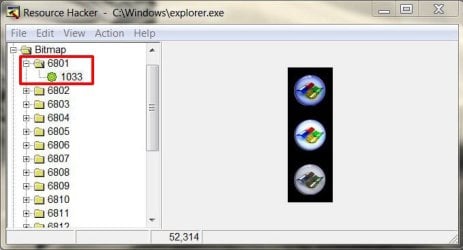
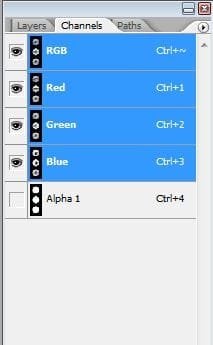
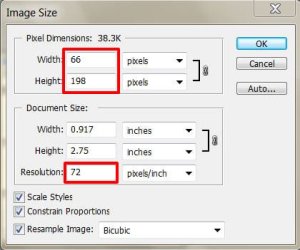
I've had no issues taking ownership of the explorer.exe file. Here's a pic of the new explorer file just below the old backup. I've also included images of the orb in Photoshop along with the dimensions and masking channel. See also the images from Resource Hacker with the old bitmap replaced by the new bitmap (repeat this image for 6805 and 6809).

When everything was said and done, I killed explorer.exe in the task manager and then restarted it again. No new orb. I seem to have gone through every single detail and can't figure out why the orb hasn't changed. The original orb still works perfectly. Need help, thanks.
 

Attachments

  • explorer.JPG
    explorer.JPG
    99.8 KB · Views: 16
  • reshacker.JPG
    reshacker.JPG
    44.4 KB · Views: 15
  • channels.JPG
    channels.JPG
    16.3 KB · Views: 8
  • image size.JPG
    image size.JPG
    42.6 KB · Views: 9

My Computer

Computer Manufacturer/Model Number
Custom Build
OS
Windows 7 Pro/32 Academic. Build 7600
CPU
Intel 2.3 Duo core
Motherboard
EliteGroup G31T-M
Memory
4 GB DDR
Graphics Card(s)
Nvidia GeForce 9500 GT
Sound Card
Built in
Monitor(s) Displays
Viewsonic 15" 4:3
Screen Resolution
1280 x 1024
Hard Drives
WD Caviar Black 750 GB
WD 250 GB External
PSU
Antec 450w
Keyboard
Standard windows
Mouse
Logitech USB
Internet Speed
Bellsouth DSL 6.0

My Computer

Computer type
PC/Desktop
Computer Manufacturer/Model Number
Self Assembled
OS
Microsoft Windows 10 Pro Insider Preview 64-bit
CPU
Intel(R) Core(TM) i3-4130 CPU @ 3.40GHz
Motherboard
Gigabyte Technology Co., Ltd. B85M-D3H
Memory
Corsair Vengence 4GB x2 (8.00GB Dual-Channel DDR3 @ 798MHz)
Graphics Card(s)
2047MB GeForce GTS 450 (ZOTAC International)
Sound Card
Onboard (Realtek High Definition Audio)
Monitor(s) Displays
LG Flatron E2040T
Screen Resolution
1600x900
Hard Drives
Western Digital 1 TB
Seagate 500 GB
PSU
Corsair VS550
Case
Cooler Master K380
Cooling
Cooler Master Seidon 120V Plus
Keyboard
Logitech MK260r
Mouse
Logitech MK260r
Internet Speed
PMPL Broadband
Antivirus
Windows Defender + MBAM
Browser
Firefox
Other Info
Dell Studio 15" Laptop
Sorry, Arc, I'm not quite understanding. Do I have to upload my orb to DeviantArt and then brows for my file and open it from there?
 

My Computer

Computer Manufacturer/Model Number
Custom Build
OS
Windows 7 Pro/32 Academic. Build 7600
CPU
Intel 2.3 Duo core
Motherboard
EliteGroup G31T-M
Memory
4 GB DDR
Graphics Card(s)
Nvidia GeForce 9500 GT
Sound Card
Built in
Monitor(s) Displays
Viewsonic 15" 4:3
Screen Resolution
1280 x 1024
Hard Drives
WD Caviar Black 750 GB
WD 250 GB External
PSU
Antec 450w
Keyboard
Standard windows
Mouse
Logitech USB
Internet Speed
Bellsouth DSL 6.0
Sorry, Arc, I'm not quite understanding. Do I have to upload my orb to DeviantArt and then brows for my file and open it from there?
No , not at all . :D

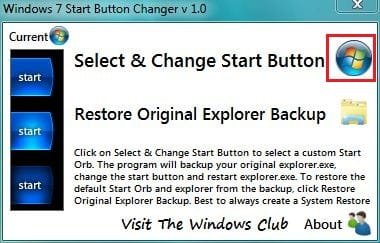
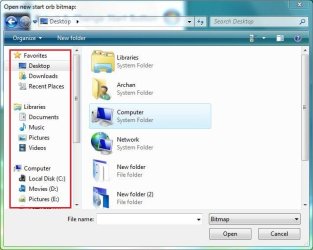
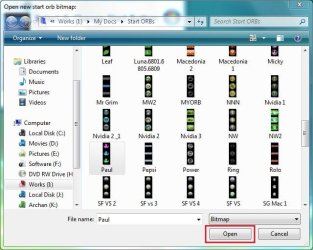
After following all the steps as per Zalith's tutorial , save it outcome somewhere in your hard disk , say on the desktop . Now open Kishan's Start Button Changer ...

Capture.JPG

Click the Windows logo button to open file browser .

Capture2.JPG

When found, select the bmp file , and click on open .

Capture3.JPG

The rest will be done automatically .

If there is any further query , post back :D
 

My Computer

Computer type
PC/Desktop
Computer Manufacturer/Model Number
Self Assembled
OS
Microsoft Windows 10 Pro Insider Preview 64-bit
CPU
Intel(R) Core(TM) i3-4130 CPU @ 3.40GHz
Motherboard
Gigabyte Technology Co., Ltd. B85M-D3H
Memory
Corsair Vengence 4GB x2 (8.00GB Dual-Channel DDR3 @ 798MHz)
Graphics Card(s)
2047MB GeForce GTS 450 (ZOTAC International)
Sound Card
Onboard (Realtek High Definition Audio)
Monitor(s) Displays
LG Flatron E2040T
Screen Resolution
1600x900
Hard Drives
Western Digital 1 TB
Seagate 500 GB
PSU
Corsair VS550
Case
Cooler Master K380
Cooling
Cooler Master Seidon 120V Plus
Keyboard
Logitech MK260r
Mouse
Logitech MK260r
Internet Speed
PMPL Broadband
Antivirus
Windows Defender + MBAM
Browser
Firefox
Other Info
Dell Studio 15" Laptop
Gotcha! Thanks. I mentioned in another thread that I wanted to do everything manually. IOW, I don't want to have to install software on my system that will do it automatically. It's quirky, I know, but that's the way I'd rather do it. I've gone over every detail and can't figure this out. Still searching. :)
 

My Computer

Computer Manufacturer/Model Number
Custom Build
OS
Windows 7 Pro/32 Academic. Build 7600
CPU
Intel 2.3 Duo core
Motherboard
EliteGroup G31T-M
Memory
4 GB DDR
Graphics Card(s)
Nvidia GeForce 9500 GT
Sound Card
Built in
Monitor(s) Displays
Viewsonic 15" 4:3
Screen Resolution
1280 x 1024
Hard Drives
WD Caviar Black 750 GB
WD 250 GB External
PSU
Antec 450w
Keyboard
Standard windows
Mouse
Logitech USB
Internet Speed
Bellsouth DSL 6.0
Then you first do a manual backup of your original explorer.exe in somewhere in your hard drive safely . Now Open explorer.exe with resource hacker . Expand bitmap, edit 6801, 6805 and 6809 with your custom made bitmap ; and save the result as explorer.exe (in a different location than your manual backup). Now as you have already taken the ownership, just replace the original with the modded one , and restart your computer . It should take the effect now .

BTW , the Start Button Changer need not to be installed ... place it anywhere and just run it . Dont take my words otherwise , but it is not wise to do a same thing with a lot of hard work when it is possible to do easily using a tool . This is called advancement of technology . That is why we use cars instead of walking a long distance .
 

My Computer

Computer type
PC/Desktop
Computer Manufacturer/Model Number
Self Assembled
OS
Microsoft Windows 10 Pro Insider Preview 64-bit
CPU
Intel(R) Core(TM) i3-4130 CPU @ 3.40GHz
Motherboard
Gigabyte Technology Co., Ltd. B85M-D3H
Memory
Corsair Vengence 4GB x2 (8.00GB Dual-Channel DDR3 @ 798MHz)
Graphics Card(s)
2047MB GeForce GTS 450 (ZOTAC International)
Sound Card
Onboard (Realtek High Definition Audio)
Monitor(s) Displays
LG Flatron E2040T
Screen Resolution
1600x900
Hard Drives
Western Digital 1 TB
Seagate 500 GB
PSU
Corsair VS550
Case
Cooler Master K380
Cooling
Cooler Master Seidon 120V Plus
Keyboard
Logitech MK260r
Mouse
Logitech MK260r
Internet Speed
PMPL Broadband
Antivirus
Windows Defender + MBAM
Browser
Firefox
Other Info
Dell Studio 15" Laptop
Then you first do a manual backup of your original explorer.exe in somewhere in your hard drive safely . Now Open explorer.exe with resource hacker . Expand bitmap, edit 6801, 6805 and 6809 with your custom made bitmap ; and save the result as explorer.exe (in a different location than your manual backup). Now as you have already taken the ownership, just replace the original with the modded one , and restart your computer . It should take the effect now .

BTW , the Start Button Changer need not to be installed ... place it anywhere and just run it . Dont take my words otherwise , but it is not wise to do a same thing with a lot of hard work when it is possible to do easily using a tool . This is called advancement of technology . That is why we use cars instead of walking a long distance .
LOL! Thanks, Arc. As referenced in my first post, it can be clearly seen that my original explorer.exe is backed up in the windows folder as explorer.bak. The new explorer.exe is the modified one that contains my custom orbs in 6801, 6805, and 6809, as seen in the ResHacker image. It just doesn't work. I tried ending the explorer.exe task in task manager and then restarting it but...... nothing.........no new orb. I posted the images in my first post so that maybe someone could see what I'm doing wrong. Again, I've gone over every detail. My only thought is that my screen viewing DPI is set at 125% and somehow, it's not accepting the 66 x 198 image dimension. Are those dimensions correct for the screen DPI that I'm using?
 

My Computer

Computer Manufacturer/Model Number
Custom Build
OS
Windows 7 Pro/32 Academic. Build 7600
CPU
Intel 2.3 Duo core
Motherboard
EliteGroup G31T-M
Memory
4 GB DDR
Graphics Card(s)
Nvidia GeForce 9500 GT
Sound Card
Built in
Monitor(s) Displays
Viewsonic 15" 4:3
Screen Resolution
1280 x 1024
Hard Drives
WD Caviar Black 750 GB
WD 250 GB External
PSU
Antec 450w
Keyboard
Standard windows
Mouse
Logitech USB
Internet Speed
Bellsouth DSL 6.0
Sorry for getting offline pal ... actually I logged off to change my screen resolution to 125% ; and got the answer (partially).

There are four sets of start orbs in explorer>bitmap . 6801-6805-6809 for 100% resolution . 6804-6808-6812 for 150% resolution ... and the remaining two sets ... i.e. 6802-6806-6810 and 6803-6807-6811 .... I am not sure which one will work for 125% resolution . If you mod the two sets, there will me excess working, but I expect your problem will be solved .

Actually facing such a situation for the first time .... so :o Whatever may happen after modding those two sets , please post back .

 

My Computer

Computer type
PC/Desktop
Computer Manufacturer/Model Number
Self Assembled
OS
Microsoft Windows 10 Pro Insider Preview 64-bit
CPU
Intel(R) Core(TM) i3-4130 CPU @ 3.40GHz
Motherboard
Gigabyte Technology Co., Ltd. B85M-D3H
Memory
Corsair Vengence 4GB x2 (8.00GB Dual-Channel DDR3 @ 798MHz)
Graphics Card(s)
2047MB GeForce GTS 450 (ZOTAC International)
Sound Card
Onboard (Realtek High Definition Audio)
Monitor(s) Displays
LG Flatron E2040T
Screen Resolution
1600x900
Hard Drives
Western Digital 1 TB
Seagate 500 GB
PSU
Corsair VS550
Case
Cooler Master K380
Cooling
Cooler Master Seidon 120V Plus
Keyboard
Logitech MK260r
Mouse
Logitech MK260r
Internet Speed
PMPL Broadband
Antivirus
Windows Defender + MBAM
Browser
Firefox
Other Info
Dell Studio 15" Laptop
Thanks, once again, Arc, You've been very helpful. I'll try these out and get back with you.
 

My Computer

Computer Manufacturer/Model Number
Custom Build
OS
Windows 7 Pro/32 Academic. Build 7600
CPU
Intel 2.3 Duo core
Motherboard
EliteGroup G31T-M
Memory
4 GB DDR
Graphics Card(s)
Nvidia GeForce 9500 GT
Sound Card
Built in
Monitor(s) Displays
Viewsonic 15" 4:3
Screen Resolution
1280 x 1024
Hard Drives
WD Caviar Black 750 GB
WD 250 GB External
PSU
Antec 450w
Keyboard
Standard windows
Mouse
Logitech USB
Internet Speed
Bellsouth DSL 6.0
Thanks, once again, Arc, You've been very helpful. I'll try these out and get back with you.
It is going to be the bedtime for me , pal (as our timezone differ near bout 12 hours :sarc: ) .... See you in the morning :D
 

My Computer

Computer type
PC/Desktop
Computer Manufacturer/Model Number
Self Assembled
OS
Microsoft Windows 10 Pro Insider Preview 64-bit
CPU
Intel(R) Core(TM) i3-4130 CPU @ 3.40GHz
Motherboard
Gigabyte Technology Co., Ltd. B85M-D3H
Memory
Corsair Vengence 4GB x2 (8.00GB Dual-Channel DDR3 @ 798MHz)
Graphics Card(s)
2047MB GeForce GTS 450 (ZOTAC International)
Sound Card
Onboard (Realtek High Definition Audio)
Monitor(s) Displays
LG Flatron E2040T
Screen Resolution
1600x900
Hard Drives
Western Digital 1 TB
Seagate 500 GB
PSU
Corsair VS550
Case
Cooler Master K380
Cooling
Cooler Master Seidon 120V Plus
Keyboard
Logitech MK260r
Mouse
Logitech MK260r
Internet Speed
PMPL Broadband
Antivirus
Windows Defender + MBAM
Browser
Firefox
Other Info
Dell Studio 15" Laptop
Great news, Arc! I got it. With my 125% screen DPI I had to chage the .bmp files in 6802, 6806, and 6810.
I'm a happy camper, now! Thanks again for your tips.
Check it out, it works great.
 

Attachments

  • task bar.JPG
    task bar.JPG
    11.3 KB · Views: 3

My Computer

Computer Manufacturer/Model Number
Custom Build
OS
Windows 7 Pro/32 Academic. Build 7600
CPU
Intel 2.3 Duo core
Motherboard
EliteGroup G31T-M
Memory
4 GB DDR
Graphics Card(s)
Nvidia GeForce 9500 GT
Sound Card
Built in
Monitor(s) Displays
Viewsonic 15" 4:3
Screen Resolution
1280 x 1024
Hard Drives
WD Caviar Black 750 GB
WD 250 GB External
PSU
Antec 450w
Keyboard
Standard windows
Mouse
Logitech USB
Internet Speed
Bellsouth DSL 6.0
Great news, Arc! I got it. With my 125% screen DPI I had to chage the .bmp files in 6802, 6806, and 6810.
I'm a happy camper, now! Thanks again for your tips.
Check it out, it works great.
Well done !! It looks great :thumbsup:
 

My Computer

Computer type
PC/Desktop
Computer Manufacturer/Model Number
Self Assembled
OS
Microsoft Windows 10 Pro Insider Preview 64-bit
CPU
Intel(R) Core(TM) i3-4130 CPU @ 3.40GHz
Motherboard
Gigabyte Technology Co., Ltd. B85M-D3H
Memory
Corsair Vengence 4GB x2 (8.00GB Dual-Channel DDR3 @ 798MHz)
Graphics Card(s)
2047MB GeForce GTS 450 (ZOTAC International)
Sound Card
Onboard (Realtek High Definition Audio)
Monitor(s) Displays
LG Flatron E2040T
Screen Resolution
1600x900
Hard Drives
Western Digital 1 TB
Seagate 500 GB
PSU
Corsair VS550
Case
Cooler Master K380
Cooling
Cooler Master Seidon 120V Plus
Keyboard
Logitech MK260r
Mouse
Logitech MK260r
Internet Speed
PMPL Broadband
Antivirus
Windows Defender + MBAM
Browser
Firefox
Other Info
Dell Studio 15" Laptop
Back
Top