Solved Digitally Signed Drivers with Recovery

CowgirlKaren

New member
I am trying to use my recovery disks after installing a new hard drive. I keep getting these messages saying my drivers aren't digitally signed. Not sure how to fix this! Maybe corrupted recovery disks?
 

My Computer

Computer Manufacturer/Model Number
Asus U50A
OS
Windows 7, 64 bit

My Computer

Computer Manufacturer/Model Number
packard bell IXTREME M5722
OS
Operating System : Windows 7 Home Premium Edition 6.01.7600 SP1 (x64)
CPU
Processor : Intel Core 2 Quad Q8300 @ 2500 MHz
Motherboard
Mainboard : Packard Bell (Acer EG43M )
Memory
Physical Memory :8GB Corsair4x 2GB 800MHz C5 DDR2
Graphics Card(s)
Video Card : XFX 6700 AMD
Monitor(s) Displays
Maestro 234DL - BenQ V2220 - BenQ VW2420H
Screen Resolution
Current Display :1920x1080p pixels at 60 Hz in HD LED
Hard Drives
Hard Disks : WDC (1000 GB)
Drive C: (Hard Disk) : 428 GB available on 491 GB
Drive D: (Hard Disk) : 426 GB available on 492 GB
SAMSUNG spinpoint HD103SJ 1000.2 GB
(X 2) KINGSTON SSD NOW V 30GB
PSU
XFX ProSeries 550W PSU
Case
PACKARD BELL IXTREME
Cooling
System Blower Current: 150mA Air Flow16CFM ;Akasa 90mm rear
Keyboard
Gigabyte Aivia K8100
Mouse
TRUST-Wireless Laser Mouse - Carbon edition MI-7770C
Internet Speed
TP-LINK > TL-WN951N / AV500 Gigabit Powerline Adapters
Browser
chrome dev
Other Info
EXTRA COOLING>(FAN CONTROLLER) PC Bay Cooler 3 x 40mm fans; Akasa AK-HD-BL Blue hard drive cooler 2 x 40 mm fan 4500 rpm 29.7 dBA
Bios> American Megatrends Inc.
Version : P01-A1
Date : 08/31/2009
Thanks....I'm downloading now and will update you with results!
 

My Computer

Computer Manufacturer/Model Number
Asus U50A
OS
Windows 7, 64 bit
So I've jumped through all the hoops and am now trying to activate windows online, but am getting the message that my key is invalid. Not sure what to do about this. Thanks!
 

My Computer

Computer Manufacturer/Model Number
Asus U50A
OS
Windows 7, 64 bit
Double check the licensed version which is printed on the COA sticker. Is that exactly what you installed? Double check at Control Panel>System.

If so, most often the problem when the key is refused is misreading from the COA sticker or mistyping a Product Key character. Triple check the key, then try again.

Most times if this is the first clean reinstall it will require a robocall to MS to trade numbers.

It will always work, eventuallly.
 
I can't find the COA sticker but went to Speccy and got the info from there. Got a message saying that is a default key and can't be used to activate. Guess I need to try something else?
 
Last edited:

My Computer

Computer Manufacturer/Model Number
Asus U50A
OS
Windows 7, 64 bit
As stated in the steps I gave you you need to use Product Key on COA sticker which legally must be on any machine in order for Windows to be preinstalled upon it.

The key scanned from HD is the factory mass activation key which cannot be used for activating a clean reinstall.

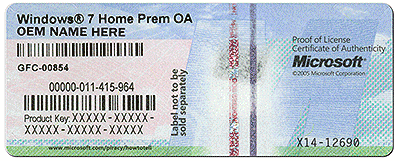
Check your computer on all sides for a COA sticker like this. On notebooks it is on bottom or under battery:

coa-stickers.gif

You would need to use the Factory Recovery disks if there is no COA sticker, but if you have to order them you should ask your OEM why there is no sticker and report it to MS Customer Service since it is not a legal preinstall of Win7.
 
Sorry for the trouble.....I found it!! Now activated. AND....I have wireless internet again. THANK YOU for your help! You're the best :)
 

My Computer

Computer Manufacturer/Model Number
Asus U50A
OS
Windows 7, 64 bit
Back
Top