Diplay drivers for Dell Optiplex GX260 for Windows 7

desigurl

New member
Local time
1:44 AM
Messages
7
Hi,
I have Dell Optiplex GX260 system. I intalled Windows 7 Ultimate on that. The resolution of screen is fine but it is not supporting 1280 x 1024 resolution and videos are not playing properly. It was not taking audio drivers as well but when I ran the SoundMax drivers for XP in compatibility mode they were installed. But display drivers are not getting installed. I even tried the various driver from Nvidia for XP/Vista/Win 7, but none of them works. Even tried the latets 191 release but no use.
Someone please help me. Suggest me some driver.
 

My Computer My Computer

At a glance

Windows 7
OS
Windows 7

My Computer My Computer

At a glance

7600.20510 x86P4 550 3.4 GHz HT running at 3.5 GHzOCZ 2 GB(2x1GB) DDR400mHz running @ 414 mHzHIS Radeon HD 3850 IceQ 3 Turbo HDMI Dual DL-...
Computer Manufacturer/Model Number
self built
OS
7600.20510 x86
CPU
P4 550 3.4 GHz HT running at 3.5 GHz
Motherboard
MSI PM8M3-V (MS-7211 v1.x) Micro-ATX mainboard
Memory
OCZ 2 GB(2x1GB) DDR400mHz running @ 414 mHz
Graphics Card(s)
HIS Radeon HD 3850 IceQ 3 Turbo HDMI Dual DL-DVI AGP
Sound Card
MOTU Traveler firewire studio interface 192 kHz 24 bit
Monitor(s) Displays
22" widescreen Acer X223W LCD, 17" Compaq P75 CRT
Screen Resolution
1680x1050 and 1280x1024
Hard Drives
SATA I x2 WD, 400 GB and 120 GB, SATA 2 WD Caviar Black 1 TB
PSU
350W generic
Case
Cybertronpc, it glows blue
Cooling
stock cpu fan, Ice-Q 3 gpu and system, many case fans
Keyboard
Logitch Classical Keyboard 200
Mouse
Logitech Mediaplay cordless
Internet Speed
1792/448 kbits/sec
Other Info
SATA II PCI fake RAID adapter, 1 GB Readyboost, original ATI Remote Wonder (even works with WMC perfectly), Logitech Rumblepad 2 game controller x2
I tried to do the same yesrterday in XP service pack 3 compatibility mode and ran it as administrator, still I had no luck. Even tried compatibility mode with Vista, still no luch!
 

My Computer My Computer

At a glance

Windows 7
OS
Windows 7
Yeah, that card is incompatible with Windows 7 unfortunately. Really only meant to be used with XP. You will enjoy Windows 7 far greater if you upgrade your video card to a new model.

Knowing Dell machines, many require to use PCI cards. You can get a decent one for around $45 US that could even be able to play Blu-Ray.

A little helpful info for ya.
 

My Computer My Computer

At a glance

7600.20510 x86P4 550 3.4 GHz HT running at 3.5 GHzOCZ 2 GB(2x1GB) DDR400mHz running @ 414 mHzHIS Radeon HD 3850 IceQ 3 Turbo HDMI Dual DL-...
Computer Manufacturer/Model Number
self built
OS
7600.20510 x86
CPU
P4 550 3.4 GHz HT running at 3.5 GHz
Motherboard
MSI PM8M3-V (MS-7211 v1.x) Micro-ATX mainboard
Memory
OCZ 2 GB(2x1GB) DDR400mHz running @ 414 mHz
Graphics Card(s)
HIS Radeon HD 3850 IceQ 3 Turbo HDMI Dual DL-DVI AGP
Sound Card
MOTU Traveler firewire studio interface 192 kHz 24 bit
Monitor(s) Displays
22" widescreen Acer X223W LCD, 17" Compaq P75 CRT
Screen Resolution
1680x1050 and 1280x1024
Hard Drives
SATA I x2 WD, 400 GB and 120 GB, SATA 2 WD Caviar Black 1 TB
PSU
350W generic
Case
Cybertronpc, it glows blue
Cooling
stock cpu fan, Ice-Q 3 gpu and system, many case fans
Keyboard
Logitch Classical Keyboard 200
Mouse
Logitech Mediaplay cordless
Internet Speed
1792/448 kbits/sec
Other Info
SATA II PCI fake RAID adapter, 1 GB Readyboost, original ATI Remote Wonder (even works with WMC perfectly), Logitech Rumblepad 2 game controller x2
Can you suggest me some good graphic cards?
 

My Computer My Computer

At a glance

Windows 7
OS
Windows 7

My Computer My Computer

At a glance

7600.20510 x86P4 550 3.4 GHz HT running at 3.5 GHzOCZ 2 GB(2x1GB) DDR400mHz running @ 414 mHzHIS Radeon HD 3850 IceQ 3 Turbo HDMI Dual DL-...
Computer Manufacturer/Model Number
self built
OS
7600.20510 x86
CPU
P4 550 3.4 GHz HT running at 3.5 GHz
Motherboard
MSI PM8M3-V (MS-7211 v1.x) Micro-ATX mainboard
Memory
OCZ 2 GB(2x1GB) DDR400mHz running @ 414 mHz
Graphics Card(s)
HIS Radeon HD 3850 IceQ 3 Turbo HDMI Dual DL-DVI AGP
Sound Card
MOTU Traveler firewire studio interface 192 kHz 24 bit
Monitor(s) Displays
22" widescreen Acer X223W LCD, 17" Compaq P75 CRT
Screen Resolution
1680x1050 and 1280x1024
Hard Drives
SATA I x2 WD, 400 GB and 120 GB, SATA 2 WD Caviar Black 1 TB
PSU
350W generic
Case
Cybertronpc, it glows blue
Cooling
stock cpu fan, Ice-Q 3 gpu and system, many case fans
Keyboard
Logitch Classical Keyboard 200
Mouse
Logitech Mediaplay cordless
Internet Speed
1792/448 kbits/sec
Other Info
SATA II PCI fake RAID adapter, 1 GB Readyboost, original ATI Remote Wonder (even works with WMC perfectly), Logitech Rumblepad 2 game controller x2
There is one more thing that I wanted to ask. If I install Win XP on my sytem again and put in all the drivers. And after that if I upgrade it to Win 7, will Win 7 take in the drivers then?
 

My Computer My Computer

At a glance

Windows 7
OS
Windows 7
No. It doesn't work that way.

What you can do is run both XP & 7 on the same computer and have a choice when you turn it on which one you want.

It isn't very easy to setup though and a sightly difficult process unless you know computers very well.

If you're interested in that, you could see the installation and setup section of the forum and ask about it there.
 

My Computer My Computer

At a glance

7600.20510 x86P4 550 3.4 GHz HT running at 3.5 GHzOCZ 2 GB(2x1GB) DDR400mHz running @ 414 mHzHIS Radeon HD 3850 IceQ 3 Turbo HDMI Dual DL-...
Computer Manufacturer/Model Number
self built
OS
7600.20510 x86
CPU
P4 550 3.4 GHz HT running at 3.5 GHz
Motherboard
MSI PM8M3-V (MS-7211 v1.x) Micro-ATX mainboard
Memory
OCZ 2 GB(2x1GB) DDR400mHz running @ 414 mHz
Graphics Card(s)
HIS Radeon HD 3850 IceQ 3 Turbo HDMI Dual DL-DVI AGP
Sound Card
MOTU Traveler firewire studio interface 192 kHz 24 bit
Monitor(s) Displays
22" widescreen Acer X223W LCD, 17" Compaq P75 CRT
Screen Resolution
1680x1050 and 1280x1024
Hard Drives
SATA I x2 WD, 400 GB and 120 GB, SATA 2 WD Caviar Black 1 TB
PSU
350W generic
Case
Cybertronpc, it glows blue
Cooling
stock cpu fan, Ice-Q 3 gpu and system, many case fans
Keyboard
Logitch Classical Keyboard 200
Mouse
Logitech Mediaplay cordless
Internet Speed
1792/448 kbits/sec
Other Info
SATA II PCI fake RAID adapter, 1 GB Readyboost, original ATI Remote Wonder (even works with WMC perfectly), Logitech Rumblepad 2 game controller x2
Hi Sri. Yes, that would be a good choice for you because according to this, you have a weak power supply. Your motherboard has an AGP slot and that would be a much better choice of card type to use if you also purchase a better power supply too.

So, if you are not going to change power supplies, you could use the card you asked about. All you have to do is make sure there is an open unused slot to install it to.
 

My Computer My Computer

At a glance

7600.20510 x86P4 550 3.4 GHz HT running at 3.5 GHzOCZ 2 GB(2x1GB) DDR400mHz running @ 414 mHzHIS Radeon HD 3850 IceQ 3 Turbo HDMI Dual DL-...
Computer Manufacturer/Model Number
self built
OS
7600.20510 x86
CPU
P4 550 3.4 GHz HT running at 3.5 GHz
Motherboard
MSI PM8M3-V (MS-7211 v1.x) Micro-ATX mainboard
Memory
OCZ 2 GB(2x1GB) DDR400mHz running @ 414 mHz
Graphics Card(s)
HIS Radeon HD 3850 IceQ 3 Turbo HDMI Dual DL-DVI AGP
Sound Card
MOTU Traveler firewire studio interface 192 kHz 24 bit
Monitor(s) Displays
22" widescreen Acer X223W LCD, 17" Compaq P75 CRT
Screen Resolution
1680x1050 and 1280x1024
Hard Drives
SATA I x2 WD, 400 GB and 120 GB, SATA 2 WD Caviar Black 1 TB
PSU
350W generic
Case
Cybertronpc, it glows blue
Cooling
stock cpu fan, Ice-Q 3 gpu and system, many case fans
Keyboard
Logitch Classical Keyboard 200
Mouse
Logitech Mediaplay cordless
Internet Speed
1792/448 kbits/sec
Other Info
SATA II PCI fake RAID adapter, 1 GB Readyboost, original ATI Remote Wonder (even works with WMC perfectly), Logitech Rumblepad 2 game controller x2
Hi Torrentg, Thanks for your Quick reply,.. I want to use this machine for input to my 52" HDTV, and installing or Upgrading to Windows 7. I Don't want to change power supplies.

How do i check Open UnUsed slot? Can I replace the card with new one ??
It would be Appreciated for your guidance.,

thanks
sri
 

My Computer My Computer

At a glance

Win 7
OS
Win 7
You can look on the back of the machine to see. Or you'd have to open the case up if you're not sure.

If you want to be completely sure, take a picture or two of the inside motherboard and attach to a post.

You're probably using onboard video now, so there is no card to "replace." You'd likely need an available open slot.
 

My Computer My Computer

At a glance

7600.20510 x86P4 550 3.4 GHz HT running at 3.5 GHzOCZ 2 GB(2x1GB) DDR400mHz running @ 414 mHzHIS Radeon HD 3850 IceQ 3 Turbo HDMI Dual DL-...
Computer Manufacturer/Model Number
self built
OS
7600.20510 x86
CPU
P4 550 3.4 GHz HT running at 3.5 GHz
Motherboard
MSI PM8M3-V (MS-7211 v1.x) Micro-ATX mainboard
Memory
OCZ 2 GB(2x1GB) DDR400mHz running @ 414 mHz
Graphics Card(s)
HIS Radeon HD 3850 IceQ 3 Turbo HDMI Dual DL-DVI AGP
Sound Card
MOTU Traveler firewire studio interface 192 kHz 24 bit
Monitor(s) Displays
22" widescreen Acer X223W LCD, 17" Compaq P75 CRT
Screen Resolution
1680x1050 and 1280x1024
Hard Drives
SATA I x2 WD, 400 GB and 120 GB, SATA 2 WD Caviar Black 1 TB
PSU
350W generic
Case
Cybertronpc, it glows blue
Cooling
stock cpu fan, Ice-Q 3 gpu and system, many case fans
Keyboard
Logitch Classical Keyboard 200
Mouse
Logitech Mediaplay cordless
Internet Speed
1792/448 kbits/sec
Other Info
SATA II PCI fake RAID adapter, 1 GB Readyboost, original ATI Remote Wonder (even works with WMC perfectly), Logitech Rumblepad 2 game controller x2
  • Like
Reactions: Sri
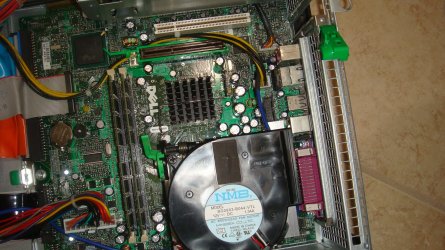
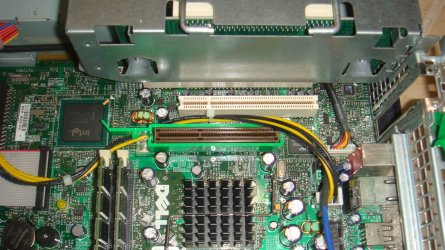
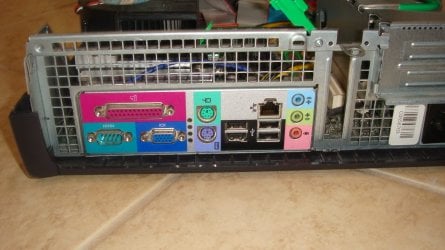
Please find the details of the Dell Optiplex 260


Attachments

  • DSC03463.JPG
    DSC03463.JPG
    417.7 KB · Views: 1,054
  • DSC03462.JPG
    DSC03462.JPG
    391.2 KB · Views: 944
  • DSC03461.JPG
    DSC03461.JPG
    253.7 KB · Views: 1,163
Last edited:

My Computer My Computer

At a glance

Win 7
OS
Win 7
Torrentg,
Please suggest me for the above config.....Optiplex GX260.
Thanks
Sri
 

My Computer My Computer

At a glance

Win 7
OS
Win 7
You definitely have an available PCI slot on the motherboard. It's the white one. But the problem is that the case will not allow that slow to be used. There's no room for it to output on the back like it needs.

So you will have to use an AGP type card. That is the available brownish slot shown. You'll need to purchase one that does not use a power connector internally because of the low-rated power supply. I'd say to look for one that doesn't have a fan too, if possible.

Imho, it's not really worth purchasing any components for a machine like this. If you did get a new AGP card though, it would help with graphics somewhat.

The problem with that though, is the chipset may not be fully supported on Vista and 7, so the AGP card may end up not working anyhow.
 

My Computer My Computer

At a glance

7600.20510 x86P4 550 3.4 GHz HT running at 3.5 GHzOCZ 2 GB(2x1GB) DDR400mHz running @ 414 mHzHIS Radeon HD 3850 IceQ 3 Turbo HDMI Dual DL-...
Computer Manufacturer/Model Number
self built
OS
7600.20510 x86
CPU
P4 550 3.4 GHz HT running at 3.5 GHz
Motherboard
MSI PM8M3-V (MS-7211 v1.x) Micro-ATX mainboard
Memory
OCZ 2 GB(2x1GB) DDR400mHz running @ 414 mHz
Graphics Card(s)
HIS Radeon HD 3850 IceQ 3 Turbo HDMI Dual DL-DVI AGP
Sound Card
MOTU Traveler firewire studio interface 192 kHz 24 bit
Monitor(s) Displays
22" widescreen Acer X223W LCD, 17" Compaq P75 CRT
Screen Resolution
1680x1050 and 1280x1024
Hard Drives
SATA I x2 WD, 400 GB and 120 GB, SATA 2 WD Caviar Black 1 TB
PSU
350W generic
Case
Cybertronpc, it glows blue
Cooling
stock cpu fan, Ice-Q 3 gpu and system, many case fans
Keyboard
Logitch Classical Keyboard 200
Mouse
Logitech Mediaplay cordless
Internet Speed
1792/448 kbits/sec
Other Info
SATA II PCI fake RAID adapter, 1 GB Readyboost, original ATI Remote Wonder (even works with WMC perfectly), Logitech Rumblepad 2 game controller x2
Thanks for your inputs... thanks lot.....
 

My Computer My Computer

At a glance

Win 7
OS
Win 7
If you look at the backplane (3rd photo) you'll notice two blanking slots.
These are for full sized PCI slots on the riser board.
Previous post is correct that the white PCI slot next to the AGP 4x slot
is indeed half height.
But the other two are not.
For example I have a Full Size PCI Winfast T1000S card in one of my slots
and a full sized PCI StarTech 4x USB out on mine.

For me, I am still on XP SP3 (not sure I want to run Windows 7 ... I still have nightmares about Vista!).

I did however have major snags getting widescreen of the latest XP DELL drivers for the GX260.
So if you have the money, I would recommend getting a dedicated PCI card.
AGPx4 cards are like gold-dust.
I am told that you cannot put a AGPx8 into a x4 slot (ie unlike memory that will chose the slowest common speed I am told AGP wont do this).
Of course, since I have never tried this I dont know how good that advice is. But the PCI cards do work well.

Also, I only have a P4 2.0GHz processor and it struggles.
I am not RAM bound (1.5 GB on XP is fine, Vista wouldnt cope with that
not sure about Windows 7).

Having said that, if the PCI graphics card supports Direct X to the correct level for Windows 7, maybe it can take some of the workload of the CPU.
You say you want to do HMDI 1080p (I think you do ... your pictures are HD res).
So since this involves lots of mp4 decoding via H264 codec (which normally you have to buy from somewhere) AND the software versions wont necessarily use the GPU, I guess you need to do some serious research.

To be blunt, wouldnt it be cheaper (in long run) to buy a new machine and take a shotgun to the GX?

My wife uses ours for word proc/admin/email/browsing and we deliberately kept it on XP (which was a lot faster than Windows 2000).
This type of DELL was not designed with Windows 7 in mind.
A nice new machine will have PCI express, and a cheap one will have nVidia inbuilt into the motherboard.
My barebones system (150GBP for 2Gb, dual core core duo system, disk drive/OS/monitor extra) runs HDTV really fine!
Indeed, I put the TV card into the DELL and got a satellite card (that can receive HD signals) for my box.
That's when I had fun finding H264 codec and noted that some will use the GPU, others wont.
There is no way on this earth that a single core P4 could hand HD without GPU support ... well not unless it was seriously overclocked.

Good luck with your quest.

Regards
Steve H

 

My Computer My Computer

At a glance

XP SP32.0 GHz P41536MINTEL 82845G
Computer Manufacturer/Model Number
Dell Optiplex GX260
OS
XP SP3
CPU
2.0 GHz P4
Motherboard
DELL Small Desktop
Memory
1536M
Graphics Card(s)
INTEL 82845G
Monitor(s) Displays
20" Samsung Syncmaster 2232MW
Hard Drives
160GB
PSU
180W

My Computer My Computer

At a glance

Windows 7 Ultimate X64Q6600 @3.62X2 MushkinXFX 4870X2
OS
Windows 7 Ultimate X64
CPU
Q6600 @3.6
Motherboard
DFI X38-T2R
Memory
2X2 Mushkin
Graphics Card(s)
XFX 4870X2
Monitor(s) Displays
Philips 240PW
Hard Drives
Intel X25-M 80GB
PSU
PCP&C 750W
Case
Antec 900
Cooling
TRUE 120
Alas, the chap has a GX260.

It has 1 AGPx4 slot
1 PCI slot for low profile
2 more PCI slots full size on a riser board.

Your newer card is PCI express. It wont work.
I say that, but use CPUz (CPUID) to check out any system.
For example it confirms I have P4 478 socket 2GHz and AGPx4.
No PCI express.

I have been searching over Xmas to find an AGPx4. In UK this is very very expensive card.
So much so that I would simply buy another barebones HDMI ready PC for less than the card.
You may find a cheap one on ebay or maybe USA is less "rip off" than UK :-).

Regards

Steve H
 

My Computer My Computer

At a glance

XP SP32.0 GHz P41536MINTEL 82845G
Computer Manufacturer/Model Number
Dell Optiplex GX260
OS
XP SP3
CPU
2.0 GHz P4
Motherboard
DELL Small Desktop
Memory
1536M
Graphics Card(s)
INTEL 82845G
Monitor(s) Displays
20" Samsung Syncmaster 2232MW
Hard Drives
160GB
PSU
180W
Yeah I just noticed he had an Optiplex GX260 in the OP. Thanks for pointing that out. I got sidetracked when the other post above listed a PCI card. As for AGP cards, New egg has a few here.

I really have a hard time telling someone to dump any money into a system that old though. I have on old Optiplex 150 that I got as a backup in case I need to get on the net and it is running Ubuntu. It is so slow though that is all it is good for though is for going on the net. I had Windows 7 installed on it just to say I did it but took it off because of the integrated video driver compatibility issues.

To the OP, I would suggest, if you really want Windows 7 on that system to go to a computer repair shop. Not a big name one, a smaller one because they will be more likely to do this: ask them to yank an AGP card out of an old system they got kicking around. You should get one real cheap if not for free.


My Computer My Computer

At a glance

Windows 7 Ultimate X64Q6600 @3.62X2 MushkinXFX 4870X2
OS
Windows 7 Ultimate X64
CPU
Q6600 @3.6
Motherboard
DFI X38-T2R
Memory
2X2 Mushkin
Graphics Card(s)
XFX 4870X2
Monitor(s) Displays
Philips 240PW
Hard Drives
Intel X25-M 80GB
PSU
PCP&C 750W
Case
Antec 900
Cooling
TRUE 120
Back
Top