Direct Sound Recording?

Adamd

New member
Power User
VIP
Local time
1:25 AM
Messages
289
So Microsoft made it a little harder to find how to record sound as it plays in real time, but now in 7 I can't figure out how to do it.


Anyone have any idea?

I have realtek audio sound.
 

My Computer

Computer Manufacturer/Model Number
Asus 15.4" laptop
OS
Windows 7 7100 build
CPU
Intel Core 2 Duo 2.5
Motherboard
Asus
Memory
4gig
Graphics Card(s)
Nvidia 9500 512mb mobile
Monitor(s) Displays
External 26" Samsung TOC (very nice!!)
Screen Resolution
19200 by 1200
Hard Drives
1 320gig 7200 rpm

My Computer

Computer type
PC/Desktop
Computer Manufacturer/Model Number
Airbot 2.0
OS
Windows 7 Ultimate x64 SP1
CPU
Core i7 920 (D0) @ 4Ghz, *26c idle *65c full load on air
Motherboard
Asus P6X58D Premium - Sata 6Gb/s - USB 3.0
Memory
12GB DDR3 Corsair Dominator -CMD12GX3M6A1600C8 at 1600MHz
Graphics Card(s)
Zotac Geforce GTX 770
Sound Card
ASUS Xonar D2X
Monitor(s) Displays
1 LG 24" Flatron W2453V-PF 1 Samsung 24" P2450H both 2ms RT
Screen Resolution
1920x1080@60hz
Hard Drives
1 Samsung 250GB 840 Evo SSD
1 OCZ Vertex2 180GB SSD
1 TB Samsung Spinpoint F1 7200RPM 32MB cache
2 500GB WD Caviar Blacks 7200RPM 32MB cache (WD5001AALS)

Pioneer DVD Burner DVR-S18M
PSU
Corsair HX1000W
Case
Cooler Master HAF 932
Cooling
Case Fans *3 230mm, *1 140mm/CPU - *Tuniq Tower 120 Extreme
Keyboard
Logitech Wireless MK700
Mouse
Logitech Wireless MK700
Internet Speed
DL 15 Mbps UL 0.98 Mbps
Antivirus
None
Browser
Firefox Nightly
Other Info
Processor-7.7 *RAM- 7.9 *Graphics-7.9 *Gaming Graphics- 7.9 *SSD- 7.8 W.E.I final score= 7.7
*Phone- LG Nexus 5
Well that might work but windows normally puts a limit like 60 seconds on it right?

I was looking for like another program that I have to work, but it seems that it can't find any device to allow it to do so other than a mic...
 

My Computer

Computer Manufacturer/Model Number
Asus 15.4" laptop
OS
Windows 7 7100 build
CPU
Intel Core 2 Duo 2.5
Motherboard
Asus
Memory
4gig
Graphics Card(s)
Nvidia 9500 512mb mobile
Monitor(s) Displays
External 26" Samsung TOC (very nice!!)
Screen Resolution
19200 by 1200
Hard Drives
1 320gig 7200 rpm
Have you tried something like Audacity?
 

My Computer

Computer type
PC/Desktop
Computer Manufacturer/Model Number
Airbot 2.0
OS
Windows 7 Ultimate x64 SP1
CPU
Core i7 920 (D0) @ 4Ghz, *26c idle *65c full load on air
Motherboard
Asus P6X58D Premium - Sata 6Gb/s - USB 3.0
Memory
12GB DDR3 Corsair Dominator -CMD12GX3M6A1600C8 at 1600MHz
Graphics Card(s)
Zotac Geforce GTX 770
Sound Card
ASUS Xonar D2X
Monitor(s) Displays
1 LG 24" Flatron W2453V-PF 1 Samsung 24" P2450H both 2ms RT
Screen Resolution
1920x1080@60hz
Hard Drives
1 Samsung 250GB 840 Evo SSD
1 OCZ Vertex2 180GB SSD
1 TB Samsung Spinpoint F1 7200RPM 32MB cache
2 500GB WD Caviar Blacks 7200RPM 32MB cache (WD5001AALS)

Pioneer DVD Burner DVR-S18M
PSU
Corsair HX1000W
Case
Cooler Master HAF 932
Cooling
Case Fans *3 230mm, *1 140mm/CPU - *Tuniq Tower 120 Extreme
Keyboard
Logitech Wireless MK700
Mouse
Logitech Wireless MK700
Internet Speed
DL 15 Mbps UL 0.98 Mbps
Antivirus
None
Browser
Firefox Nightly
Other Info
Processor-7.7 *RAM- 7.9 *Graphics-7.9 *Gaming Graphics- 7.9 *SSD- 7.8 W.E.I final score= 7.7
*Phone- LG Nexus 5
Yes they give you that little recorder than they completely disable all recording in your driver software to somehow make up for it. All the recording features on my Asus XonarD2 driver software does not show up anymore. Another one of Windows famous were not gunna let you record anything unless it's through the OP system deals.
 
Yes they give you that little recorder than they completely disable all recording in your driver software to somehow make up for it. All the recording features on my Asus XonarD2 driver software does not show up anymore. Another one of Windows famous were not gunna let you record anything unless it's through the OP system deals.

This sucks.

At least i still have an XP box so I can do this, but much rather be able to do it all on 1 system...

This so called new "feature" I am not a fan of at all...
 

My Computer

Computer Manufacturer/Model Number
Asus 15.4" laptop
OS
Windows 7 7100 build
CPU
Intel Core 2 Duo 2.5
Motherboard
Asus
Memory
4gig
Graphics Card(s)
Nvidia 9500 512mb mobile
Monitor(s) Displays
External 26" Samsung TOC (very nice!!)
Screen Resolution
19200 by 1200
Hard Drives
1 320gig 7200 rpm
Driver related?

This issue may be driver related. I am running the release candidate of Windows 7, which comes with audio drivers supplied by Microsoft. I was unable to record off the sound card until going to the Realtek website and downloading the High Definition Audio drivers for Vista. This was a bit risky as no official W7 support is given, but the drivers installed OK and I can now record off the sound card.
 
Last edited:

My Computer

OS
Vista
This issue may be driver related. I am running the release candidate of Windows 7, which comes with audio drivers supplied by Microsoft. I was unable to record off the sound card until going to the Realtek website and downloading the High Definition Audio drivers for Vista. This was a bit risky as no official W7 support is given, but the drivers installed OK and I can now record off the sound card.

I will have to give this a shot! Thanks!!!
 

My Computer

Computer Manufacturer/Model Number
Asus 15.4" laptop
OS
Windows 7 7100 build
CPU
Intel Core 2 Duo 2.5
Motherboard
Asus
Memory
4gig
Graphics Card(s)
Nvidia 9500 512mb mobile
Monitor(s) Displays
External 26" Samsung TOC (very nice!!)
Screen Resolution
19200 by 1200
Hard Drives
1 320gig 7200 rpm
Recording from the sound card

Thanks, this was a stopgap solution that worked for me, but would depend on compatibility with the soundcard inside the computer. There are various audio drivers on the Realtek website, but people with other sound cards such as Asus may have problems if their cards are not supported in Windows 7.

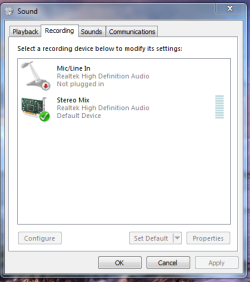
In order to record off the sound card, it may be necessary to right click the "Recording devices" window to ensure that "Show Disabled Devices" and "Show Disconnected Devices" are checked. By selecting "Stereo Mix" as the recording source, it should be possible to record whatever goes through the sound card. See below for an illustration.

Incidentally, the Sound Recorder in Windows 7 is the same mediocre tool that it was in Vista. There are plenty of other pieces of audio recording software, but Microsoft has skimped with such a basic sound recorder. :confused:
 

Attachments

  • realtek.PNG
    realtek.PNG
    18.3 KB · Views: 2,100

My Computer

OS
Vista
yes but thereseems to be no time limit on recording now, it will record for as long as you like.
 

My Computer

Computer Manufacturer/Model Number
Home Built / Acer Aspire 7720G Laptop
OS
Windows 7 Build 7600 Laptop and desktop. Also OSX 10.5.7 and 10.6 Snow on Laptop
CPU
AMD Athlon64 Dual core 4200+ / Laptop T5750
Motherboard
Gigabyte / Acer Aspire
Memory
2 x 1Gb = 2 Gb / acer 3GB
Graphics Card(s)
Geforce 8600GT / Geforce 9300M G 256Mb
Sound Card
Terratec DMX 6fire for Music production and X-Fi Xtreme
Monitor(s) Displays
2 x 17" (Dell and Compaq) / 17" WXGA Laptop Screen
Screen Resolution
1280x1024 / 1440x900 (Full HD when conneced to 32" LCD)
Hard Drives
2x Sata 160GB 2x USB 300Gb 1x 160Gb IDE 1x USB 1TB / 250Gb Sata Laptop with Blu-ray drive
PSU
400W + Not 100% sure
Keyboard
Logitech Cordless Keyboard
Mouse
Logitech Mx 700
Internet Speed
20 Meg Down / 1 Meg up Cable
Other Info
Konica Minolta Colour Laser printer, Epson Stylus R360 (Mostly used for printing on CD's/DVD's), Cannon Scanner, Mercury surround system, about 6 external hard drives all 200Gb plus along with the normall home entertainment stuff attached.... DBox 2, XBox 360, etc. etc.
Don t work with me...
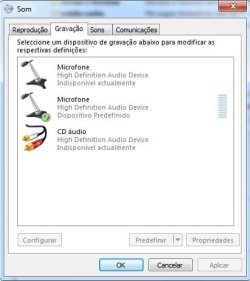
see what happened (the pic), there's no "stereo mix"... what now?...
 

Attachments

  • ScreenShot001.jpg
    ScreenShot001.jpg
    25.2 KB · Views: 75

My Computer

OS
windows 7
I'm generally not satisfied with the quality that windows gives in sound recording and time restrictions is of course a drawback.
I have recently discovered a good MP3 Recorder, that is pretty easy to use, with pause datection function and records directly in mp3.
 

My Computer

OS
Vista
Same problem as above... I am using Realtek on this computer... do I need a different sound-card or what? I don't understand why windows would make such a simple process so complicated... any suggestions?
 

My Computer

OS
windows 7
Thanks, this was a stopgap solution that worked for me, but would depend on compatibility with the soundcard inside the computer. There are various audio drivers on the Realtek website, but people with other sound cards such as Asus may have problems if their cards are not supported in Windows 7.

In order to record off the sound card, it may be necessary to right click the "Recording devices" window to ensure that "Show Disabled Devices" and "Show Disconnected Devices" are checked. By selecting "Stereo Mix" as the recording source, it should be possible to record whatever goes through the sound card. See below for an illustration.

Incidentally, the Sound Recorder in Windows 7 is the same mediocre tool that it was in Vista. There are plenty of other pieces of audio recording software, but Microsoft has skimped with such a basic sound recorder. :confused:

duh... I needed to read this more closely!
 

My Computer

OS
windows 7
hi there - am I a dunce? I have disabled/disconnected devices checked and I still can't put my hands on the soundcard to record from it

Apologies if I'm a fool but any help would be gratefully received..
 

Attachments

  • 1.jpg
    1.jpg
    28.6 KB · Views: 63

My Computer

OS
Windows 7
Installing the correct drivers worked for me. I have a DFI, and 7 picked up drivers for the soundcard, but they were generic. As soon as I installed the correct drivers, I was able to record from the stereo mix.
 

My Computer

OS
Windows 7 Ultimate
Sadly no guarantees here

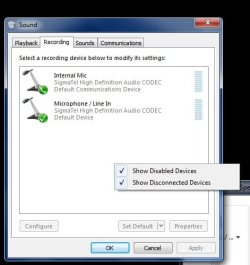
Mikkey's sound card is SigmaTel, and there have been other complaints that the drivers for this brand do not support Stereo Mix. Some computers seem to have Stereo Mix disabled no matter what. Fortunately Realtek High Definition does support Stereo Mix with the correct drivers, so this is something to look out for when buying a new computer.
 

My Computer

OS
Vista
1. Click the Start Button, type "MMSYS.CPL" (without quotation marks) in the Start Search box and press Enter.
2. On Recording tab, right-click on the blank area
3. Check “Show Disabled Devices” and “Show Disconnected Devices” and the Stereo Mix should show up.

If it is disabled, right click on it and choose Enable.
 

My Computer

OS
7
Thanks, this was a stopgap solution that worked for me, but would depend on compatibility with the soundcard inside the computer. There are various audio drivers on the Realtek website, but people with other sound cards such as Asus may have problems if their cards are not supported in Windows 7.

In order to record off the sound card, it may be necessary to right click the "Recording devices" window to ensure that "Show Disabled Devices" and "Show Disconnected Devices" are checked. By selecting "Stereo Mix" as the recording source, it should be possible to record whatever goes through the sound card. See below for an illustration.

Incidentally, the Sound Recorder in Windows 7 is the same mediocre tool that it was in Vista. There are plenty of other pieces of audio recording software, but Microsoft has skimped with such a basic sound recorder. :confused:


.... I don't see this STEREO MIX option in RECORDING DEVICES boss. Wat's the problem. I can't record any onscreen sounds btw :(
help me
 

My Computer

Computer Manufacturer/Model Number
Vaio VPCEB24EN
OS
Windows 7 Home Basic 64Bit
CPU
Intel Core i3
Memory
3 GB
Graphics Card(s)
ATI Radaen 512MB
Sound Card
nothin special
Monitor(s) Displays
LCD
Hard Drives
320 GB HDD
Hope this helps

Following the instructions given in this thread should allow Stereo Mix recording as long as the sound card allows it. If you have followed the instructions and still cannot find Stereo Mix, it may be that the card does not allow it. Realtek does allow Stereo Mix recording with the up to date drivers, but I can't comment on other sound cards.

Beyond that, it may be a question of playing around with the volume and recording levels until the desired results are achieved, which sometimes takes a while.
 

My Computer

OS
Vista
Back
Top