Direct Sound Recording?

Thanks, this was a stopgap solution that worked for me, but would depend on compatibility with the soundcard inside the computer. There are various audio drivers on the Realtek website, but people with other sound cards such as Asus may have problems if their cards are not supported in Windows 7.

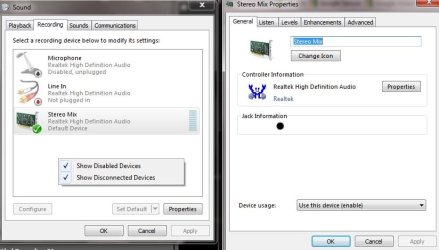
In order to record off the sound card, it may be necessary to right click the "Recording devices" window to ensure that "Show Disabled Devices" and "Show Disconnected Devices" are checked. By selecting "Stereo Mix" as the recording source, it should be possible to record whatever goes through the sound card. See below for an illustration.

Incidentally, the Sound Recorder in Windows 7 is the same mediocre tool that it was in Vista. There are plenty of other pieces of audio recording software, but Microsoft has skimped with such a basic sound recorder. :confused:

Hi,i did all the things said... i enabled stereo mix n made it as the default device too....! bt i still cant record the output sound... m too using win 7 n realtek audio... plz do help...!!!!! i used adobe audition 3.0 for recording sound it did with win xp bt m still unable to do it wid wind 7...!!!!! DO help....!!!!! Regards...
 

My Computer My Computer

OS
Windows 7 Ultimate x64
CPU
i ball
Motherboard
intel
Memory
500 GB
Graphics Card(s)
ATI Radeon 4350
Sound Card
realtek
Monitor(s) Displays
samsung
Hard Drives
Seagate
Suggestions

Hi, first the good news, Stereo Mix *should* work with Realtek and up to date drivers. Beyond that, it may be a question of playing with the volume levels for input and output, selecting the correct source etc. I think that the sound recording controls in Vista and 7 are less easy to use than the ones in Windows XP. You could also use the trial version of Wavepad ( Audio Editing Software - Sound, Music, Voice & Mp3 Editor ) as this is way better than the sound recorder in any version of Windows.
 

My Computer My Computer

OS
Vista
M STILL UNABLE TO RECORD....!! donno wats the prob m using win 7 ultimate x64.....
wat shud i do i need this output recording !!!! plz do help.....
Regards...
 

My Computer My Computer

OS
Windows 7 Ultimate x64
CPU
i ball
Motherboard
intel
Memory
500 GB
Graphics Card(s)
ATI Radeon 4350
Sound Card
realtek
Monitor(s) Displays
samsung
Hard Drives
Seagate
Without seeing the computer involved, it is hard to give advice. I have had Stereo Mix recording working on Vista and 7 with Realtek on two different computers with Wavepad, which is my standard recording software. Please keep trying with the settings, or ask a local computer expert who can see the computer.:)
 

My Computer My Computer

OS
Vista
Without seeing the computer involved, it is hard to give advice. I have had Stereo Mix recording working on Vista and 7 with Realtek on two different computers with Wavepad, which is my standard recording software. Please keep trying with the settings, or ask a local computer expert who can see the computer.:)


Hey!dont know how but its done!
Can record output sound!thanks for help!
Software you recommended works properly too!

:)
 

My Computer My Computer

OS
Windows 7 Ultimate x64
CPU
i ball
Motherboard
intel
Memory
500 GB
Graphics Card(s)
ATI Radeon 4350
Sound Card
realtek
Monitor(s) Displays
samsung
Hard Drives
Seagate
The sound card should be fully Windows 7 or Vista compatible in order to record from the sound card. Legacy cards drivers show microphone and speaker volume controls only. That's why it is not possible to record sound you hear out of your speakers from CD, Synthesizer, Line-In or from your browser.
 

My Computer My Computer

OS
Windows 7 Ultimate x32
No Problemo

Click the sound configuration utility in Win 7 control panel. Click Recording tab.
Right click in the white area under microphone or line in. Check show disabled devices. Whalla, there is Stereo Mix(Realtek), highlight it and then click properties. At the bottom you'll see Device usage, enable it and hit OK or Apply. :cool:
 

Attachments

  • StereoMixRealtek.jpg
    StereoMixRealtek.jpg
    67.8 KB · Views: 218

My Computer My Computer

OS
7 64
Almost. The problem is that the sound card is too old for Windows 7 and hence there is no Stereo Mix :(
 

My Computer My Computer

OS
Windows 7 Ultimate x32
Back
Top