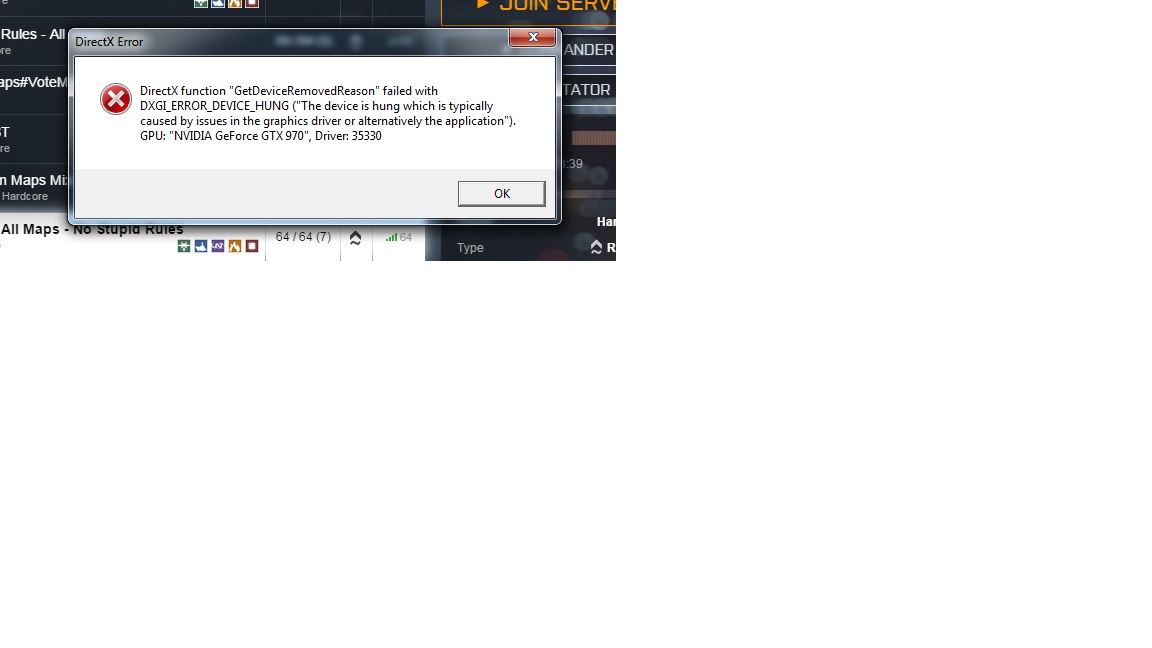
I built a new computer a couple weeks ago. just a few min ago i got this error
i'm not sure what i can do to fix this issue. I also get the error "the display driver has stopped working and has recovered". I ran the Microsoft fix it tool for the display driver stopped working error but it still does it. I also have set my power options to high power like one of the solutions said to do in one of the fixes for that error.
My video drivers are up to date and i have always done clean installs on my drivers.
Main Monitor: 40" Vizio , Second Monitor: 32" Sony Bravia TV
Screen Resolution
1920x1080
Hard Drives
Samsung 840 EVO SSD (Main C drive. OS and Games)
WD Black 2TB (everything but OS and Games)
WD Green 1TB (Storage)
WD Veloiraptor 300gb (old drive for random overflow games)
PSU
Ultra X3 1000w
Case
Corsair obsidian 800D
Cooling
Corsair H100i Watercooling CPU cooler, 5x 120mm corsair fans
Keyboard
Razer Blackwidow Ultimate Stealth
Mouse
Razer Naga 2014
Internet Speed
Comcast, 50MB/s
Antivirus
Microsoft Security Essentials
Browser
Google Chrome, IE
Other Info
HP dvd1720 disk drive, Lamptron FC5 fan controler. Asus Dark Knight router.
I have installed an older driver and the computer as had the display driver stopped responding and recovered twice in the last hour after install.
I'm not sure what else to do
My Computer
Computer type
PC/Desktop
Computer Manufacturer/Model Number
custome built
OS
windows 7 64
CPU
Intel i7 Devils Canyon 4790k LGA 1150
Motherboard
MSI X97A Gaming 7
Memory
Corsair Vengeance 16GB (2x8gb)
Graphics Card(s)
EVGA Nvidia GTX 970 SSC
Sound Card
Sound Blaster Recon3D Fatal1ty Professional
Monitor(s) Displays
Main Monitor: 40" Vizio , Second Monitor: 32" Sony Bravia TV
Screen Resolution
1920x1080
Hard Drives
Samsung 840 EVO SSD (Main C drive. OS and Games)
WD Black 2TB (everything but OS and Games)
WD Green 1TB (Storage)
WD Veloiraptor 300gb (old drive for random overflow games)
PSU
Ultra X3 1000w
Case
Corsair obsidian 800D
Cooling
Corsair H100i Watercooling CPU cooler, 5x 120mm corsair fans
Keyboard
Razer Blackwidow Ultimate Stealth
Mouse
Razer Naga 2014
Internet Speed
Comcast, 50MB/s
Antivirus
Microsoft Security Essentials
Browser
Google Chrome, IE
Other Info
HP dvd1720 disk drive, Lamptron FC5 fan controler. Asus Dark Knight router.
I have never had the display error happen while playing a game. It's always been while just on the desktop or on the internet. Like YouTube. But never a game.
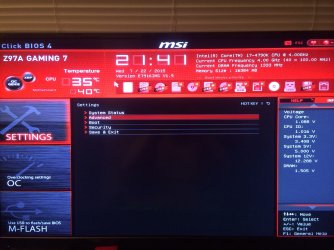
Let me figure out how to check my rails with this Msi mobo bios
My Computer
Computer type
PC/Desktop
Computer Manufacturer/Model Number
custome built
OS
windows 7 64
CPU
Intel i7 Devils Canyon 4790k LGA 1150
Motherboard
MSI X97A Gaming 7
Memory
Corsair Vengeance 16GB (2x8gb)
Graphics Card(s)
EVGA Nvidia GTX 970 SSC
Sound Card
Sound Blaster Recon3D Fatal1ty Professional
Monitor(s) Displays
Main Monitor: 40" Vizio , Second Monitor: 32" Sony Bravia TV
Screen Resolution
1920x1080
Hard Drives
Samsung 840 EVO SSD (Main C drive. OS and Games)
WD Black 2TB (everything but OS and Games)
WD Green 1TB (Storage)
WD Veloiraptor 300gb (old drive for random overflow games)
PSU
Ultra X3 1000w
Case
Corsair obsidian 800D
Cooling
Corsair H100i Watercooling CPU cooler, 5x 120mm corsair fans
Keyboard
Razer Blackwidow Ultimate Stealth
Mouse
Razer Naga 2014
Internet Speed
Comcast, 50MB/s
Antivirus
Microsoft Security Essentials
Browser
Google Chrome, IE
Other Info
HP dvd1720 disk drive, Lamptron FC5 fan controler. Asus Dark Knight router.
My 3.3v is 3.408v
My 5v is 5.000v
My 12v is 12.288v
Attachments
image.jpg
619.4 KB
· Views: 1
My Computer
Computer type
PC/Desktop
Computer Manufacturer/Model Number
custome built
OS
windows 7 64
CPU
Intel i7 Devils Canyon 4790k LGA 1150
Motherboard
MSI X97A Gaming 7
Memory
Corsair Vengeance 16GB (2x8gb)
Graphics Card(s)
EVGA Nvidia GTX 970 SSC
Sound Card
Sound Blaster Recon3D Fatal1ty Professional
Monitor(s) Displays
Main Monitor: 40" Vizio , Second Monitor: 32" Sony Bravia TV
Screen Resolution
1920x1080
Hard Drives
Samsung 840 EVO SSD (Main C drive. OS and Games)
WD Black 2TB (everything but OS and Games)
WD Green 1TB (Storage)
WD Veloiraptor 300gb (old drive for random overflow games)
PSU
Ultra X3 1000w
Case
Corsair obsidian 800D
Cooling
Corsair H100i Watercooling CPU cooler, 5x 120mm corsair fans
Keyboard
Razer Blackwidow Ultimate Stealth
Mouse
Razer Naga 2014
Internet Speed
Comcast, 50MB/s
Antivirus
Microsoft Security Essentials
Browser
Google Chrome, IE
Other Info
HP dvd1720 disk drive, Lamptron FC5 fan controler. Asus Dark Knight router.
It did it again today. I completely uninstalled the nvidia items like the guide says. I even tried older drivers.. Is this a card issue? Should I RMA?
My Computer
Computer type
PC/Desktop
Computer Manufacturer/Model Number
custome built
OS
windows 7 64
CPU
Intel i7 Devils Canyon 4790k LGA 1150
Motherboard
MSI X97A Gaming 7
Memory
Corsair Vengeance 16GB (2x8gb)
Graphics Card(s)
EVGA Nvidia GTX 970 SSC
Sound Card
Sound Blaster Recon3D Fatal1ty Professional
Monitor(s) Displays
Main Monitor: 40" Vizio , Second Monitor: 32" Sony Bravia TV
Screen Resolution
1920x1080
Hard Drives
Samsung 840 EVO SSD (Main C drive. OS and Games)
WD Black 2TB (everything but OS and Games)
WD Green 1TB (Storage)
WD Veloiraptor 300gb (old drive for random overflow games)
PSU
Ultra X3 1000w
Case
Corsair obsidian 800D
Cooling
Corsair H100i Watercooling CPU cooler, 5x 120mm corsair fans
Keyboard
Razer Blackwidow Ultimate Stealth
Mouse
Razer Naga 2014
Internet Speed
Comcast, 50MB/s
Antivirus
Microsoft Security Essentials
Browser
Google Chrome, IE
Other Info
HP dvd1720 disk drive, Lamptron FC5 fan controler. Asus Dark Knight router.
The voltages look fine. It may be a bit premature to RMA, first can you uninstall the card via Device Manager and physically remove it from the PC, check to see if it's clean (overheating isn't a problem so I doubt that's an issue) then reseat the card making sure all connections are full ymade and secure. Reboot and clean install the card's graphics driver and PhysX only. Are you running in SLi? And what browser are you using?
My Computer
Computer type
PC/Desktop
Computer Manufacturer/Model Number
Custom Build
OS
W7 Pro x64 SP1 | W10 Pro IP x64 | W8.1 Pro x64 VM | Linux Mint VM
I am not running SLI. just the 1 EVGA GTX 970 SSC. and the browser i use is Chrome.
would precision X cause it? i just have that downloaded so my cards fans are always running. If i don't have that installed the fans don't spin at all until the card reaches like 60c. that bugged me because i don't want it to overheat so i downloaded and use precision X and have it to run at start up of windows. and keeps my fans at idle at 30% speed. and when it gets above 70c they go to 60% speed. and 100% speed if it gets above 90c.
i will try removing the card and reseating it. but i am 100% sure its in there good and seated well.
My Computer
Computer type
PC/Desktop
Computer Manufacturer/Model Number
custome built
OS
windows 7 64
CPU
Intel i7 Devils Canyon 4790k LGA 1150
Motherboard
MSI X97A Gaming 7
Memory
Corsair Vengeance 16GB (2x8gb)
Graphics Card(s)
EVGA Nvidia GTX 970 SSC
Sound Card
Sound Blaster Recon3D Fatal1ty Professional
Monitor(s) Displays
Main Monitor: 40" Vizio , Second Monitor: 32" Sony Bravia TV
Screen Resolution
1920x1080
Hard Drives
Samsung 840 EVO SSD (Main C drive. OS and Games)
WD Black 2TB (everything but OS and Games)
WD Green 1TB (Storage)
WD Veloiraptor 300gb (old drive for random overflow games)
PSU
Ultra X3 1000w
Case
Corsair obsidian 800D
Cooling
Corsair H100i Watercooling CPU cooler, 5x 120mm corsair fans
Keyboard
Razer Blackwidow Ultimate Stealth
Mouse
Razer Naga 2014
Internet Speed
Comcast, 50MB/s
Antivirus
Microsoft Security Essentials
Browser
Google Chrome, IE
Other Info
HP dvd1720 disk drive, Lamptron FC5 fan controler. Asus Dark Knight router.
Yes uninstall Precision X, at least it's another factor removed from the equation. My 980 Classy fans don't spin until it hits 60°C, that's nothing to worry about as it's perfectly normal.
Please update your system specs as it lists 570s in SLi.
My Computer
Computer type
PC/Desktop
Computer Manufacturer/Model Number
Custom Build
OS
W7 Pro x64 SP1 | W10 Pro IP x64 | W8.1 Pro x64 VM | Linux Mint VM
So i uninstalled Precision X and updated to the newest Nvidia driver that came out the other day. so far so good. I will post again if i get the Display Driver has stopped working and recovered message.
why would Precision X make that happen?
My Computer
Computer type
PC/Desktop
Computer Manufacturer/Model Number
custome built
OS
windows 7 64
CPU
Intel i7 Devils Canyon 4790k LGA 1150
Motherboard
MSI X97A Gaming 7
Memory
Corsair Vengeance 16GB (2x8gb)
Graphics Card(s)
EVGA Nvidia GTX 970 SSC
Sound Card
Sound Blaster Recon3D Fatal1ty Professional
Monitor(s) Displays
Main Monitor: 40" Vizio , Second Monitor: 32" Sony Bravia TV
Screen Resolution
1920x1080
Hard Drives
Samsung 840 EVO SSD (Main C drive. OS and Games)
WD Black 2TB (everything but OS and Games)
WD Green 1TB (Storage)
WD Veloiraptor 300gb (old drive for random overflow games)
PSU
Ultra X3 1000w
Case
Corsair obsidian 800D
Cooling
Corsair H100i Watercooling CPU cooler, 5x 120mm corsair fans
Keyboard
Razer Blackwidow Ultimate Stealth
Mouse
Razer Naga 2014
Internet Speed
Comcast, 50MB/s
Antivirus
Microsoft Security Essentials
Browser
Google Chrome, IE
Other Info
HP dvd1720 disk drive, Lamptron FC5 fan controler. Asus Dark Knight router.