
Hello everyone,
Hopefully someone here will be able to help me with a rather challenging problem I have getting Dragon Age 2 to work on my system. When I install and run the game I get the following error:
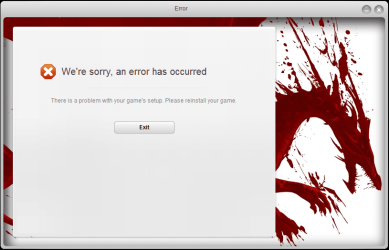
I already tried the suggested fixes like upgrading drivers (ATI) and setting it to DirectX9. While reinstalling I noticed the game tried to install directx after giving a message that my current version was not sufficient. Strange as to my knowing and dxdiag backs me up, I do have the latest version installed. Out of curiosity I tried to install directX again manually and got this:
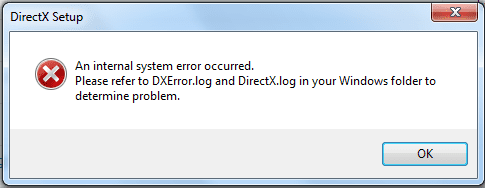
The error log showed me the following:
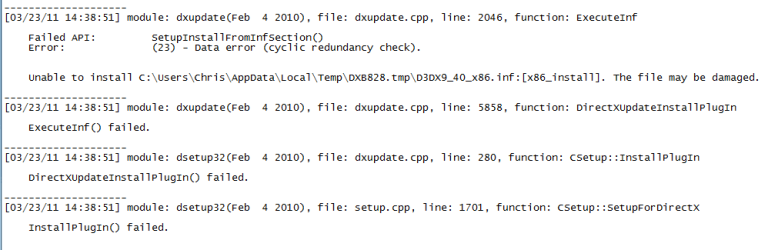
I googled the data error (cyclic redundancy check but got nothing. I did do a windows 7 update as this was suggested on some other forum.
I installed Dragon Age 2 on my crappy laptop and there it ran straight away. DirectX also just reinstalls correctly when I do so on my laptop. Thus I believe the problem lies with DirectX but I am out of ideas.
Has anyone here ever encountered this before and knows how to fix it?
My specs:
Intel Core 2 DUO E8500
Gigabyte EP45-DS3L
ATI Radeon HD4850
Windows 7 Professional 32 bit
Hopefully someone here will be able to help me with a rather challenging problem I have getting Dragon Age 2 to work on my system. When I install and run the game I get the following error:
I already tried the suggested fixes like upgrading drivers (ATI) and setting it to DirectX9. While reinstalling I noticed the game tried to install directx after giving a message that my current version was not sufficient. Strange as to my knowing and dxdiag backs me up, I do have the latest version installed. Out of curiosity I tried to install directX again manually and got this:
The error log showed me the following:
I googled the data error (cyclic redundancy check but got nothing. I did do a windows 7 update as this was suggested on some other forum.
I installed Dragon Age 2 on my crappy laptop and there it ran straight away. DirectX also just reinstalls correctly when I do so on my laptop. Thus I believe the problem lies with DirectX but I am out of ideas.
Has anyone here ever encountered this before and knows how to fix it?
My specs:
Intel Core 2 DUO E8500
Gigabyte EP45-DS3L
ATI Radeon HD4850
Windows 7 Professional 32 bit
My Computer
- OS
- Windows Professional 32-bit
- CPU
- Intel Core 2 Duo E8500
- Motherboard
- Gigabyte EP45-DS3L
- Memory
- 4 GB
- Graphics Card(s)
- ATI Radeon 4800HD

 now for not trying it, but you are a lifesafer for pointing it out. Tryed Dragon Age and now it works too so it was DirectX that was being the pain in my ass.


