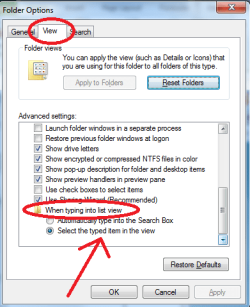
Hi all!
I have a habit of whenever looking at cluttered folders (Program files) to press the key of the first letter of the file i want (say Mozilla firefox, i press letter M).
This works fine in XP, ubuntu, pretty much everything. But windows 7 rather "searches" for things with the letter M, which has a several second delay on my PC which i don't like and/or need.
Does anyone know how to disable this auto-"search
" feature?
Cheers,
soule
I have a habit of whenever looking at cluttered folders (Program files) to press the key of the first letter of the file i want (say Mozilla firefox, i press letter M).
This works fine in XP, ubuntu, pretty much everything. But windows 7 rather "searches" for things with the letter M, which has a several second delay on my PC which i don't like and/or need.
Does anyone know how to disable this auto-"search
" feature?
Cheers,
soule
Last edited:
My Computer
At a glance
Windows 7Pentium D 3.4ghz (dual-core)2GBIntel integrated
- Computer Manufacturer/Model Number
- HP debranded :P
- OS
- Windows 7
- CPU
- Pentium D 3.4ghz (dual-core)
- Motherboard
- ASUStek
- Memory
- 2GB
- Graphics Card(s)
- Intel integrated
- Monitor(s) Displays
- 17" Dell CRT
- Hard Drives
- 250GB Hitachi
- PSU
- Generic 500W
- Case
- HP