

Hello.
I was messing around with my gmail and Google Driver earlier, when suddenly this icon appeared (see image below) with a message, saying something about "background apps".
This might seem silly of me, but the icon is annoying the hell out of me right now, and I would love for it just go away.
Does anyone know how I can get rid of this icon? I don't want it to show up ever again.
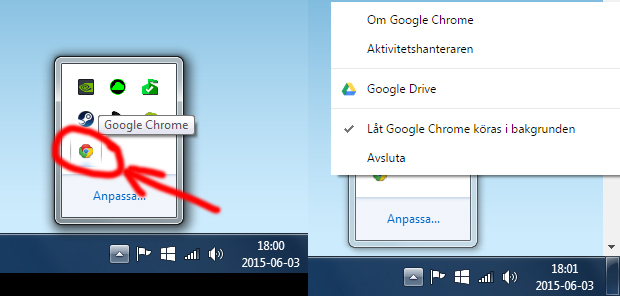
Translation, from above:
*About Google Chrome
*Task manager
*Google Drive
*✔ Allow Google Chrome to be run in the background
*Exit
EDIT: Um.. I played around, removed the "check mark" and it seems to have removed the icon. (Easier than I thought.)
I can't be 100% sure that it won't re-appear after I restart my computer, though.
But the problem seems to be solved for now. Also I feel stupid.
I was messing around with my gmail and Google Driver earlier, when suddenly this icon appeared (see image below) with a message, saying something about "background apps".
This might seem silly of me, but the icon is annoying the hell out of me right now, and I would love for it just go away.
Does anyone know how I can get rid of this icon? I don't want it to show up ever again.
Translation, from above:
*About Google Chrome
*Task manager
*Google Drive
*✔ Allow Google Chrome to be run in the background
*Exit
EDIT: Um.. I played around, removed the "check mark" and it seems to have removed the icon. (Easier than I thought.)
I can't be 100% sure that it won't re-appear after I restart my computer, though.
But the problem seems to be solved for now. Also I feel stupid.
Last edited:
My Computer
- Computer type
- PC/Desktop
- Computer Manufacturer/Model Number
- Myself
- OS
- Windows 7 Professional x64
- CPU
- AMD FX 8320
- Motherboard
- ASUS M5A97
- Memory
- 8GB
- Graphics Card(s)
- Nvidia Geforce GTX 770
- Monitor(s) Displays
- Acer P223w
- Screen Resolution
- 1680x1050
- Hard Drives
- Samsung SpinPoint 1TB @ 7200rpm
- PSU
- Corsair 620HX - 620W
- Case
- Lian-Li Scandinavian Edition
- Keyboard
- Razer Lycosa
- Mouse
- Razer DeathAdder


