
Disable Scrolling in Windows 7 Taskbar?

Munna2002

New member
Local time
9:53 PM
Messages
7
Hello, I have been using Windows XP for a very long time and have customized Windows 7 taskbar to mimic most of XP's behavior with the aid of "7 Taskbar Tweaker" (custom groups, never combine tasks, etc.)

However, as I run 21 or more tasks, I expected the tasks in the taskbar to shrink in size like in Windows XP. However, a scrollbar has been added to the bottom of the taskbar, which makes task management very cumbersome. I have attached a screenshot to illustrate.

Is there a way to disable the scrollbar in the taskbar (see red rectangle selection)? I'd like the tasks to shrink in size or create multiple columns in the same taskbar space like in Windows XP.
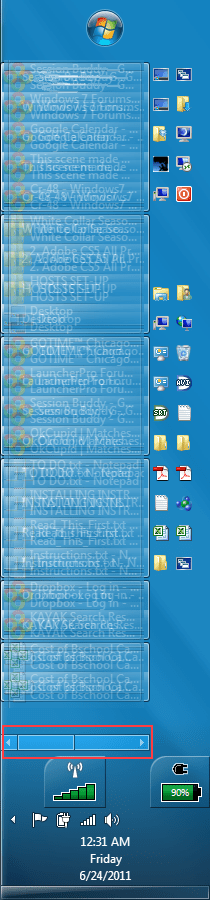
Scrolling Taskbar.png
 

My Computer

OS
Windows 7
With taskbar on left, the problem is that you don't get more columns for new tabs when you drag the taskbar to the right, you just get longer tabs. This seems like a bug, or maybe it's a "feature" I don't understand...

When using taskbar on the bottom, I can get 20 tabs per row without scrolling kicking in, but have to manually drag the edge of the taskbar up to make more rows. I just had 60 separate tabs open, way more than I ever need...
 

My Computer

OS
Windows 7
Yes I agree. When the taskbar is on the bottom, no scrollbar appears. But when the taskbar is in a vertical position, it appears. Is there a fix for this? A registry hack, an option to select, or something?
 

My Computer

OS
Windows 7
So, why is it that you are stuck trying to emulate a 10 year old operating system? The Windows 7 task bar has far more capabilities and functionality than the one in XP did. Why not move forward instead of back?
 

My Computer

Computer Manufacturer/Model Number
Custom
OS
Windows 7 Ultimate RTM (Technet)
CPU
3.00 gigahertz Intel Core2 Duo E8400
Motherboard
ASUSTeK Computer INC. P5K/EPU Rev 1.xx
Memory
4GB
Graphics Card(s)
ATI Radeon X1950 Pro
Sound Card
Built in HD Audio
Monitor(s) Displays
22" Gateway LCD
Screen Resolution
1920 x 1200
Hard Drives
ST3160023A [Hard drive] (160.04 GB) -- drive 0, rev 8.01, ST3500630AS [Hard drive] (500.11 GB) -- drive 2, rev 3.AAK
ST3500630AS [Hard drive] (500.11 GB) -- drive 1, rev 3.AAK
Keyboard
Logitech G11
Mouse
Microsoft Wireless Laser Mouse 5000
Internet Speed
13.44 Mbps
So, why is it that you are stuck trying to emulate a 10 year old operating system? The Windows 7 task bar has far more capabilities and functionality than the one in XP did. Why not move forward instead of back?

I combine the best of both worlds (Windows Peek + Listed Tasks). There are several reasons:
1) I prefer having individual tasks listed out upfront and not hidden as icons or combined. I often have many tasks and do not want to waste precious time searching for a particular task when I need it.
2) The pinned icon takes up too much space on the taskbar. As an alternative, I have a launch bar for frequently used applications in the Quick Launch toolbar. When the program is open, I can then take advantage of Jump Lists, a Windows 7 feature, if I prefer.
3) Since I have a widescreen monitor, the vertical taskbar makes the most sense.

Given these preferences, I'd greatly appreciate it if someone can suggest a tweak or a hack to remove the scrollbar from the vertical taskbar! Thanks in advance.
 

My Computer

OS
Windows 7
Is there a fix for this? A registry hack, an option to select, or something?
Don't think there is.
You could (when needed) shrink your quicklaunch toolbars down to give more taskbar real estate, and get 30+ tabs open before seeing the scrollbar. You could put some of those shortcuts in Start Menu, or...
If you put "folders full of shortcuts" into your toolbar (e.g. quicklaunch) folder, then shrink it on the taskbar so the >> is showing, it makes it like Start menu - once you click on the >>, the folders open when you hover on them.

You'll also find that in Windows 7 Explorer, there are many ways to jump here and there easily, and you may eventually not feel the need to have so many shortcuts on the taskbar or desktop. The explorer address bar takes some getting used to, but is way more powerful than XP's, and the Favorites section of the Navigation Pane is a wonderful "quicklaunch" feature itself. Just 2 examples, but take your time and enjoying playing around with the new stuff and make it your own!
 

My Computer

OS
Windows 7
Back
Top