Disabling Administrator Account

isaiah40

New member
Local time
3:40 PM
Messages
28
Hello,
I am going to try and explain this as best as I can.
I am trying to disable the administrator account. I have tried everything
and nothing is working. Each time I turn on my computer it comes up with a login for the standard account and the administrator's account. I just want have only one login option. How in the world do I do that? PLEASE HELP!

Thanks.
 

My Computer

OS
I do not know
well login to your standard acount and run an elevated commpand prompt


To disable the Windows 7 administrator account type in and then hit enter:
net user administrator /active:no
 
Last edited by a moderator:

My Computer

Computer type
PC/Desktop
Computer Manufacturer/Model Number
HP Pavilion g7-1350dx
OS
Windows 7 Ultimate SP1 x64
CPU
AMD A6-3420M APU
Memory
4.0 Gb DDR3 838 MHz
Graphics Card(s)
AMD Radeon HD 6520G
Sound Card
IDT HD Audio
Screen Resolution
1600x 900
Hard Drives
500GB Hitachi HTS547550A9E384
You must have one administrator account.
 

My Computer

OS
ME/XP/Vista/Win7
I belive he is trying to say that he activated the built in admin acount, and now cant "disable it". The standard acount will always ba an admin account(the one you first set up).
 

My Computer

Computer type
PC/Desktop
Computer Manufacturer/Model Number
HP Pavilion g7-1350dx
OS
Windows 7 Ultimate SP1 x64
CPU
AMD A6-3420M APU
Memory
4.0 Gb DDR3 838 MHz
Graphics Card(s)
AMD Radeon HD 6520G
Sound Card
IDT HD Audio
Screen Resolution
1600x 900
Hard Drives
500GB Hitachi HTS547550A9E384
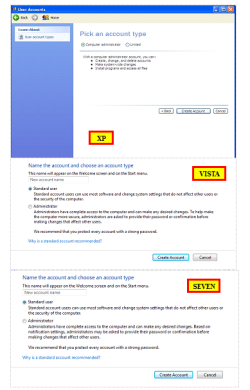
Standard user account is not a administrator account.
 

My Computer

OS
ME/XP/Vista/Win7
Standard user account is not a administrator account.

The default account created when I installed windows 7 on my PC is? I have enabled the built in administrator account and they both are listed as Administrator on the manage accounts page? I'm not 100% sure what you meant by that statement so maybe I misunderstood what you meant to say. :)
 

My Computer

Computer type
PC/Desktop
Computer Manufacturer/Model Number
Home Built
OS
Windows 10 Education 64 bit
CPU
AMD Phenom II X4 980 Black Edition Deneb 3.7GHz
Motherboard
Asus M4N68T-M V2 µATX Motherboard
Memory
8GB 4GBx2 Kingston PC10600 DDR3 1333 Memory
Graphics Card(s)
Zotac NVIDIA Geforce GT640 2 Gig DDR3 PCIe
Sound Card
VIA VT1708s High Definition Audio 8-channel Onboard
Monitor(s) Displays
22" LG E2242 1080p and 2 19" I-INC AG191D
Screen Resolution
1280x1024 - 1920x1080 - 1280x1024
Hard Drives
Crucial M100 256 GB SSD and 500 GB WD Blue SATA
PSU
Thermaltake TR 620
Case
Power Up Black ATX Mid-Tower Case
Cooling
Stock heatsink and fan
Keyboard
Logitech Wireless K350 Wave
Mouse
Logitech Wireless M570 Trackman Wheel
Internet Speed
80 Mbps Down 30 Mbps Up
Antivirus
Windows Defender
Browser
Internet Explorer 11
Other Info
HP DVD1040e Lightscribe - External USB2
Standard user account is not a administrator account.

The default account created when I installed windows 7 on my PC is? I have enabled the built in administrator account and they both are listed as Administrator on the manage accounts page? I'm not 100% sure what you meant by that statement so maybe I misunderstood what you meant to say. :)
The default account created when you installed Windows is an administrator account, albeit a limited admin account. You can create a standard user account. You will always need to have one admin account.

Check this tutorial on the built in administrator account: http://www.sevenforums.com/tutorials/507-built-administrator-account-enable-disable.html
 

My Computer

Computer Manufacturer/Model Number
Home built
OS
Windows 7 Ultimate 32 bit
CPU
Intel(R) Pentium(R) 4 CPU 3.00GHz
Motherboard
ASUS P4P800-VM Motherboard Chipset: Intel 865G + ICH5
Memory
2.50 GB RAM
Graphics Card(s)
NVIDIA GeForce 7600 GS
Sound Card
SoundMax Integrated Digital Audio (Chip)
Monitor(s) Displays
ViewSonic VX 1962 wm
Screen Resolution
1680 X 1050
Hard Drives
Seagate Barracuda 7200.10 80 GB
ST380215A ATA Device 18.6 GB
Western Digital "My Book" external hard drive 750 GB
Cooling
Fan based
Keyboard
Microsoft Comfort Curve Keyboard 2000 v10 USB
Mouse
Logitec optic USB
Internet Speed
3.01 Mb/s download 0.64 Mb/s upload
Maybe I miss-interpreted what I wrote. I probably should have said "The default acount you create during an Windows 7 install has administrator privleges" instead of:
The standard acount will always ba an admin account(the one you first set up).
 

My Computer

Computer type
PC/Desktop
Computer Manufacturer/Model Number
HP Pavilion g7-1350dx
OS
Windows 7 Ultimate SP1 x64
CPU
AMD A6-3420M APU
Memory
4.0 Gb DDR3 838 MHz
Graphics Card(s)
AMD Radeon HD 6520G
Sound Card
IDT HD Audio
Screen Resolution
1600x 900
Hard Drives
500GB Hitachi HTS547550A9E384
Never disable the account named "Administrator"...this is a bad, bad, bad idea. Give it a ridiculously difficult password, but don't disable it. Trust me, you'll need it one day and regret it.
 

My Computer

Computer Manufacturer/Model Number
Custom
OS
Windows 7 Ultimate RTM (Technet)
CPU
3.00 gigahertz Intel Core2 Duo E8400
Motherboard
ASUSTeK Computer INC. P5K/EPU Rev 1.xx
Memory
4GB
Graphics Card(s)
ATI Radeon X1950 Pro
Sound Card
Built in HD Audio
Monitor(s) Displays
22" Gateway LCD
Screen Resolution
1920 x 1200
Hard Drives
ST3160023A [Hard drive] (160.04 GB) -- drive 0, rev 8.01, ST3500630AS [Hard drive] (500.11 GB) -- drive 2, rev 3.AAK
ST3500630AS [Hard drive] (500.11 GB) -- drive 1, rev 3.AAK
Keyboard
Logitech G11
Mouse
Microsoft Wireless Laser Mouse 5000
Internet Speed
13.44 Mbps
Never disable the account named "Administrator"...this is a bad, bad, bad idea. Give it a ridiculously difficult password, but don't disable it. Trust me, you'll need it one day and regret it.

The thing is, it's disabled by default in windows 7. I tweak my system and sometimes go where no one has gone before.:shock: I may need that account to bail myself out afterwards:o, so I enable it and password protect it.;)
 

My Computer

Computer type
PC/Desktop
Computer Manufacturer/Model Number
Home Built
OS
Windows 10 Education 64 bit
CPU
AMD Phenom II X4 980 Black Edition Deneb 3.7GHz
Motherboard
Asus M4N68T-M V2 µATX Motherboard
Memory
8GB 4GBx2 Kingston PC10600 DDR3 1333 Memory
Graphics Card(s)
Zotac NVIDIA Geforce GT640 2 Gig DDR3 PCIe
Sound Card
VIA VT1708s High Definition Audio 8-channel Onboard
Monitor(s) Displays
22" LG E2242 1080p and 2 19" I-INC AG191D
Screen Resolution
1280x1024 - 1920x1080 - 1280x1024
Hard Drives
Crucial M100 256 GB SSD and 500 GB WD Blue SATA
PSU
Thermaltake TR 620
Case
Power Up Black ATX Mid-Tower Case
Cooling
Stock heatsink and fan
Keyboard
Logitech Wireless K350 Wave
Mouse
Logitech Wireless M570 Trackman Wheel
Internet Speed
80 Mbps Down 30 Mbps Up
Antivirus
Windows Defender
Browser
Internet Explorer 11
Other Info
HP DVD1040e Lightscribe - External USB2
OK here is a tweak I use on windows XP to "show" the admin on the welcome screen.
Windows Registry Editor Version 5.00
[HKEY_LOCAL_MACHINE\SOFTWARE\Microsoft\Windows NT\CurrentVersion\Winlogon\SpecialAccounts\UserList]
"Administrator"=dword:00000001

If you change the dword to 00000000 the admin account will not show up on your welcome screen. I just tried it on my W7 system and I could remove "hide" and put it back by editing that key. Your milage may vary and do so at your own risk. ;)

EDIT: While this tweak doesn't disable the admin account, it just hides it from the welcome screen, once you hid it I'm not sure how you can ever logon to it again. Switch Users just brings up the welcome screen with no admin account to click. In XP you could hit ctrl > alt > del twice and then type in administrator, doesn't seem to work for windows 7?
 

My Computer

Computer type
PC/Desktop
Computer Manufacturer/Model Number
Home Built
OS
Windows 10 Education 64 bit
CPU
AMD Phenom II X4 980 Black Edition Deneb 3.7GHz
Motherboard
Asus M4N68T-M V2 µATX Motherboard
Memory
8GB 4GBx2 Kingston PC10600 DDR3 1333 Memory
Graphics Card(s)
Zotac NVIDIA Geforce GT640 2 Gig DDR3 PCIe
Sound Card
VIA VT1708s High Definition Audio 8-channel Onboard
Monitor(s) Displays
22" LG E2242 1080p and 2 19" I-INC AG191D
Screen Resolution
1280x1024 - 1920x1080 - 1280x1024
Hard Drives
Crucial M100 256 GB SSD and 500 GB WD Blue SATA
PSU
Thermaltake TR 620
Case
Power Up Black ATX Mid-Tower Case
Cooling
Stock heatsink and fan
Keyboard
Logitech Wireless K350 Wave
Mouse
Logitech Wireless M570 Trackman Wheel
Internet Speed
80 Mbps Down 30 Mbps Up
Antivirus
Windows Defender
Browser
Internet Explorer 11
Other Info
HP DVD1040e Lightscribe - External USB2
Never disable the account named "Administrator"...this is a bad, bad, bad idea. Give it a ridiculously difficult password, but don't disable it. Trust me, you'll need it one day and regret it.

The thing is, it's disabled by default in windows 7. I tweak my system and sometimes go where no one has gone before.:shock: I may need that account to bail myself out afterwards:o, so I enable it and password protect it.;)

That's very odd. I've installed Windows 7 at least 30 times on various machines and it has never had the Administrator account disabled. Just checked it on this machine, and it's enabled, and I didn't do anything to enable it.
 

My Computer

Computer Manufacturer/Model Number
Custom
OS
Windows 7 Ultimate RTM (Technet)
CPU
3.00 gigahertz Intel Core2 Duo E8400
Motherboard
ASUSTeK Computer INC. P5K/EPU Rev 1.xx
Memory
4GB
Graphics Card(s)
ATI Radeon X1950 Pro
Sound Card
Built in HD Audio
Monitor(s) Displays
22" Gateway LCD
Screen Resolution
1920 x 1200
Hard Drives
ST3160023A [Hard drive] (160.04 GB) -- drive 0, rev 8.01, ST3500630AS [Hard drive] (500.11 GB) -- drive 2, rev 3.AAK
ST3500630AS [Hard drive] (500.11 GB) -- drive 1, rev 3.AAK
Keyboard
Logitech G11
Mouse
Microsoft Wireless Laser Mouse 5000
Internet Speed
13.44 Mbps
Never disable the account named "Administrator"...this is a bad, bad, bad idea. Give it a ridiculously difficult password, but don't disable it. Trust me, you'll need it one day and regret it.

The thing is, it's disabled by default in windows 7. I tweak my system and sometimes go where no one has gone before.:shock: I may need that account to bail myself out afterwards:o, so I enable it and password protect it.;)

That's very odd. I've installed Windows 7 at least 30 times on various machines and it has never had the Administrator account disabled. Just checked it on this machine, and it's enabled, and I didn't do anything to enable it.

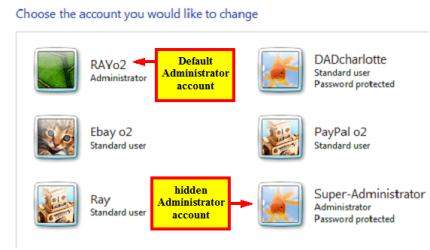
Default Administrator account, or hidden Administrator account?

Captureadadad222.PNG
 

My Computer

OS
ME/XP/Vista/Win7
I have the same question as Theog. I think we are confusing the administrator acconts.

The administrator account created when you install Windows is a limited administrator accounts - not the wide open admin account as in XP. However, you can do anything with your system through this account if you know how. It will more than suffice for most administrative tasks.

There is also a built in, hidden administrator account. This one is more wide open and closer to the admin account account in XP. To access this account, you must unhide it. Most of us do not really need this account and for the average user, I recommend that it be left hidden. Most certainly if you choose to unhide, password protect it.

For security, MS and security gurus recommend that you create a standard user account in addition to the admin account that is created when you install Windows and use this standard user account for your daily computer activities. I must confess that I do not always follow this. I do not recommend that one use the hidden administrator account for routine, daily computer use.
 
Last edited:

My Computer

Computer Manufacturer/Model Number
Home built
OS
Windows 7 Ultimate 32 bit
CPU
Intel(R) Pentium(R) 4 CPU 3.00GHz
Motherboard
ASUS P4P800-VM Motherboard Chipset: Intel 865G + ICH5
Memory
2.50 GB RAM
Graphics Card(s)
NVIDIA GeForce 7600 GS
Sound Card
SoundMax Integrated Digital Audio (Chip)
Monitor(s) Displays
ViewSonic VX 1962 wm
Screen Resolution
1680 X 1050
Hard Drives
Seagate Barracuda 7200.10 80 GB
ST380215A ATA Device 18.6 GB
Western Digital "My Book" external hard drive 750 GB
Cooling
Fan based
Keyboard
Microsoft Comfort Curve Keyboard 2000 v10 USB
Mouse
Logitec optic USB
Internet Speed
3.01 Mb/s download 0.64 Mb/s upload
When I personally refer to "The Administrator" account I am referring to the built in account that has the user name "Administrator" and is an administrator account in that it has administrator privileges. Not the user account created when you install windows, that is also an administrator account and has administrator listed in the account type or description. It's my understanding that the built in Administrator account is disabled by default and has to be enabled to be used and have the password set. It didn't show up here until I enabled it.
Capture.GIF
 

My Computer

Computer type
PC/Desktop
Computer Manufacturer/Model Number
Home Built
OS
Windows 10 Education 64 bit
CPU
AMD Phenom II X4 980 Black Edition Deneb 3.7GHz
Motherboard
Asus M4N68T-M V2 µATX Motherboard
Memory
8GB 4GBx2 Kingston PC10600 DDR3 1333 Memory
Graphics Card(s)
Zotac NVIDIA Geforce GT640 2 Gig DDR3 PCIe
Sound Card
VIA VT1708s High Definition Audio 8-channel Onboard
Monitor(s) Displays
22" LG E2242 1080p and 2 19" I-INC AG191D
Screen Resolution
1280x1024 - 1920x1080 - 1280x1024
Hard Drives
Crucial M100 256 GB SSD and 500 GB WD Blue SATA
PSU
Thermaltake TR 620
Case
Power Up Black ATX Mid-Tower Case
Cooling
Stock heatsink and fan
Keyboard
Logitech Wireless K350 Wave
Mouse
Logitech Wireless M570 Trackman Wheel
Internet Speed
80 Mbps Down 30 Mbps Up
Antivirus
Windows Defender
Browser
Internet Explorer 11
Other Info
HP DVD1040e Lightscribe - External USB2
When I personally refer to "The Administrator" account I am referring to the built in account that has the user name "Administrator" and is an administrator account in that it has administrator privileges. Not the user account created when you install windows, that is also an administrator account and has administrator listed in the account type or description. It's my understanding that the built in Administrator account is disabled by default and has to be enabled to be used and have the password set. It didn't show up here until I enabled it.
View attachment 87364

Yes, you are correct. We usually refer to it as the "hidden administrator account" to avoid confusing it with the default administrator account generated upon installing Windows.

The hidden administrator account is the one that I recommend that most users leave hidden for security reasons. It should not be used for day to day, routine computer use.
 

My Computer

Computer Manufacturer/Model Number
Home built
OS
Windows 7 Ultimate 32 bit
CPU
Intel(R) Pentium(R) 4 CPU 3.00GHz
Motherboard
ASUS P4P800-VM Motherboard Chipset: Intel 865G + ICH5
Memory
2.50 GB RAM
Graphics Card(s)
NVIDIA GeForce 7600 GS
Sound Card
SoundMax Integrated Digital Audio (Chip)
Monitor(s) Displays
ViewSonic VX 1962 wm
Screen Resolution
1680 X 1050
Hard Drives
Seagate Barracuda 7200.10 80 GB
ST380215A ATA Device 18.6 GB
Western Digital "My Book" external hard drive 750 GB
Cooling
Fan based
Keyboard
Microsoft Comfort Curve Keyboard 2000 v10 USB
Mouse
Logitec optic USB
Internet Speed
3.01 Mb/s download 0.64 Mb/s upload
Some of the confusion comes from the fact that the default for windows 7 is to make any user accounts you create a member of the "administrators" group. Thus they shown Administrator as the account "type". The systems Administrator "account" is a member of the administrators "group". Disabling one (the account) doesn't disable the other (the group). I have the hidden account enabled so I can use it if my main user account gets corrupted and I can't log in to it. Someone can correct me if I'm wrong but if you can't log in, you can't enable the admin account, and if it's not enabled you can't log into it to try and fix the other user account.
 

My Computer

Computer type
PC/Desktop
Computer Manufacturer/Model Number
Home Built
OS
Windows 10 Education 64 bit
CPU
AMD Phenom II X4 980 Black Edition Deneb 3.7GHz
Motherboard
Asus M4N68T-M V2 µATX Motherboard
Memory
8GB 4GBx2 Kingston PC10600 DDR3 1333 Memory
Graphics Card(s)
Zotac NVIDIA Geforce GT640 2 Gig DDR3 PCIe
Sound Card
VIA VT1708s High Definition Audio 8-channel Onboard
Monitor(s) Displays
22" LG E2242 1080p and 2 19" I-INC AG191D
Screen Resolution
1280x1024 - 1920x1080 - 1280x1024
Hard Drives
Crucial M100 256 GB SSD and 500 GB WD Blue SATA
PSU
Thermaltake TR 620
Case
Power Up Black ATX Mid-Tower Case
Cooling
Stock heatsink and fan
Keyboard
Logitech Wireless K350 Wave
Mouse
Logitech Wireless M570 Trackman Wheel
Internet Speed
80 Mbps Down 30 Mbps Up
Antivirus
Windows Defender
Browser
Internet Explorer 11
Other Info
HP DVD1040e Lightscribe - External USB2

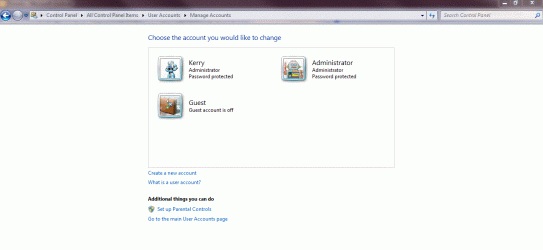
I think some people in this thread may be confusing the administrator "account type" with the actual user account named Administrator. In your screen shot you are selecting the type of "user account" you want that user to be, admin or standard user. That has nothing to do with enabling or disabling the usually hidden account named "Administrator". If you look at my screen shoot you will see {Kerry > Administrator > Password protected}, and {Administrator > Administrator > Password protected}. The second one, I believe, is what the OP doesn't want to see on the welcome screen. In my case it's only there because I ran "net user administrator /active:yes". :)
 

My Computer

Computer type
PC/Desktop
Computer Manufacturer/Model Number
Home Built
OS
Windows 10 Education 64 bit
CPU
AMD Phenom II X4 980 Black Edition Deneb 3.7GHz
Motherboard
Asus M4N68T-M V2 µATX Motherboard
Memory
8GB 4GBx2 Kingston PC10600 DDR3 1333 Memory
Graphics Card(s)
Zotac NVIDIA Geforce GT640 2 Gig DDR3 PCIe
Sound Card
VIA VT1708s High Definition Audio 8-channel Onboard
Monitor(s) Displays
22" LG E2242 1080p and 2 19" I-INC AG191D
Screen Resolution
1280x1024 - 1920x1080 - 1280x1024
Hard Drives
Crucial M100 256 GB SSD and 500 GB WD Blue SATA
PSU
Thermaltake TR 620
Case
Power Up Black ATX Mid-Tower Case
Cooling
Stock heatsink and fan
Keyboard
Logitech Wireless K350 Wave
Mouse
Logitech Wireless M570 Trackman Wheel
Internet Speed
80 Mbps Down 30 Mbps Up
Antivirus
Windows Defender
Browser
Internet Explorer 11
Other Info
HP DVD1040e Lightscribe - External USB2
Back
Top