I have followed the directions for disabling automatic bulleting in Microsoft Office 2010 by highlighting
NONE on each of the menus for parapraphing options. But I still have automatic bulleting every time I start a new paragraph. I can get rid of this sometimes by clicking on NORMAL for the Text Menus and by highlighting and deleting, but sometimes it comes back as soon as I hit return.
I have also deleted all options on automatic formatting and auto correcting under Proofing (File/Options) menu in case that had anything to do with it.
Can anyone explain to me how I delete automatic bulleting ? It is wasting enormous amounts of my time.
My Computer
Computer type
PC/Desktop
Computer Manufacturer/Model Number
Mesh
OS
Windows 7 Home Premium Upgrade designed for Windows Vista
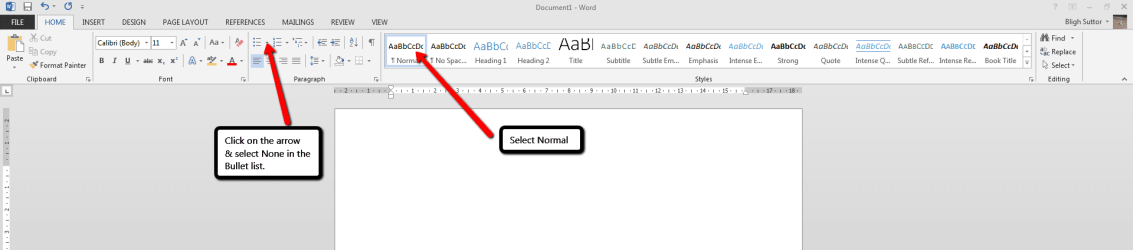
I use Word 2013, but I think they are very similar. Below is a screen shot that may help you stop The Bullets.
If you are using a Template as the basis for your document & the Template was formatted with Bullets then any document based on it will keep using Bullets.
To prevent this start a new document from scratch & make sure that you have it set up as the screen shot shows.
I hope this helps you.
Thanks very much. I found out from another source that moving the cursor on to the same line as the bullet and pressing Shift before the delete back arrow removes it. I then have to go to Select Normal text to move the cursor back to the body text line (i.e. to cancel the indent). Every now and again this seems to cancel the bullet altogether but not always. Whilst writing this reply, I opened a new document in an attempt to see if I can work out what I did that permanently affected the bullet and discovered that if I press enter again AFTER the bullet has shown up, it disappears. But I still have to select Normal lettering to lose the indent !
I guess the word "intuitive" in Microsoft lingo means "guess what you have to do." I feel a bit like one of these poor animals that has to "learn" how to get the food to show it can !!
My Computer
Computer type
PC/Desktop
Computer Manufacturer/Model Number
Mesh
OS
Windows 7 Home Premium Upgrade designed for Windows Vista