- Local time
- 4:38 AM
- Messages
- 91
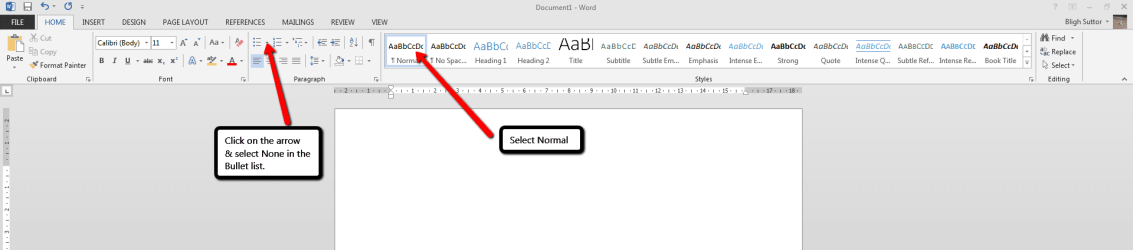
I have followed the directions for disabling automatic bulleting in Microsoft Office 2010 by highlighting
NONE on each of the menus for parapraphing options. But I still have automatic bulleting every time I start a new paragraph. I can get rid of this sometimes by clicking on NORMAL for the Text Menus and by highlighting and deleting, but sometimes it comes back as soon as I hit return.
I have also deleted all options on automatic formatting and auto correcting under Proofing (File/Options) menu in case that had anything to do with it.
Can anyone explain to me how I delete automatic bulleting ? It is wasting enormous amounts of my time.
NONE on each of the menus for parapraphing options. But I still have automatic bulleting every time I start a new paragraph. I can get rid of this sometimes by clicking on NORMAL for the Text Menus and by highlighting and deleting, but sometimes it comes back as soon as I hit return.
I have also deleted all options on automatic formatting and auto correcting under Proofing (File/Options) menu in case that had anything to do with it.
Can anyone explain to me how I delete automatic bulleting ? It is wasting enormous amounts of my time.
My Computer
- Computer type
- PC/Desktop
- Computer Manufacturer/Model Number
- Mesh
- OS
- Windows 7 Home Premium Upgrade designed for Windows Vista
- Browser
- Internet Explorer