Disabling Certain USB Devices

jo15765

New member
Member
Local time
4:29 PM
Messages
73
I only have one user account, I would rather not create multiple accounts for each user on my home PC so the group policy would not be a good option. But is there a way to block certain USB devices say a cell phone or an IPOD from being charged via the USB port? And I want to disable the devices from all (I have 4) USB ports on the PC.
 

My Computer

OS
Ultimate 64x
I only have one user account, I would rather not create multiple accounts for each user on my home PC so the group policy would not be a good option. But is there a way to block certain USB devices say a cell phone or an IPOD from being charged via the USB port? And I want to disable the devices from all (I have 4) USB ports on the PC.

Can you explain a little more about why you want to do this? It might help us to find a solution for you. You see, certain devices require a driver to be loaded in order to charge the device. In essence, Apple stuff will generally refuse to charge unless iTunes and it's entourage of random software is installed. In this case do not install it. Other hardware simply draws from the 5v provided by USB and does little else. Those are the hard devices to block as you'd need a filter driver to detect their presence and shut down USB power.
 

My Computer

Computer type
Laptop
Computer Manufacturer/Model Number
Apple
OS
El Capitan / Windows 10
CPU
i7-4980HQ
Memory
16GB
Graphics Card(s)
Iris 5200
I am wanting my computer to NOT charge an IPOD if it is connected, I don't have the Apple "Fluff" installed, iTunes, Safari, etc. but there may have been a driver for the ipod installed and that is how it is being charged, I am not sure. I am wanting to prevent this from charging. The phone from charging, I figured that out, I just uninstalled the software, and it prevents the phone from charging. But still stuck on the Ipod????
 

My Computer

OS
Ultimate 64x
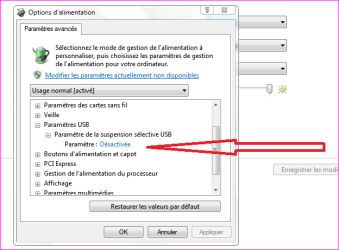
Maybe can you try in the Power Plan to enable this....
 

Attachments

  • Capture.PNG
    Capture.PNG
    15.1 KB · Views: 194

My Computer

Computer type
PC/Desktop
Computer Manufacturer/Model Number
Custom Build
OS
Windows 7 Professional SP1 - x64 [Non-UEFI Boot]
CPU
Ivy Bridge Core i5 3570K (Delidded)
Motherboard
Asus P8Z77-V LE PLUS
Memory
G.Skill "Ares" DDR3 PC3-12800 - 1600MHz (16Gb)
Graphics Card(s)
Asus Dual-RX480-O4G
Sound Card
Creative Sound Blaster Z w/5.1 sound system
Monitor(s) Displays
Asus IPS 23"
Screen Resolution
16/9
Hard Drives
Internal:
500Go Sata 6Gb/s (x2)
500Go Sata 3Gb/s (x2)
SSD 60Go Sata 6Gb/s
PSU
In Win C 900W Series 80+ Platinum
Case
Thermaltake Chaser A71
Cooling
Custom Water Cooling Loop
Keyboard
Cooler Master QuickFire XTi
Mouse
Razer Imperator 2012 (4G)
Antivirus
MSE
Browser
IE 11.0.xxx Rtm
Other Info
"Raid0" with Intel Smart Response Technology (HDD/SSD)
Some devices do not require a driver to draw power from a USB port. The USB port always delivers a set amount of power regardless if there is any data connection to the computer. The iPod itself does not require drivers installed to charge, and if it did it would be a temporary driver loaded by Plug and Play only to then be removed when the device is removed.
 

My Computer

Computer type
PC/Desktop
Computer Manufacturer/Model Number
Alienware Aurora ALX R4
OS
Windows 10 Pro (x64)
CPU
Intel Core i7-3930K (3.2GHz - 4.5GHz)
Motherboard
Alienware Aurora-R4 x79
Memory
4x Samsung 4GB PC3-12800 DDR3 (16GB 1600MHz)
Graphics Card(s)
Nvidia Geforce GTX 690
Sound Card
SteelSeries Siberia Elite
Monitor(s) Displays
Dell UltraSharp U3011
Screen Resolution
2560x1600
Hard Drives
Samsung 850 Pro 256 GB, Seagate 1TB Desktop Hybrid HDD, 2x Western Digital 4TB Green HDD
PSU
875W Some Dell PSU <.<
Case
Alienware Aurora ALX
Cooling
Custom Liquid Cooling (EK CPU & GPU blocks) dual EK 480RAD
Keyboard
Logitech G710+ Mechanical
Mouse
Logitech G700s
Internet Speed
Verizon Fios (50 mbps average)
Other Info
Server: Intel NUC D54250WYK: i5-4250U, 16GB, 256 GB mSATA, Windows Server 2012 R2
NON I do not understand your post.

Locig Earth are you telling me there is no way to prevent that specific device from charging? If that is the case is there a way to disable all devices from charging usb then?
 

My Computer

OS
Ultimate 64x
No way as far as I know. Either the port is a powered one or not. If it is, it supplies power on port.

I hope you don;t mind if I ask. Why?
 

My Computer

Computer type
PC/Desktop
Computer Manufacturer/Model Number
Home built (GeneO industries)/Model 4
OS
Windows 10 Pro. EFI boot partition, full EFI boot
CPU
i7 4770k 4.4GHz (44-44-43-43 turbo) @ 1.248V
Motherboard
ASUS Maximus VI Hero
Memory
16GB (8GBx2) @2200 MHz G.skill Sniper 10-11-10-30-1, 1.6V
Graphics Card(s)
MSI GTX 970 Gaming 4G
Sound Card
Onboard SupremeFX Audio
Monitor(s) Displays
NEC Spectraview 2490WUXi-SV
Screen Resolution
1920 x 1200
Hard Drives
Samsung 850 Pro 256GB (OS), Samsung 2x 128GB 840 Pro SSD in RAID0, 3x WD Blue 6Gb/s 1TB RAID0, WD 2TB Black external USB 3.0, 2TB WD20EARS Green external USB 3.0, 2x 500GB Seagate and 1 750 GB external USB, 1x 350GB external USB3
PSU
Seasonic X-850 (2012 KM3 model)
Case
Fractal Design Define R4
Cooling
NH-D14, NF-F12, NF-A15; NF-P14, NF-P12,NF-A14, S12A PWM
Keyboard
Cooler Master Storm Quickfire Rapid - Brown
Mouse
Logitech G602
Internet Speed
126.4 Mb/s down, 24.3 Mb/s up
Other Info
USB 3.0 x8 , SATA III x8, eSATA, USB 2.0 x6. Samsung DVD R/W drive.

WEI: CPU 7.8, Memory 7.9, Graphics 7.9, Disk 7.9
NON I do not understand your post.

Locig Earth are you telling me there is no way to prevent that specific device from charging? If that is the case is there a way to disable all devices from charging usb then?

When you set this to "Enable"...the computer will cut power on certain USB Ports...But it is not clear it will do it if the device is plugged into the port...It is just a try.;)

Remember to set it back to "Disabled" it if it doesn't work, because some of your ports might show they are not in use (you might think they're failling!):)
 

My Computer

Computer type
PC/Desktop
Computer Manufacturer/Model Number
Custom Build
OS
Windows 7 Professional SP1 - x64 [Non-UEFI Boot]
CPU
Ivy Bridge Core i5 3570K (Delidded)
Motherboard
Asus P8Z77-V LE PLUS
Memory
G.Skill "Ares" DDR3 PC3-12800 - 1600MHz (16Gb)
Graphics Card(s)
Asus Dual-RX480-O4G
Sound Card
Creative Sound Blaster Z w/5.1 sound system
Monitor(s) Displays
Asus IPS 23"
Screen Resolution
16/9
Hard Drives
Internal:
500Go Sata 6Gb/s (x2)
500Go Sata 3Gb/s (x2)
SSD 60Go Sata 6Gb/s
PSU
In Win C 900W Series 80+ Platinum
Case
Thermaltake Chaser A71
Cooling
Custom Water Cooling Loop
Keyboard
Cooler Master QuickFire XTi
Mouse
Razer Imperator 2012 (4G)
Antivirus
MSE
Browser
IE 11.0.xxx Rtm
Other Info
"Raid0" with Intel Smart Response Technology (HDD/SSD)
Back
Top